
1. Pengenalan
Terima kasih kerana membeliasing the RCA SP550BT Portable Speaker. This manual provides important information regarding the setup, operation, and maintenance of your new speaker. Please read it thoroughly before use and keep it for future reference.
The RCA SP550BT is a versatile portable speaker featuring 50W output, Bluetooth connectivity, USB playback, FM radio, AUX input, True Wireless Stereo (TWS) function, LED lights, and a microphone input for an enhanced audio experience.
2. Kandungan Pakej
Sila semak pakej untuk item berikut:
- RCA SP550BT Portable Speaker
- Alat Kawalan Jauh
- Kabel Kuasa
- Manual Pengguna (dokumen ini)
3. Produk Lebihview
Familiarize yourself with the main components and features of your RCA SP550BT speaker.

Rajah 3.1: Depan view of the RCA SP550BT portable speaker. This image displays the speaker in an upright position, highlighting the top control panel and the three prominent speaker cones with red illumination.

Rajah 3.2: sebelah view of the RCA SP550BT portable speaker. This perspective shows the depth of the speaker and the integrated handle for portability.

Rajah 3.3: Mendatar view of the RCA SP550BT portable speaker. This image illustrates the speaker's design when placed on its side, emphasizing the speaker grille and LED lighting.
3.1 Alat Kawalan Jauh
Alat kawalan jauh yang disertakan membolehkan pengendalian pembesar suara yang mudah dari jauh.
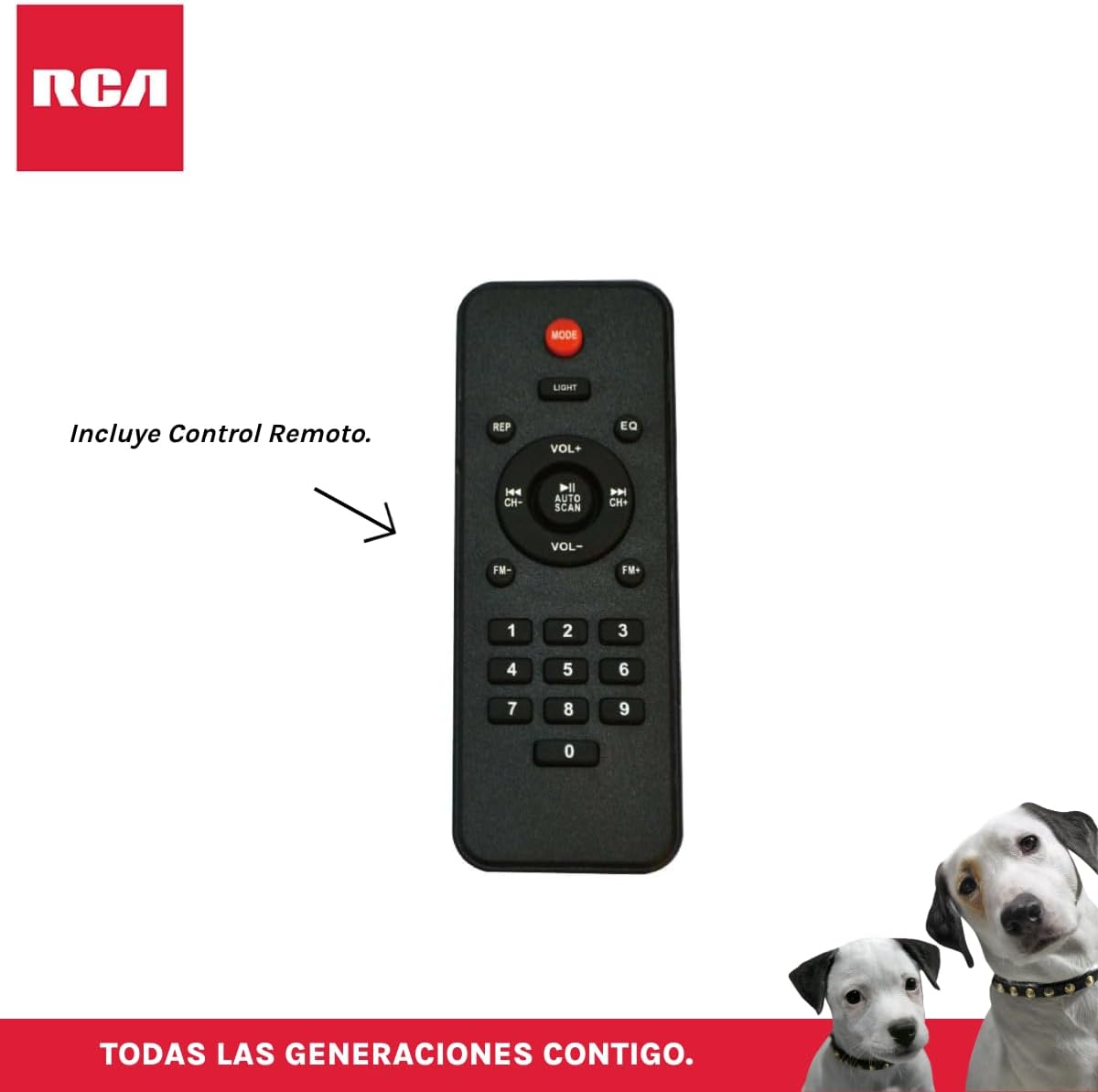
Rajah 3.4: RCA SP550BT Remote Control. This image displays the full layout of the remote control, including buttons for power, mode selection, volume adjustment, track navigation, equalizer settings, and a numeric keypad.
4. Persediaan
4.1 Sambungan Kuasa
- Pastikan pembesar suara diletakkan di atas permukaan yang stabil dan rata.
- Connect the power cable to the speaker's power input port.
- Plug the other end of the power cable into a standard electrical outlet (AC 100-240V, 50/60Hz).
- Press the power button on the speaker or remote control to turn it on.
5. Arahan Operasi
5.1 Hidupkan/Mati Kuasa
- Untuk menghidupkan pembesar suara, tekan butang KUASA button on the control panel or the remote control.
- To turn off the speaker, press the KUASA butang lagi.
5.2 Pemilihan Mod
Tekan ke MODE button on the control panel or remote control to switch between Bluetooth, USB, FM, and AUX input modes.
5.3 Berpasangan Bluetooth
- Hidupkan pembesar suara dan pilih mod Bluetooth menggunakan MODE button. The display will show "BLUE" and a pairing indicator will flash.
- Dayakan Bluetooth pada peranti mudah alih anda (telefon pintar, tablet, dll.).
- Cari untuk "RCA SP550BT" in your device's Bluetooth list and select it to pair.
- Once paired, the speaker will emit a confirmation sound, and the Bluetooth indicator will stop flashing.
- Anda kini boleh memainkan audio daripada peranti anda melalui pembesar suara.
5.4 Main Semula USB
- Insert a USB flash drive (FAT32 format, max 32GB) containing MP3 audio files ke dalam port USB.
- The speaker will automatically switch to USB mode and begin playing the first track. If not, press the MODE butang untuk memilih mod USB.
- Gunakan MAIN/JEDA, SEBELUMNYA, dan SETERUSNYA buttons on the control panel or remote to control playback.
5.5 Radio FM
- Turn on the speaker and select FM mode using the MODE butang.
- Tekan dan tahan butang MAIN/JEDA butang (atau SCAN AUTO on remote) to automatically scan and save available FM stations.
- Gunakan SEBELUMNYA dan SETERUSNYA butang untuk menavigasi melalui stesen yang disimpan.
5.6 Input AUX
- Connect an external audio device (e.g., MP3 player, laptop) to the speaker's AUX input port using a 3.5mm audio cable (not included).
- Pilih mod AUX menggunakan MODE butang.
- Kawal main balik dan kelantangan daripada peranti anda yang disambungkan.
5.7 Fungsi TWS (Stereo Wayarles Sejati).
The TWS function allows you to connect two RCA SP550BT speakers wirelessly for a stereo sound experience.
- Ensure both SP550BT speakers are powered on and in Bluetooth mode, but not yet paired with any device.
- Pada salah satu pembesar suara, tekan dan tahan TWS button (if available, or a dedicated TWS pairing button) until you hear a confirmation tone. The speakers will attempt to pair with each other.
- Once successfully paired, one speaker will act as the master (left channel) and the other as the slave (right channel).
- Now, pair your mobile device with the master speaker via Bluetooth as described in section 5.3.
5.8 Lampu LED
Tekan ke CAHAYA button on the control panel or remote control to cycle through different LED light modes or to turn them off.
5.9 Penggunaan Mikrofon
Connect a wired microphone (not included) to the microphone input port on the speaker. Adjust the microphone volume using the dedicated knob (if available) or the main volume control.
6. Penyelenggaraan
- Pembersihan: Gunakan kain lembut dan kering untuk membersihkan bahagian luar pembesar suara. Jangan gunakan pembersih atau pelarut yang melelas.
- Storan: Apabila tidak digunakan untuk tempoh yang lama, simpan pembesar suara di tempat yang sejuk dan kering jauh dari cahaya matahari langsung dan suhu yang melampau.
- Pendedahan Air: Pembesar suara ini tidak kalis air. Elakkan daripada mendedahkannya kepada air atau kelembapan berlebihan.
7. Penyelesaian masalah
Jika anda menghadapi masalah dengan pembesar suara anda, rujuk masalah dan penyelesaian biasa berikut:
| Masalah | Kemungkinan Punca | Penyelesaian |
|---|---|---|
| Tiada kuasa | Power cable not connected; Power outlet not working; Speaker off. | Check power cable connection; Try a different outlet; Press the POWER button. |
| Tiada bunyi | Volume too low; Incorrect mode selected; Device not connected properly. | Increase volume; Select correct input mode (Bluetooth, USB, AUX); Reconnect device. |
| Penggandingan Bluetooth gagal | Speaker not in pairing mode; Device Bluetooth off; Speaker already paired. | Ensure speaker is in Bluetooth pairing mode; Turn on device Bluetooth; Disconnect from other devices. |
| Main balik USB tidak berfungsi | USB drive format incompatible; Corrupt files; USB drive not inserted correctly. | Ensure USB is FAT32 format; Check file integrity; Reinsert USB drive. |
| Penerimaan radio FM lemah | Isyarat lemah; Gangguan. | Relocate speaker; Extend antenna (if applicable). |
8. Spesifikasi
| Ciri | Spesifikasi |
|---|---|
| Model | SP550BT |
| Jenama | RCA |
| Kuasa Keluaran Pembesar Suara | 50 Watt (Maksimum) |
| Teknologi Ketersambungan | Bluetooth, USB, AUX |
| Teknologi Tanpa Wayar | Bluetooth |
| Mod Keluaran Audio | Stereo |
| Jenis Pembesar Suara | Portable, Outdoor |
| Jenis Pemasangan | Pemasangan Atas Meja |
| Kaedah Kawalan | Alat Kawalan Jauh |
| Saiz Pembesar Suara | 6.5 Inci |
| Diameter Woofer | 6.5 Inci |
| Kapasiti Bateri | 4400 Miliamp jam |
| Sumber Kuasa | Kabel Elektrik |
| Peranti Serasi | Komputer Riba, Pemain MP3, Telefon Pintar, Tablet |
| GTIN / UPC | 044476152061 |
9. Waranti dan Sokongan
This product comes with a limited warranty. Please refer to the warranty card included in your package for specific terms and conditions. For technical support or service inquiries, please contact RCA customer service through their official webtapak atau maklumat hubungan yang diberikan bersama pembelian anda.
Note: Warranty terms may vary by region. Keep your proof of purchase for warranty claims.