
WOOPKER AK45
Stereo WOOPKER AK45 AmpManual Pengguna yang lebih hidup
Model: AK45
1. Pengenalan
The WOOPKER AK45 is a versatile 2-channel stereo amplifier designed for home audio systems. It features multiple input options including Bluetooth 5.0, AUX, USB, SD card, and FM radio, making it suitable for various audio sources and environments. This manual provides detailed instructions for setting up and operating your AK45 amppenguat untuk memastikan prestasi optimum.

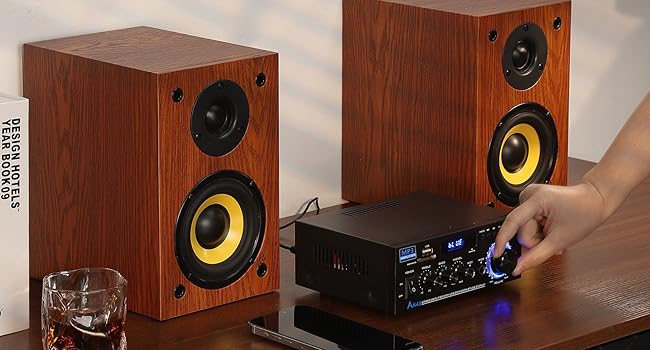
Image 1.1: The WOOPKER AK45 Stereo Amplifier with its included remote control. This image displays the front panel controls and the compact design of the amplebih hidup.
2. Apa yang ada di dalam Kotak
Sila sahkan bahawa semua item terdapat dalam pakej:
- Stereo WOOPKER AK45 Amppenguat x 1
- Alat kawalan jauh x 1
- Kabel Kuasa x 1
- Antena FM x 1
- Manual Pengguna x 1

Image 2.1: Visual representation of the items included in the WOOPKER AK45 amplifier package. This includes the amplifier unit, remote control, power cable, FM antenna, and user manual.
3. Produk Lebihview
3.1 Panel Depan

Imej 3.1: Terperinci view daripada AK45 amplifier's front panel, highlighting the various controls and input ports such as USB, SD Card slot, display, microphone inputs, and adjustment knobs.
- Suis kuasa: Berpusing amphidup atau mati.
- Port USB: For connecting USB flash drives for audio playback.
- Slot Kad SD/MMC: For inserting SD or MMC cards for audio playback.
- paparan: Menunjukkan mod semasa, maklumat trek atau frekuensi FM.
- Tombol Treble: Melaraskan output audio frekuensi tinggi.
- Tombol Bes: Melaraskan output audio frekuensi rendah.
- Mic/Vol Knob: Melaraskan kelantangan mikrofon.
- MIC1/MIC2 Inputs: Bicu 6.35mm untuk menyambung mikrofon.
- Butang Mod: Cycles through input sources (Bluetooth, AUX, USB, SD, FM).
- Butang Navigasi: For track control (previous/next), play/pause, and FM station tuning.
- Tombol Kelantangan: Main volume control for overall audio output.
3.2 Panel Belakang
Imej 3.2: Belakang view daripada AK45 amplifier, illustrating the speaker output terminals, RCA audio input, FM antenna connection, DC 12V input, and AC power input.
- SEMUT FM: Sambungan untuk antena FM.
- AUDIO INPUT (RCA): Red and white RCA jacks for connecting external audio devices (e.g., CD player, DVD player, TV).
- OUTPUT SPEAKER: Terminals for connecting passive speakers (4-16 Ohms impedance).
- Input Kuasa DC 12V/5A: For connecting a 12V DC power adapter (if applicable).
- Input Kuasa AC: For connecting the main AC power cable (AC90-240V, 50-60Hz).
4. Persediaan
4.1 Sambungan Pembesar suara
AK45 amplifier is designed for passive speakers with an impedance of 4-16 Ohms. Follow these steps to connect your speakers:
- Identify the positive (+) and negative (-) terminals on your speakers and on the amplifier. Positive terminals are typically red, and negative terminals are black.
- Press the clasp on the ampTerminal output pembesar suara lifier.
- Insert the bare speaker wires into the corresponding terminals. Ensure a secure connection and that no stray wire strands are touching other terminals.
- Connect the right speaker to the 'RIGHT' output and the left speaker to the 'LEFT' output.

Image 4.1: Visual guide for connecting passive speakers to the rear panel of the AK45 amplifier, illustrating the correct polarity for left and right channels.
4.2 Sambungan Kuasa
Connect the provided AC power cable to the AC Power Input on the rear panel of the amplifier, then plug it into a standard wall outlet. If using a DC 12V power source, connect it to the DC 12V/5A input.
Sambungan Antena FM 4.3
Connect the included FM antenna to the 'FM ANT' port on the rear panel for improved FM radio reception.
5. Arahan Operasi
5.1 Hidupkan/Mati Kuasa
Flip the 'POWER' switch on the front panel to the 'ON' position to power on the amplifier. Flip it to 'OFF' to power down.
5.2 Pemilihan Input
Press the 'MODE' button on the front panel or the remote control to cycle through available input sources: Bluetooth (BT), AUX, USB, SD Card, and FM Radio. The selected mode will be displayed on the front panel screen.
5.3 Berpasangan Bluetooth
- Tukar amplifier to 'BT' mode using the 'MODE' button. The display will show 'BLUE' and flash, indicating it's ready for pairing.
- Pada peranti mudah alih anda (telefon pintar, tablet, dll.), dayakan Bluetooth dan cari peranti yang tersedia.
- Select 'BT' from the list of devices to pair. Once connected, the 'BLUE' indicator on the amplifier will stop flashing.
- Mula memainkan audio daripada peranti anda.
Nota: Maintain a distance of less than 30 feet (10 meters) between the amplifier and your Bluetooth device for optimal connection. For TV or PC devices, keep the distance within 15 feet (5 meters).
Video 5.1: A demonstration of connecting speakers, powering on the AK45 amplifier, and pairing a mobile device via Bluetooth. This video also shows the amplifier playing music through connected speakers.
5.4 Main Semula USB/Kad SD
Masukkan pemacu kilat USB atau kad SD/MMC yang mengandungi audio files into the respective port/slot on the front panel. The amplifier will automatically switch to USB or SD mode and begin playback. Use the navigation buttons on the front panel or remote control to manage playback.
5.5 Operasi Radio FM
In FM mode, use the navigation buttons to scan for radio stations. Press and hold the 'Play/Pause' button to auto-scan and save available stations. Use the 'Previous/Next' buttons to cycle through saved stations.
5.6 Penggunaan Mikrofon
Connect up to two microphones to the 'MIC1' and 'MIC2' input jacks on the front panel. Adjust the microphone volume using the 'MIC/VOL' knob. The amplifier supports karaoke functions.

Image 5.2: The AK45 amplifier connected to two microphones, demonstrating its capability for karaoke or dual microphone use.
5.7 Pelarasan Audio
Use the 'TREBLE', 'BASS', and 'MIC/VOL' knobs on the front panel to fine-tune the audio output to your preference. The main 'VOLUME' knob controls the overall sound level.
5.8 Penggunaan Alat Kawalan Jauh
The included remote control allows for convenient operation from a distance. Ensure the plastic isolation sheet is removed from the battery compartment before first use. The remote can control power, mode selection, volume, track navigation, and EQ settings.
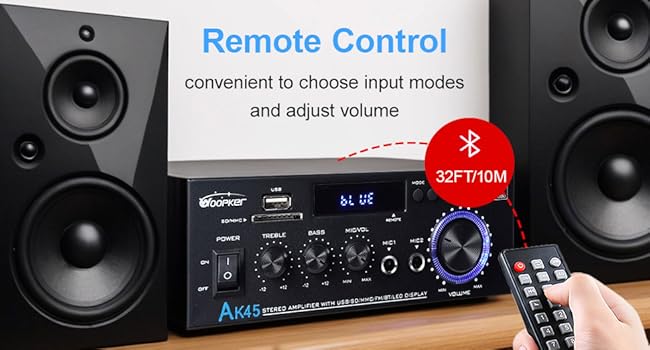
Image 5.3: The AK45 amplifier with its remote control, illustrating the convenience of remote operation for input mode selection and volume adjustments.
6. Spesifikasi
| Ciri | Spesifikasi |
|---|---|
| Nombor Model | AK45 |
| Jenama | PEMERIKSA |
| Output Kuasa | 40W + 40W (Rated), 300W + 300W (Max) |
| Versi Bluetooth | 5.0 |
| Teknologi Ketersambungan | AUX, USB, SD Card, Bluetooth |
| Peranti Serasi | Smartphone, Tablet, PC, TV, MP3 Player, CD Player, DVD Player, Projector |
| Mod Keluaran Audio | Stereo (Saluran 2.0) |
| Impedans Pembesar Suara | 4-16 Ohm |
| Berat Barang | 9.6 auns |
| Dimensi Pakej | 8.58 x 8.11 x 3.82 inci |
| Input Kuasa | AC90-240V, 50-60Hz / DC 12V/5A |
7. Penyelesaian masalah
If you encounter issues with your AK45 amplifier, rujuk kepada masalah dan penyelesaian biasa berikut:
- Tiada Kuasa:
- Pastikan kabel kuasa disambungkan dengan selamat ke kedua-dua amplampu dan soket kuasa yang berfungsi.
- Check if the power switch on the front panel is in the 'ON' position.
- Tiada Bunyi:
- Verify that speakers are correctly connected to the 'SPEAKERS OUTPUT' terminals with correct polarity.
- Periksa tahap kelantangan pada kedua-dua amppengubah suai dan peranti sumber audio anda.
- Ensure the correct input mode (Bluetooth, AUX, USB, SD, FM) is selected.
- If using AUX, ensure the audio cable is securely connected to both the amplifier's 'AUDIO INPUT' and your source device.
- Isu Berpasangan Bluetooth:
- Pastikan amplifier is in 'BT' mode and the 'BLUE' indicator is flashing.
- Ensure your device's Bluetooth is enabled and it's within the recommended range (30 feet/10 meters).
- Cuba nyahgandingkan dan pasangkan semula peranti.
- USB/SD Card Not Playing:
- Pastikan pemacu USB atau kad SD dimasukkan dengan betul.
- Periksa audio files berada dalam format yang disokong.
- Cuba pemacu USB atau kad SD lain.
- Penerimaan Radio FM yang lemah:
- Ensure the FM antenna is properly connected.
- Adjust the position of the FM antenna for better signal reception.
8. Penyelenggaraan
To ensure the longevity and optimal performance of your AK45 amplifier, ikut garis panduan penyelenggaraan ini:
- Pembersihan: Gunakan kain lembut dan kering untuk membersihkan bahagian luar amppenghidrat. Jangan gunakan pembersih cecair atau bahan kasar.
- Pengudaraan: Memastikan amplifier is placed in a well-ventilated area to prevent overheating. Do not block the ventilation openings.
- Storan: Apabila tidak digunakan untuk tempoh yang lama, simpan amppenyangga di tempat yang sejuk dan kering jauh dari cahaya matahari langsung dan suhu yang melampau.
- Pengendalian: Elakkan menjatuhkan atau mendedahkan amppenebat kepada hentaman kuat.
- Matikan: Sentiasa matikan kuasa amplifier before connecting or disconnecting any cables or accessories.
9. Waranti dan Sokongan
WOOPKER is committed to providing quality products and customer satisfaction. For any inquiries or support needs, please refer to the following:
- Customer Response: We aim to provide quick responses to customer inquiries within 24 hours.
- Polisi Pemulangan: Produk boleh dipulangkan untuk pertukaran atau bayaran balik dalam tempoh 30 hari dari tarikh pembelian.
- Sokongan Teknikal: Lifetime technical customer support is available for your product.

Imej 9.1: Tamatview of WOOPKER's customer support commitments, including response times, return policy, and technical support availability.
Ask a question about this manual
Ask about setup, troubleshooting, compatibility, parts, safety, or missing instructions. Manuals+ will review the question and use this page’s manual context to help answer it.