
Cillso H97
Cillso H97 Wireless Earbuds
Manual Arahan Pengguna
Maklumat Keselamatan Penting
Sila baca semua arahan keselamatan dengan teliti sebelum menggunakan produk ini. Kegagalan mematuhi arahan ini boleh mengakibatkan kecederaan atau kerosakan.
- Jangan dedahkan fon telinga atau bekas pengecas kepada suhu yang melampau, cahaya matahari langsung atau api.
- Avoid using the product in environments with high humidity or water, beyond its IP7 waterproof rating.
- Do not disassemble, repair, or modify the product. This will void the warranty.
- Jauhkan produk daripada kanak-kanak dan haiwan peliharaan.
- Use only the provided charging cable or a certified standard charger (5V/1A; 5V/2A) to charge the case.
- Elakkan mendengar pada tahap kelantangan tinggi untuk tempoh yang lama untuk mengelakkan kerosakan pendengaran.
Kandungan Pakej
Sahkan bahawa semua item terdapat dalam pakej anda:
- 2x Bluetooth Earbuds (Left and Right)
- 1x Kes Pengecasan Mudah Alih
- 1x Kabel Pengecas Jenis-C
- 1x Manual Pengguna
Produk Selesaiview
Familiarize yourself with the components of your Cillso H97 Wireless Earbuds.
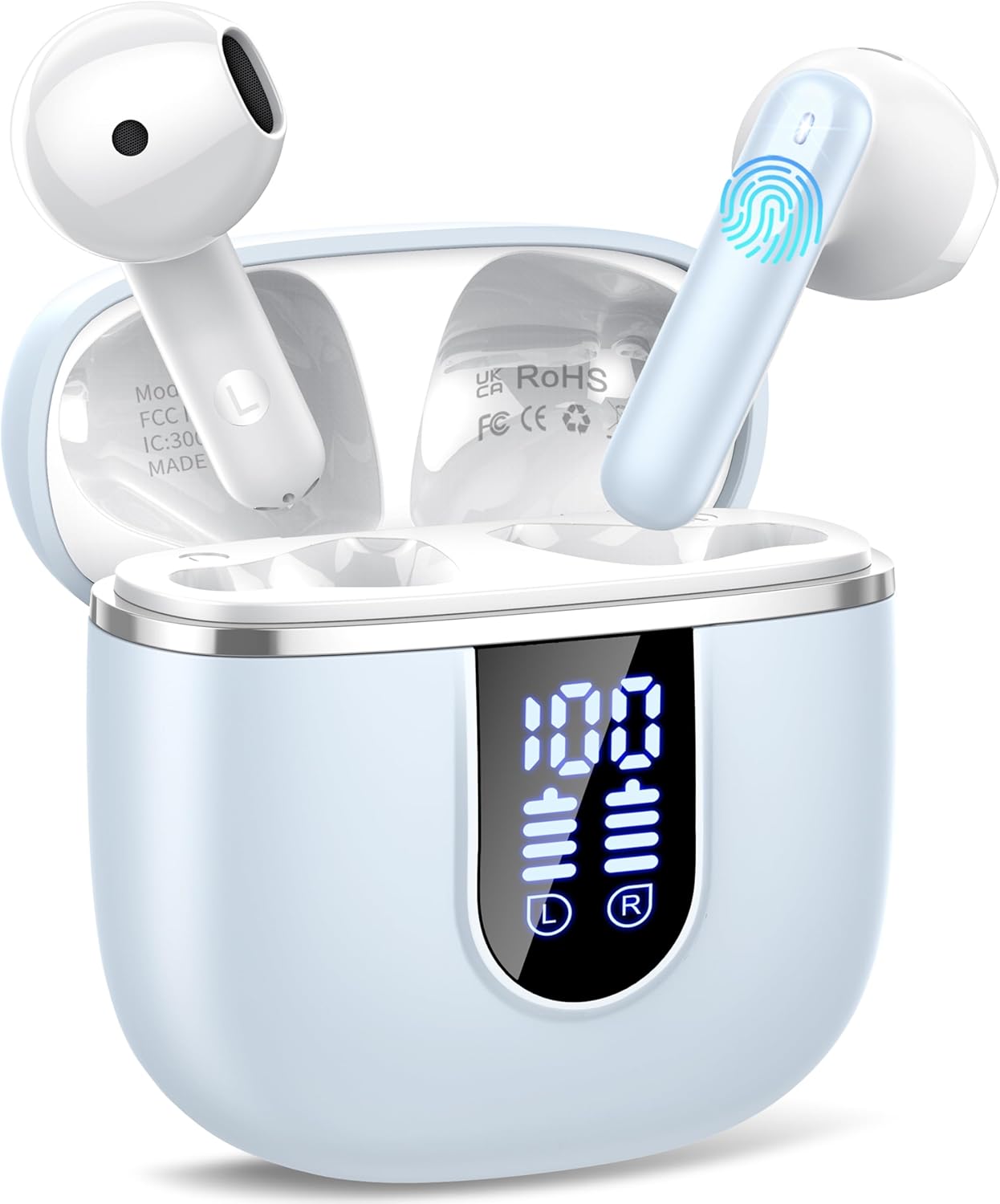
Image: The Cillso H97 Wireless Earbuds are shown inside their open charging case. The case features a dual LED display indicating battery percentages for the case and individual earbuds. The earbuds are white with a sleek design, and the charging case is a light azure color.
The image above displays the earbuds within their charging case. Key features include the dual LED display on the charging case, which shows the battery status for both the case and each earbud. The earbuds themselves are designed for in-ear comfort and feature touch control areas.
Persediaan
1. Mengecas Fon Telinga dan Sarung
Sebelum penggunaan pertama, cas sepenuhnya fon telinga dan bekas pengecas.
- Connect the provided Type-C charging cable to the charging port on the case and to a standard USB power adapter (5V/1A or 5V/2A).
- The dual LED display on the charging case will show the charging progress. A full charge for the case takes approximately 1.5 hours.
- Place the earbuds into the charging case. They will automatically begin charging. The LED display will indicate their charging status.
- The earbuds provide up to 8 hours of playback on a single charge, and the charging case provides an additional 32 hours of playtime.
2. Berpasangan dengan Peranti Anda
The H97 earbuds utilize Bluetooth 5.4 for a stable and efficient connection.
- Gandingan Awal:
- Pastikan Bluetooth peranti anda dihidupkan.
- Buka penutup bekas pengecas. Fon telinga akan dihidupkan secara automatik dan memasuki mod berpasangan.
- On your device, search for Bluetooth devices and select "H97" from the list.
- Sebaik sahaja disambungkan, anda akan mendengar gesaan pengesahan dan fon telinga akan sedia untuk digunakan.
- Penyambungan Semula Automatik: After the initial pairing, the earbuds will automatically connect to the last paired device when the charging case lid is opened.
- Mod Earbud Tunggal: Either earbud can be used independently. Simply take one out of the case, and it will connect.
Arahan Operasi
1. Memakai Earbud
The H97 earbuds are designed for an ergonomic and secure fit.

Image: A diagram illustrating the correct angle and position for wearing the earbud in the ear canal for optimal comfort and sound.
- Masukkan perlahan-lahan setiap fon telinga ke dalam saluran telinga anda.
- Adjust the earbud until it feels snug and comfortable. A proper fit ensures optimal sound quality and noise isolation.
- Each earbud weighs only 3.5 grams, providing lightweight comfort for extended wear.
2. Kawalan Sentuh
The earbuds feature sensitive touch sensors for easy control of various functions:
| Tindakan | Fungsi |
|---|---|
| Ketik Tunggal (Kiri/Kanan) | Mainkan / Jeda muzik, Jawapan / Tamatkan panggilan |
| Ketik Dua Kali (Kiri) | Lagu Sebelumnya |
| Ketik Dua Kali (Kanan) | Lagu Seterusnya |
| Ketik Tiga Kali (Kiri) | Kelantangan Kurang |
| Ketik Tiga Kali (Kanan) | Kelantangan Naik |
| Tekan lama (2 saat) | Tolak Panggilan, Aktifkan Pembantu Suara |
3. Hidupkan/Mati Kuasa
- Hidupkan kuasa: Open the charging case lid, or long-press the touch area on both earbuds for 3 seconds if they are outside the case and off.
- Matikan: Place the earbuds back into the charging case and close the lid. Alternatively, long-press the touch area on both earbuds for 5 seconds.
4. Membuat dan Menerima Panggilan
The H97 earbuds are equipped with 4 ENC (Environmental Noise Cancelling) microphones to ensure clear call quality.
- Jawab Panggilan: Ketik sekali sama ada fon telinga.
- Tamatkan Panggilan: Single tap either earbud during a call.
- Tolak Panggilan: Tekan lama mana-mana fon telinga selama 2 saat.
5. Main balik Audio
Experience immersive HiFi stereo sound with deep bass, delivered by 14.2mm diaphragm drivers and AAC/SBC audio encoding.
- Main/Jeda: Ketik sekali sama ada fon telinga.
- Lagu Seterusnya: Ketik dua kali pada fon telinga kanan.
- Lagu Sebelumnya: Ketik dua kali pada fon telinga kiri.
Penyelenggaraan
Penjagaan yang betul akan memanjangkan jangka hayat fon telinga anda.
- Pembersihan: Gunakan kain lembut, kering, bebas serabut untuk membersihkan fon telinga dan bekas pengecas. Jangan gunakan bahan kimia yang keras atau bahan yang melelas.
- Storan: Apabila tidak digunakan, simpan fon telinga dalam bekas pengecasnya untuk melindunginya dan memastikan ia dicas. Simpan di tempat yang sejuk dan kering.
- Tahan Air: The earbuds feature IP7 nano-coating technology, protecting them from daily splashes, sweat, and rain. Do not submerge them in water or expose them to strong jets of water. Ensure they are dry before placing them back in the charging case.
Menyelesaikan masalah
Jika anda menghadapi sebarang masalah, rujuk kepada masalah dan penyelesaian biasa berikut:
| Masalah | Penyelesaian yang Mungkin |
|---|---|
| Fon telinga tidak berpasangan dengan peranti |
|
| Hanya satu fon telinga berfungsi |
|
| Kes pengecas tidak dicas |
|
| Kualiti bunyi yang lemah atau sambungan terputus-putus |
|
Spesifikasi
Key technical details of the Cillso H97 Wireless Earbuds:
- model: H97
- Versi Bluetooth: 5.4
- Pengekodan Audio: AAC / SBC
- Saiz Pemandu: 14.2mm Diaphragm Driver
- Masa Main Earbud: Sehingga 8 jam (caj tunggal)
- Jumlah Masa Main (dengan bekas pengecas): Sehingga 40 jam
- Masa Pengecasan (Kes): Approximately 1.5 hours (Type-C)
- Penilaian Kalis Air: IP7
- Berat Earbud: 3.5 gram (setiap satu)
- Berat Kes Pengecasan: 32 gram
- Dimensi Produk: 0.79 x 0.79 x 0.79 inches (earbuds, approximate)
- Berat Barang: 3.2 auns (jumlah berat pakej)
- Bateri: 2 A bateri diperlukan (termasuk)
- Keserasian: Most Bluetooth devices (Android 4.4+, iOS 8.0+, Bluetooth 4.0+)
Waranti dan Sokongan
Cillso products are designed for reliability and performance. This product comes with a standard manufacturer's warranty against defects in materials and workmanship.
- For warranty claims or technical support, please refer to the contact information provided with your purchase or visit the official Cillso webtapak.
- Sila simpan bukti pembelian anda untuk perkhidmatan waranti.
Ask a question about this manual
Ask about setup, troubleshooting, compatibility, parts, safety, or missing instructions. Manuals+ will review the question and use this page’s manual context to help answer it.