
1. Pengenalan
Thank you for choosing the BLOW S18D Senior Phone. This device is designed for ease of use, featuring large buttons, a clear display, and essential functions for daily communication. Please read this manual carefully to understand how to operate your phone safely and efficiently.
2. Kandungan Pakej
Ensure all items are present in your package. If anything is missing or damaged, please contact your retailer.
- BLOW S18D Senior Phone
- Dok Pengecasan
- Power Adapter (AC Charger)
- Bateri
- Manual Pengguna

Image: BLOW S18D phone with charging dock, power adapter, and product box.
3. Reka Letak Telefon
Familiarize yourself with the key components of your BLOW S18D phone.
3.1 Depan View
The front of the phone features the display screen, navigation buttons, call/end buttons, and the numeric keypad with large, easy-to-read characters.
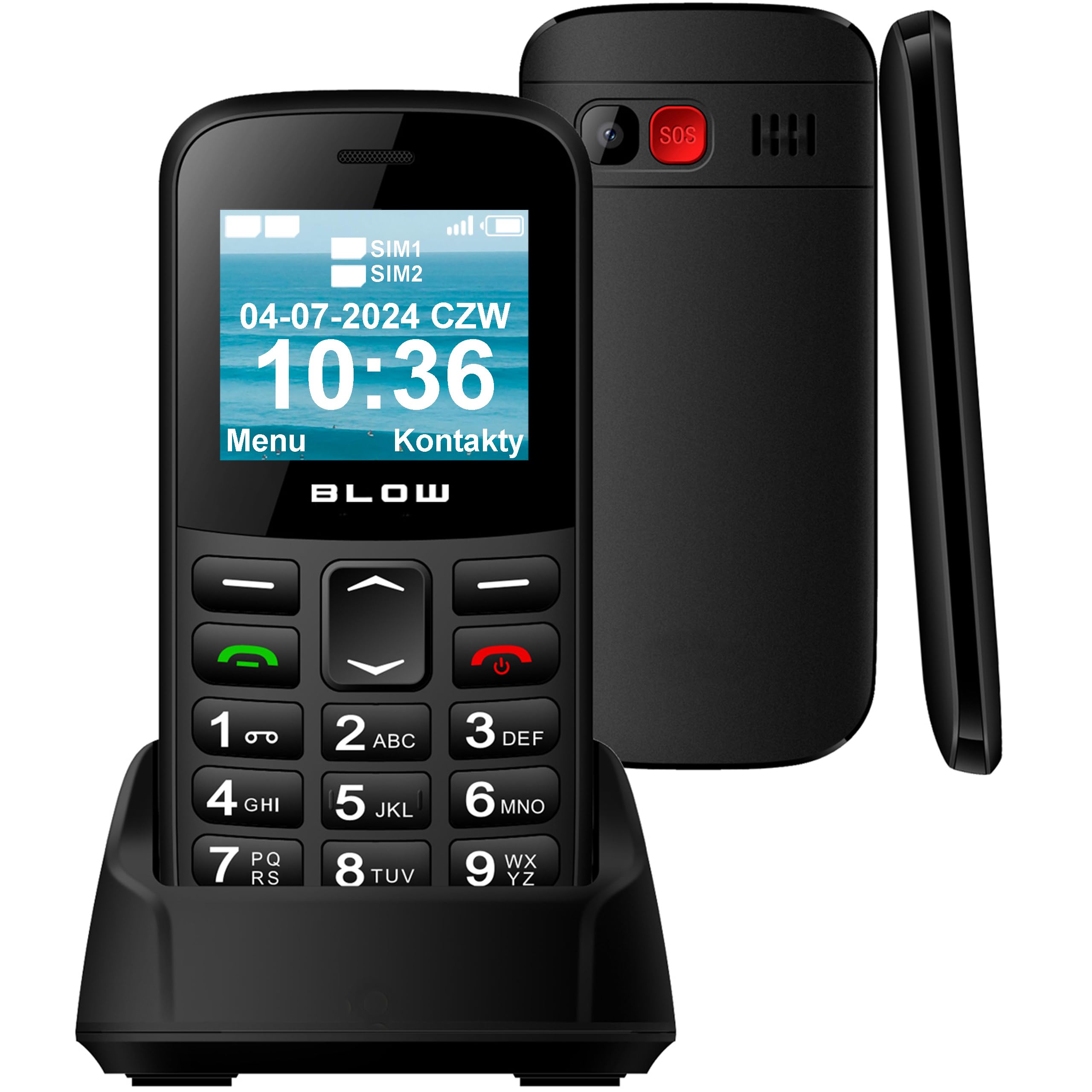
Imej: Depan view of the BLOW S18D senior phone in its charging dock, highlighting the large keypad and display.
3.2 Back and Side Views
The back of the phone includes the SOS emergency button, camera, and speaker. The sides may contain volume controls and the USB-C charging port.

Imej: Sisi dan belakang view of the BLOW S18D senior phone, illustrating its slim profile and the prominent SOS button on the rear.
4. Persediaan
4.1 Memasukkan Kad SIM dan Bateri
- Tanggalkan penutup belakang telefon dengan berhati-hati.
- Insert your SIM card(s) into the designated slot(s). The phone supports Dual SIM.
- If using an external memory card (up to 32 GB), insert it into the microSD card slot.
- Masukkan bateri, pastikan kenalan sejajar dengan betul.
- Pasang semula penutup belakang sehingga ia klik pada tempatnya.
4.2 Mengecas Telefon
Before first use, fully charge the phone battery.
- Sambungkan penyesuai kuasa ke salur keluar dinding.
- Place the phone into the charging dock, ensuring it sits securely and the charging indicator appears on the screen. Alternatively, connect the USB-C cable directly to the phone.
- Cas penuh biasanya mengambil masa beberapa jam.
4.3 Menghidupkan/Mematikan
- Untuk menghidupkan: Tekan dan tahan butang Kuasa/Tamatkan Panggilan butang sehingga skrin menyala.
- Untuk mematikan kuasa: Tekan dan tahan butang Kuasa/Tamatkan Panggilan button, then confirm power off on the screen.
5. Arahan Operasi
5.1 Membuat dan Menerima Panggilan
- Membuat Panggilan: Masukkan nombor telefon menggunakan pad kekunci dan tekan butang Panggil butang (hijau).
- Menerima Panggilan: Apabila telefon berdering, tekan butang Panggil button (green) to answer. Press the Tamatkan Panggilan button (red) to reject or end a call.
5.2 Menghantar dan Menerima SMS
- Navigasi ke Mesej menu.
- Pilih Tulis Mesej to compose a new SMS.
- Masukkan nombor penerima atau pilih daripada kenalan, kemudian taip mesej anda.
- Tekan Hantar.
5.3 Fungsi Kecemasan SOS
The SOS button is located on the back of the phone. It allows you to quickly contact pre-set emergency numbers in critical situations.
- Setting SOS Numbers: Pergi ke tetapan > Tetapan SOS to add up to 5 emergency contacts.
- Mengaktifkan SOS: Tekan dan tahan butang SOS button for a few seconds. The phone will automatically call the emergency contacts one by one until one answers, and send an emergency SMS.

Image: The BLOW S18D phone with its SOS button highlighted, set against a background suggesting emergency services.
5.4 Radio FM
- Akses ke Radio FM aplikasi dari menu utama.
- Use the navigation buttons to scan for stations or manually tune.
- Headphones may be required to act as an antenna for optimal reception.
5.5 Lampu suluh
Telefon ini dilengkapi lampu suluh terbina dalam untuk kemudahan.
- To turn on/off the flashlight, typically press and hold the '0' key or a dedicated side button (refer to your phone's specific key mapping).

Image: The BLOW S18D phone with its flashlight activated, shown illuminating a dark path.
5.6 Dual SIM Management
The BLOW S18D supports two SIM cards, allowing you to manage two different phone numbers simultaneously.
- You can select which SIM card to use for calls or messages from the phone's settings or directly before making a call/sending a message.
- The display will show the status of both SIM cards.

Image: The BLOW S18D phone display showing the status of two SIM cards (SIM1, SIM2) and the current date and time.
5.7 Kesambungan Bluetooth
The phone supports Bluetooth for connecting to compatible devices such as headsets or car kits.
- Pergi ke tetapan > Bluetooth.
- Hidupkan Bluetooth On dan cari peranti yang tersedia.
- Select your desired device and pair them.
6. Penyelenggaraan
6.1 Pembersihan
- Gunakan kain lembut dan kering untuk membersihkan permukaan dan skrin telefon.
- Elakkan menggunakan pembersih cecair atau bahan yang melelas.
6.2 Penjagaan Bateri
- Jangan dedahkan bateri kepada suhu yang melampau.
- Use only the original charger provided with the phone.
- If the phone will not be used for an extended period, charge it partially and store it in a cool, dry place.
6.3 Penyimpanan
- Store the phone in a dry environment, away from direct sunlight and moisture.
- Jauhkan daripada kanak-kanak dan haiwan peliharaan.
7. Penyelesaian masalah
If you encounter issues with your phone, try the following solutions before seeking professional assistance.
| Masalah | Penyelesaian yang Mungkin |
|---|---|
| Telefon tidak dihidupkan | Pastikan bateri dimasukkan dengan betul dan dicas sepenuhnya. |
| Tidak boleh membuat atau menerima panggilan | Check if the SIM card is properly inserted and activated. Verify network signal strength. |
| Kualiti bunyi yang lemah | Ensure the speaker/earpiece is not blocked. Adjust volume settings. |
| Bateri cepat habis | Kurangkan kecerahan skrin. Tutup aplikasi yang tidak digunakan. Hadkan penggunaan data latar belakang. |
| SOS button not working | Verify that emergency contacts are correctly set in SOS settings. |
8. Spesifikasi
Below are the technical specifications for the BLOW S18D Senior Phone:
| Ciri | Perincian |
|---|---|
| Jenama | TIupan |
| Nama Model | Blow S18D |
| Sistem Operasi | KaiOS |
| Saiz RAM yang Dipasang | 32 MB |
| Max Supported Flash Memory Size | 32 GB (for external memory card) |
| Saiz Skrin | 1.77 Inci |
| Pembawa Tanpa Wayar | All carriers |
| Teknologi Selular | 3G |
| Teknologi Ketersambungan | Bluetooth |
| warna | Hitam |
| Jenis Penyambung | USB Jenis C |
| Faktor Bentuk | Batu tulis |
| Tahap Ketahanan Air | Bukan kalis air |
| Ciri Khas | Dual SIM, Built-in Flashlight, FM Radio, SOS Button |
| Penerangan Kamera | belakang |
| Kuasa Bateri | 800 mAh |
| Jenis Paparan | LCD |
| Ketumpatan Piksel | 50 PPI |
| Tahun Model | 2024 |
| Negara Asal | China |
9. Maklumat Waranti
The BLOW S18D Senior Phone comes with a Waranti pengilang selama 2 tahun. Waranti ini melindungi kecacatan pada bahan dan mutu kerja di bawah penggunaan biasa. Ia tidak melindungi kerosakan yang disebabkan oleh penyalahgunaan, kemalangan, pengubahsuaian yang tidak dibenarkan atau haus dan lusuh biasa.
Please retain your proof of purchase for warranty claims. For detailed warranty terms and conditions, refer to the documentation provided with your product or contact the manufacturer directly.
10. Sokongan
If you require further assistance or have questions not covered in this manual, please contact your retailer or the BLOW customer support. You can typically find contact information on the product packaging or the manufacturer's official webtapak.
When contacting support, please have your product model (S18D) and purchase details ready.