
1. Produk Lebihview
The SelfieShow Q01 is a versatile and portable device designed to enhance your mobile photography and videography experience. It functions as both an extendable selfie stick and a stable tripod, offering flexibility for various shooting scenarios.
Key features include a 7-section telescopic rod that extends up to 106 cm, a 360° rotatable phone holder, and a detachable wireless remote control for convenient remote shooting. Its lightweight and foldable design makes it an ideal companion for travel and everyday use.

Image: The SelfieShow Q01 in selfie stick mode, tripod mode, and folded for portability.
2. Komponen
Pakej termasuk komponen berikut:
- Selfie Stick Tripod (main unit)
- Manual Pengguna
- CR1632 Battery (pre-installed in remote control)
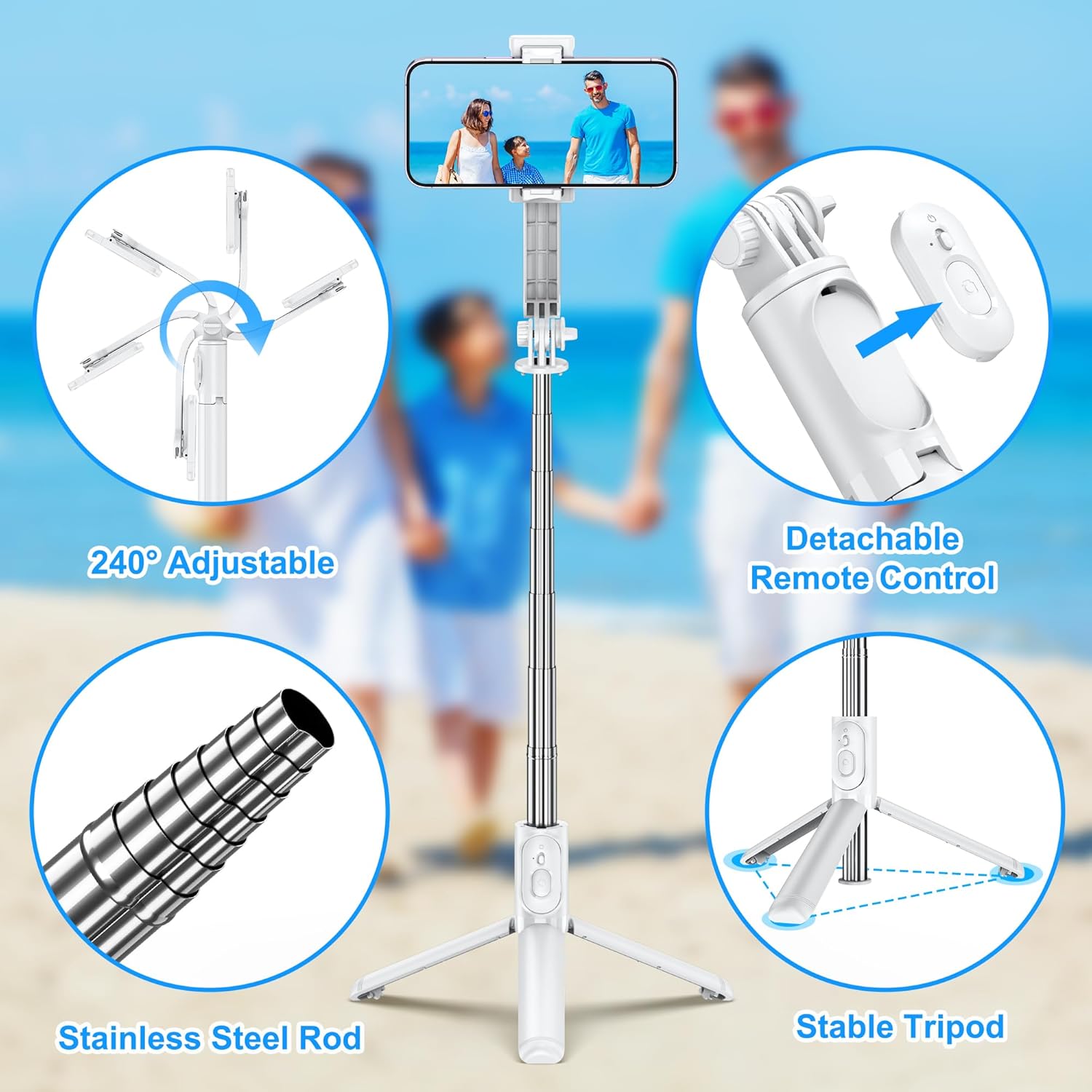
Image: Visual representation of the product's main features including the adjustable head, remote, rod, and tripod.
3. Persediaan dan Pemasangan
Follow these steps to set up your SelfieShow Q01:
- Stretch the Selfie Stick: Gently pull the top section of the selfie stick upwards to extend the telescopic rod.
- Buka Tripod: If using as a tripod, spread the three legs at the base of the stick outwards until they form a stable triangular base.
- Pasang Telefon Anda: Open the phone holder clip and carefully place your smartphone inside, ensuring it is securely gripped. The holder supports phones between 6.5 cm and 9.5 cm (2.5 to 3.7 inches) in width.
- Take Out the Remote Control: The remote control is integrated into the handle. Slide it out from its slot.
- Connect Your Phone (Bluetooth Pairing):
- Turn on the remote control by pressing and holding the button until the indicator light flashes.
- On your smartphone, go to Bluetooth settings and search for new devices.
- Select "SelfieShow" (or similar name) from the list of available devices to pair. The indicator light on the remote will stop flashing once connected.
- Ambil Foto/Video: Once paired, open your phone's camera app. Press the button on the remote control to capture photos or start/stop video recording.

Image: Detailed steps for setting up and using the selfie stick, from extending to Bluetooth pairing.
4. Arahan Operasi
4.1 Extending the Selfie Stick
The telescopic rod can be extended up to 106 cm (41.7 inches) by pulling the sections outwards. Ensure all sections are fully extended and locked into place for maximum stability, especially when using it as a selfie stick for group photos or wider shots.
4.2 Adjusting Phone Holder Angle
The phone holder features a 360° rotation capability, allowing you to switch between horizontal and vertical orientations. Additionally, the holder can be tilted up to 225°, providing flexibility for various shooting angles, including overhead or low-angle shots.

Image: Demonstrates the 360° rotation and 240° tilt functionality of the phone holder for versatile shooting.
4.3 Using the Detachable Remote Control
The wireless remote control allows you to capture photos or videos from a distance of up to 10 meters (33 feet). This is ideal for group photos, long-exposure shots, or when you want to avoid camera shake.
- Hidupkan/Mati Kuasa: Press and hold the button on the remote to turn it on or off.
- Berpasangan: Rujuk Bahagian 3.5 untuk arahan pemasangan Bluetooth.
- Tangkap: Once paired, a single press of the button will trigger the camera shutter or start/stop video recording in your phone's camera app.
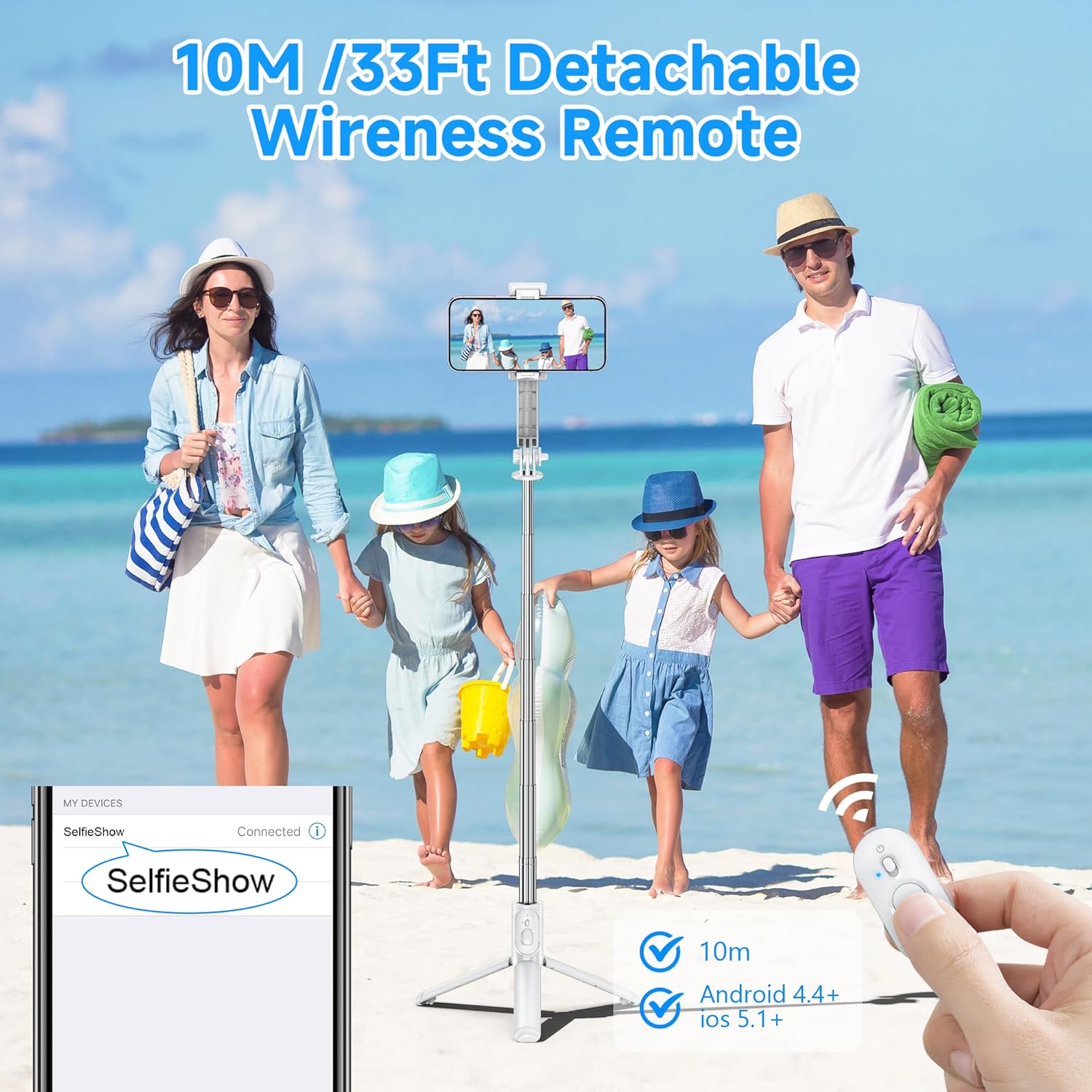
Image: The remote control and its effective range, highlighting its Bluetooth connectivity.
4.4 Detachable Phone Holder Functionality
The phone clip can be detached from the selfie stick and used independently as a compact phone stand. This is useful for watching videos, video calls, or simply propping up your phone on a flat surface.
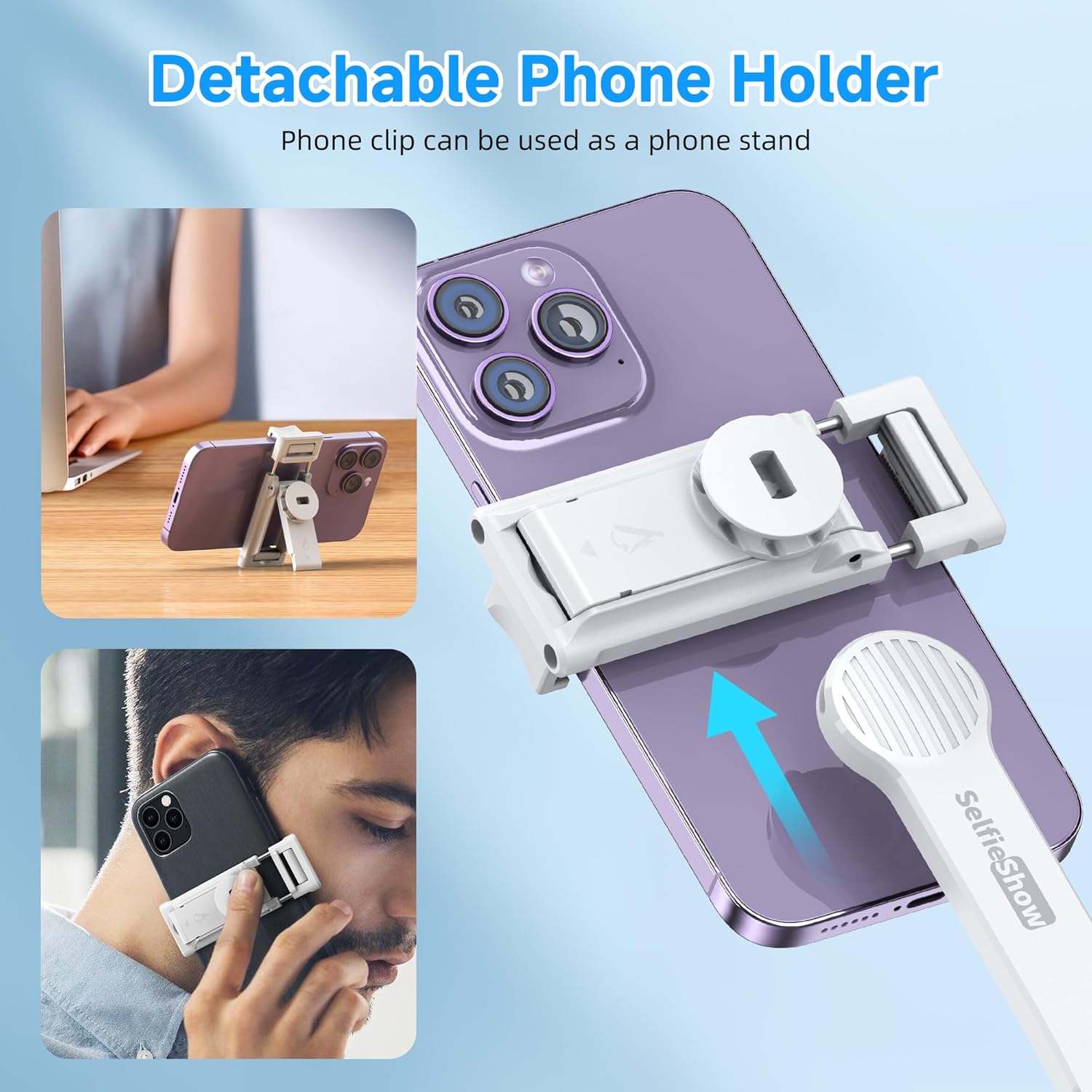
Image: The phone holder can be removed and used as a separate phone stand.
5. Penyelenggaraan
To ensure the longevity and optimal performance of your SelfieShow Q01, please follow these maintenance guidelines:
- Pembersihan: Wipe the device with a soft, dry cloth. Avoid using abrasive cleaners or solvents that may damage the surface.
- Storan: Store the selfie stick in a cool, dry place away from direct sunlight and extreme temperatures. Ensure it is folded to its compact size when not in use.
- Bateri: The remote control uses a CR1632 button cell battery. If the remote's response becomes slow or it fails to connect, replace the battery.
- Elakkan beban berlebihan: Do not attempt to attach devices heavier than the recommended maximum weight (165 grams) to prevent damage to the phone holder or the stick.
6. Penyelesaian masalah
If you encounter issues with your SelfieShow Q01, refer to the following common problems and solutions:
- Alat Kawalan Jauh Tidak Menyambung:
- Ensure the remote control is powered on and fully charged (or has a fresh battery).
- Pastikan Bluetooth didayakan pada telefon pintar anda.
- Nyahpasang dan pasangkan semula peranti dalam tetapan Bluetooth telefon anda.
- Pastikan alat kawalan jauh berada dalam jarak operasi 10 meter.
- Phone Not Stable in Holder:
- Verify that your phone's width is within the supported range (6.5 cm to 9.5 cm).
- Ensure the phone is centered and securely clamped by the holder.
- Selfie Stick Wobbles When Extended:
- Ensure all telescopic sections are fully extended and locked into place.
- Avoid excessive force or sudden movements when extended.
7. Spesifikasi
| Ciri | Spesifikasi |
|---|---|
| Jenama | SelfieShow |
| Nombor Model | Q01 |
| warna | putih |
| Berat Barang | 160 Gram |
| Berat Maksimum Disyorkan | 165 Gram |
| Saiz Dilipat | 5.2 x 3.7 x 19.8 cm (2.05 x 1.46 x 7.8 inci) |
| Panjang Lanjutan Maksimum | 106 cm (41.7 inci) |
| Lebar Pemegang Telefon | 6.5 - 9.5 sm (2.5 - 3.7 inci) |
| Peranti Serasi | Mobile Phone (iOS and Android) |
| Bateri Kawalan Jauh | CR1632 Logam Litium (termasuk) |
| Julat Tanpa Wayar | Sehingga 10 meter (33 kaki) |
| UPC | 614162255873 |

Image: Compatibility details for various smartphone models and the phone holder's adjustable width.
8. Maklumat Waranti
The SelfieShow Q01 comes with a Waranti pengilang selama 1 tahun dari tarikh pembelian. Waranti ini meliputi kecacatan bahan dan mutu kerja di bawah penggunaan biasa. Ia tidak meliputi kerosakan yang disebabkan oleh salah guna, kemalangan, pengubahsuaian tanpa kebenaran atau haus dan lusuh biasa.
Sila simpan bukti pembelian anda untuk tuntutan waranti.
9. Sokongan
For further assistance, technical support, or warranty inquiries, please refer to the contact information provided on the product packaging or the official SelfieShow webtapak.
We recommend visiting the official product support page for the most up-to-date information, FAQs, and potential software updates (if applicable).