
1. Pengenalan
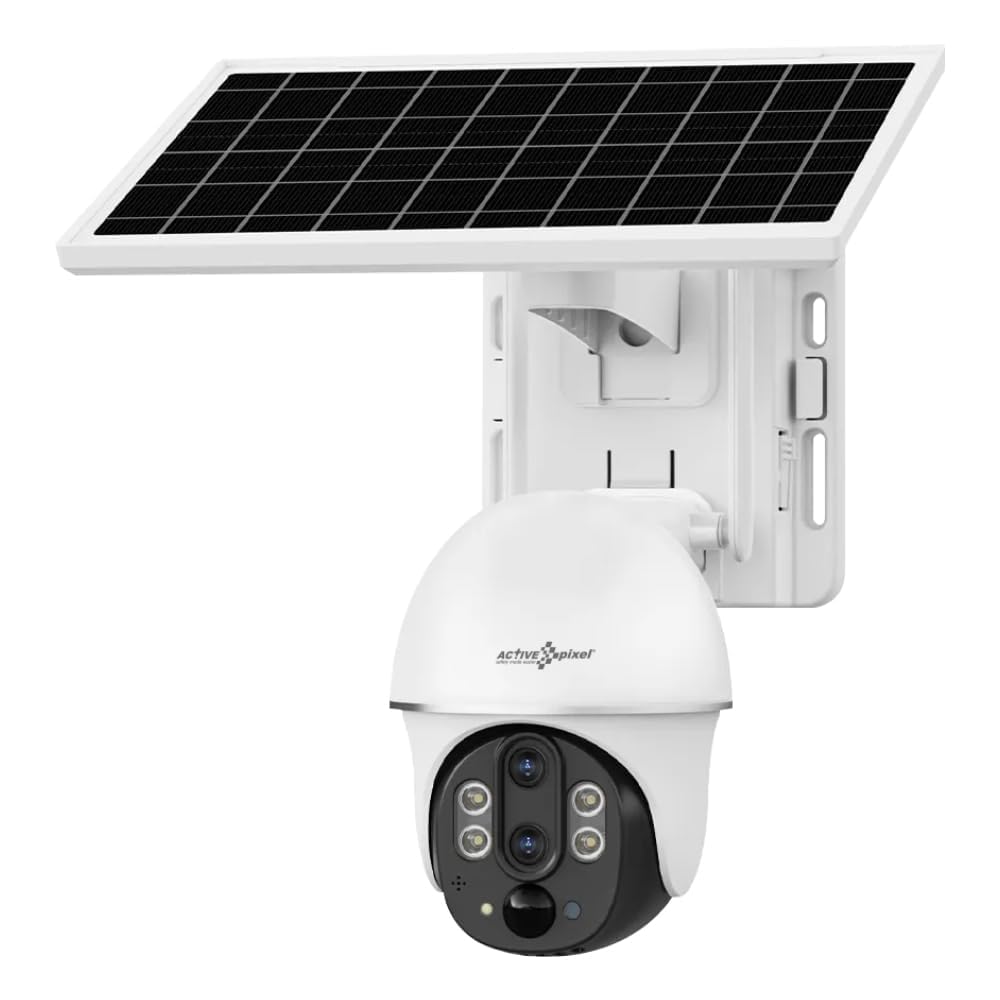
This manual provides detailed instructions for the installation, operation, and maintenance of your Active Pixel 4G Solar Powered Dual Lens Security Camera. Please read this manual thoroughly before using the product to ensure proper function and safety. This camera is designed for outdoor surveillance, featuring 4G connectivity, solar power, dual lenses for 10x zoom, 2-way audio, and motion detection capabilities.
1.1 Kandungan Pakej
- 1x 4G Solar Camera (with included battery)
- 1x Manual Pengguna
- 1x Screw Kit for installation
- Panel Suria 1x
2. Maklumat Keselamatan
Observe the following safety precautions to prevent damage to the product or injury to yourself or others.
- Pemasangan: Ensure the camera is securely mounted to prevent falling. Avoid installing near flammable or explosive materials.
- Sumber Kuasa: Use only the provided solar panel and integrated battery. Do not attempt to replace the battery with unapproved alternatives.
- Tahan Air: The camera is IP65/IP66 rated for water and dust resistance. However, avoid submerging the camera in water or exposing it to high-pressure water jets.
- Suhu: Operate the camera within the specified temperature range of -15°C to 60°C.
- Pembongkaran: Jangan cuba membuka atau mengubah suai kamera. Ini akan membatalkan jaminan dan boleh menyebabkan kerosakan atau kecederaan.
- Kanak-kanak: Jauhkan kamera dan aksesorinya daripada capaian kanak-kanak.
3. Produk Lebihview
The Active Pixel 4G Solar Powered Dual Lens Security Camera is a robust surveillance solution. Key features include:
- Sistem Dwi Lensa: Provides 10x zoom capability (3x optical + 3.2x digital).
- Kesambungan 4G: Operates on 4G LTE networks, ideal for locations without Wi-Fi. (Note: 4G Jio Sim Card Not Supported. VI and Airtel SIM recommended.)
- Berkuasa Suria: Equipped with a 7W solar panel and 8000mAh battery for continuous operation.
- Resolusi Tinggi: 2MP+2MP sensors delivering 1080P Full HD video.
- Zum Pan-Condong (PTZ): 355° horizontal pan and 90° vertical tilt for wide area coverage.
- Pengesanan Pintar: PIR + Radar dual induction detection for human/animal detection.
- Audio Dua hala: Mikrofon dan pembesar suara terbina dalam untuk komunikasi.
- Penglihatan Malam Warna: Clear color night vision up to 50ft.
- Storan: Supports local TF card (up to 128GB, not included) and cloud storage.
- tahan cuaca: IP65/IP66 rated for outdoor use.
4. Persediaan
4.1 Pemasangan Kad SIM
- Locate the SIM card slot on the camera body.
- Insert a compatible 4G SIM card (VI or Airtel recommended) into the slot. Ensure the SIM card is correctly oriented.
- Tutup penutup slot kad SIM dengan kukuh untuk mengekalkan kalis air.
4.2 Pemasangan Apl dan Persediaan Akaun
- Download the "V380 Pro" app from your smartphone's app store (Android or iOS).
- Buka aplikasi dan daftar akaun baharu atau log masuk jika anda sudah mempunyai akaun.
- Ikut arahan dalam apl untuk menambah kamera anda. Ini biasanya melibatkan pengimbasan kod QR pada kamera atau memasukkan IDnya secara manual.
4.3 Memasang Kamera dan Panel Suria
- Pilih Lokasi: Select a location with good 4G signal strength and ample direct sunlight for the solar panel. The camera should be mounted at a height that provides optimal viewing angle and security.
- Lekapkan Kamera: Use the provided screw kit to securely mount the camera to a wall or pole. Ensure the mounting surface is stable.
- Pasang Panel Suria: Mount the solar panel in a position where it receives maximum direct sunlight throughout the day. Adjust its angle for optimal charging efficiency.
- Sambungkan Panel Suria: Connect the solar panel cable to the camera's charging port. Ensure the connection is secure and waterproof.
5. Arahan Operasi
5.1 Langsung View dan Kawalan PTZ
- Open the V380 Pro app and select your camera from the device list.
- The app will display the live video feed.
- Gunakan kawalan pada skrin untuk menyorot (355° mendatar) dan condongkan (90° menegak) kamera.
- Pinch to zoom on the live feed to utilize the 10x dual lens zoom.
5.2 Audio Dua Hala
- Semasa dalam live view, ketik ikon mikrofon untuk bercakap melalui pembesar suara kamera.
- Tap the speaker icon to listen to audio from the camera's microphone.
5.3 Pengesanan Gerakan dan Makluman
- Access the camera settings in the V380 Pro app.
- Enable "Smart Detection" (PIR+Radar dual induction) for human/animal detection.
- Configure alert settings, including push notifications to your mobile phone.
- When motion is detected, the camera will automatically record the event and send an alert.
5.4 Rakaman dan Main semula
- Storan Setempat: Insert a TF card (up to 128GB, not included) into the camera's slot for local recording. Recordings can be accessed via the app.
- Storan Awan: Subscribe to the cloud storage service through the V380 Pro app for alarm video storage.
- Kepada view dirakam footage, navigate to the playback section in the app and select the desired date and time.
5.5 Penglihatan Malam
The camera automatically switches to night vision mode in low light conditions using its IR-CUT switch and 4pcs Double Core LEDs. It provides clear color night vision up to 50 feet (15 meters).
6. Penyelenggaraan
- Pembersihan: Kerap mengelap kanta kamera dan panel solar dengan lembut, damp cloth to ensure clear vision and efficient charging. Do not use harsh chemicals.
- Penjagaan Bateri: The integrated battery is designed for long life. Ensure the solar panel is clean and receives adequate sunlight for optimal charging. Avoid prolonged storage in extreme temperatures.
- Kemas kini Firmware: Check the V380 Pro app periodically for firmware updates. Keeping the firmware updated ensures optimal performance and security.
- Pengurusan Kad TF: If using a TF card, periodically check its storage capacity and format it if necessary to maintain recording efficiency.
7. Penyelesaian masalah
| Masalah | Kemungkinan Punca | Penyelesaian |
|---|---|---|
| Kamera tidak dihidupkan. | Low battery; Solar panel not charging; Faulty connection. | Ensure solar panel is clean and receiving direct sunlight. Check solar panel connection to the camera. Allow time for battery to charge. |
| Tiada isyarat 4G atau di luar talian. | SIM card not inserted correctly; SIM card not activated; Poor network coverage; Incompatible SIM card. | Reinsert SIM card. Verify SIM card is active and has data plan. Move camera to an area with better 4G coverage. Ensure using a compatible SIM (VI/Airtel). |
| Pengesanan gerakan tidak berfungsi. | Detection sensitivity too low; Feature disabled in app; Obstructions in detection area. | Check app settings to ensure motion detection is enabled and sensitivity is appropriate. Clear any obstructions. |
| Kualiti video yang teruk. | Dirty lens; Poor network signal; Low light conditions. | Clean the camera lens. Ensure good 4G signal. Video quality may be reduced in very low light, but night vision should activate. |
| Tidak dapat menyambung ke apl. | Incorrect camera ID; App issues; Network problems. | Verify camera ID. Restart the app or your phone. Check your phone's internet connection. Reset the camera if necessary (refer to app for reset procedure). |
8. Spesifikasi
| Ciri | Perincian |
|---|---|
| Model | AP-4G-SY2.0MP-DUAL LENS-V-3.6MM |
| Sensor | 1/2.8" Progressive Scan CMOS *2 |
| Kanta | 4mm F1.6 (Horizontal View: 80±5°, Vertical: 90±5°), 12mm F1.6 (Horizontal View: 26±1°, Vertical: 30±1°) |
| Zum | 10X Conflate Zoom (3X Optical + 3.2X Digital) |
| Pemampatan Video | H.265/15FPS |
| Resolusi | Main stream: 1920*1080P, Sub-stream: 640×360P |
| Rangkaian | 4G LTE (SIM Supported) |
| Kaedah Pengesanan | PIR + Radar dual induction detection |
| Jarak Pengesanan | 0~12J |
| Sudut Pengesanan | 120° |
| Pan-Tilt | Mendatar: 355°, Menegak: 90° |
| Kelajuan Putar | Mendatar 55°/s, Menegak 40°/s |
| Penglihatan Malam | IR-CUT automatic switch, 4pcs Double Core LEDs, effective distance 10M (IR/White LED) |
| Audio | Built-in speaker (3W), Built-in microphone (pickup area ~20M) |
| Penyimpanan | TF card (Max 128GB), Cloud Storage (Alarm video) |
| kuasa | 7W Solar Panel, 8000mAh Battery (included) |
| Tahan Air | IP65, IP66 |
| Suhu Operasi | -15°C hingga 60°C |
| Dimensi (L x W x H) | 20 x 18 x 16 cm |
| Berat badan | 1.2 kg |
| Kaedah Kawalan | App (V380 Pro) |
| OS yang serasi | Android, iOS |
9. Waranti dan Sokongan
For warranty information and technical support, please refer to the contact details provided at the point of purchase or on the official Active Pixel website. The manufacturer is Glorious Digital Solution Pvt Ltd. For customer care, you may contact 9321367328.
Sila simpan bukti pembelian anda untuk tuntutan waranti.