
1. Pengenalan
This manual provides detailed instructions for the installation, operation, and maintenance of your Rebluum RB-5PT2 5MP Solar Powered Outdoor Wireless Security Camera. Please read this manual thoroughly before using the product to ensure proper function and safety. Keep this manual for future reference.

Image: The Rebluum RB-5PT2 camera with its solar panel and a smartphone displaying a live feed.
2. Kandungan Pakej
Sahkan bahawa semua item yang disenaraikan di bawah disertakan dalam pakej anda. Jika ada item yang hilang atau rosak, sila hubungi sokongan pelanggan.
- 1 × 5MP Solar PTZ Camera
- 1 × Panel Suria
- 1 × Manual Pengguna
- 1 × Warning Sticker
- 2 × Stands (1 for Camera, 1 for Panel)
3. Produk Lebihview
The Rebluum RB-5PT2 is a 5-megapixel (2560x1920) outdoor wireless security camera featuring 360° pan and tilt capabilities, solar power, and advanced motion detection. It is designed for continuous outdoor surveillance with minimal maintenance.

Image: The camera's pan and tilt functionality provides extensive coverage.
4. Panduan Persediaan
4.1 Pengecasan Awal
Before installation, fully charge the camera's built-in 9600mAh battery using the provided USB cable and a standard 5V/2A USB power adapter (not included). The camera can also be charged by the solar panel once installed, but an initial full charge is recommended for optimal performance.
4.2 Muat Turun Apl dan Pembuatan Akaun
- Download the "CloudEdge" app from the App Store (iOS) or Google Play Store (Android).
- Buka apl dan ikut arahan pada skrin untuk membuat akaun baharu atau log masuk jika anda sudah mempunyai akaun.

Image: Visual representation of the three-step setup process: app download, Wi-Fi connection, and installation.
4.3 Camera Pairing (Wi-Fi Connection)
- Pastikan telefon pintar anda disambungkan ke a Rangkaian Wi-Fi 2.4GHz. This camera does not support 5GHz Wi-Fi. If you have a dual-band router, select the 2.4GHz option.
- In the CloudEdge app, tap "Add Device" or the "+" icon.
- Pilih model kamera anda daripada senarai.
- Follow the app's instructions to connect the camera to your Wi-Fi network. This typically involves scanning a QR code generated by the app with the camera lens.
4.4 Installation (Mounting)
The camera supports both wall-mount and ceiling-mount installations. Choose a location that provides optimal viewing angles and sufficient sunlight for the solar panel.
- Penempatan Kamera: Mount the camera at a height of 7-10 feet (2-3 meters) for optimal motion detection range and coverage.
- Peletakan Panel Suria: Position the solar panel in a location that receives direct sunlight for several hours each day to ensure continuous charging. The solar panel comes with a separate stand and a long cable for flexible placement.
- Use the provided mounting screws and anchors to securely attach the camera and solar panel stands to the desired surfaces.
- Sambungkan kabel panel solar ke port pengecasan kamera.

Image: The camera and solar panel installed on an exterior wall, demonstrating a typical setup.

Image: Various installation scenarios for the camera and solar panel.
5. Arahan Operasi
5.1 Langsung View dan Kawalan Pan/Tilt
Once the camera is connected, open the CloudEdge app and select your camera to view suapan langsung. Gunakan kawalan pada skrin untuk menyorot kamera secara mendatar (355°) dan condongkannya secara menegak (90°) untuk melaraskan viewing area. The camera also supports 4x digital zoom.
5.2 Audio Dua Hala
The camera features a built-in microphone and speaker, allowing for two-way communication. Tap the microphone icon in the live view untuk bercakap melalui kamera dan mendengar audio dari lokasi kamera.

Image: Remote access and two-way audio functionality via the smartphone app.
5.3 Pengesanan Gerakan dan Makluman
The camera utilizes PIR motion detection with AI human detection to minimize false alarms. You can customize motion detection settings within the CloudEdge app:
- Sensitiviti: Adjust the detection sensitivity (levels 1-10) to suit your environment.
- Zon Aktiviti: Tentukan kawasan tertentu dalam kamera view di mana pengesanan gerakan harus aktif.
- Jadual Rakaman: Set specific times or days for motion-triggered recording.
- Makluman: Receive instant push notifications on your smartphone when motion is detected.

Image: The CloudEdge app interface for configuring intelligent motion detection settings.
5.4 Multi-Alarms (Spotlight and Siren)
The camera features multiple alarm modes to deter intruders and provide visual alerts:
- Voice Warning: Play a pre-recorded message or custom voice alert.
- Flashlight Warning: Activate the built-in spotlights to illuminate the area.
- Siren: Bunyikan siren yang boleh didengar.
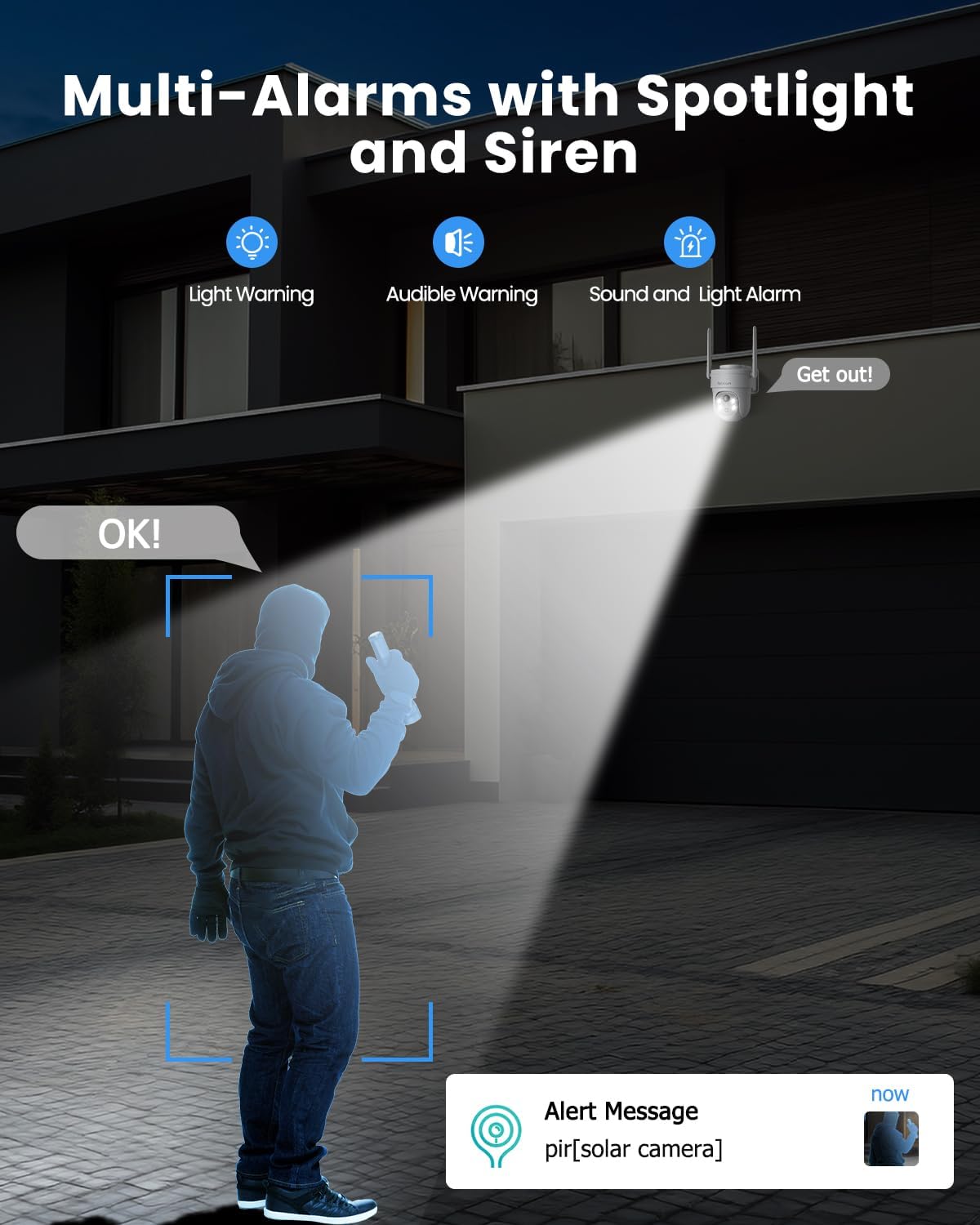
Image: The camera's multi-alarm system with spotlight and siren in action.
5.5 Mod Penglihatan Malam
The camera offers both infrared (IR) night vision and color night vision:
- Penglihatan Malam Inframerah: Memberikan video hitam putih yang jelas dalam keadaan cahaya malap.
- Penglihatan Malam Warna: When spotlights are activated (either manually or by motion detection), the camera can capture full-color video at night.

Image: Demonstrating the camera's ability to capture vivid details day and night.
5.6 Rakaman dan Penyimpanan
The camera supports two storage options:
- Kad SD mikro: Insert a Micro SD card (up to 128GB, not included) into the camera's slot for local storage of recordings.
- Storan Awan: The camera offers basic 6-second cloud storage for 7 days without monthly fees. Optional paid cloud plans are available for extended storage. All stored videos are encrypted for privacy.

Image: Storage options for recorded video footage.
5.7 Smart Home Integration (Alexa)
The Rebluum RB-5PT2 camera is compatible with Amazon Alexa. You can use voice commands to view the camera's live feed on compatible smart displays.
- Enable the CloudEdge skill in your Alexa app.
- Link your CloudEdge account.
- Use commands like "Alexa, show me the [camera name]" to view makanan.

Image: The camera integrates with smart home systems like Amazon Alexa.
5.8 Akses Perkongsian
You can share access to your camera's live feed and recordings with family members or trusted individuals through the CloudEdge app. This allows multiple users to monitor the property simultaneously.
6. Penyelenggaraan
6.1 Pembersihan
- Regularly clean the camera lens and solar panel surface with a soft, damp kain untuk menanggalkan habuk, kotoran atau serpihan. Ini memastikan kualiti imej yang jelas dan pengecasan solar yang cekap.
- Elakkan penggunaan bahan kimia yang keras atau bahan kasar yang boleh merosakkan permukaan.
6.2 Pengurusan Bateri
- The solar panel is designed to keep the battery charged. In periods of prolonged cloudy weather or heavy usage, the battery level may drop. Monitor the battery status in the app.
- If the battery level becomes critically low, you may need to temporarily remove the camera and charge it via USB.
6.3 Kemas Kini Perisian Tegar
Periodically check the CloudEdge app for available firmware updates. Keeping your camera's firmware up-to-date ensures optimal performance, security, and access to new features.
7. Penyelesaian masalah
- Kamera tidak bersambung ke Wi-Fi: Ensure your Wi-Fi network is 2.4GHz. This camera does not support 5GHz. Check your Wi-Fi password and signal strength. Try moving the camera closer to the router during setup.
- Bateri tidak dicas: Verify the solar panel is clean and receiving direct sunlight. Check the connection between the solar panel and the camera. In low light conditions, USB charging may be necessary.
- Penggera palsu yang kerap: Adjust the motion detection sensitivity in the app. Define specific activity zones to exclude areas with irrelevant motion (e.g., moving trees, busy roads).
- No recordings: Ensure a Micro SD card is properly inserted and formatted, or that your cloud storage subscription is active. Check motion detection settings to confirm recording is enabled.
- Kamera luar talian: Check your Wi-Fi connection. Restart the camera by pressing the reset button or power cycling it if accessible.
- Nota Penting: This camera supports manual rotation control through the app and does not have an automatic tracking function.
8. Spesifikasi
| Ciri | Spesifikasi |
|---|---|
| Nama Model | RB-5PT2 |
| Resolusi Tangkapan Video | 2560 × 1920 (5MP) |
| Julat Pan/Sendeng | 355° Mendatar, 90° Menegak |
| Sumber Kuasa | Solar Powered and Battery Powered (9600mAh) |
| Protokol Ketersambungan | Wi-Fi (2.4GHz sahaja) |
| Julat Penglihatan Malam | 100 Kaki |
| Pilihan Storan | Mikro SD (sehingga 128GB), Storan Awan |
| Tahap Ketahanan Air | IP66 Kalis Air |
| Suhu Operasi | -10°C hingga 55°C |
| Peranti Serasi | Desktop, Laptop, Smartphone, Tablet (via CloudEdge app) |
| Jenis Pengawal | Amazon Alexa, Android, CloudEdge, Google Assistant, iOS |
| bahan | Akrilonitril Butadiena Stirena (ABS) |
| Dimensi Item (L x W x H) | 7 x 5 x 8 inci |
| Berat Barang | 2.35 paun |
9. Waranti dan Sokongan
Rebluum products are designed for reliability and performance. For specific warranty details, please refer to the warranty card included with your product or visit the official Rebluum website. For technical support, troubleshooting assistance, or any questions regarding your RB-5PT2 camera, please contact Rebluum customer service through the contact information provided on the product packaging or the official webtapak.
You can also find additional resources and FAQs within the CloudEdge application.