
T10 ULTRA 2
T10 ULTRA 2 Smart Watch User Manual
Model: T10 ULTRA 2 | Brand: Generic
pengenalan
Welcome to the user manual for your new T10 ULTRA 2 Smart Watch. This device features a 2.19-inch HD infinite large screen, wireless charging capabilities, and a 49MM display, designed to enhance your daily life with smart connectivity and health monitoring. This manual provides detailed instructions on how to set up, operate, maintain, and troubleshoot your smartwatch to ensure optimal performance and longevity.
Kandungan Pakej
Upon opening your T10 ULTRA 2 Smart Watch package, please verify that all the following items are included:
- T10 ULTRA 2 Smart Watch (Black)
- Kabel Pengecas Tanpa Wayar
- Manual Pengguna
- Watch Strap (Black)

Image: The T10 ULTRA 2 Smart Watch, its retail packaging, wireless charging cable, and user manual.
Panduan Persediaan
1. Mengecas Jam Tangan Pintar
Before first use, fully charge your T10 ULTRA 2 Smart Watch.
- Connect the wireless charging cable to a USB power adapter (not included) or a computer's USB port.
- Place the back of the T10 ULTRA 2 Smart Watch onto the wireless charging pad. Ensure the watch is properly aligned for charging to begin.
- The watch screen will indicate charging status. A full charge typically takes approximately 2 hours.
2. Menghidupkan/Mematikan
- Hidupkan kuasa: Press and hold the side button (usually the crown or a dedicated power button) for a few seconds until the screen lights up.
- Matikan: Press and hold the side button, then select the "Power Off" option on the screen.
3. Initial Pairing with Your Smartphone
To unlock the full functionality of your T10 ULTRA 2 Smart Watch, you need to pair it with your smartphone via Bluetooth.
- Download the companion application for your T10 ULTRA 2 Smart Watch from your smartphone's app store (e.g., Google Play Store or Apple App Store). Refer to the watch screen or included manual for the specific app name (e.g., "Zepp" as indicated in specifications).
- Dayakan Bluetooth pada telefon pintar anda.
- Buka aplikasi pendamping dan ikut arahan pada skrin untuk membuat akaun atau log masuk.
- In the app, select "Add Device" or "Pair New Device" and choose your T10 ULTRA 2 Smart Watch from the list of available devices.
- Sahkan permintaan berpasangan pada telefon pintar anda dan jam tangan pintar.
- Once paired, the watch will synchronize data and settings with your phone.
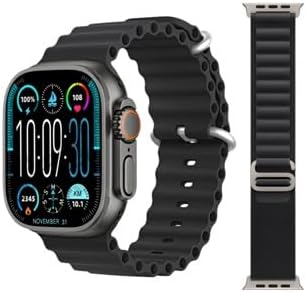
Image: The T10 ULTRA 2 Smart Watch showing its main display with time, date, and various health indicators.
Arahan Operasi
Navigasi Asas
- Skrin sentuh: Swipe left, right, up, or down to navigate through menus, notifications, and widgets. Tap to select an item.
- Butang Sisi/Mahkota: Press to return to the home screen or wake the device. Rotate the crown (if applicable) to scroll through lists or zoom.
- Butang Tindakan: Some models may have a customizable action button for quick access to specific functions.
Membuat dan Menerima Panggilan
The T10 ULTRA 2 Smart Watch supports Bluetooth calling, allowing you to make and receive calls directly from your wrist when connected to your smartphone.
- Untuk Membuat Panggilan: Access the dialer or contacts list on your watch, select a contact, or dial a number.
- Untuk Menerima Panggilan: Apabila panggilan masuk, jam tangan akan memaparkan ID pemanggil. Ketik ikon hijau untuk menjawab atau ikon merah untuk menolak.

Image: The T10 ULTRA 2 Smart Watch screen showing an incoming call interface with a phone number displayed.
Notifications and Messages
Receive real-time notifications for calls, messages, and app alerts directly on your watch.
- Leret ke bawah dari bahagian atas muka jam tangan ke view pemberitahuan terkini.
- Configure which app notifications you wish to receive through the companion app on your smartphone.
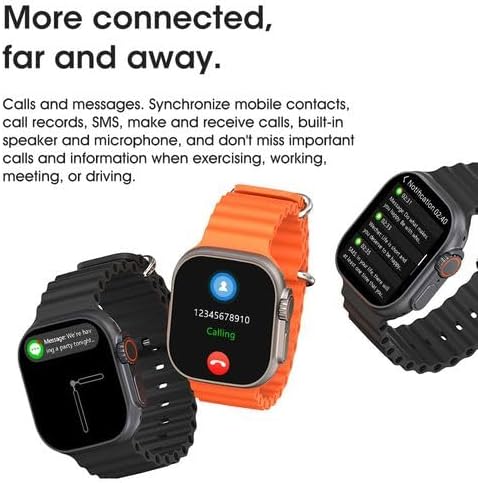
Image: The T10 ULTRA 2 Smart Watch screen showing a message notification from a contact.
Penjejakan Kesihatan dan Kecergasan
Your T10 ULTRA 2 Smart Watch is equipped with sensors to monitor various health and fitness metrics.
- Pemantauan Denyut Jantung: Access the heart rate app on the watch to measure your current heart rate.
- Penjejakan Aktiviti: Tracks steps taken, distance covered, and calories burned throughout the day.
- Pemantauan Tidur: Memantau corak tidur anda apabila dipakai semalaman.
- Mod Senaman: Select from various sports modes to track specific workouts.
Ciri-ciri lain
The T10 ULTRA 2 Smart Watch offers a range of additional features for convenience and utility:
- Pengatup Jauh: Kawal kamera telefon anda dari jauh.
- Kawalan Muzik: Mainkan, jeda, langkau trek dan laraskan kelantangan untuk muzik yang dimainkan pada telefon anda.
- Kunci PIN: Secure your watch with a PIN.
- AI Arm: (Functionality may vary, typically related to gesture control or voice assistant activation).
- Kalkulator: Fungsi asas aritmetik.
- Jam randik & Pemasa: Untuk aktiviti masa.
- Ramalan cuaca: Dapatkan kemas kini cuaca masa nyata.
- Cari Telefon: Locate your misplaced smartphone by making it ring.
- Peringatan Kitaran Haid Wanita: Jejaki dan ramalkan kitaran haid.
- Lampu suluh: Gunakan skrin sebagai sumber cahaya.
- GPS Movement Track: Record your movement routes during outdoor activities.
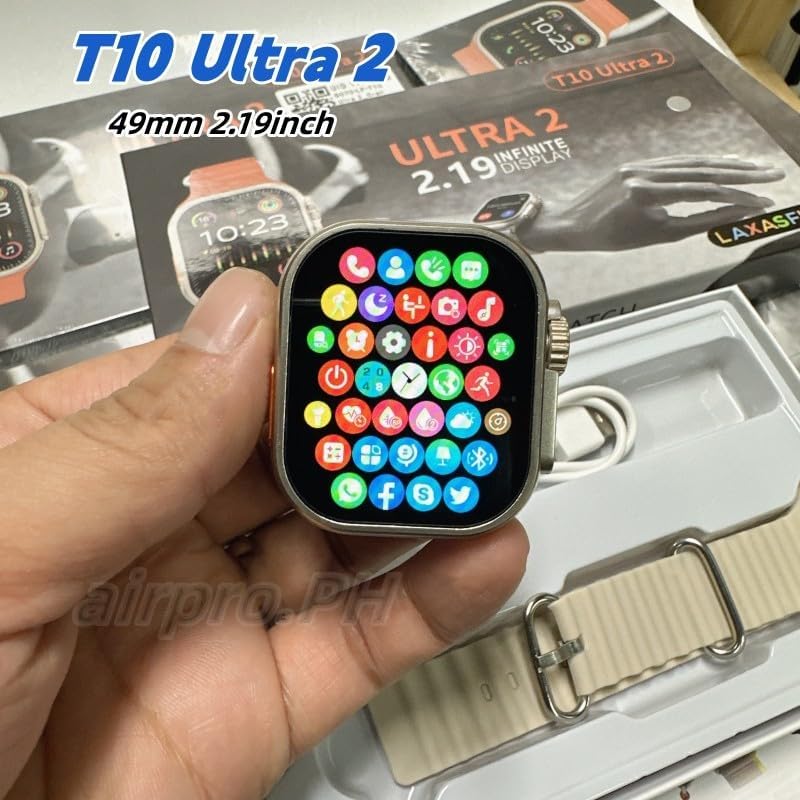
Image: The T10 ULTRA 2 Smart Watch screen showing a grid of colorful application icons, representing various functions.
Penyelenggaraan
Proper maintenance ensures the longevity and optimal performance of your T10 ULTRA 2 Smart Watch.
- Pembersihan: Wipe the watch screen and body with a soft, lint-free cloth. For stubborn smudges, slightly dampen kain dengan air. Elakkan bahan kimia yang keras atau bahan yang melelas.
- Penjagaan Tali: Clean the watch strap regularly, especially if it's silicone or rubber, to prevent skin irritation.
- Tahan Air: While the watch may have some water resistance, avoid prolonged submersion or exposure to hot water, steam, or high-pressure water jets. Do not operate buttons underwater.
- Penjagaan Bateri: Avoid fully discharging the battery frequently. Charge the watch regularly, ideally before it drops below 20%. Store in a cool, dry place if not used for extended periods.
- Elakkan Suhu Melampau: Do not expose the watch to extreme hot or cold temperatures, as this can damage the battery and internal components.

Image: The underside of the T10 ULTRA 2 Smart Watch, highlighting the optical sensors used for health monitoring.
Menyelesaikan masalah
If you encounter issues with your T10 ULTRA 2 Smart Watch, try the following solutions before seeking professional assistance.
- Tonton Tidak Dihidupkan:
- Pastikan jam tangan dicas sepenuhnya. Sambungkannya ke pengecas selama sekurang-kurangnya 30 minit.
- Press and hold the side button for 10-15 seconds to perform a forced restart.
- Tidak Boleh Dipasangkan dengan Telefon Pintar:
- Ensure Bluetooth is enabled on your phone and the watch is discoverable.
- Make sure the companion app is installed and updated.
- Mulakan semula jam tangan dan telefon pintar anda.
- Lupakan peranti dalam tetapan Bluetooth telefon anda dan cuba pasangkan semula.
- Data Kesihatan Tidak Tepat:
- Pastikan jam tangan dipakai dengan kemas pada pergelangan tangan anda, tidak terlalu longgar atau terlalu ketat.
- Bersihkan penderia di belakang jam tangan.
- Kemas kini firmware jam tangan melalui aplikasi pendamping.
- Hayat Bateri Pendek:
- Kurangkan kecerahan skrin.
- Disable unnecessary notifications or features (e.g., always-on display).
- Hadkan pemantauan kadar denyutan jantung berterusan jika tidak diperlukan.
- Pastikan jam tangan dicas sepenuhnya setiap kali.
- Skrin sentuh Tidak Responsif:
- Mulakan semula jam tangan.
- Pastikan skrin bersih dan kering.
Spesifikasi
| Ciri | Perincian |
|---|---|
| Nombor Model | T10 ULTRA 2 |
| Jenama | Generik |
| Saiz Skrin | 49 Millimeters (2.19 Inch HD Infinite Large Screen) |
| Teknologi Ketersambungan | Bluetooth |
| Sistem Operasi | Zepp OS (as indicated by specification data) |
| Kapasiti Penyimpanan Memori | 8 GB |
| Kapasiti Bateri | 1500 Miliamp jam |
| Komposisi Sel Bateri | Litium Ion |
| Bateri Diperlukan | 1 P76 battery (included) |
| Ciri Khas | Phone Calls, Wireless Charging, Remote Shutter, Music Control, PIN Lock, AI Arm, Calculator, Stopwatch, Weather Forecast, Find Phone, Female Menstrual Cycle Reminder, Flashlight, GPS Movement Track |
| warna | Hitam |
| Peranti Serasi | Telefon pintar |
| Dimensi Pakej | 21.3 x 11 x 2.7cm; 0.65g |
Waranti dan Sokongan
For information regarding warranty coverage, technical support, or service inquiries for your T10 ULTRA 2 Smart Watch, please refer to the warranty card included in your product packaging or visit the official website of the manufacturer. Keep your proof of purchase for warranty claims.
No official seller videos were found for this product in the provided data.
Ask a question about this manual
Ask about setup, troubleshooting, compatibility, parts, safety, or missing instructions. Manuals+ will review the question and use this page’s manual context to help answer it.