
DOOGEE DOOGEE Blade 10 Ultra
Manual Pengguna Telefon Pintar DOOGEE Blade 10 Ultra
Model: DOOGEE Blade 10 Ultra
1. Pengenalan
This manual provides comprehensive instructions for the safe and efficient use of your DOOGEE Blade 10 Ultra smartphone. Please read this manual carefully before using the device to ensure optimal performance and longevity.

Imej: Depan dan belakang view of the DOOGEE Blade 10 Ultra smartphone, highlighting its rugged design and key features like NFC and Android 14.
2. Persediaan
2.1 Membuka Kotak dan Pemeriksaan Awal
Carefully unbox your DOOGEE Blade 10 Ultra and verify that all components are present and in good condition. The package should contain:
- 1 x DOOGEE Blade 10 Ultra Smartphone
- 1 x Kabel USB Jenis-C
- 1 x Pengecas
- 1 x Tempered Glass Protector (pre-applied)
- 1 x Manual Pengguna
2.2 Pemasangan Kad SIM dan Kad microSD
To install your SIM card(s) and/or microSD card:
- Cari dulang SIM di sisi peranti.
- Masukkan alat ejektor SIM ke dalam lubang kecil di sebelah dulang untuk membukanya.
- Place your Nano-SIM card(s) and/or microSD card into the designated slots. Ensure the gold contacts are facing down. The device supports up to 2TB external storage via microSD.
- Tolak dulang perlahan-lahan ke dalam slot sehingga ia berbunyi klik pada tempatnya.

Image: Illustration of the internal storage components, showing 8GB+12GB RAM and 256GB ROM, with support for up to 2TB microSD card.
2.3 First Power On and Basic Setup
Press and hold the power button until the DOOGEE logo appears. Follow the on-screen prompts to complete the initial setup, including language selection, Wi-Fi connection, Google account setup, and security settings.
2.4 Mengecas Peranti
Connect the USB Type-C cable to the phone's charging port and the other end to the provided charger. Plug the charger into a power outlet. The battery indicator will show charging status. For optimal battery life, fully charge the device before first use.
3. Mengendalikan Telefon Pintar Anda
3.1 Berakhirview of Android 14
Your DOOGEE Blade 10 Ultra runs on the latest Android 14 operating system, offering enhanced privacy features, improved security, and a more personalized user experience. Explore new customization options and streamlined notifications.

Image: The Android 14 system logo, emphasizing its smart, secure, and convenient features.
3.2 Paparan dan Navigasi
The device features a 6.56-inch HD+ IPS waterdrop display with a 90Hz refresh rate for smooth visuals. Navigate the interface using touch gestures: swipe, tap, pinch-to-zoom, and long-press.
3.3 Penggunaan Kamera
Capture high-quality photos and videos with the 50MP AI main camera and 8MP front camera. The Morpho Imaging Algorithm enhances your photography with various modes including HDR, Watermark, Video, Picture, Beauty, Pro Mode, Portrait, Gif, Panorama, and Filter.

Image: Visual representation of the 50MP main camera and 8MP front camera, detailing the various imaging modes available through the Morpho Imaging Algorithm.
3.4 Ketersambungan
Your smartphone supports a wide range of connectivity options:
- Wi-Fi: Connect to 2.4G and 5G networks (802.11ac/a/b/g/n).
- Bluetooth: BT5.0 for connecting to wireless accessories.
- NFC: Untuk pembayaran tanpa sentuh dan perkongsian data pantas.
- OTG: On-The-Go support for connecting USB devices.
- Navigasi: Integrated GPS, Glonass, Galileo, and Beidou for accurate positioning.
- Rangkaian Selular: Supports 2G GSM (B2/3/5/8), 3G WCDMA (B1/2/4/5/8), and 4G FDD (B1/2/3/4/5/7/8/18/19/20/25/26/28A/28B/66) bands.
3.5 Pengurusan Bateri
The DOOGEE Blade 10 Ultra is equipped with a large 5150mAh battery, providing extended usage times. To maximize battery life:
- Optimize screen brightness.
- Tutup aplikasi latar belakang yang tidak digunakan.
- Lumpuhkan Wi-Fi, Bluetooth atau GPS apabila tidak digunakan.
- Expected battery life: up to 470 hours standby, 111.9 hours music, 25.5 hours talk, 16.7 hours video, 7.6 hours web melayari.
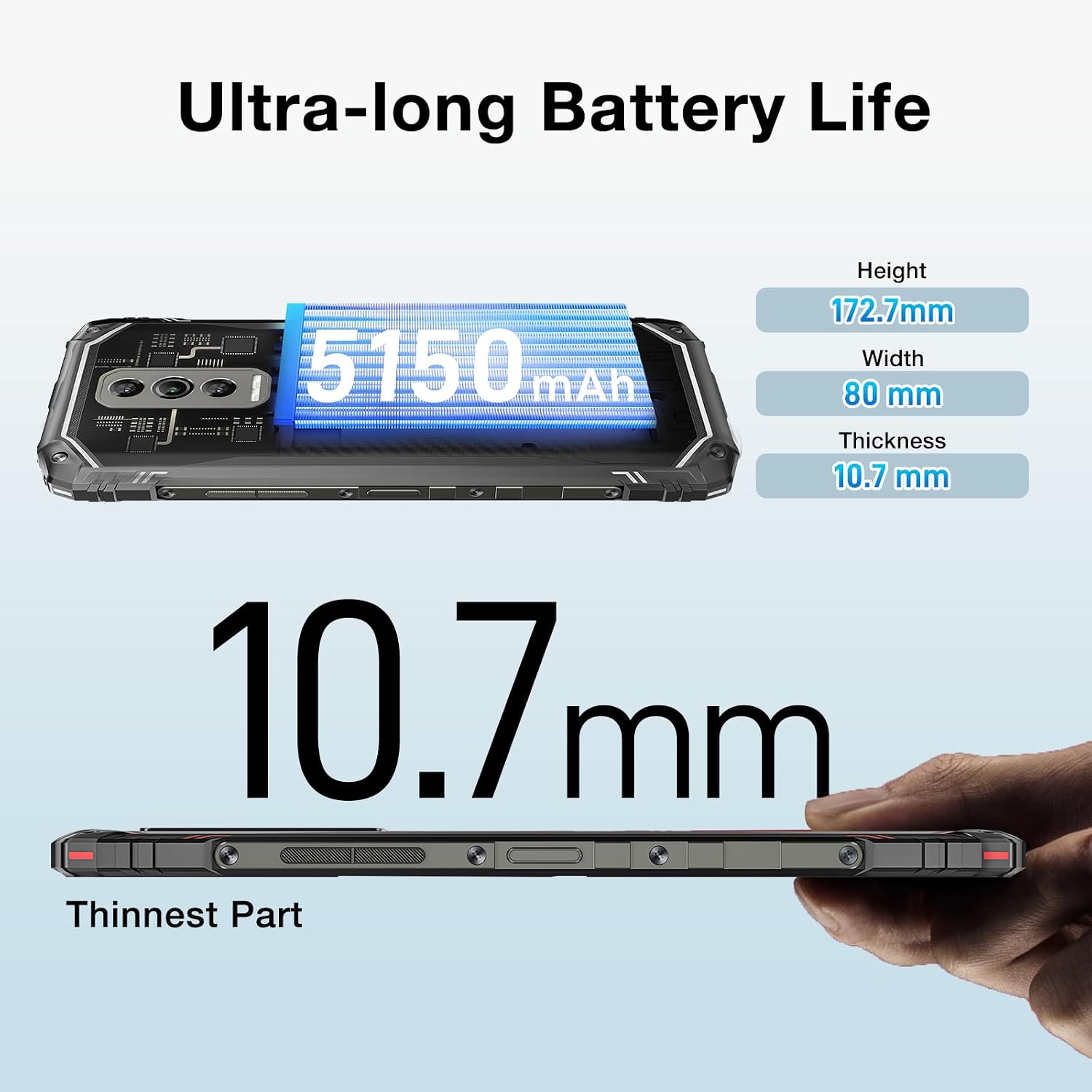
Image: The DOOGEE Blade 10 Ultra highlighting its 5150mAh battery capacity and physical dimensions (Height: 172.7mm, Width: 80mm, Thickness: 10.7mm).
3.6 Pengurusan Storan
The device comes with 256GB of internal storage (ROM) and up to 20GB of RAM (8GB physical + 12GB virtual). You can expand storage by up to 2TB using a microSD card. Regularly clear cache and unnecessary files untuk mengekalkan prestasi optimum.
3.7 Widevine L1 Support
The DOOGEE Blade 10 Ultra supports Widevine L1, enabling high-definition streaming from popular platforms. Enjoy your favorite movies and shows in crisp, clear quality.
4. Penyelenggaraan
4.1 Membersihkan Peranti Anda
Use a soft, lint-free cloth to clean the screen and body of your phone. Avoid using harsh chemicals or abrasive materials that could damage the device. For stubborn smudges, slightly dampen kain dengan air atau pembersih skrin.
4.2 Kemas Kini Perisian
Semak dan pasang kemas kini perisian secara kerap untuk memastikan peranti anda mempunyai ciri terkini, tampung keselamatan dan peningkatan prestasi. Pergi ke Tetapan > Sistem > Kemas kini sistem untuk menyemak kemas kini.
4.3 Pengoptimuman Storan
To keep your phone running smoothly, periodically review and delete unnecessary apps, photos, videos, and files. Utilize cloud storage or transfer large files to a computer to free up internal space.
5. Penyelesaian masalah
If you encounter issues with your DOOGEE Blade 10 Ultra, refer to the following common solutions:
| Masalah | Penyelesaian |
|---|---|
| Peranti tidak dihidupkan | Ensure the battery is charged. Connect to the charger for at least 10 minutes, then try powering on. If unresponsive, perform a forced restart by holding the power button for 10-15 seconds. |
| Isu pengecasan | Check the USB cable and charger for damage. Try a different power outlet. Ensure the charging port is clean and free of debris. |
| Sambungan rangkaian yang lemah | Check if airplane mode is off. Restart the device. Verify SIM card is properly inserted. Contact your network provider if the issue persists. |
| Aplikasi ranap atau beku | Clear the app's cache and data (Settings > Apps > [App Name] > Storage). Update the app to the latest version. If the problem continues, uninstall and reinstall the app. |
| Device running slow | Close unused background apps. Clear cache and temporary files. Ensure sufficient storage space is available. Restart the device. |
5.1 Tetapan Semula Kilang
If other troubleshooting steps fail, you may need to perform a factory reset. Amaran: Ini akan memadamkan semua data pada telefon anda. Sandarkan data penting sebelum meneruskan. Pergi ke Tetapan > Sistem > Tetapkan semula pilihan > Padam semua data (tetapan semula kilang) dan ikut arahan pada skrin.
6. Spesifikasi
Detailed technical specifications for the DOOGEE Blade 10 Ultra:
| Ciri | Spesifikasi |
|---|---|
| Model | DOOGEE Blade 10 Ultra |
| Sistem Operasi | Android 14 |
| Paparan | 6.56-inch HD+ IPS Waterdrop, 90Hz Refresh Rate |
| Pemproses | Spreadtrum T606 Octa-core 1.6GHz (12nm) |
| RAM | Sehingga 20GB (8GB fizikal + 12GB maya) |
| Storan Dalaman (ROM) | 256GB |
| Storan Boleh Dikembangkan | Sehingga 2TB melalui kad microSD |
| Kamera Utama | AI 50MP |
| Kamera Depan | 8MP |
| Kapasiti Bateri | 5150mAh |
| Jalur Rangkaian | 2G GSM: B2/3/5/8; 3G WCDMA: B1/2/4/5/8; 4G FDD: B1/2/3/4/5/7/8/18/19/20/25/26/28A/28B/66 |
| Wi-Fi | 2.4G/5G (802.11ac/a/b/g/n) |
| Bluetooth | BT5.0 |
| NFC | Disokong |
| OTG | Disokong |
| Navigasi | GPS | Glonass | Galileo | Beidou |
| Dimensi (H x W x T) | 172.7mm x 80mm x 10.7mm |
| warna | Hitam |

Image: Diagram illustrating the powerful Octa-core 1.6GHz processor, highlighting its boosted performance and reduced consumption.
7. Waranti dan Sokongan
For warranty information, please refer to the warranty card included in your product packaging or visit the official DOOGEE website. For technical support or further assistance, please contact DOOGEE customer service through their official channels.
Ask a question about this manual
Ask about setup, troubleshooting, compatibility, parts, safety, or missing instructions. Manuals+ will review the question and use this page’s manual context to help answer it.