
1. Pengenalan
This manual provides detailed instructions for the VIKYLIN 8MP Fixed Dome PoE IP Camera Outdoor, Model VK-YC2583I-28. This camera features 4K Ultra HD resolution, full-color night vision, human/vehicle detection, a built-in microphone, and Power over Ethernet (PoE) for simplified installation. Please read this manual thoroughly before installation and operation to ensure proper use and optimal performance.
2. Kandungan Pakej
Sahkan bahawa semua item yang disenaraikan di bawah disertakan dalam pakej anda. Jika ada item yang hilang atau rosak, sila hubungi sokongan pelanggan.
- 1x 4K PoE IP Dome Camera
- 1x Base Sticker
- 1x Manual Arahan
- 1x Screw Bag (containing screws for mounting)
- 1x Waterproof Kit

Image: Package contents of the VIKYLIN 8MP Fixed Dome PoE IP Camera.
3. Ciri-ciri Produk
- Resolusi Ultra HD 4K: Provides clear image quality with 8MP (3840 × 2160) resolution at 20 frames per second, featuring a 1/2.8” 8 Megapixel Scan CMOS sensor and a 2.8mm fixed lens for a 112° ultra-wide viewsudut ing.
- Penglihatan Malam Warna Penuh: Equipped with F1.6 aperture and soft supplemental lighting, this camera provides detailed full-color video even in extremely dark scenes.
- Cahaya Dwi Pintar: The camera intelligently switches between IR (infrared) and warm light illumination based on detection, ensuring optimal night vision while deterring intruders with a warm light flash.
- Human/Vehicle Detection: Advanced detection functions reduce false alarms by accurately identifying human and vehicle movement. Detection areas and sensitivity can be adjusted.
- Mikrofon terbina dalam: Capture clear audio from the camera's vicinity, allowing for one-way audio monitoring and recording.
- Kuasa Ethernet (PoE): Simplifies installation by providing both power and data connection through a single Cat 5 or Cat 6 Ethernet cable.
- Reka bentuk tahan lasak: IP67 weatherproof and IK10 vandal-proof rating ensures reliable outdoor performance in various conditions.
- Efficient Compression: Utilizes H.265+/H.264 encoding technology to save bandwidth and storage space without compromising video quality.
Feature Demonstrations
Video: Demonstration of the camera's UltraHD 4K picture display quality.

Image: Smart Dual Illuminators in action, providing full-color night vision when a target is detected.

Image: Human and Vehicle Detection capabilities, highlighting reduced false alarms.
Video: Full Color Camera Night Vision demonstration, showcasing clear imaging in low-light conditions.

Image: Built-in microphone feature allowing for one-way audio communication.
4. Persediaan dan Pemasangan
The VIKYLIN 8MP Fixed Dome PoE IP Camera is designed for easy installation using Power over Ethernet (PoE). A single Ethernet cable provides both power and data connectivity.
4.1 Pemasangan Fizikal
- Pilih Lokasi: Select a suitable indoor or outdoor location for mounting. The camera is IP67 rated for weather resistance and IK10 for vandal resistance.
- Pemasangan: Use the provided base sticker as a template to mark drill holes. Secure the camera using the included screws.
- Sambungan Kabel: Connect a Cat 5 or Cat 6 Ethernet cable from the camera to a PoE injector, PoE switch, or PoE NVR. Ensure the waterproof kit is properly installed for outdoor use.

Image: Camera's IP67 weatherproof and IK10 vandal-proof design.
4.2 Tatarajah Awal
After physical installation, configure the camera using the web antara muka atau aplikasi mudah alih.
- Sambungkan ke Rangkaian: Ensure the camera is connected to your network via PoE.
- Kamera Temui: Use a PC software like VMS or SADP Tool to search for the camera device on your network.
- Akses Web Antara muka: Buka a web browser and enter the camera's IP address. Log in using the default credentials (usually admin/admin or admin/12345).
- Enable P2P: Navigate to Configuration > Network > P2P and enable the P2P function. Scan the QR code to add the device to your mobile app.
Video: Detailed guide on configuring the 4K Full Color PoE IP Dome Camera, including human/vehicle detection settings and night vision options.
5. Arahan Operasi
Operate your VIKYLIN IP camera using the 'Remoteeyes' mobile app or compatible PC software.
5.1 Mobile App (Remoteeyes)
- Muat turun Aplikasi: Download the 'Remoteeyes' app from the Apple App Store or Google Play Store.
- Tambah Peranti: Use the P2P function (QR code scan) to add your camera to the app.
- Langsung View: Access live video feeds from your camera anytime, anywhere.
- Main balik: Review dirakam footage dengan ciri main balik pintar.
- Audio Sehala: Utilize the built-in microphone for one-way audio communication.
- Makluman: Receive real-time video/snapshot alerts on your mobile phone when human or vehicle detection is triggered.
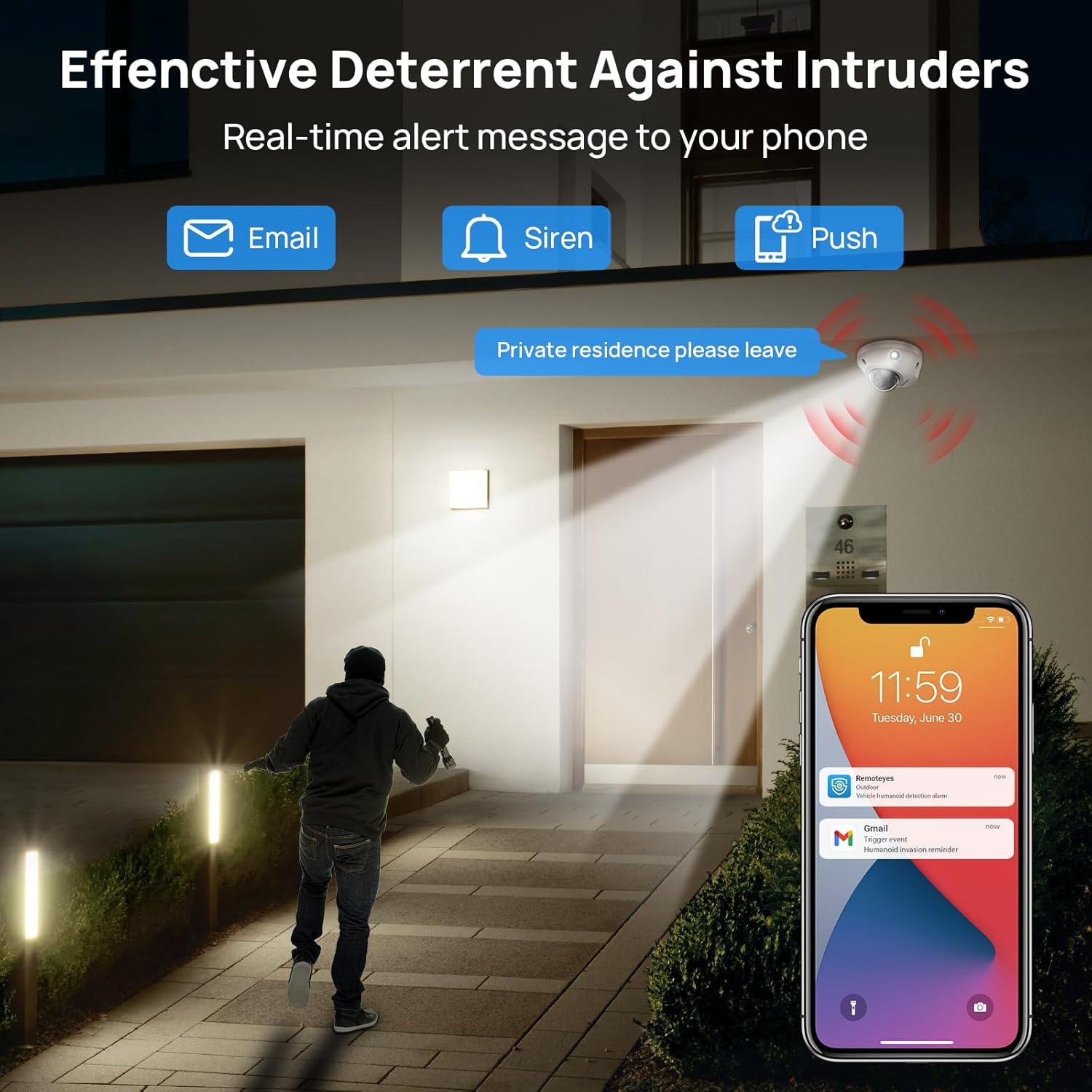
Image: Real-time alerts and deterrent features in action.
5.2 PC Software and Third-Party Compatibility
The camera is compatible with free PC software (VMS) and third-party monitoring software such as Blue Iris, iSpy, and VLC. It supports the Open Network Video Interface protocol (ONVIF) and RTSP for integration with various systems.
Local PC/NVR/NAS video storage is supported, with options for 24/7 recording or motion-triggered video to NVR or FTP.
6. Penyelenggaraan
To ensure optimal performance and longevity of your VIKYLIN IP Camera, consider the following maintenance tips:
- Pembersihan tetap: Bersihkan kanta dan perumah kamera secara berkala dengan lembut, damp kain untuk menghilangkan habuk dan serpihan. Elakkan pembersih yang kasar.
- Kemas kini Firmware: Semak pengeluar website or app for available firmware updates to ensure your camera has the latest features and security enhancements.
- Pemeriksaan Kabel: Regularly inspect the Ethernet cable and connections for any signs of wear or damage, especially for outdoor installations.
- Pengurusan Storan: If using local storage (Micro SD card, NVR, NAS), ensure sufficient storage space is available and manage recordings as needed.
7. Penyelesaian masalah
If you encounter issues with your VIKYLIN 8MP Fixed Dome PoE IP Camera, refer to the following common troubleshooting steps:
- Tiada Kuasa/Sambungan:
- Verify the Ethernet cable is securely connected to both the camera and the PoE source (NVR, switch, or injector).
- Ensure the PoE source is powered on and functioning correctly.
- Periksa kabel untuk kerosakan.
- Cannot Access Camera:
- Confirm the camera's IP address using the SADP Tool or VMS software.
- Ensure your computer or mobile device is on the same network as the camera.
- Check firewall settings on your computer or router that might be blocking access.
- Reset the camera to factory defaults if you have forgotten the password (a reset button is available on the camera).
- Kualiti Imej Lemah:
- Bersihkan lensa kamera.
- Check network bandwidth; insufficient bandwidth can affect streaming quality.
- Adjust image settings (brightness, contrast, WDR) in the camera's web interface or app.
- Penggera Palsu:
- Adjust the sensitivity of human/vehicle detection.
- Define specific detection zones to exclude areas with irrelevant motion (e.g., trees swaying).
For further assistance, please contact VIKYLIN customer support.
8. Spesifikasi
| Ciri | Perincian |
|---|---|
| Nama Model | 4K Dual-light Built-in Microphone PoE IP Dome Camera (VK-YC2583I-28-N) |
| Nombor Model Item | VK-YC2583I-28 |
| Resolusi Pegun Berkesan | 8 MP (3840 x 2160) |
| Kadar Bingkai | 20 bingkai sesaat |
| Lensa | 2.8mm fixed lens, F1.6 Super Aperture |
| Viewsudut | 112° Ultra lebar |
| Julat Penglihatan Malam | 98 Feet (Full Color / IR View) |
| Teknologi Cahaya Rendah | Night Color / IR, Smart Dual Light |
| Audio | Built-in Mic (One-way Audio) |
| Pengesanan | Pengesanan Manusia/Kenderaan |
| Teknologi Ketersambungan | Ethernet (PoE) |
| Sumber Kuasa | Elektrik Bertali arus (PoE) |
| Penyimpanan | Local PC/NVR/NAS Video Storage, supports up to 256GB Micro SD card (not included) |
| Keserasian | PoE NVR, ONVIF, Blue Iris, iSpy, VLC, Remoteeyes App (iOS/Android), VMS PC software |
| Penilaian Perlindungan Antarabangsa | IP67 (kalis air) |
| Perlindungan Kesan | IK10 (Vandal-proof) |
| Suhu Operasi | -30°C hingga 60°C (-22°F hingga 140°F) |
| Kelembapan | < 90% |
| bahan | logam |
| Dimensi Produk | 5.51 x 5.51 x 3.94 inci |
| Berat Barang | 1.17 paun |

Image: Technical specifications overview daripada kamera.
9. Waranti dan Sokongan
VIKYLIN provides comprehensive support for its products.
- Waranti: The product includes a 2-year warranty.
- Sokongan Teknikal: Sokongan teknikal seumur hidup disediakan.
- Maklumat Hubungan: For any questions or issues, please contact our support team via email at cairo@vikylin.com.
- Pelan Perlindungan: Extended protection plans are available for purchase separately (e.g., 2-Year Protection Plan, 3-Year Protection Plan, Complete Protect).