
1. Pengenalan
This manual provides detailed instructions for the installation, setup, operation, and maintenance of your SALCAR T5W Smart Wi-Fi Heating Thermostat. This device is designed to offer precise temperature control, energy efficiency, and smart home integration for your heating system. Please read this manual thoroughly before installation and use to ensure proper functionality and safety.

Image 1.1: SALCAR T5W Smart Wi-Fi Thermostat with its accompanying smartphone application interface.
2. Kandungan Pakej
Sahkan bahawa semua item yang disenaraikan di bawah disertakan dalam pakej anda:
- 1 x SALCAR T5W Smart Wi-Fi Thermostat
- 1 x Manual Pengguna
- 2 x Skru Pemasangan
- 2 x AA 1.5V Alkaline Batteries

Image 2.1: Contents of the SALCAR T5W Thermostat package.
3. Ciri-ciri Produk
The SALCAR T5W Thermostat offers a range of features designed for comfort and energy efficiency:
- Kesambungan Wi-Fi: Remote control and monitoring via the Tuya Smart Life app.
- Kawalan Suara: Serasi dengan Amazon Alexa dan Google Assistant untuk operasi bebas tangan.
- Jadual Boleh Diprogram: Customize heating schedules with 5+2, 6+1, or 7-day options, allowing up to 6 heating events per day.
- Kunci Kanak-kanak: Menghalang perubahan yang tidak dibenarkan pada tetapan.
- Anti-frost Protection: Automatically activates heating to prevent pipes from freezing.
- Memori Kuasa: Retains settings in case of power interruption.
- Sensor Kelembapan Terbina dalam: Displays current room humidity.
- Paparan LCD: Clear digital display for temperature, time, and mode.
- Pengesanan Tetingkap Terbuka: (Feature may vary by firmware) Automatically adjusts heating when an open window is detected.

Imej 3.1: Selesaiview of the SALCAR T5W Smart Thermostat's key features.
4. Pemasangan
4.1. Pendawaian
Penting: Electrical installation should be performed by a qualified professional to ensure safety and compliance with local regulations. Always turn off the main power supply before beginning any wiring work.
The SALCAR T5W thermostat supports two main wiring configurations:
- For Valve Actuator (NC Electrothermal Actuator): Connect the Neutral (N) and Live (L) wires from your power supply to the corresponding terminals on the thermostat. Connect the actuator to the N and NO (Normally Open) terminals.
- For Water/Gas Boiler (Dry Contact Control): Connect the N and L wires from your power supply to the thermostat. Connect the boiler's control wires to the N and COM (Common) terminals.

Image 4.1: Wiring diagrams for connecting the thermostat to a valve actuator or a boiler.
4.2. Pemasangan Bateri
The thermostat is powered by two AA 1.5V alkaline batteries.
- Gently pull the front cover of the thermostat upwards and outwards to detach it from the backplate.
- Insert the two AA 1.5V alkaline batteries into the battery compartment, ensuring correct polarity (+/-).
- Align the front cover with the backplate and push it back into place until it clicks securely.

Image 4.2: Step-by-step guide for battery installation.
5. Persediaan Awal dan Sambungan Wi-Fi
To utilize the smart features of your SALCAR T5W thermostat, connect it to your home Wi-Fi network via the Tuya Smart Life app.
- Muat turun Apl: Cari untuk "Tuya Smart" or "Smart Life" in your smartphone's app store (iOS or Android) and install it.
- Daftar/Log Masuk: Buka aplikasi dan buat akaun baharu atau log masuk dengan akaun sedia ada.
- Activate Wi-Fi Pairing Mode: Ensure the thermostat is powered OFF. Press and hold the 'OFF' button on the thermostat for approximately 3 seconds until the Wi-Fi icon on the display starts blinking rapidly. This indicates it is in pairing mode.
- Tambahkan Peranti dalam Apl: In the Tuya Smart Life app, tap the '+' icon (usually in the top right corner) to add a new device. Select 'Add Device' and then choose 'Small Home Appliances' > 'Thermostat (Wi-Fi)'.
- Sambung ke Wi-Fi 2.4GHz: Confirm your smartphone is connected to a 2.4GHz Wi-Fi network. Enter your Wi-Fi password in the app and proceed. The app will search for and connect to the thermostat.
- penyiapan: Once connected, the Wi-Fi icon on the thermostat display will become solid. You can then rename your device in the app and begin controlling it remotely.

Image 5.1: Visual guide for Wi-Fi connection using the Tuya Smart Life app.
6. Mengendalikan Termostat
6.1. Paparan dan Butang Termostat
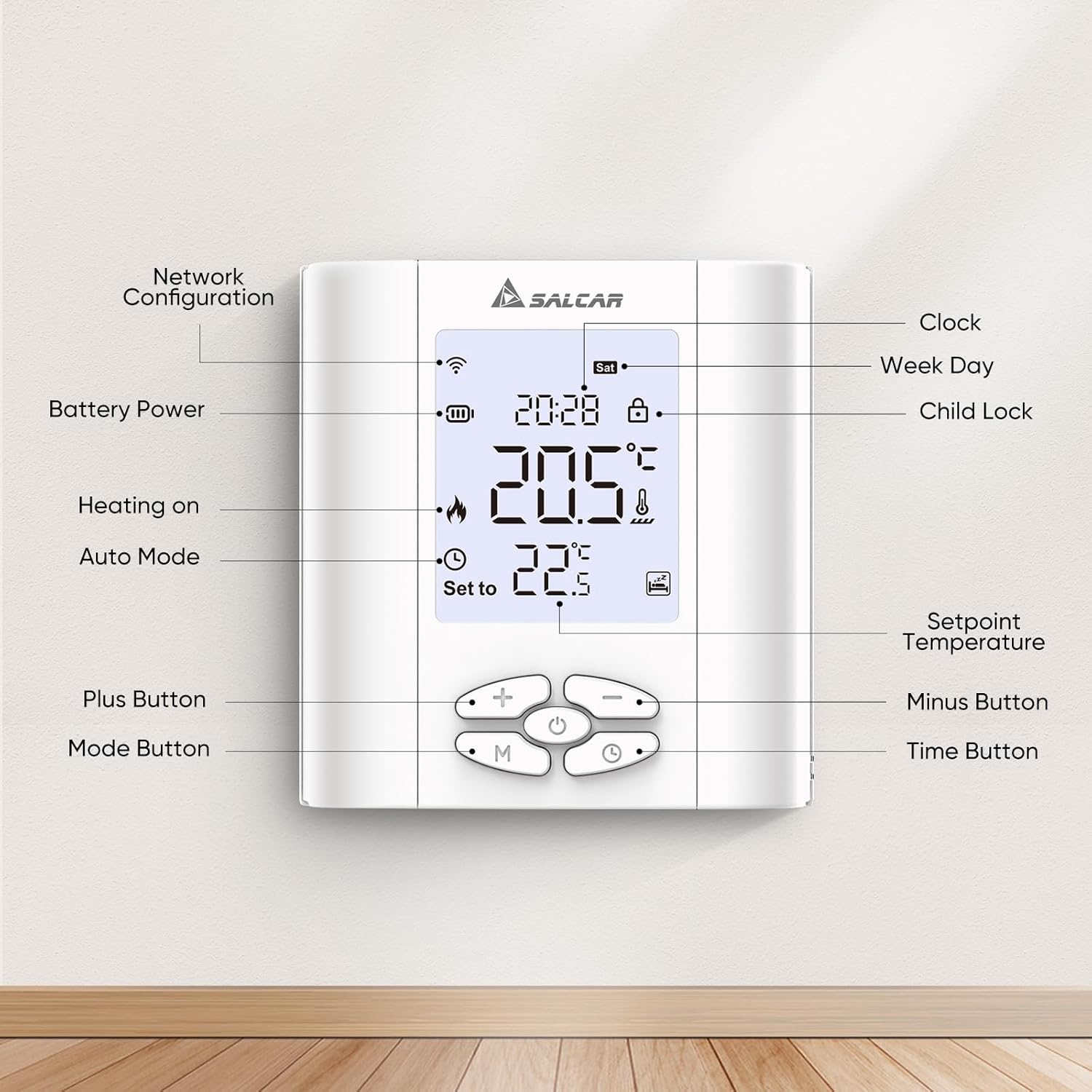
Image 6.1: Labeled components of the SALCAR T5W Thermostat display and control buttons.
| unsur | Penerangan |
|---|---|
| Network Configuration Icon | Menunjukkan status sambungan Wi-Fi. |
| Ikon Kuasa Bateri | Menunjukkan tahap bateri semasa. |
| Heating On Icon | Menunjukkan bila sistem pemanasan aktif. |
| Ikon Mod Auto | Indicates the thermostat is operating in automatic programmed mode. |
| Butang Tambah (+) | Increases temperature setpoint or adjusts settings. |
| Butang Mod (M) | Switches between manual and automatic modes, or enters programming. |
| Paparan Jam | Menunjukkan masa semasa. |
| Week Day Display | Menunjukkan hari semasa dalam seminggu. |
| Ikon Kunci Kanak-kanak | Indicates if child lock is active. |
| Suhu Setpoint | Tetapan suhu yang dikehendaki. |
| Butang tolak (-) | Decreases temperature setpoint or adjusts settings. |
| Butang Masa | Digunakan untuk menetapkan masa dan jadual pengaturcaraan. |
6.2. Mod Operasi
- Mod Manual: The thermostat maintains a constant temperature set by the user until manually changed.
- Mod Automatik (Diprogramkan): The thermostat follows a pre-set heating schedule based on time and day.
6.3. Programming Heating Schedules
The thermostat supports 5+2 (weekday/weekend), 6+1 (Mon-Sat/Sun), and 7-day (individual day) programming. You can set up to 6 heating events per day.
- Press the 'M' (Mode) button to enter programming mode.
- Use the '+' and '-' buttons to select the desired programming type (5+2, 6+1, or 7 days).
- Press the 'Time' button to confirm and move to setting the first event's time and temperature.
- Use '+' and '-' to adjust the time, then 'Time' to confirm.
- Use '+' and '-' to adjust the temperature for that event, then 'Time' to confirm.
- Repeat for all 6 events for the selected day(s).
- Exit programming mode by pressing 'M' or waiting for the thermostat to automatically exit.

Imej 6.2: Cthample of setting programmable heating schedules via the app.
6.4. Kunci Kanak-kanak
To activate or deactivate the child lock, press and hold the '+' and '-' buttons simultaneously for a few seconds until the child lock icon appears or disappears on the display.
6.5. Anti-frost Protection
The anti-frost function helps prevent your heating system from freezing by automatically activating heating if the room temperature drops below a set threshold (e.g., 5°C). This feature is active by default and can usually be configured in advanced settings via the app.

Image 6.3: Illustration of the anti-frost protection feature.
7. Penyepaduan Kawalan Suara
The SALCAR T5W thermostat is compatible with Amazon Alexa and Google Assistant, allowing you to control your heating with voice commands.
- Pautkan Akaun: In the Alexa or Google Home app, enable the "Tuya Smart" or "Smart Life" skill/service. Follow the on-screen instructions to link your Tuya Smart Life account.
- Cari Peranti: Setelah dipautkan, minta pembantu suara anda untuk "Temui peranti" atau memulakan penemuan peranti secara manual dalam apl.
- Perintah Suara: Anda kini boleh menggunakan arahan seperti:
- "Alexa, tetapkan [Nama Termostat] kepada 22 darjah."
- "Ok Google, apakah suhu di [Nama Bilik]?"
- "Alexa, hidupkan [Nama Termostat]."

Image 7.1: Demonstrating voice control with Amazon Alexa and Google Assistant.
8. Penyelenggaraan
8.1. Penggantian Bateri
When the battery icon on the display indicates low power, replace the two AA 1.5V alkaline batteries. Follow the steps outlined in Section 4.2 for battery installation. It is recommended to replace both batteries at the same time.
9. Penyelesaian masalah
If you encounter issues with your SALCAR T5W thermostat, refer to the following common problems and solutions:
| Masalah | Kemungkinan Punca | Penyelesaian |
|---|---|---|
| Termostat tidak dihidupkan | Bateri mati atau tidak dipasang dengan betul. | Gantikan bateri, pastikan polariti yang betul. |
| Wi-Fi icon not blinking during pairing | Bukan dalam mod berpasangan. | Ensure thermostat is OFF, then press and hold the 'OFF' button for 3 seconds. |
| Tidak dapat menyambung ke Wi-Fi | Incorrect Wi-Fi password, 5GHz network, or too far from router. | Verify password, ensure 2.4GHz network, move thermostat closer to router. |
| Pemanasan tidak hidup/mati | Incorrect wiring, thermostat in wrong mode, or setpoint not met. | Check wiring (consult professional), switch to manual mode, adjust setpoint, or check program. |
| Bacaan suhu tidak tepat | Thermostat placed near heat source/draft, or needs calibration. | Relocate thermostat, check app for calibration options. |
10. Spesifikasi
| Atribut | Perincian |
|---|---|
| Jenama | SALCAR |
| Model | T5W |
| Dimensi | 8.6 x 2.08 x 9 cm |
| Berat badan | 200 gram |
| bahan | plastik |
| Voltage | 15 Volt (for internal operation, external power supply for heating control) |
| Ciri Khas | Sensor kelembapan |
| Jenis Pengawal | Aplikasi Kehidupan Pintar Tuya |
| Kegunaan Produk Khusus | Kawalan dandang |
11. Waranti dan Sokongan
For warranty information, technical support, or service inquiries, please contact SALCAR customer support. Refer to the product packaging or the official SALCAR webtapak untuk butiran hubungan terkini.
Maklumat Hubungan Pengilang:
- Syarikat: Salcar GmbH
- Alamat: An der Hebemärchte 6, 04316 Leipzig, Germany
- e-mel: info@salcar.de
- telefon: 0341 25257850

Image 11.1: Manufacturer contact details as found on the product packaging.