
1. Pengenalan
This manual provides essential instructions for the safe and effective operation of your Fujifilm S4500 and S4530 Compact Digital Camera. Please read this manual thoroughly before using the camera and keep it in a safe place for future reference. The Fujifilm S4500/S4530 is equipped with a 14MP CCD sensor, a 30x optical zoom Fujinon lens, and is capable of recording 720p HD movies.
2. Produk Lebihview
Familiarize yourself with the main components of your camera.
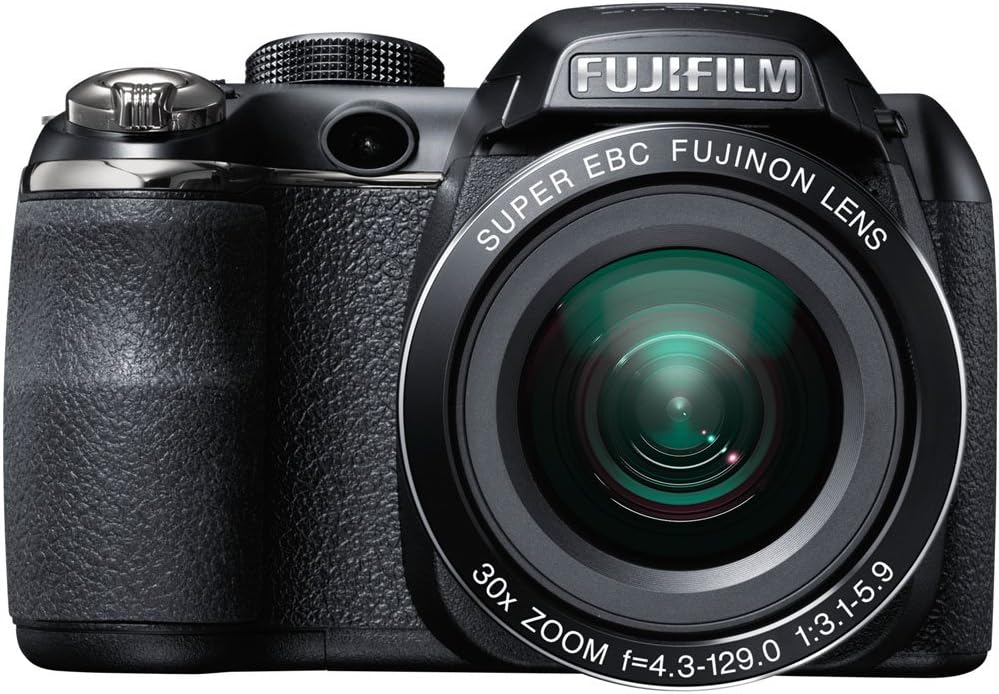
Rajah 2.1: Depan view of the Fujifilm S4500/S4530 camera with the built-in flash in the raised position, showcasing the Fujinon 30x optical zoom lens.

Rajah 2.2: Depan view of the Fujifilm S4500/S4530 camera with the built-in flash in the lowered position, highlighting the lens barrel and grip.

Rajah 2.3: sebelah view of the Fujifilm S4500/S4530 camera, showing the ergonomic grip and control layout.
Komponen Utama:
- Kanta: Fujinon 30x Optical Zoom Lens (24-720mm equivalent).
- kilat: Built-in pop-up flash.
- Paparan LCD: 3-inch, 230,000-dot screen for viewing dan navigasi menu.
- Viewpencari: elektronik Viewpencari (EVF).
- Dial Kawalan: For selecting shooting modes.
- Butang Pengatup: Untuk menangkap foto.
- Tuas Zum: Mengawal zum optik dan digital.
3. Persediaan
3.1. Memasukkan Bateri
- Buka penutup petak bateri yang terletak di bahagian bawah kamera.
- Insert four (4) AA alkaline batteries, ensuring correct polarity (+/-) as indicated inside the compartment.
- Tutup penutup petak bateri dengan selamat.
3.2. Memasukkan Kad Memori
- Buka penutup slot kad memori, biasanya terletak di bahagian tepi atau bawah kamera.
- Insert an SD, SDHC, or SDXC memory card with the label facing the correct direction until it clicks into place.
- Tutup penutup slot kad memori dengan selamat.
3.3. Kuasa Awal Hidup dan Tetapan Tarikh/Masa
- Tekan ke HIDUP/MATI butang untuk menghidupkan kamera.
- The first time you power on, you will be prompted to set the date and time. Use the directional buttons to navigate and the MENU / OK butang untuk mengesahkan.
- Ikut arahan pada skrin untuk melengkapkan persediaan awal.
4. Arahan Operasi
4.1. Mengambil Foto
- Hidupkan kamera.
- Pilih mod penangkapan menggunakan dail mod (cth, AUTO for automatic settings).
- Bingkaikan gambar anda menggunakan monitor LCD atau elektronik viewpencari.
- Use the zoom lever to adjust the focal length.
- Tekan butang pengatup separuh ke bawah untuk memfokus. Bingkai fokus akan bertukar hijau apabila fokus dicapai.
- Tekan butang pengatup ke bawah sepenuhnya untuk mengambil gambar.
4.2. Merakam Video
- Turn the mode dial to the movie recording setting (often indicated by a film camera icon).
- Frame your subject.
- Tekan butang rakaman filem khusus (jika ada) atau butang pengatup untuk mula merakam.
- Press the button again to stop recording. The camera records in 720p HD resolution.
4.3. Main balik
- Tekan ke BERMAIN butang untuk memasuki mod main balik.
- Use the directional buttons to scroll through your photos and videos.
- Tekan MENU / OK kepada view options for the selected image/video.
4.4. Mod Denyar
The camera offers various flash modes, including Auto and Red Eye Reduction. To change the flash mode, press the flash button (often indicated by a lightning bolt icon) and use the directional buttons to select your desired mode from the on-screen menu.
5. Penyelenggaraan
5.1. Membersihkan Kamera
- Kanta: Use a soft, lint-free cloth or a lens brush to gently remove dust. For smudges, use a specialized lens cleaning solution applied to the cloth, not directly to the lens.
- Paparan LCD: Lap perlahan-lahan menggunakan kain lembut dan kering. Elakkan menekan terlalu kuat.
- Badan Kamera: Use a soft, dry cloth to wipe away dust and fingerprints. Do not use organic solvents or strong cleaning agents.
5.2. Penjagaan Bateri
- Tanggalkan bateri apabila kamera tidak akan digunakan untuk tempoh yang lama untuk mengelakkan kebocoran.
- Simpan bateri di tempat yang sejuk dan kering.
- Replace all four AA batteries at the same time with new ones for optimal performance.
5.3. Penyimpanan
When storing the camera, ensure it is turned off, and the lens cap is attached. Store in a dry, well-ventilated area away from direct sunlight, high temperatures, and humidity.
6. Penyelesaian masalah
| Masalah | Penyelesaian |
|---|---|
| Kamera tidak dihidupkan. | Check if batteries are inserted correctly and are fully charged. Replace with new AA batteries if necessary. |
| Imej adalah kabur. | Ensure the lens is clean. Press the shutter button halfway to allow the camera to focus before taking the shot. Check if the camera is in a suitable shooting mode for the lighting conditions. |
| Flash tidak menyala. | Check the flash mode settings. Ensure the flash is raised if it is a pop-up type. The flash may not fire if the battery level is low. |
| Ralat kad memori. | Ensure the memory card is inserted correctly. Try formatting the card (this will erase all data). If the problem persists, try a different memory card. |
| Tidak boleh merakam video. | Ensure the camera is in video recording mode. Check if there is sufficient space on the memory card. |
7. Spesifikasi
| Ciri | Perincian |
|---|---|
| Nama Model | Fujifilm S4500 / S4530 |
| Penderia Imej | 14 Megapixel 1/2.3-inch CCD |
| Lensa | Fujinon 30x Optical Zoom (24-720mm equivalent) |
| Zum Digital | Sehingga 6.7x |
| Penstabilan Imej | Penstabilan Imej Digital |
| Paparan LCD | 3.0 inci, 230,000 titik |
| Rakaman Video | 720p HD (MP4 format) |
| Media Storan | SD / SDHC / SDXC memory cards |
| Sensitiviti ISO | Auto, 100, 200, 400, 800, 1600, 3200, 6400 (expanded to 51200) |
| Kelajuan Pengatup | 8 saat hingga 1/2000 saat |
| Bekalan Kuasa | 4x bateri alkali AA |
| Ketersambungan | HDMI, USB |
| Dimensi (lebih kurang) | 1.2 Pounds (Item Weight) |
8. Waranti dan Sokongan
This Fujifilm S4500/S4530 camera typically comes with a 90-day limited warranty. Please refer to your purchase documentation for specific warranty terms and conditions. For technical support or service inquiries, please contact Fujifilm customer service or the retailer from whom the product was purchased.