
pengenalan
Thank you for choosing the TRIUMPHKEY Massage Gaming Chair, Model 0758. This chair is designed to provide optimal comfort and support for extended periods of sitting, whether for gaming or office work. It features an ergonomic design, adjustable recline, a retractable footrest, and a lumbar cushion with a massage function. Please read this manual thoroughly before assembly and use to ensure proper operation and safety.
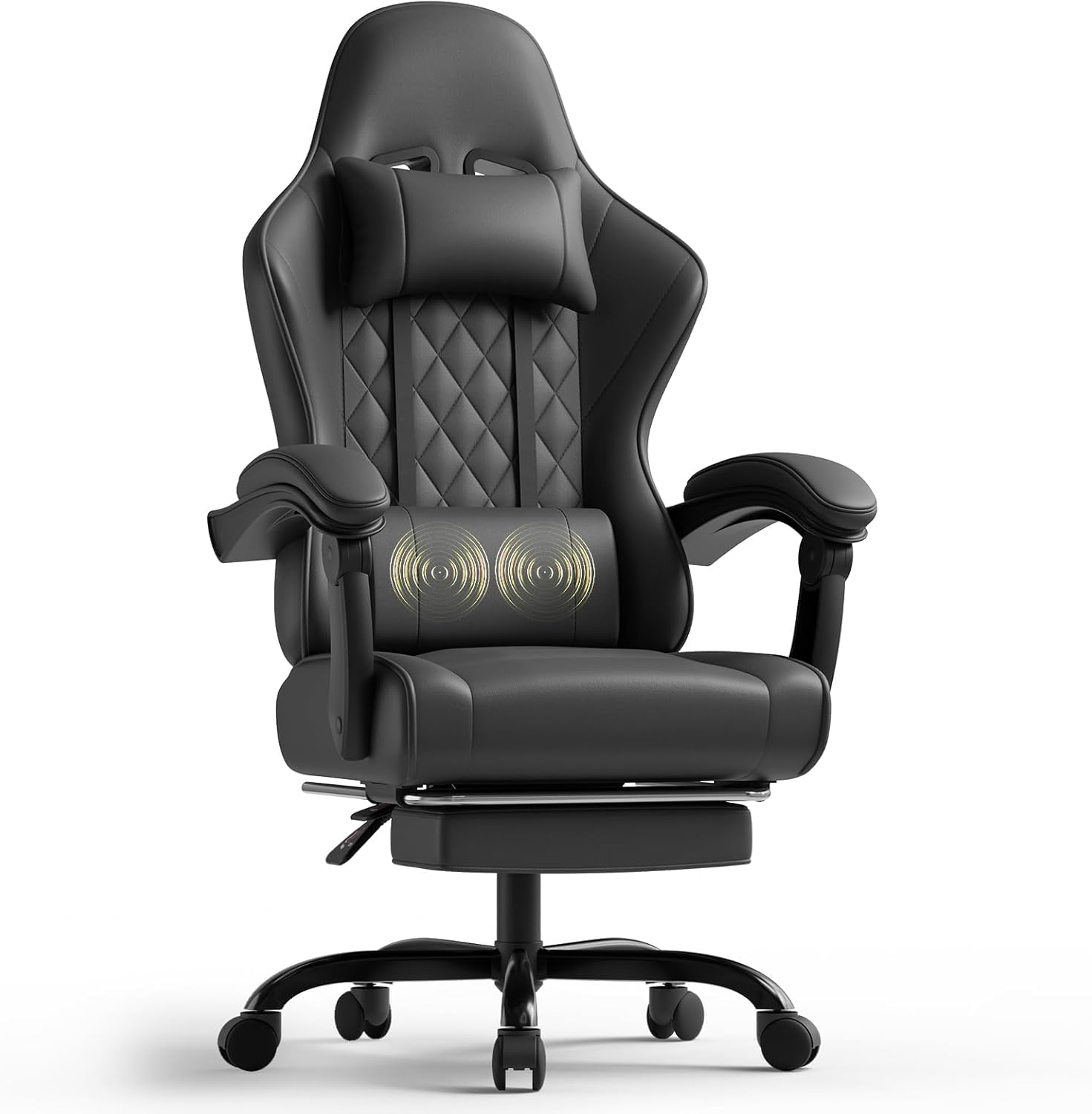
Image: The TRIUMPHKEY Massage Gaming Chair, Model 0758, showcasing its design and features in a typical use environment.
Maklumat Keselamatan
- Muatan Maksimum Disyorkan: The chair is designed to support a maximum weight of 150 kg (330 lbs). Do not exceed this weight limit to prevent damage or injury.
- Ensure all screws and bolts are securely tightened before use and periodically check for any loosening.
- Keep hands and fingers clear of moving parts, especially during recline adjustment and footrest operation.
- Gunakan kerusi di atas permukaan yang rata dan stabil untuk mengelakkannya daripada terbalik.
- Jangan berdiri di atas kerusi atau gunakannya sebagai bangku tangga.
- Jauhkan kanak-kanak dan haiwan peliharaan daripada kerusi semasa pemasangan dan pelarasan.
Kandungan Pakej
Please verify that all components are present before beginning assembly. Refer to the parts list included in your product packaging for a detailed inventory. Typical components include:
- Backrest
- Kusyen Tempat Duduk
- Tempat letak tangan (2)
- Silinder Angkat Gas
- Pangkalan Bintang
- Kastor (5)
- Plat Mekanisme
- Bantal Headrest
- Kusyen Urut Lumbar
- Perhimpunan Pijakan Kaki
- Kit Perkakasan (skru, pencuci, sepana Allen)
- Arahan Perhimpunan
Persediaan dan Perhimpunan
Assembly of the TRIUMPHKEY Massage Gaming Chair is designed to be straightforward, typically taking 20-30 minutes. Follow the detailed instructions provided in your package. Below are general steps:
- Pasang Kastor ke Pangkalan: Masukkan lima roda ke dalam lubang di hujung setiap kaki tapak bintang sehingga ia klik dengan selamat di tempatnya.
- Masukkan Pengangkat Gas: Letakkan silinder pengangkat gas ke dalam lubang tengah tapak bintang.
- Pasang Plat Mekanisme pada Tempat Duduk: Align the mechanism plate with the screw holes on the underside of the seat cushion. Secure it with the provided screws. Ensure the front of the mechanism plate faces the front of the seat.
- Sambungkan Tempat Duduk ke Lif Gas: Letakkan tempat duduk yang telah dipasang dengan berhati-hati di atas silinder pengangkat gas.
- Pasang Sandaran Belakang ke Tempat Duduk: Align the backrest with the mounting brackets on the seat. Secure it using the designated screws.
- Pasang tempat letak tangan: Attach the armrests to the side of the seat and backrest using the provided screws. Ensure they are firmly secured.
- Attach Headrest and Lumbar Cushion: Position the headrest pillow and lumbar massage cushion as desired. The lumbar cushion typically attaches with straps and connects via USB for its massage function.
- Pasang Tempat Letak Kaki: Slide the footrest assembly into its designated slots under the seat.
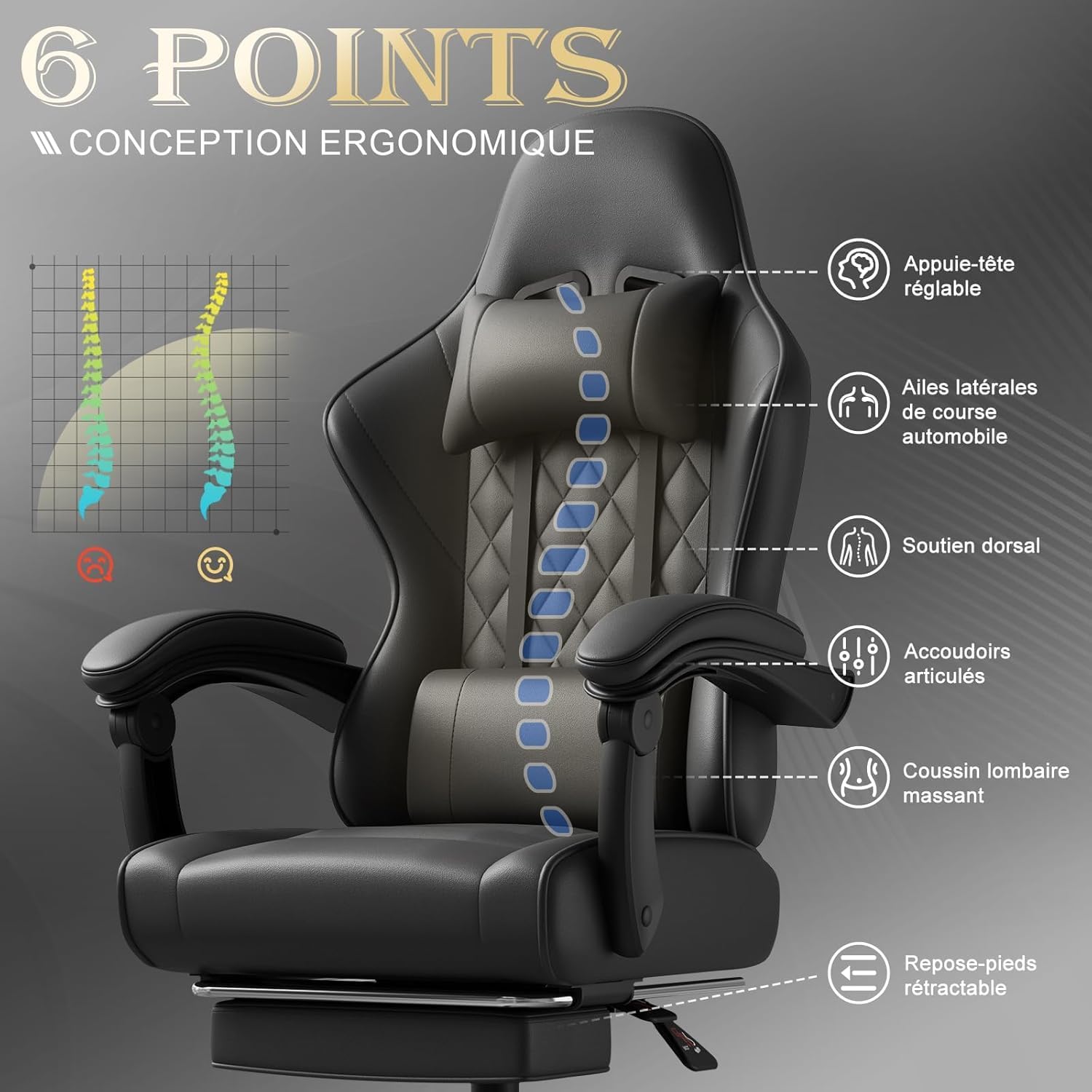
Imej: Tamatview of the chair's ergonomic design, highlighting key support points for the head, back, and lumbar region, along with adjustable armrests and footrest.
Arahan Operasi
Pelarasan Ketinggian Kerusi
To adjust the chair height, locate the lever on the right side, beneath the seat. Pull the lever up while sitting to lower the chair, or pull it up while standing to raise the chair. Release the lever at the desired height.
Backrest Recline Function
The backrest can be adjusted from 90° to 150°. Pull the recline lever, typically located on the right side of the seat, and lean back or forward to achieve your desired angle. Release the lever to lock the backrest in position.

Image: Visual representation of the chair's adjustable recline, demonstrating angles suitable for working (90°), reading (105°), watching movies (120°), and resting (135°).
Pijakan Kaki Boleh Tarik
To use the footrest, pull it out from under the seat. Extend it to your preferred length. To retract, push it back under the seat until it is fully stored.
Lumbar Massage Function
The lumbar cushion features a 2-point massage function. Connect the USB cable from the lumbar cushion to a USB power source (e.g., computer, power bank). Press the switch on the cushion to activate or deactivate the massage. This function helps relieve fatigue during long sitting sessions.

Imej: Terperinci view of the lumbar massage cushion, highlighting its high-frequency vibration massage feature designed to relax lower back muscles.
Lengan Tangan Boleh Laras
The armrests are designed to articulate and adapt to your arm position, whether sitting upright or reclining. Their triangular frame enhances stability.
Penyelenggaraan
- Pembersihan: Wipe the synthetic leather surfaces with a soft, damp kain. Untuk kesan degil, gunakan larutan sabun yang lembut dan keringkan dengan teliti. Elakkan bahan kimia yang keras atau pembersih yang kasar.
- Pemeriksaan perkakasan: Periksa semua skru dan bolt secara berkala untuk memastikan ia ketat. Ketatkan semula jika perlu untuk mengekalkan kestabilan dan keselamatan.
- Penyelenggaraan Kastor: Clean any debris (hair, dust) from the casters regularly to ensure smooth movement.
- Lumbar Cushion: Ensure the USB cable for the massage function is not pinched or damaged.
Menyelesaikan masalah
- Kerusi tidak melaraskan ketinggian: Pastikan tuil pengangkat gas digunakan sepenuhnya. Jika masalah berterusan, silinder pengangkat gas mungkin perlu diganti.
- Backrest does not recline or lock: Check if the recline lever is fully engaged. Ensure no obstructions are preventing movement.
- Massage function not working: Verify the USB cable is securely connected to a working power source. Check the power switch on the lumbar cushion.
- Kerusi goyah: Check all assembly screws and bolts, especially those connecting the seat to the mechanism plate and the backrest. Tighten any loose hardware.
- Kastor tidak bergolek dengan lancar: Clean any hair or debris from the caster wheels.
Spesifikasi
| Ciri | Perincian |
|---|---|
| Jenama | TRIUMPHKEY |
| Nombor Model | 0758 |
| warna | Hitam |
| bahan | Kulit Sintetik |
| Dimensi Produk (L x W x H) | 48 x 65 x 130 cm (18.9 x 25.6 x 51.2 inci) |
| Berat Barang | 17.2 Kilogram (37.9 lbs) |
| Kapasiti Beban Maksimum | 150 kg (330 lbs) |
| Sudut Berbaring | 90° hingga 150° |
| Ciri Khas | Lumbar Massager, Adjustable Headrest, Reclinable, Retractable Footrest, Adjustable Armrests |

Image: Detailed dimensions of the TRIUMPHKEY Massage Gaming Chair, including height, width, and depth measurements for various components.
Waranti dan Sokongan
For information regarding warranty coverage, terms, and conditions, please refer to the documentation included with your purchase or contact the retailer directly. For technical support or assistance with parts, please contact TRIUMPHKEY customer service through the contact information provided on the product packaging or the official TRIUMPHKEY webtapak.