
1. Pengenalan
The OontZ Angle 3 Pro is a high-performance portable Bluetooth speaker designed for both indoor and outdoor use. It features robust audio output, extended battery life, and a durable waterproof design, making it suitable for various environments. This manual provides essential information for setting up, operating, and maintaining your speaker.
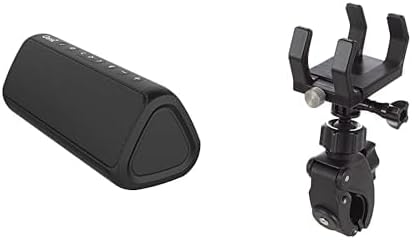
Image 1: The OontZ Angle 3 Pro Bluetooth Speaker (left) shown alongside its multipurpose bracket and clamp mount (right).
2. Ciri-ciri Utama
- Kualiti Audio Unggul: Engineered with 40% larger custom Neodymium drivers and a 21-Watt Digital AMP, delivering crystal clear sound, rich bass, and distortion-free audio even at maximum volume.
- Jangka Hayat Bateri: Enjoy up to 15 hours of playtime on a full charge when set to 2/3 volume.
- Ketersambungan Teguh: Advanced antenna design provides a wireless range of up to 100 feet via Bluetooth 5.0, ensuring a fast and stable connection to your smartphone, tablet, laptop, or other Bluetooth-enabled devices.
- IPX7 Waterproof & Saltproof: Certified IPX7 water-resistant, allowing the speaker to be submerged up to 1 meter for 30 minutes. It is also saltproof, making it ideal for beach and outdoor activities.
- Reka Bentuk Mudah Alih: Lightweight and easy to carry, featuring a unique triangular shape that allows for versatile placement.
- Pemasangan Serbaguna: Includes an official bracket and clamp mount for secure attachment to boat railings, kayaks, rod holders, handlebars, or beach umbrellas.
- Kawalan Bersepadu: Features touch controls for power, volume, track navigation, and Bluetooth pairing.
- Input Bantu: Supports direct connection via an auxiliary input for non-Bluetooth devices.
- Fungsi Bank Kuasa: The USB port can provide power to charge your iPhone, smartphone, or other devices (output up to 5V – 1A).
- Gandingan Stereo: Connect two OontZ Angle 3 Pro speakers together for enhanced stereo sound.
- Penyepaduan Pembantu Suara: Push a button to activate and talk to Siri on your iPhone.
3. Panduan Persediaan
3.1 Mengecas Speaker
- Locate the rubber flap on the side of the speaker.
- Gently open the flap to reveal the USB-C charging port.
- Connect the provided USB-C charging cable to the speaker and a compatible USB power source (e.g., wall adapter, computer USB port).
- Penunjuk LED akan menunjukkan status pengecasan. Pengecasan penuh biasanya mengambil masa beberapa jam.
- Once fully charged, securely close the rubber flap to maintain the IPX7 waterproof rating.
3.2 Menghidupkan/Mematikan
- Untuk menghidupkan, tekan dan tahan Butang kuasa (usually indicated by a circle with a vertical line) until you hear an audible cue and the LED indicator lights up.
- Untuk mematikan, tekan dan tahan Butang kuasa again until the speaker powers down.
3.3 Berpasangan Bluetooth
- Ensure the speaker is powered on and within range of your Bluetooth device (e.g., smartphone, tablet).
- The Bluetooth LED indicator on the speaker will flash blue, indicating it is in pairing mode.
- Pada peranti anda, pergi ke tetapan Bluetooth dan cari peranti yang tersedia.
- Select "OontZ Angle 3 Pro" from the list.
- Once connected, the Bluetooth LED will turn solid blue, and you will hear a confirmation tone.
3.4 Auxiliary Input Connection
- Open the rubber flap on the side of the speaker to access the auxiliary input port.
- Connect a 3.5mm audio cable (not included) from your audio source to the speaker's auxiliary input.
- Pembesar suara secara automatik akan bertukar kepada mod tambahan.
- Adjust volume from both your audio source and the speaker.
4. Arahan Operasi
4.1 Kawalan Asas
- Kelantangan Naik/Turun: Tekan ke '+' or '-' butang pada pembesar suara.
- Main/Jeda: Tekan ke Butang Main/Jeda (ikon segi tiga).
- Lagu Seterusnya: Tekan ke Butang Track Seterusnya (right arrow icon).
- Trek Sebelumnya: Tekan ke Butang Track Sebelumnya (left arrow icon).
- Jawab/Tamatkan Panggilan: Tekan ke Butang Main/Jeda during an incoming call.
- Aktifkan Pembantu Suara (Siri): Press the dedicated voice assistant button (if available, or long-press Play/Pause on some models) to activate Siri on your connected iPhone.
4.2 Stereo Pairing (Dual Speaker Mode)
For an immersive stereo experience, you can connect two OontZ Angle 3 Pro speakers together. Refer to the official OontZ app or Cambridge Soundworks website for detailed instructions on stereo pairing, as the process may vary slightly.
5. Penjagaan dan Penyelenggaraan
- Integriti Kalis Air: Always ensure the rubber flap covering the charging and auxiliary ports is securely closed when using the speaker near water or in wet conditions to maintain its IPX7 waterproof rating.
- Pembersihan: Gunakan yang lembut, damp cloth to clean the speaker. Avoid using harsh chemicals or abrasive cleaners.
- Ketahanan Bateri: To prolong battery life, avoid fully discharging the speaker frequently. Charge it regularly, and if storing for an extended period, ensure it has a partial charge (around 50%).
- Storan: Simpan pembesar suara di tempat yang sejuk dan kering jauh dari suhu yang melampau.
6. Penyelesaian masalah
- Tiada Kuasa: Pastikan pembesar suara dicas sepenuhnya. Sambungkannya ke sumber kuasa dan periksa penunjuk pengecasan.
- Tiada Bunyi: Check the volume levels on both the speaker and your connected device. Ensure the speaker is correctly paired via Bluetooth or connected via auxiliary cable.
- Isu Pemotongan/Pemasangan Bluetooth:
- Ensure the speaker is within the 100-foot Bluetooth range.
- Turn off and on the Bluetooth on your device and the speaker.
- Forget the speaker from your device's Bluetooth list and re-pair.
- Ensure no other devices are actively connected to the speaker.
- Kualiti Bunyi Lemah: Ensure the speaker is not too far from your device. Check for obstructions between the speaker and your device. If using auxiliary input, try a different cable.
7. Spesifikasi
| Ciri | Perincian |
|---|---|
| Nama Model | Angle 3 Pro |
| Jenis Pembesar Suara | Luar |
| Ciri Khas | Lightweight, Wireless Charging (referring to power bank function) |
| Peranti Serasi | Komputer riba, Telefon Pintar, Tablet |
| warna | Hitam |
| Adakah Kalis Air | True (IPX7) |
| Kaedah Kawalan | Sentuh |
| Teknologi Komunikasi Tanpa Wayar | Bluetooth |
| Sumber Kuasa | Dikuasakan Bateri |
| Tahap Ketahanan Air | Kalis air |
| Jenis Pemacu Audio | Pemandu Dinamik |
| Julat Bluetooth | 100 Kaki |
| Kuasa Output Maksimum Pembesar Suara | 21 Watt |
| Teknologi Ketersambungan | Bluetooth |
| Mod Keluaran Audio | Stereo |
| Jenis Pemasangan | Vehicle Mount, Handlebar |
| Pengeluar | Cambridge Soundworks |
| Nombor Model Item | fed95d1f-ed0f-48b2-ba82-6b915e90b190 |
8. Waranti dan Sokongan
The OontZ Angle 3 Pro Bluetooth Speaker comes with a Limited Warranty. For specific warranty details, product support, or to register your product, please visit the official Cambridge Soundworks webtapak atau hubungi perkhidmatan pelanggan mereka.
Sokongan dalam talian: www.TheOontZ.com