
1. Pengenalan
The Yahboom Jetcobot is a 7-axis collaborative robotic arm designed for educational and research purposes, integrating seamlessly with the Jetson Nano/Orin Nano Super/Orin NX Super ecosystem. It offers advanced capabilities for robot algorithm development, ROS simulation, and AI vision applications. This manual provides essential information for setting up, operating, and maintaining your Jetcobot.
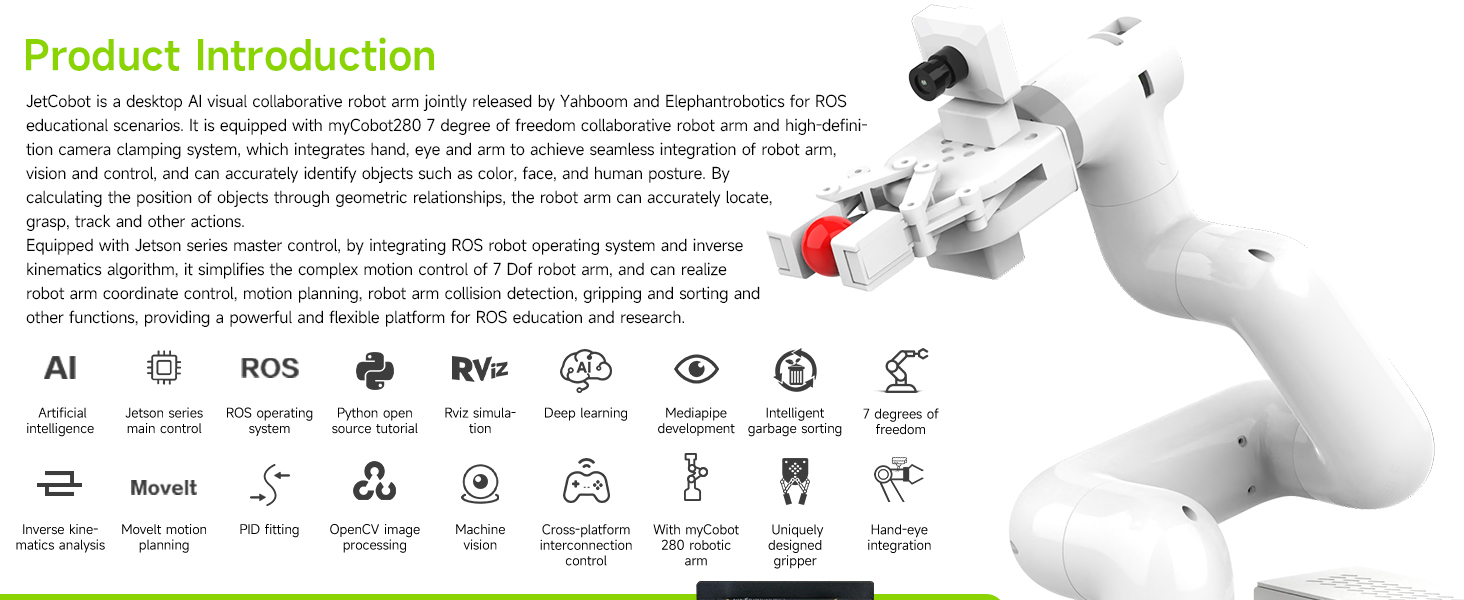
Imej 1.1: Selesaiview of the Yahboom Jetcobot Robotic Arm, highlighting its collaborative design and integration with Jetson Orin Nano.

Image 1.2: Comparison chart illustrating the AI performance improvements with the SUPER upgrade for Jetson Orin Nano and NX developer kits.
2. Persediaan
2.1 Membuka Kotak dan Pengenalan Komponen
Carefully unbox your Jetcobot. Verify all components are present according to the packing list. The main components include the robotic arm, development board kit, adaptive gripper, USB HD camera, and power supply.
Video 2.1: Jetcobot product unboxing video. This video demonstrates the unboxing process and identifies the various components included in the package.
2.2 Product Structure and Assembly
The Jetcobot features a modular design. Refer to the diagram below for component identification and assembly guidance. Ensure all connections are secure before powering on the device.
- Lengan Robotik: The 7-axis MyCobot280 arm provides flexible movement.
- Adaptive Gripper: Attach the gripper to the end effector for object manipulation.
- USB HD Camera: Mount the camera for AI vision capabilities.
- ROS Main Control Board (Optional): Integrates with Jetson Nano, Orin Nano SUPER, or Orin NX SUPER.
- Chassis Box & Base: Provides stability and houses the control board.
- Cawan sedutan: Secure the robotic arm base to a flat surface.

Image 2.1: Detailed diagram of the Jetcobot's product structure, showing the robotic arm, gripper, camera, control board, and chassis box.
2.3 Sambungan Kuasa
Connect the provided power adapter to the Jetcobot and a suitable power outlet. Ensure you use the correct power adapter to prevent damage to the unit.
3. Arahan Operasi
3.1 Basic Movement and Control
The Jetcobot is a 7-axis collaborative robot, offering high flexibility. It can be controlled via a USB game controller or through a multi-function Android app. The adaptive gripper allows for precise object handling.
Video 3.1: Jetcobot robot arm video. This video demonstrates the robotic arm's movements and control capabilities.

Image 3.1: The Jetcobot robotic arm demonstrating precise object manipulation by picking up a colored block.
3.2 AI Vision and Remote Control
Equipped with a USB HD camera, the Jetcobot supports AI vision for tasks such as object recognition, tracking, and grasping. Remote control is possible via a USB game controller for optimal experience, or through a multi-function Android app (note: the app may not control the gripper).
- Pengiktirafan: Identify wooden blocks and stickers.
- Penjejakan: Follow objects or human postures.
- Grasping: Perform precise pick-and-place actions.
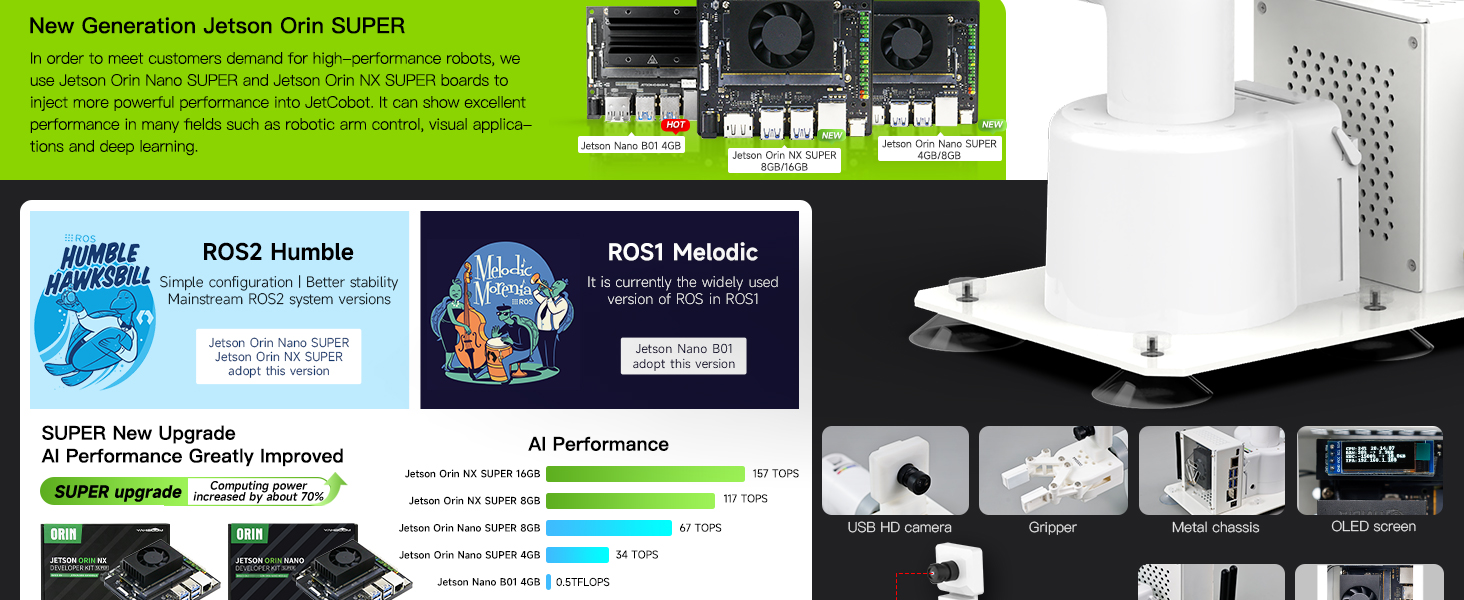
Image 3.2: Jetcobot being controlled via a USB handle and demonstrating APP control capabilities.

Image 3.3: The Jetcobot demonstrating AI visual recognition, including color recognition and tracking of objects on a patterned mat.
4. Programming & ROS System
4.1 ROS Ecosystem Integration
The Jetcobot leverages the open-source Jetson Nano ecosystem and comes with a built-in ROS (Robot Operating System) environment. This provides a robust platform for robot algorithm development and simulation learning.
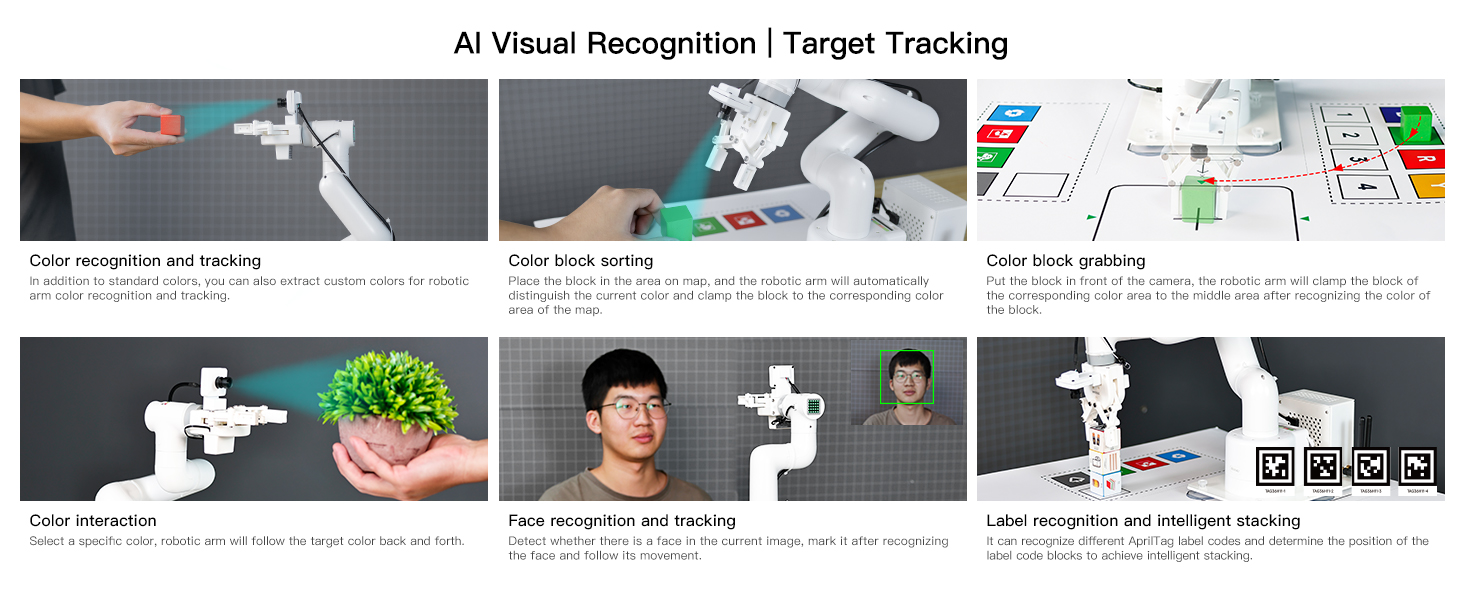
Image 4.1: Jetcobot showcasing its compatibility with ROS and OpenCV for advanced programming and visual processing.
4.2 Software and Development
Explore RoboFlow, the industrial robot software, and utilize Python driver libraries for easier and faster development. The system supports multiple programming languages and various software interaction methods. Jupyter Lab pages can be created online for development.
- RoboFlow: Industrial robot software for advanced control.
- Perpustakaan Python: Simplify development with Python.
- ROS Simulation: Built-in environment for testing and learning.
- Inverse Kinematics: Built-in algorithm for precise positioning.

Image 4.2: The Jetcobot connected to a laptop, illustrating its use in a programming and development environment.
5. Penyelenggaraan
To ensure the longevity and optimal performance of your Jetcobot, follow these general maintenance guidelines:
- Pembersihan: Regularly wipe down the robotic arm and chassis with a soft, dry cloth. Avoid using harsh chemicals or abrasive materials.
- Pemeriksaan Bersama: Periodically check the robotic arm's joints for any signs of wear or looseness.
- Pengurusan Kabel: Ensure all cables are neatly routed and not pinched or strained.
- Kemas Kini Perisian: Keep the operating system and any installed software up to date to benefit from the latest features and security patches.
- Keadaan Persekitaran: Operate the Jetcobot in a clean, dry environment within recommended temperature ranges.
6. Penyelesaian masalah
If you encounter issues with your Jetcobot, consider the following common troubleshooting steps:
- Isu Kuasa: Ensure the power adapter is correctly connected and the power outlet is functional. Verify that the correct power adapter is used.
- Masalah Ketersambungan: Check USB and network connections. For wireless control, ensure the device is properly paired.
- Unexpected Movement/Inaccuracy: Recalibrate the robotic arm if movements are erratic. Ensure the base is stable and on a flat surface.
- Ralat Perisian: Restart the software application or the entire system. Consult the online tutorials and documentation for specific error codes.
- Gripper Malfunction: Check for any obstructions in the gripper mechanism. Ensure the gripper is properly attached and receiving commands.
Untuk penyelesaian masalah yang lebih terperinci atau isu berterusan, sila rujuk bahagian sokongan.
7. Spesifikasi
Key technical specifications for the Yahboom Jetcobot with Jetson Orin Nano Super 8GB:
| Ciri | Perincian |
|---|---|
| Nama Jenama | Yahboom |
| Nama Model | Jetcobot |
| Nombor Model | Jetcobot |
| Lembaga Kawalan | Jetson Orin Nano Super 8GB |
| Degrees of Freedom (DOF) | 7 |
| Jenis Bahan | plastik |
| Dimensi Item (L x W x H) | 10 x 8 x 15 inci |
| Sumber Kuasa | Battery (2 AA and 2 AAA batteries required, included) |
| Penggunaan yang Disyorkan | Educational research and development, robot arm control, AI vision applications |
| Sistem Operasi | Ubuntu 22.04 (ROS2 Humble) |
| Repeat Positioning Accuracy | ±0.5mm |
| USB HD Camera | 0.3MP, 110° FOV, 480P resolution, 30fps |

Image 7.1: Technical drawing illustrating the dimensions of the Jetcobot robotic arm.

Image 7.2: Detailed specifications for the Jetcobot's adaptive gripper and USB HD camera.
8. Waranti & Sokongan
8.1 Maklumat Waranti
The Yahboom Jetcobot comes with a 90-day warranty against manufacturer defects. This warranty covers defects in materials and workmanship under normal use.
8.2 Sokongan Teknikal
For technical assistance, tutorials, or any questions regarding your Jetcobot, please contact Yahboom support. We provide high-quality technical support services.
- Sumber Dalam Talian: melawat yahboom.net/download for detailed tutorials and system files.
- Sokongan E-mel: Hubungi kami di amazon@yahboom.com or support@yahboom.com.

Image 8.1: Yahboom customer support contact details for assistance.