
ExtreLife HD68-B
ExtreLife Wireless Charging RGB Gaming Mouse Pad HD68-B User Manual
Model: HD68-B | Brand: ExtreLife
pengenalan
This manual provides comprehensive instructions for the ExtreLife Wireless Charging RGB Gaming Mouse Pad, model HD68-B. This product integrates a large mouse pad with wireless charging capabilities for compatible smartphones and AirPods, alongside customizable RGB lighting. Please read this manual thoroughly before use to ensure proper operation and maintenance.
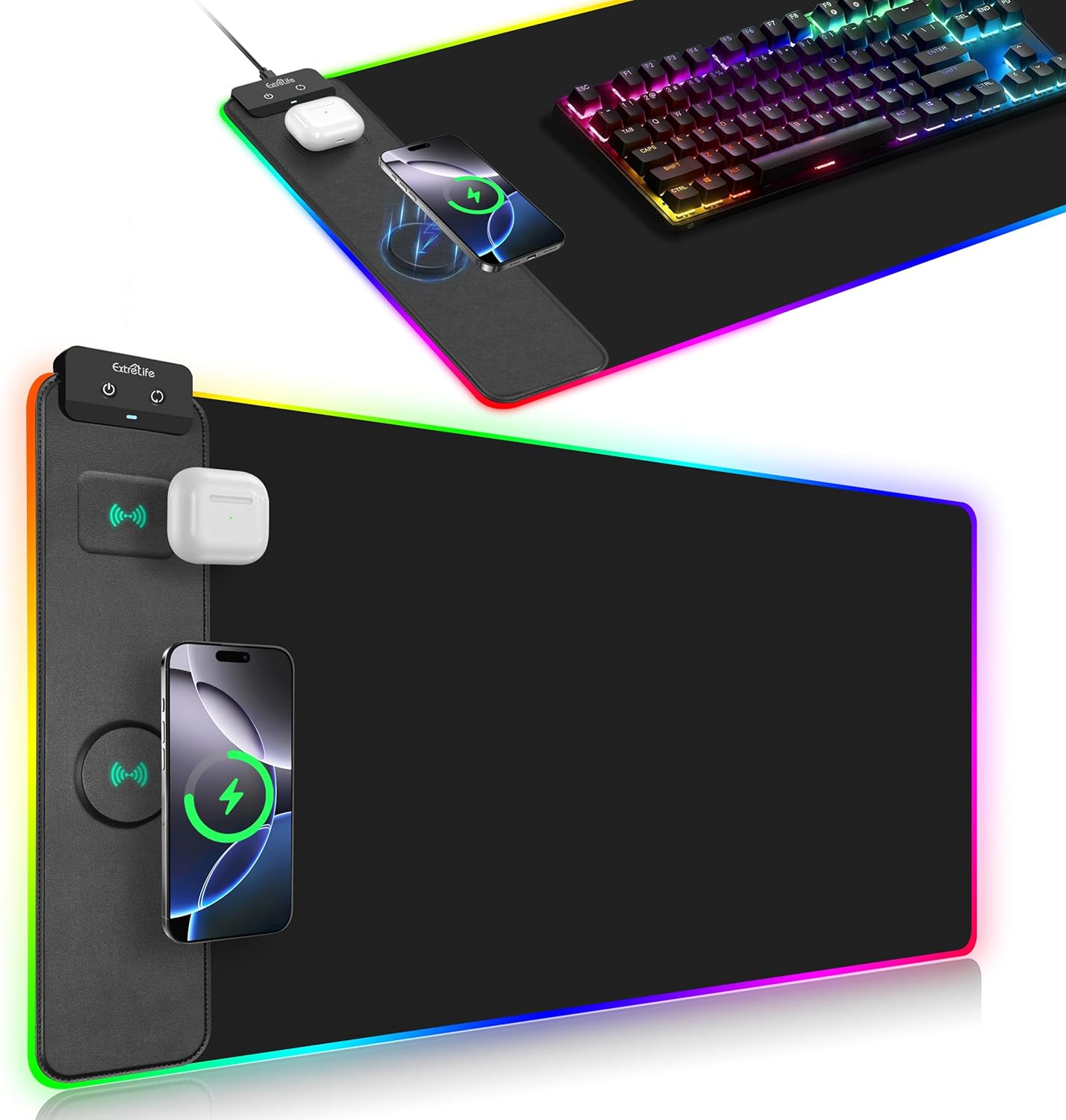
Image: The ExtreLife Wireless Charging RGB Gaming Mouse Pad, displaying its large surface, integrated wireless charging areas for a smartphone and AirPods, and vibrant RGB edge lighting. A gaming keyboard and mouse are also visible on the pad.
Kandungan Pakej
Sahkan bahawa semua item terdapat dalam pakej:
- ExtreLife Wireless Charging RGB Gaming Mouse Pad (Model HD68-B)
- Kabel Jenis-C USB
- Manual Pengguna (dokumen ini)
Nota: A power adapter (9V 2A) is required for 15W wireless charging but is not included in the package.
Arahan Persediaan
- Unroll the Mouse Pad: Carefully unroll the mouse pad and place it on a flat, stable desk surface. Allow some time for any creases from packaging to flatten.
- Sambungkan Kuasa: Locate the USB Type-C port on the control module of the mouse pad. Connect one end of the provided USB Type-C cable to this port.
- Sumber Kuasa: Connect the other end of the USB Type-C cable to a compatible USB power adapter (not included) or a USB port on your computer. For optimal wireless charging performance, especially 15W charging, a 9V 2A power adapter is recommended.
- Hidupkan kuasa: Once connected to power, the RGB lighting should illuminate. Use the control buttons on the module to adjust settings.

Imej: A terperinci view of the mouse pad's control module, showing the two control buttons and the Type-C charging port where the power cable connects.
Arahan Operasi
Mod Pencahayaan RGB
The mouse pad features 13 distinct RGB lighting modes.
- Static Lighting Modes: 11 different static color options.
- Kesan Dinamik: 2 dynamic lighting effects (gradient and flashing).
To cycle through the lighting modes, press the dedicated lighting control button on the control module. The pad includes a power-off memory function, which will recall the last selected lighting mode when the device is powered on again.

Image: A visual representation of the 13 RGB lighting modes, including various static colors and dynamic effects, demonstrating the customization options for the mouse pad's edge lighting.
Fungsi Pengecasan Wayarles
The mouse pad offers two wireless charging areas:
- Pengecasan Telefon: Up to 15W for compatible smartphones.
- Pengecasan AirPods: Up to 5W for compatible AirPods.
Keserasian:
- Telefon pintar: Compatible with iPhone 16/15/14/13/12/11/X/XR/XS/8 series, Samsung Galaxy S23/S22/S21/S20/S10/S9/S8/Note 9/8, and other Qi-enabled smartphones.
- AirPods: Compatible with AirPods 3rd generation, AirPods Pro 2nd generation, and AirPods Pro.
Pengecasan Wayarles Magnetik: The phone charging area features a built-in raised magnetic charger. This function is compatible only with iPhone 16/15/14/13/12 Series. When a compatible iPhone is placed on the magnetic charging pad, it will automatically align for efficient charging.
Lampu Penunjuk Pengecasan:
- White Off: Mengecas.
- Merah Berkelip: Placed-error, over-temperature, or Foreign Object Detection (FOD).

Image: The mouse pad with a smartphone and AirPods placed on their respective wireless charging zones, indicating active charging.

Image: An illustration detailing the magnetic wireless charging function, showing how compatible iPhones align automatically for charging on the designated area.
Penyelenggaraan dan Penjagaan
- Pembersihan: The mouse pad features a waterproof surface. To clean, gently wipe with a damp kain. Elakkan menggunakan bahan kimia yang keras atau pembersih yang kasar.
- Storan: When not in use, the mouse pad can be easily rolled up without causing wrinkles or creases. Store in a dry place away from direct sunlight.
- Elakkan Kerosakan: Do not bend or fold the mouse pad sharply, especially the RGB light strip. Avoid placing heavy or sharp objects on the pad for extended periods.

Image: A close-up showing water beading on the mouse pad's surface, highlighting its waterproof feature for easy cleaning.
Menyelesaikan masalah
| Masalah | Kemungkinan Punca | Penyelesaian |
|---|---|---|
| Pengecasan tanpa wayar perlahan atau tidak berfungsi. |
|
|
| Pencahayaan RGB tidak berfungsi. |
|
|
| Red flashing indicator light. |
|
|
Spesifikasi
| Jenama | Kehidupan Ekstrem |
| Nombor Model | HD68-B |
| Dimensi (LxW) | 31.5 x 15.7 inci (800 x 400 mm) |
| Ketebalan | 4mm |
| Berat Barang | 2.03 paun |
| warna | Hitam |
| bahan | Faux Leather, Rubber |
| Wireless Phone Charging Output | Up to 15W (requires 9V 2A adapter, not included) |
| Wireless AirPods Charging Output | 5W |
| Mod Pencahayaan RGB | 13 (11 static, 2 dynamic) |
| Ciri Khas | Ergonomic, Non-slip, Smooth Surface, Waterproof, Wireless Charging, Magnetic Alignment (for compatible iPhones) |

Image: A visual representation of the mouse pad's extended dimensions, measuring 31.5 inches (800mm) in length and 15.7 inches (400mm) in width, with a thickness of 4mm.
Waranti dan Sokongan Pelanggan
For any issues or inquiries regarding your ExtreLife Wireless Charging RGB Gaming Mouse Pad, please contact us directly through the Amazon Message Center. Our customer service team is committed to providing a satisfactory solution and will respond to your query within 24 hours.
Kaedah Hubungan:
- Via Amazon Message Center: Contact ExtreLife Direct
Ask a question about this manual
Ask about setup, troubleshooting, compatibility, parts, safety, or missing instructions. Manuals+ will review the question and use this page’s manual context to help answer it.