
1. Pengenalan
Thank you for choosing the G-Power GP-PB014 10000mAh Power Bank. This portable charging device is designed to provide reliable power for your electronic devices on the go. It features multiple ports and integrated safety mechanisms like over-charging, over-current, and short-circuit protection. Please read this manual carefully before using the product to ensure safe and optimal performance. Keep this manual for future reference.
2. Arahan Keselamatan
Untuk mengelakkan kerosakan pada produk atau kecederaan pada diri sendiri dan orang lain, sila patuhi langkah berjaga-jaga keselamatan berikut:
- Jangan dedahkan bank kuasa kepada suhu yang melampau (panas atau sejuk), cahaya matahari langsung atau kelembapan yang tinggi.
- Do not disassemble, modify, or attempt to repair the device. This will void the warranty and may cause damage.
- Jauhkan bank kuasa daripada air dan cecair lain.
- Jangan jatuhkan, tebuk atau gunakan daya berlebihan pada power bank.
- Gunakan hanya kabel pengecasan dan penyesuai yang diperakui.
- Jauhkan daripada kanak-kanak.
- Buang power bank secara bertanggungjawab mengikut peraturan tempatan. Jangan buangnya ke dalam tong sampah rumah.
3. Kandungan Pakej
Sila semak pakej untuk item berikut:
- G-Power GP-PB014 10000mAh Power Bank
- USB Charging Cable (Type-A to Type-C or Micro-USB, depending on model variant)
- Manual Pengguna
4. Produk Lebihview
The G-Power GP-PB014 is a compact and efficient power bank featuring multiple charging ports and an LED indicator for battery status.
Komponen:
- Port Output USB-A (x2): Untuk mengecas peranti luaran.
- Pelabuhan Jenis-C: Functions as both input for charging the power bank and output for charging devices.
- Lampu Penunjuk LED: Paparkan baki kapasiti bateri.
- Butang Kuasa: Activates the LED indicator and initiates charging.
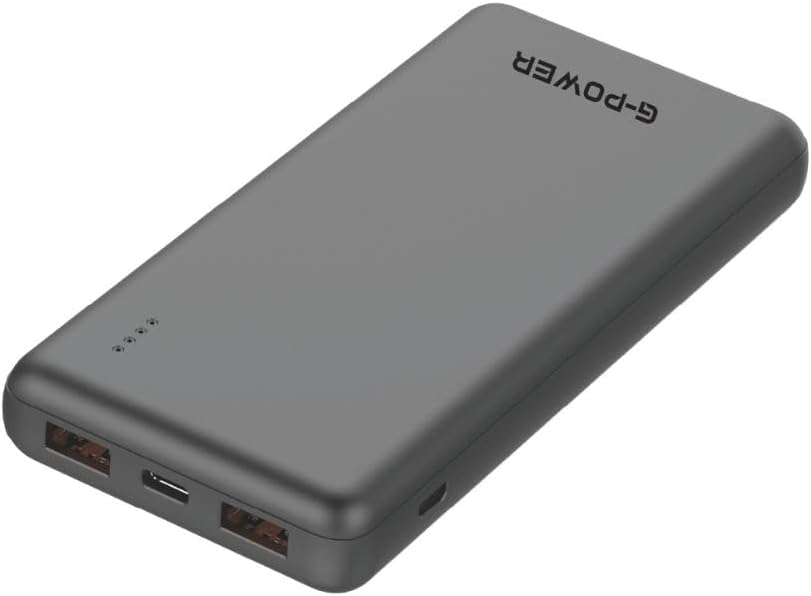
Imej: Atas view of the G-Power GP-PB014 Power Bank, highlighting the two USB-A output ports and the single USB-C port. This view helps identify the different connection types available on the device.

Imej: Depan view of the G-Power GP-PB014 Power Bank, displaying the four small LED indicator lights that show the current battery charge level.
5. Persediaan
Pengecasan Awal Bank Kuasa:
Before first use, fully charge your G-Power GP-PB014 Power Bank.
- Connect the provided USB charging cable to the Type-C input port on the power bank.
- Connect the other end of the cable to a USB wall adapter (not included) or a computer's USB port.
- The LED indicators will light up and blink, showing the charging progress. All four LEDs will be solid when fully charged.
6. Arahan Operasi
Mengecas Peranti Anda:
- Connect your device's charging cable to one of the USB-A output ports or the Type-C port on the power bank.
- Sambungkan hujung kabel yang lain ke peranti anda.
- Bank kuasa akan mula mengecas peranti anda secara automatik. Jika tidak, tekan butang kuasa sekali untuk memulakan pengecasan.
- The LED indicators will show the remaining battery level of the power bank during charging.

Image: The G-Power GP-PB014 Power Bank connected via a cable to a smartphone, indicating active charging. The phone screen shows a charging percentage.
Memeriksa Tahap Bateri:
Press the power button once to check the remaining battery capacity. The LED indicators will light up for a few seconds:
- 4 LED: 75% - 100% dicaj
- 3 LED: 50% - 75% dicaj
- 2 LED: 25% - 50% dicaj
- 1 LED: 0% - 25% dicaj (caj semula tidak lama lagi)
7. Penyelenggaraan
- Pembersihan: Lap bank kuasa dengan kain lembut dan kering. Jangan gunakan bahan kimia yang keras atau bahan yang melelas.
- Storan: Simpan bank kuasa di tempat yang sejuk dan kering jauh dari cahaya matahari langsung dan suhu yang melampau.
- Penjagaan Bateri: Untuk memanjangkan hayat bateri, cas sepenuhnya power bank sekurang-kurangnya sekali setiap tiga bulan jika tidak digunakan secara tetap.
8. Penyelesaian masalah
| Masalah | Kemungkinan Punca | Penyelesaian |
|---|---|---|
| Power bank tidak dicas | Cable is faulty or not properly connected; charger is not working; power bank is fully charged. | Check cable connections; try a different cable or wall adapter; verify LED indicators. |
| Peranti tidak mengecas daripada bank kuasa | Power bank battery is depleted; cable is faulty or not properly connected; device is incompatible; power button not pressed. | Recharge power bank; check cable connections; try a different cable; ensure device is compatible; press power button. |
| Pengecasan perlahan | Cable is not suitable for fast charging; device requires higher input; multiple devices charging simultaneously. | Use a high-quality, fast-charging cable; ensure device supports fast charging; charge devices one at a time for optimal speed. |
9. Spesifikasi
| Nombor Model | GP-PB014 |
| Kapasiti Bateri | 10000mAh |
| Jenis Bateri | Polimer Litium |
| Input (Jenis-C) | 5V / 2.1A (Typical) |
| Output (USB-A x2) | 5V / 2.1A (Max per port) |
| Output (Jenis-C) | 5V / 2.1A (Maks) |
| Jumlah Output | 2.1 Amps |
| Dimensi Produk | 20 x 5 x 10 cm |
| Berat Barang | 200 Gram |
| Ciri Khas | Fast Charging, LED Indicator Lights, Slim Design |
| warna | Hitam |
| Pengeluar | G-Power |
| Negara Asal | China |
10. Waranti dan Sokongan
G-Power products are manufactured to the highest quality standards. This product comes with a limited warranty from the date of purchase. For detailed warranty information, technical support, or customer service inquiries, please refer to the warranty card included with your product or visit the official G-Power webtapak.
Sila simpan bukti pembelian anda untuk tuntutan waranti.