
1. Pengenalan
This manual provides comprehensive instructions for the installation, operation, maintenance, and troubleshooting of your EIMSOAH 7in HD Carplay Screen. Please read this manual thoroughly before using the product to ensure proper function and safety.
The EIMSOAH Carplay Screen is an advanced in-dash navigation and multimedia system designed to enhance your driving experience with features such as wireless CarPlay/Android Auto, GPS navigation, and a high-definition touch screen display.
2. Maklumat Keselamatan
Always prioritize safety. Improper installation or operation can lead to damage to the device, vehicle, or personal injury. Observe the following safety guidelines:
- Ensure the vehicle's ignition is off and the battery is disconnected before installation to prevent electrical shorts.
- Rujuk profesional untuk pemasangan jika anda tidak pasti tentang sebarang langkah.
- Do not operate the device in a way that distracts you from driving. Always keep your eyes on the road.
- Elakkan daripada mendedahkan peranti kepada suhu yang melampau, cahaya matahari langsung untuk tempoh yang lama atau kelembapan yang berlebihan.
- Jangan cuba membuka atau mengubah suai unit. Ini akan membatalkan jaminan dan boleh menyebabkan kerosakan.
- Ensure all wiring is properly insulated and secured to prevent short circuits or interference.
3. Kandungan Pakej
Sahkan bahawa semua item yang disenaraikan di bawah terdapat dalam pakej anda:
- 1 x Car Multimedia Player Display
- 7 x Wiring Harnesses (various types for power, audio, video, etc.)
- 1 x GPS Box/Antenna
- 1 x Manual Arahan (dokumen ini)
- 1 x Wiring Instruction Diagram

Figure 3.1: Complete package contents including the main display unit, wiring harnesses, and GPS antenna.
4. Persediaan dan Pemasangan
This section outlines the general steps for installing the EIMSOAH Carplay Screen. Specific wiring details are provided in the separate Wiring Instruction Diagram included in your package. Professional installation is recommended.
- Sediakan Kenderaan:
- Turn off the vehicle's ignition and remove the key.
- Disconnect the negative terminal of the car battery to prevent electrical hazards.
- Carefully remove the existing car stereo or dashboard panel to access the wiring harness and mounting area.
- Sambungkan Abah-abah Pendawaian:
- Refer to the provided Wiring Instruction Diagram for detailed connections.
- Connect the main power harness, speaker wires, and other necessary connections (e.g., AUX, USB, reverse camera input if applicable) to the corresponding ports on the car multimedia player.
- Pastikan semua sambungan selamat dan terlindung dengan betul.
- Pasang Antena GPS:
- Pasang antena GPS di lokasi yang jelas view langit, biasanya di papan pemuka atau di bawah cermin depan, jauh daripada halangan logam.
- Route the GPS antenna cable to the back of the head unit and connect it to the designated GPS input.
- Lekapkan Unit:
- Carefully slide the car multimedia player into the dashboard opening.
- Secure the unit using the provided mounting brackets or screws, ensuring it is firmly in place.
- Sambung semula Bateri dan Ujian:
- Sambung semula terminal negatif bateri kereta.
- Turn on the vehicle's ignition and power on the car multimedia player.
- Test all functions, including audio, touch screen response, GPS signal, Bluetooth connectivity, and any connected accessories (e.g., reverse camera).
- Pasang semula Papan Pemuka:
- Once all functions are verified, carefully reassemble the dashboard panels.

Figure 4.1: The Carplay screen integrated into a vehicle's dashboard.
5. Arahan Operasi
The EIMSOAH Carplay Screen operates on Android 12, providing a user-friendly interface. Below are common operations:
5.1 Navigasi Asas
- Hidupkan/Mati Kuasa: Tekan dan tahan butang kuasa (biasanya di sebelah kiri unit) untuk menghidupkan atau mematikan peranti. Tekanan ringkas biasanya akan membisukan/menyahbisukan audio.
- Kawalan Kelantangan: Use the volume buttons on the unit or steering wheel controls (if configured) to adjust audio levels.
- Skrin Utama: Tap the "Home" icon to return to the main application screen.
- Butang Belakang: Tap the "Back" icon to return to the previous screen or menu.
- Apl Terbaharu: Tap the "Recent Apps" icon to view dan bertukar antara aplikasi yang baru dibuka.
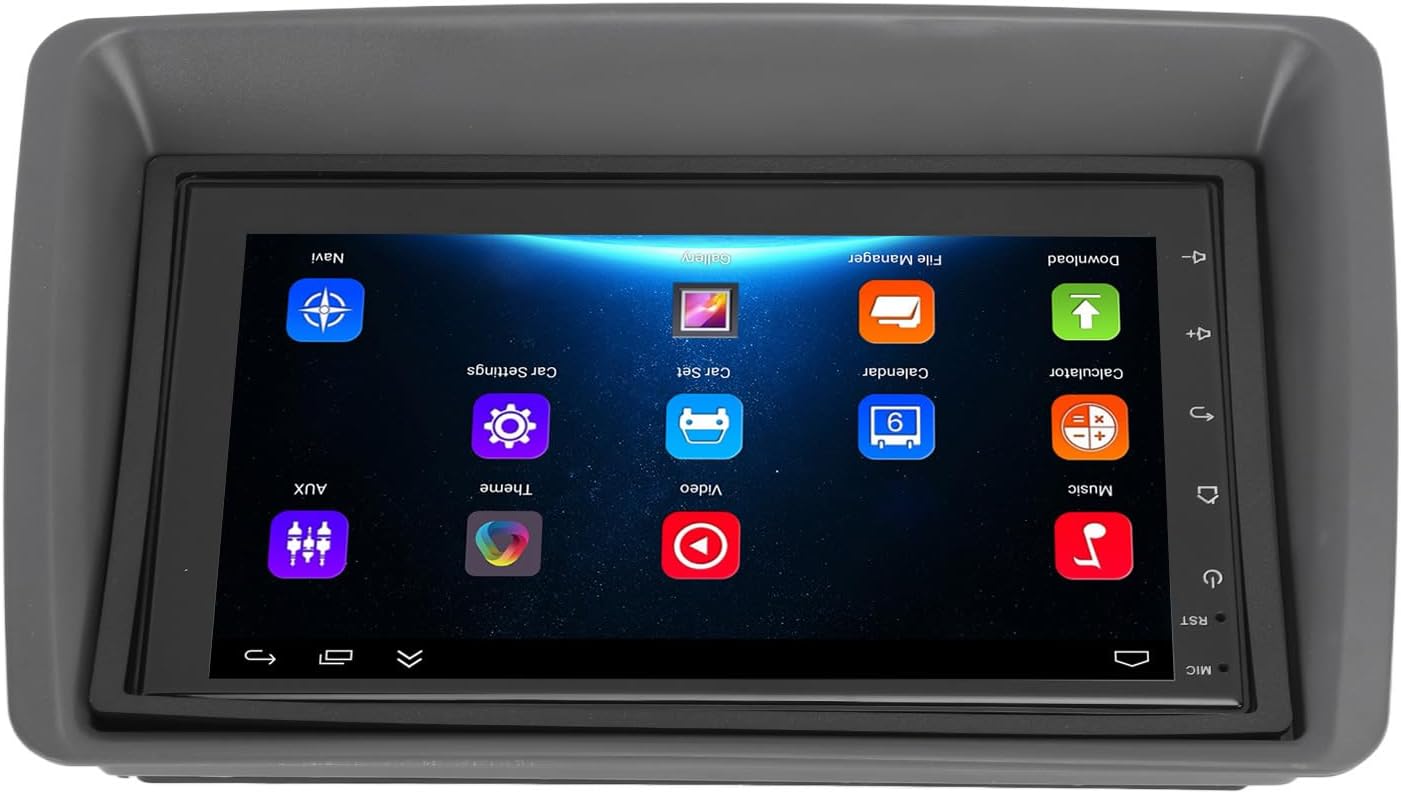
Figure 5.1: Main user interface of the Carplay screen.
5.2 CarPlay Wayarles / Android Auto
The unit supports wireless Apple CarPlay and Android Auto for seamless smartphone integration.
- Pastikan Bluetooth dan Wi-Fi didayakan pada telefon pintar anda.
- On the Carplay screen, navigate to the "CarPlay" or "Android Auto" application.
- Follow the on-screen prompts to pair your phone via Bluetooth. Once paired, the system will automatically establish a Wi-Fi connection for CarPlay/Android Auto functionality.
- Your phone's compatible apps (navigation, music, messaging) will be displayed on the Carplay screen.
5.3 Navigasi GPS
The unit supports both online and offline GPS navigation.
- Navigasi Dalam Talian: Connect the unit to Wi-Fi (via a mobile hotspot or vehicle Wi-Fi) to use online mapping services. Download navigation apps from the pre-installed app store.
- Navigasi Luar Talian: Download map data for offline use within your preferred navigation application. This allows navigation without an active internet connection.
5.4 Kesambungan Bluetooth
Sambungkan telefon pintar anda melalui Bluetooth untuk panggilan bebas tangan dan penstriman audio.
- Go to the "Settings" menu on the Carplay screen and select "Bluetooth".
- Enable Bluetooth and make the device discoverable.
- On your smartphone, search for available Bluetooth devices and select "EIMSOAH Carplay" (or similar name).
- Sahkan kod gandingan pada kedua-dua peranti.
- Once connected, you can make/receive calls and play audio through the car's speakers.
5.5 Paparan Skrin Pisah
The unit supports split-screen functionality, allowing two applications to be viewed serentak.
- Buka aplikasi pertama yang ingin anda gunakan.
- Press and hold the "Recent Apps" button (or swipe up and hold from the bottom of the screen, depending on the Android version).
- Drag the first app to one side of the screen.
- Select the second application from the recent apps list or app drawer to fill the other half of the screen.
5.6 Reverse Image Function
If a compatible reverse camera is connected (not included), the screen will automatically display the reverse view apabila kenderaan ditukar ke gear undur.
- Ensure the reverse camera is properly installed and connected to the designated video input.
- Sistem akan bertukar kepada kamera secara automatik view apabila gear undur dihidupkan.
6. Penyelenggaraan
Proper maintenance ensures the longevity and optimal performance of your EIMSOAH Carplay Screen.
- Membersihkan Skrin: Gunakan kain lembut dan tidak berbulu untuk mengelap skrin dengan lembut. Untuk calitan degil, sedikit dampen kain dengan air atau pembersih selamat skrin. Elakkan bahan yang melelas atau bahan kimia yang keras.
- Kemas Kini Perisian: Periodically check for software updates through the system settings (if available) to ensure you have the latest features and bug fixes.
- Keadaan Persekitaran: Avoid exposing the unit to extreme temperatures, high humidity, or direct sunlight for extended periods.
- Pengurusan Kabel: Pastikan semua kabel disambungkan dengan selamat dan tidak tersepit atau terdedah kepada haus berlebihan.
7. Penyelesaian masalah
If you encounter issues with your EIMSOAH Carplay Screen, refer to the following common problems and solutions:
| Masalah | Kemungkinan Punca | Penyelesaian |
|---|---|---|
| Unit tidak dihidupkan. | Tiada bekalan kuasa; pendawaian longgar; fius yang ditiup. | Check power connections and vehicle fuse box. Ensure battery is connected. |
| Tiada output audio. | Volume muted; speaker wires disconnected; incorrect audio settings. | Check volume level and mute status. Verify speaker wire connections. Adjust audio output settings. |
| Skrin sentuh tidak bertindak balas. | Software glitch; screen protector interference; physical damage. | Restart the unit. Remove any screen protectors to test. If problem persists, contact support. |
| Isyarat GPS lemah atau hilang. | GPS antenna obstructed or disconnected; poor satellite coverage. | Pastikan antena GPS mempunyai jernih view of the sky and is securely connected. Move to an open area. |
| Isu sambungan Bluetooth. | Bluetooth off on device/phone; pairing error; interference. | Ensure Bluetooth is enabled on both devices. Delete previous pairings and re-pair. Move phone closer to unit. |
| CarPlay/Android Auto tidak bersambung. | Wi-Fi/Bluetooth issues; phone compatibility; app issues. | Verify Wi-Fi and Bluetooth are active. Restart phone and unit. Ensure phone OS is up to date. |
If the problem persists after trying these solutions, please contact EIMSOAH customer support for further assistance.
8. Spesifikasi
Detailed technical specifications for the EIMSOAH 7in HD Carplay Screen:
| Ciri | Penerangan |
|---|---|
| Saiz Skrin | 7 inci |
| Sistem Operasi | Android 12 |
| CPU | 4 Teras |
| Resolusi Skrin | 1024x600 |
| Versi Bluetooth | 4.0 |
| Radio | FM/RDS |
| Kuasa Keluaran | 4 x 45W |
| Image Connection | For Android / For iOS (Wireless Apple CarPlay, Wired/Wireless Android Auto) |
| Navigasi GPS | Support Online/Offline Navigation |
| Jenis Skrin Sentuh | HD Capacitive Multi-Point Touch |
| Wireless WI-FI | Support 3G/4G/5G wireless signal reception |
| Paparan Skrin Pisah | Supported (left and right split screen) |
| Kawalan Roda Stereng | Disokong |
| Reverse Image Input | Supported (HD reverse video input, camera not included) |
| Fungsi USB | Two USB ports (media playback, file transfer, DVR) |
| Fungsi AUX | Audio/Video input from external devices |
| Litar Pelindung | Lebihan, Overvoltage, Litar pintas |
| Matikan Memori | Disokong |
| Input/Output Video | Two video inputs, one video output |
| Output Audio | Left Audio Output, Right Audio Output |
| Format Gambar yang Disokong | JPEG, GIF, PNG, BMP, JPG |
| Format Video yang Disokong | MP4 / MP5 / MKV / AVI / RMVB / 1080P |
| Format Audio yang Disokong | MP3/WMA/WAV/FLAC |
| Bahasa | Built-in Multiple Languages (Simplified Chinese, Traditional Chinese, English, German, Russian, Spanish, Italian, etc.) |
| Kelengkapan | Replacement for Fiat Panda 2003-2012 |
| Berat Barang | 2.57 paun |
| Dimensi Pakej | 14.17 x 8.27 x 4.72 inci |
9. Waranti dan Sokongan
EIMSOAH products are designed for reliability and performance. For warranty information and technical support, please refer to the following:
- Waranti: Specific warranty terms and conditions may vary. Please refer to the warranty card included with your product or contact the seller/manufacturer directly for details regarding coverage period and claims process.
- Sokongan Teknikal: For technical assistance, troubleshooting beyond this manual, or inquiries about parts and service, please contact EIMSOAH customer support through the retailer where you purchased the product or visit the official EIMSOAH brand store on Amazon: EIMSOAH Store.