
Tikom L9000 Plus
Manual Pengguna Kombo Vakum dan Mop Robot Tikom L9000 Plus
Model: L9000 Plus
1. Produk Lebihview
The Tikom L9000 Plus is an advanced robot vacuum and mop combo designed to provide comprehensive floor cleaning. It features automatic self-emptying, precise LiDAR navigation for efficient mapping, powerful suction, and integrated sweeping and mopping capabilities. This manual provides essential information for setting up, operating, and maintaining your device.

The Tikom L9000 Plus robot vacuum and its accompanying self-emptying base, shown with the mobile application interface displaying a mapped home layout.

Illustration of the automatic self-emptying feature, demonstrating how the robot's dustbin contents are transferred to the 2.5L dust bag in the base, providing up to 60 days of hands-free cleaning.

The robot utilizing 360° LiDAR navigation to create accurate maps, enabling efficient room mapping, path planning, and optimized cleaning routes. The mobile app displays the generated map.

Seorang bekasample of customized cleaning schedules and zones, showing how users can define specific cleaning times for different rooms, set virtual walls, and designate no-go zones or no-mop zones via the app.

Visual representation of the robot's powerful 4000 Pa suction, capable of effectively cleaning various floor types, including hard floors, tiles, wooden floors, and low-pile carpets. Suction levels can be adjusted.

The L9000 Plus performing both vacuuming and mopping functions simultaneously. It features a 300ml dustbin, a 250ml water tank, and adjustable 3-level water output for thorough cleaning on various hard floor surfaces.
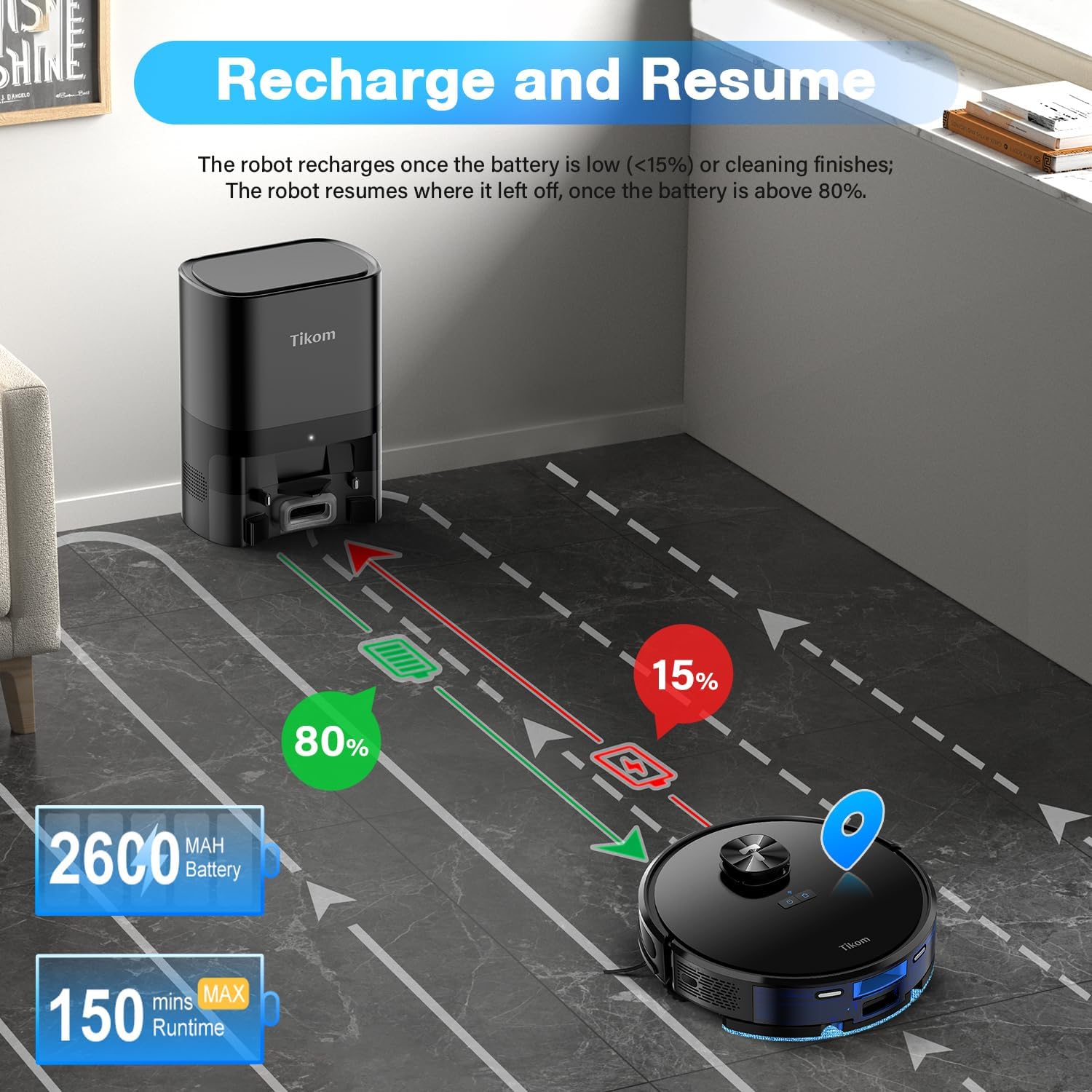
Diagram illustrating the robot's recharge and resume function. The robot automatically returns to the charging station when its battery is low (below 15%) or cleaning is complete, and resumes cleaning from where it left off once the battery reaches 80%.

Examples of smart map settings, including the creation of virtual walls to restrict access to certain areas, no-go zones to prevent the robot from entering, and no-mop zones to protect carpets or rugs during mopping.

The robot can be controlled via the Tuya Smart App or voice commands through compatible devices like Alexa or Google Assistant. The image shows the robot's compact height of 4.33 inches, allowing it to clean under furniture.
2. Apa yang ada di dalam Kotak
Upon unboxing your Tikom L9000 Plus, please verify that all the following components are included:
- Pembersih Vakum Robot (1)
- Automatic Self-Emptying Base (1)
- Tong Habuk & Tangki Air 2-dalam-1 (1)
- Pemegang Kain Mengemop (1)
- Kain Mop Ganti (1)
- Stesen Pengecasan (1)
- Penyesuai Kuasa (1)
- Berus Sisi (4)
- Berus Pembersihan (1)
- HEPA dan Span Ganti (1)
- Plat Penyekat Lutsinar Tong Habuk (2)
- Panduan Memulakan Pantas (1)
- Manual Pengguna (1)
3. Persediaan
3.1 Penempatan Stesen Pengecasan
Place the Automatic Self-Emptying Base against a wall in an open area, ensuring there are no obstacles within 1.5 meters (5 feet) in front of the base and 0.5 meters (1.6 feet) on either side. This allows the robot to easily dock and empty its dustbin.
3.2 Caj Permulaan
Connect the power adapter to the charging station and plug it into a wall outlet. Place the robot onto the charging pins of the base. Ensure the robot is properly aligned. The robot will begin charging automatically. For first-time use, fully charge the robot before operation.
3.3 Sambungan dan Pemetaan Apl
- Muat turun Aplikasi Pintar Tuya dari gedung aplikasi peranti mudah alih anda.
- Daftar atau log masuk ke akaun anda.
- Follow the in-app instructions to add your Tikom L9000 Plus. Ensure your Wi-Fi network is 2.4GHz, as the robot only supports this frequency.
- Once connected, initiate a mapping run. The robot will use its LiDAR navigation to scan your home and create an accurate map. This map can be saved and customized within the app. The L9000 Plus can save up to 5 different maps.
4. Arahan Operasi
4.1 Cleaning Modes and Scheduling
- Pembersihan Auto: The robot cleans the entire mapped area automatically.
- Bersihkan Tempat: Direct the robot to clean a specific small area with concentrated dirt.
- Pembersihan Zon: Tentukan zon tertentu pada peta untuk robot bersihkan.
- Pembersihan Bilik: Select specific rooms on the map for cleaning.
- Penjadualan: Set up recurring cleaning schedules for different rooms or the entire home via the Tuya Smart App.
4.2 Suction and Water Output Adjustment
Through the Tuya Smart App, you can adjust the suction power (Low, Medium, High) and the water output level (3 levels) to suit different floor types and cleaning needs.
4.3 Virtual Walls and No-Go Zones
Use the Tuya Smart App to set up virtual walls, no-go zones, and no-mop zones on your map. This prevents the robot from entering specific areas or mopping carpets.
4.4 Automatic Self-Emptying
After each cleaning cycle, the robot will automatically return to the self-emptying base to transfer collected dust and debris into the 2.5L dust bag. This allows for up to 60 days of cleaning without manual dustbin changes.
4.5 Recharge and Resume
If the battery level drops below 15% during a cleaning cycle, the robot will automatically return to the charging station. Once the battery is charged to 80%, it will resume cleaning from where it left off.
4.6 Kawalan Suara
The Tikom L9000 Plus is compatible with Alexa. Once connected, you can use voice commands such as "Alexa, turn on the robot" to start or stop cleaning.
5. Penyelenggaraan
Regular maintenance ensures optimal performance and extends the lifespan of your Tikom L9000 Plus.
5.1 Dust Bag Replacement (Self-Emptying Base)
The 2.5L dust bag in the self-emptying base should be replaced approximately every 60 days, or when the indicator light on the base signals it is full. Open the top lid of the base, remove the full bag, and insert a new one.
5.2 2-in-1 Dust Bin & Water Tank Cleaning
- Dust Bin (300ml): After each cleaning cycle, remove the dust bin from the robot, open it, and empty the collected debris. Rinse the dust bin with water if necessary, and allow it to air dry completely before reinserting.
- Tangki Air (250ml): Empty any remaining water after each mopping session. Clean the tank with clean water and allow it to air dry.
5.3 Pembersihan/Penggantian Penapis
The HEPA filter inside the dust bin should be cleaned regularly using the provided cleaning brush. Tap off excess dust. Replace the HEPA filter and sponge every 3-6 months, or as needed, to maintain suction performance.
5.4 Pembersihan Berus
- Berus Utama: Remove the main brush cover and the brush itself. Use the cleaning tool to remove hair and debris tangled around the brush.
- Berus Sisi: Check the side brushes for tangled hair or debris. Remove and clean them as needed. Replace worn or damaged side brushes.
5.5 Pembersihan Sensor
Wipe the cliff sensors, wall sensors, and charging contacts on the robot and charging base with a clean, dry cloth regularly to ensure proper navigation and charging.
6. Penyelesaian masalah
If you encounter issues with your Tikom L9000 Plus, refer to the following common problems and solutions:
| Masalah | Kemungkinan Punca | Penyelesaian |
|---|---|---|
| Robot tidak bermula atau bertindak balas. | Bateri lemah; Suis kuasa dimatikan; Robot tersekat. | Pastikan robot dicas; Hidupkan suis kuasa; Kosongkan sebarang halangan. |
| Robot tidak dapat menemui stesen pengecas. | Charging station obstructed; Robot too far from base. | Ensure clear path to base; Place robot closer to base. |
| Prestasi pembersihan yang lemah. | Full dust bin; Clogged filter; Worn brushes. | Empty dust bin; Clean/replace filter; Clean/replace brushes. |
| Isu sambungan apl. | Incorrect Wi-Fi (not 2.4GHz); Network instability. | Ensure 2.4GHz Wi-Fi; Restart router; Re-pair device in app. |
| Mapping errors or robot gets lost. | LiDAR sensor obstructed; Significant changes in environment. | Clean LiDAR sensor; Reset and remap the area if necessary. |
| Robot kerap tersangkut. | Cables, small objects on floor; Steep drops. | Bersihkan lantai daripada halangan; Gunakan zon larangan untuk kawasan bermasalah. |
For persistent issues not covered here, please refer to the detailed troubleshooting section in the full user manual or contact Tikom customer support.
7. Spesifikasi
| Ciri | Spesifikasi |
|---|---|
| Jenama | Tikom |
| Nama Model | L9000 Plus |
| Ciri Khas | LiDAR Navigation Laser, Smart Mapping, 2-in-1 Sweeping & Mopping, Automatic Self-Emptying |
| warna | Hitam |
| Dimensi Produk | 12.6"L x 12.6"W x 3.66"H |
| Jenis Penapis | Penapis HEPA |
| Hayat Bateri | 150 minutes (in quiet mode) |
| Voltage | 14.4 Volt |
| Kapasiti Beg Habuk | 2.5 Liter |
| Kapasiti Tong Debu | 300 ml |
| Kapasiti Tangki Air | 250 ml |
| Sumber Kuasa | Dikuasakan Bateri |
| Kaedah Kawalan | Aplikasi, Suara (Alexa) |
| Peranti Serasi | Telefon pintar |
| Berat Barang | 6.17 paun |
| Pengeluar | Tikom |
| Tarikh Mula-mula Tersedia | 24 Ogos 2024 |
8. Waranti dan Sokongan
Your Tikom L9000 Plus Robot Vacuum and Mop Combo is covered by a manufacturer's warranty. Please refer to the warranty card included in your packaging for specific terms and conditions, including the warranty period and coverage details.
For technical assistance, troubleshooting beyond this manual, or warranty claims, please contact Tikom customer support. Contact information can typically be found on the official Tikom webtapak atau pada pembungkusan produk.
Ask a question about this manual
Ask about setup, troubleshooting, compatibility, parts, safety, or missing instructions. Manuals+ will review the question and use this page’s manual context to help answer it.