
1. Produk Lebihview
This manual provides essential information for the setup, operation, and maintenance of your new 155 cm (59 inches) 4K Ultra HD LED TV, Model 55D4K. Please read this manual thoroughly before using the product to ensure proper functionality and safety.

Rajah 1.1: Depan view of the 59-inch 4K Ultra HD LED TV. This image displays the television screen with a vibrant background, highlighting its 4K HDR capabilities, Dynamic Color Enhancement, Dolby Audio, and T-Screen technology.

Figure 1.2: Key features and energy efficiency rating. This image shows the TV's 4-star energy rating and highlights features such as Dynamic Color Enhancement, AI PQ Processor, T-Screen, Multiple Eye Care, Dolby Audio, HDMI connectivity, 16GB memory, and a metallic bezel-less design.
2. Apa yang ada di dalam Kotak
Carefully unpack the box and ensure all items are present and undamaged. If any items are missing or damaged, please contact customer support.
- 1N LED TV (Main Unit)
- Kabel Audio 1N
- 1N Stand (for table-top mounting)
- Manual Pengguna 1N (dokumen ini)
- Kad Waranti 1N
- Kawalan Jauh 1N
- 2N Batteries (for remote control)
3. Persediaan
3.1 Pemasangan Fizikal
Your TV can be installed on a tabletop using the provided stand or mounted on a wall (wall mount kit sold separately).

Figure 3.1: Product dimensions for installation planning. This diagram illustrates the TV's dimensions in centimeters and inches, including height with and without the stand, width, and depth, along with its weight specifications.
3.1.1 Table-Top Installation
- Letakkan skrin TV dengan berhati-hati pada permukaan yang lembut dan rata untuk mengelakkan kerosakan.
- Attach the provided stand to the designated slots on the bottom of the TV using the screws included with the stand.
- Ensure the stand is securely fastened before carefully lifting the TV to its upright position on a stable, level surface.
3.1.2 Pemasangan Dinding
For wall mounting, a compatible VESA wall mount kit (not included) is required. Refer to the wall mount kit's instructions for proper installation. Ensure the wall can support the TV's weight (9.2 kg with stand, 9 kg without stand).

Rajah 3.2: Belakang view of the television. This image displays the back panel of the TV, indicating the VESA mounting points and the general location of input/output ports.
3.2 Menyambung Peranti
Sambungkan peranti luaran anda ke port TV. TV ini mempunyai pelbagai pilihan sambungan:
- Port HDMI (x3): For set-top boxes, Blu-ray players, gaming consoles.
- Port USB (x1): For connecting hard drives or other USB devices.
- Pelabuhan Ethernet: Untuk sambungan internet berwayar.
- Output Fon Kepala: Untuk menyambungkan fon kepala atau sistem audio luaran.
The TV also supports Wi-Fi and Bluetooth for wireless connectivity.
3.3 Hidupkan dan Persediaan Awal
- Selepas menyambungkan semua peranti yang diingini, palamkan kord kuasa TV ke salur keluar dinding.
- Tekan butang kuasa pada TV atau alat kawalan jauh untuk menghidupkan TV.
- Ikut arahan pada skrin untuk melengkapkan persediaan awal, termasuk pemilihan bahasa, sambungan rangkaian (Wi-Fi atau Ethernet) dan pengimbasan saluran.
- Sign in with your Google account to access Google TV features and download apps.
4. Arahan Operasi
4.1 Penggunaan Alat Kawalan Jauh
The universal remote control allows you to navigate the TV's interface and control various functions. Insert the two provided batteries into the remote control, observing polarity.

Figure 4.1: The universal remote control. This image highlights the remote's layout, including the Google Assistant button and dedicated quick access buttons for popular streaming services like Netflix, Prime Video, Sony LIV, and YouTube.
- Butang Kuasa: Menghidupkan/mematikan TV.
- Pad Navigasi (Atas/Bawah/Kiri/Kanan/OK): Menavigasi menu dan mengesahkan pilihan.
- Kelantangan Naik/Turun: Melaraskan kelantangan audio.
- Saluran Atas/Bawah: Menukar saluran TV.
- Butang Pembantu Google: Activates voice commands for search, smart device control, and more.
- Butang Akses Pantas: Dedicated buttons for Netflix, Prime Video, Sony LIV, and YouTube for instant access.
4.2 Ciri TV Pintar (TV Google)
Your TV comes with Google TV, providing a personalized entertainment experience.
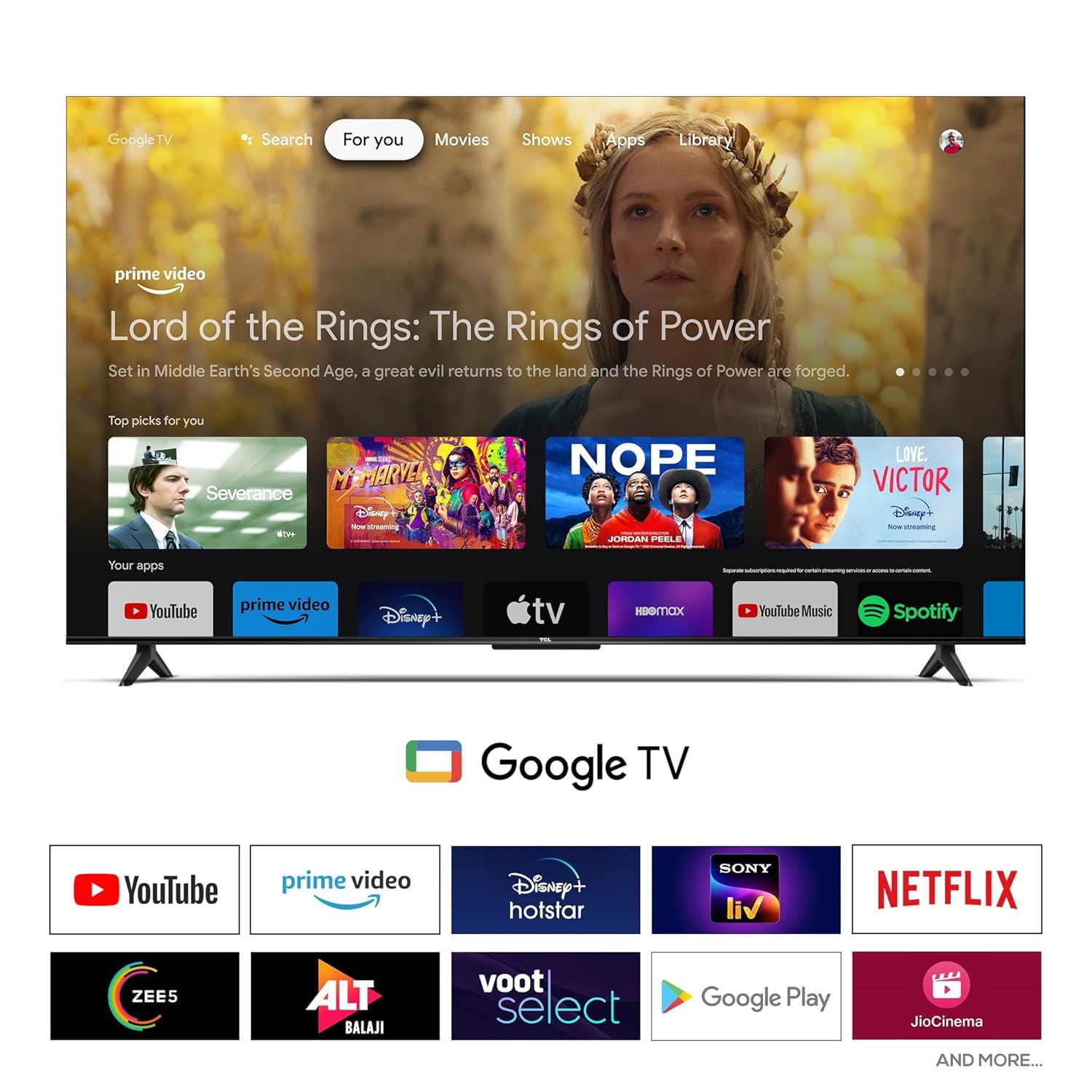
Figure 4.2: Google TV user interface. This screenshot displays the home screen of Google TV, featuring recommended content and a selection of pre-installed and downloadable applications such as YouTube, Prime Video, Disney+ Hotstar, Netflix, and more.
- Cadangan Peribadi: Cadangan kandungan berdasarkan anda viewing history across various streaming services.
- Akses Apl: Download and stream from a wide range of applications available on Google Play Store (e.g., YouTube, Prime Video, Netflix, Disney+ Hotstar, Sony LIV, Zee5, JioCinema).
- Pembantu Google: Use voice commands to search for movies, control smart home devices, get answers, and manage your day.
- Chromecast Terbina dalam: Hantar kandungan terus daripada telefon pintar atau tablet serasi anda ke TV.
4.3 Tetapan Audio dan Video
Access the TV's settings menu to customize picture and sound quality.
- Mod Gambar: Select from various preset modes (e.g., Standard, Vivid, Movie, Game) or customize settings like brightness, contrast, color, and sharpness.
- Mod Bunyi: Choose audio presets (e.g., Standard, Music, Movie, Speech) or adjust equalizer settings. The TV supports Dolby Audio for enhanced sound.
- Jenis Paparan: HDR 10 is supported for enhanced dynamic range with compatible content.
5. Penyelenggaraan
5.1 Membersihkan TV
- Sentiasa cabut plag TV dari salur keluar kuasa sebelum membersihkan.
- Gunakan kain lembut, kering dan bebas serabut untuk mengelap skrin dan kabinet dengan perlahan.
- Untuk tanda degil, ringankan dampbilas kain dengan air atau pembersih skrin yang lembut dan tidak kasar. Jangan sekali-kali sembur pembersih terus ke skrin.
- Elakkan menggunakan pembersih, lilin atau pelarut yang kasar kerana ia boleh merosakkan kemasan TV.
5.2 Kemas Kini Perisian
TV anda mungkin menerima kemas kini perisian untuk meningkatkan prestasi dan menambah ciri baharu. Pastikan TV anda disambungkan ke Internet untuk menerima kemas kini ini secara automatik atau menyemaknya secara manual melalui menu tetapan TV.
6. Penyelesaian masalah
If you encounter issues with your TV, refer to the following common problems and solutions. If the problem persists, contact customer support.
| Masalah | Penyelesaian yang Mungkin |
|---|---|
| Tiada Kuasa | Pastikan kord kuasa dipasang dengan selamat pada kedua-dua TV dan salur keluar elektrik yang berfungsi. Cuba kedai lain. |
| Tiada Gambar/Bunyi | Check input source (HDMI, USB). Ensure cables are securely connected. Try a different HDMI port. |
| Alat Kawalan Jauh Tidak Berfungsi | Check batteries and replace if necessary. Ensure no obstructions between remote and TV. Re-pair Bluetooth remote if applicable. |
| Kualiti Gambar Lemah | Adjust picture settings (brightness, contrast, sharpness). Check source resolution. Ensure 4K content is being played for optimal 4K display. |
| Tiada Sambungan Internet | Check Wi-Fi password. Restart your router. Try connecting via Ethernet cable. |
7. Spesifikasi
| Ciri | Perincian |
|---|---|
| Nama Model | 55H4K |
| Saiz Skrin | 155 cm (59 inches) / 55 Inches (diagonal) |
| Resolusi | 4K Ultra HD (3840 x 2160 piksel) |
| Kadar Segar Semula | 60 Hertz |
| Teknologi Paparan | LED, HDR 10 |
| Viewsudut | 178 Darjah |
| Output Audio | 24 Watts, Dolby Audio, Surround Sound |
| Ketersambungan | 3 HDMI Ports, 1 USB Port, Ethernet, Wi-Fi, Bluetooth, Headphone Output |
| Sistem Operasi | Google TV |
| Memori (RAM/Storan) | 2 GB RAM / 16 GB Storage |
| Dimensi Produk (LxWxH) | 25.5 x 122.6 x 75 cm (dengan dirian) |
| Berat Barang | 9.2 kg (dengan pendirian) |
| Penggunaan Kuasa | 125 Watt (Mod Hidup) |
| Sumber Kuasa | AC 240 Volt |
| Alat Kawalan Jauh | Universal (IR, Bluetooth) |
| Jenis Pemasangan | Table Top & Wall Mount |
8. Waranti dan Sokongan
8.1 Maklumat Waranti
Produk ini disertakan dengan a Waranti 2 Tahun from the date of purchase. Please retain your purchase receipt and the warranty card for any warranty claims. The warranty covers manufacturing defects and malfunctions under normal use conditions. It does not cover damage caused by misuse, accidents, unauthorized repairs, or natural disasters.
8.2 Sokongan Pelanggan
For technical assistance, troubleshooting beyond this manual, or warranty claims, please contact the manufacturer's customer support. Refer to the warranty card or the manufacturer's official weblaman web untuk maklumat hubungan.
Pengeluar: India
model: 55H4K
Tarikh Mula-mula Tersedia: 27 Mac 2024