
1. Pengenalan
Thank you for choosing the Hama DR2002BT Digital Radio. This device offers a comprehensive audio experience with FM, DAB/DAB+ digital radio reception, and Bluetooth connectivity. Its user-friendly design, featuring large buttons and a clear 4.3-inch TFT color display, makes it suitable for all users. This manual will guide you through the setup, operation, and maintenance of your new digital radio.
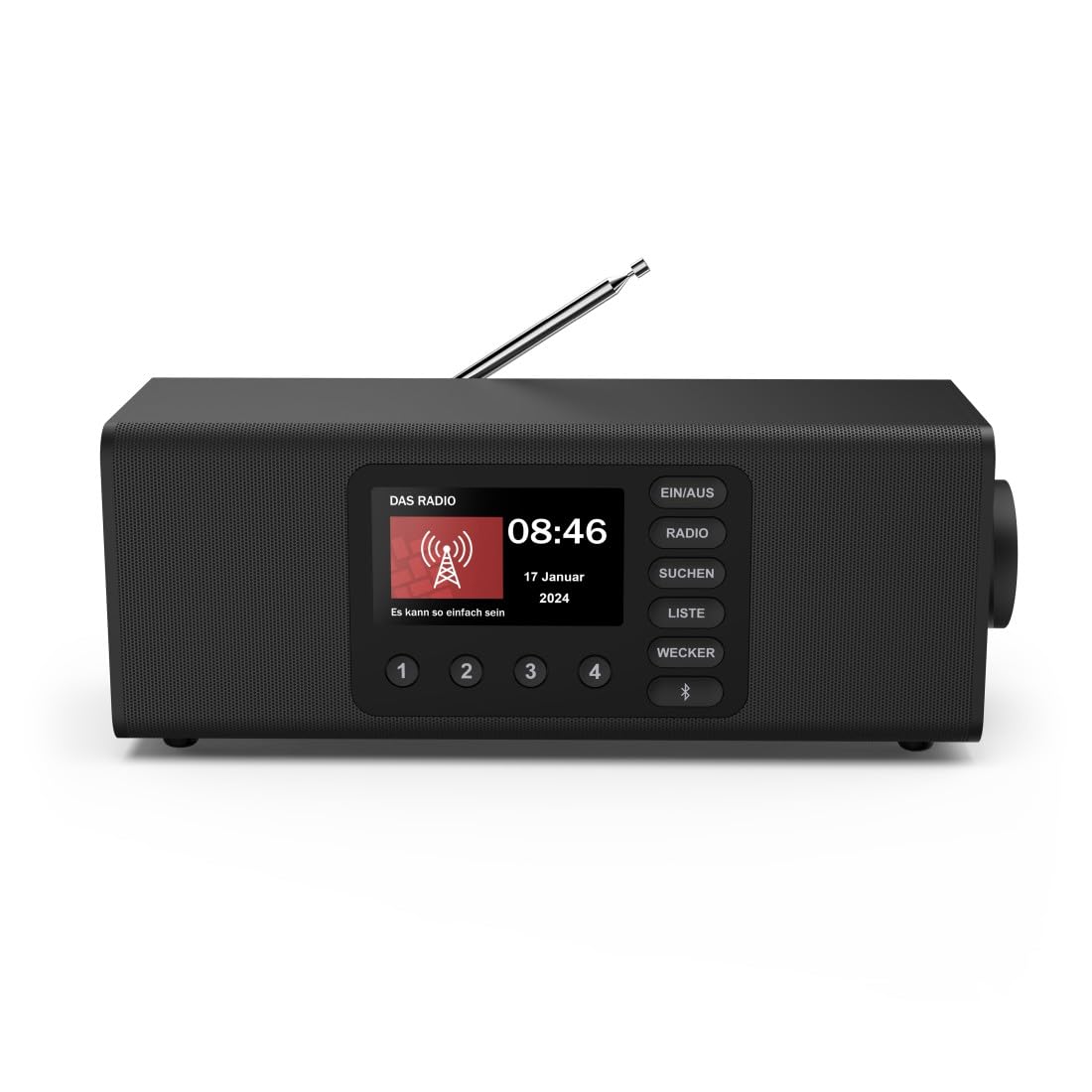
Imej: Depan view of the Hama DR2002BT Digital Radio, showcasing butang paparan dan kawalannya.
2. Maklumat Keselamatan
Sila baca arahan keselamatan ini dengan teliti sebelum menggunakan peranti ini. Simpan manual ini untuk rujukan pada masa hadapan.
- Jangan dedahkan peranti kepada kelembapan, hujan atau suhu yang melampau.
- Elakkan meletakkan peranti berhampiran sumber haba atau di bawah cahaya matahari langsung.
- Jangan buka peranti casing. Pembaikan hanya boleh dilakukan oleh kakitangan yang berkelayakan.
- Gunakan hanya penyesuai kuasa yang disediakan.
- Pastikan pengudaraan yang betul di sekeliling peranti.
3. Kandungan Pakej
Sahkan bahawa semua item ada semasa membongkar:
- Hama DR2002BT Digital Radio
- Penyesuai Kuasa
- Manual Pengguna
4. Produk Lebihview
4.1 Kawalan dan Paparan Panel Hadapan

Image: Front panel of the radio highlighting the display and control buttons, with icons for Bluetooth, DAB+, and Alarm functions.
The front panel features a 4.3-inch TFT color display, large control buttons, and a rotary knob for easy navigation and selection. Key buttons include:
- EIN/AUS (ON/OFF): Menghidupkan atau mematikan peranti.
- RADIO: Switches between FM and DAB/DAB+ modes.
- SUCHEN (SEARCH): Initiates station scanning.
- LISTE (LIST): Accesses the list of available stations.
- WECKER (ALARM): Mengkonfigurasi tetapan penggera.
- Butang Bluetooth: Mengaktifkan mod gandingan Bluetooth.
- Butang Pratetap (1-4): Akses pantas ke stesen kegemaran yang disimpan.
- Rotary Knob (LAUTSTÄRKE/NAVIGIEREN): Controls volume and navigates menus.
4.2 Sambungan Panel Belakang
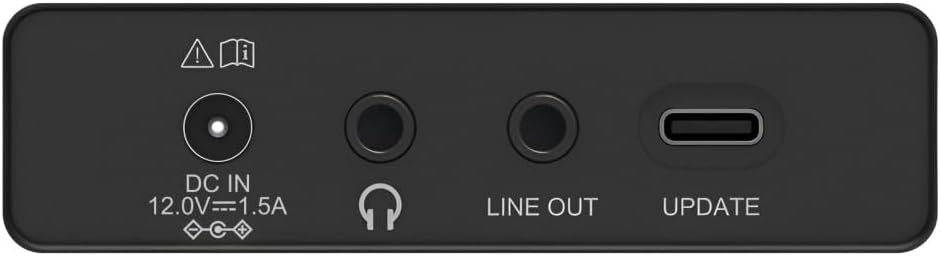
Image: Close-up of the rear panel showing the DC IN, Headphone, Line Out, and UPDATE (USB-C) ports.
The rear panel provides essential connectivity options:
- DC IN 12.0V --- 1.5A: Power input for the external adapter.
- Bicu Fon Kepala (3.5mm): Untuk mendengar secara peribadi.
- BARIS KELUAR: Output audio untuk menyambung ke luaran amppenghidup atau pembesar suara.
- UPDATE (USB-C): Untuk kemas kini perisian tegar.
- Antena Teleskopik: For FM and DAB/DAB+ reception.

Imej: Belakang view of the Hama DR2002BT Digital Radio with its telescopic antenna extended for optimal signal reception.
5. Persediaan
5.1 Sambungan Kuasa
- Sambungkan penyesuai kuasa yang disediakan kepada DC IN port di bahagian belakang radio.
- Palamkan penyesuai kuasa ke dalam salur keluar kuasa yang sesuai.
- Radio akan dihidupkan secara automatik atau memasuki mod siap sedia.
5.2 Antenna Positioning
For optimal FM and DAB/DAB+ reception, fully extend the telescopic antenna. Position the radio near a window if reception is poor.
5.3 Persediaan Awal (Penggunaan Pertama)
Upon first power-on, the radio may guide you through an initial setup process, including language selection and an automatic DAB station scan. Follow the on-screen prompts.
6. Arahan Operasi
6.1 Hidupkan/Mati Kuasa
Tekan ke EIN / AUS butang untuk menghidupkan atau mematikan radio.
6.2 DAB/DAB+ Radio Mode
- Tekan ke RADIO butang untuk memilih mod DAB.
- If this is the first time in DAB mode or if you want to rescan, press SUCHEN untuk melakukan imbasan penuh untuk stesen yang tersedia.
- Use the rotary knob to navigate through the station list. Press the knob to select a station.
- Kepada view the station list, press the SENARAI butang.
Mod Radio 6.3 FM
- Tekan ke RADIO butang untuk memilih mod FM.
- Tekan SUCHEN to automatically scan for the next available FM station.
- Alternatively, use the rotary knob to manually tune to a frequency.
6.4 Menyimpan dan Mengingat Semula Pratetap
The radio allows you to store up to 4 favorite stations using the dedicated preset buttons (1-4).
- Tune to the desired station (DAB or FM).
- Press and hold one of the preset buttons (1-4) until the display confirms the station has been saved.
- To recall a preset station, simply press the corresponding preset button (1-4).
6.5 Operasi Bluetooth

Imej: Depan view of the radio with Bluetooth and stereo speaker icons, indicating its wireless audio streaming capability.
The Hama DR2002BT can stream audio from your smartphone, tablet, or laptop via Bluetooth 5.0.
- Press the Bluetooth button on the front panel to enter Bluetooth pairing mode. The display will show a pairing indicator.
- On your external device (smartphone, tablet), enable Bluetooth and search for available devices.
- Select "Hama DR2002BT" from the list of devices to pair.
- Once paired, you can play audio from your device, and it will be output through the radio's speakers.
6.6 Fungsi Jam Penggera

Image: A person waking up with the Hama DR2002BT Digital Radio placed on a bedside table, illustrating its alarm clock functionality.
The radio features two independent alarm settings.
- Tekan ke WECKER button to access alarm settings.
- Use the rotary knob to select Alarm 1 or Alarm 2.
- Configure the alarm time, source (buzzer or radio station), and repetition (once, daily, weekdays, weekends, or specific days).
- Press the rotary knob to confirm each setting.
- To quickly activate/deactivate an alarm, press the WECKER button and use the rotary knob to toggle the alarm status.

Image: A person interacting with the Hama DR2002BT Digital Radio, demonstrating its ease of use for setting functions like alarms or tuning stations.
7. Penyelenggaraan
To ensure the longevity and optimal performance of your Hama DR2002BT Digital Radio, follow these maintenance guidelines:
- Pembersihan: Gunakan kain lembut, kering dan bebas bulu untuk membersihkan bahagian luar radio. Jangan gunakan pembersih, lilin atau pelarut yang kasar.
- habuk: Regularly dust the device to prevent accumulation in vents and ports.
- Storan: Jika menyimpan radio untuk tempoh yang lama, putuskan sambungannya daripada bekalan kuasa dan simpan di tempat yang sejuk dan kering.
- Antena: Kendalikan antena teleskopik dengan berhati-hati untuk mengelakkan bengkok atau patah.
8. Penyelesaian masalah
Jika anda menghadapi masalah dengan radio anda, rujuk masalah dan penyelesaian biasa berikut:
| Masalah | Kemungkinan Punca | Penyelesaian |
|---|---|---|
| Tiada kuasa | Penyesuai kuasa tidak disambungkan; Soket kuasa rosak | Periksa sambungan penyesuai kuasa; Cuba salur kuasa yang berbeza. |
| Penerimaan radio yang lemah (DAB/FM) | Antenna not extended; Weak signal area; Interference | Fully extend the telescopic antenna; Reposition the radio (e.g., near a window); Perform a new station scan. |
| Penggandingan Bluetooth gagal | Bluetooth not enabled on external device; Radio not in pairing mode; Device too far | Ensure Bluetooth is on and visible on your device; Press the Bluetooth button on the radio; Move devices closer (within 10m). |
| Tiada bunyi | Kelantangan terlalu rendah; Bisu diaktifkan; Sumber yang dipilih salah | Increase volume using the rotary knob; Check if mute is active; Ensure the correct mode (DAB, FM, Bluetooth) is selected. |
| Penggera tidak berbunyi | Alarm not activated; Incorrect alarm time/day set | Verify alarm is enabled in settings; Check alarm time and repetition settings. |
9. Spesifikasi

Image: Diagram showing the dimensions of the Hama DR2002BT Digital Radio: 35 cm (width), 12.5 cm (depth), and 13 cm (height).
| Ciri | Perincian |
|---|---|
| Nombor Model | DR2002BT (00054298) |
| Penerimaan | DAB, DAB+, FM |
| Versi Bluetooth | 5.0 |
| Kuasa Output (RMS) | 10 W (Stereo) |
| Paparan | Paparan Warna TFT 4.3" |
| Sambungan | 3.5mm Jack (Headphone), USB-C (Update), Line Out, DC IN |
| Bekalan Kuasa | Penyesuai Kuasa Luaran |
| Dimensi (W x D x H) | 35 x 12.5 x 13 cm |
| Berat badan | 1788 Gram |
| bahan | plastik |
| warna | Hitam |
| Ciri-ciri Tambahan | Alarm Function (2 alarms), Direct Selection Keys |
10. Waranti dan Sokongan
Hama GmbH & Co KG provides a warranty for this product. Please refer to the warranty card included in your package or visit the official Hama webtapak untuk terma dan syarat jaminan terperinci.
For technical support, troubleshooting assistance, or spare parts, please contact Hama customer service or visit their website. The availability of spare parts in the EU is guaranteed for 7 years.
- Pengeluar: Hama GmbH & Co KG
- Negara Asal: Jerman
- EU Spare Parts Availability: 7 Tahun