
1. Pengenalan
Thank you for choosing the Polti Smart 110 Eco steam cleaner. This manual provides essential information for the safe and efficient use, maintenance, and troubleshooting of your appliance. Please read these instructions carefully before first use and keep them for future reference.

Figure 1: Polti Smart 110 Eco Steam Cleaner. This image shows the complete steam cleaner unit with its hose and floor brush attachment.
2. Arahan Keselamatan
Sentiasa patuhi langkah berjaga-jaga keselamatan asas apabila menggunakan peralatan elektrik untuk mengurangkan risiko kebakaran, renjatan elektrik dan kecederaan diri.
- Do not direct steam at people, animals, or electrical appliances. Steam is very hot and can cause burns.
- Ensure the power cord is not damaged and do not operate the appliance if the cord or plug is compromised.
- Jangan sekali-kali merendam perkakas dalam air atau cecair lain.
- Do not open the boiler cap while the appliance is under pressure or hot.
- Keep the appliance out of reach of children and supervise children to ensure they do not play with the appliance.
- Gunakan hanya air paip. Jangan masukkan detergen, pewangi atau bahan kimia lain ke dalam tangki air.
- Always unplug the appliance before filling, cleaning, or performing maintenance.
3. Produk Lebihview
3.1 Komponen dan Aksesori
Your Polti Smart 110 Eco comes with the following components and accessories:
- Unit Pembersih Stim Utama
- Flexible Steam Hose with Gun
- Tiub Sambungan (2)
- VaporForce Brush (rectangular floor brush)
- Brush Storage Insert
- Berus Kecil
- Muncung Pemusat
- Window Tool
- Small Round Brushes (various sizes)
- Cloth for Floor Brush
- corong
- Jag Pengukur

Figure 2: All included accessories for the Polti Smart 110 Eco. This image displays the steam cleaner unit alongside all its attachments, including various brushes, nozzles, and cloths.
3.2 Kawalan dan Penunjuk
- Butang Kuasa: Menghidupkan dan mematikan perkakas.
- Steam Adjustment Dial: Regulates the steam output (Min, Eco, Standard, Max).
- Steam Ready Indicator Light: Illuminates when the appliance has reached operating temperature.
- Penutup Tangki Air: For filling the water tank.
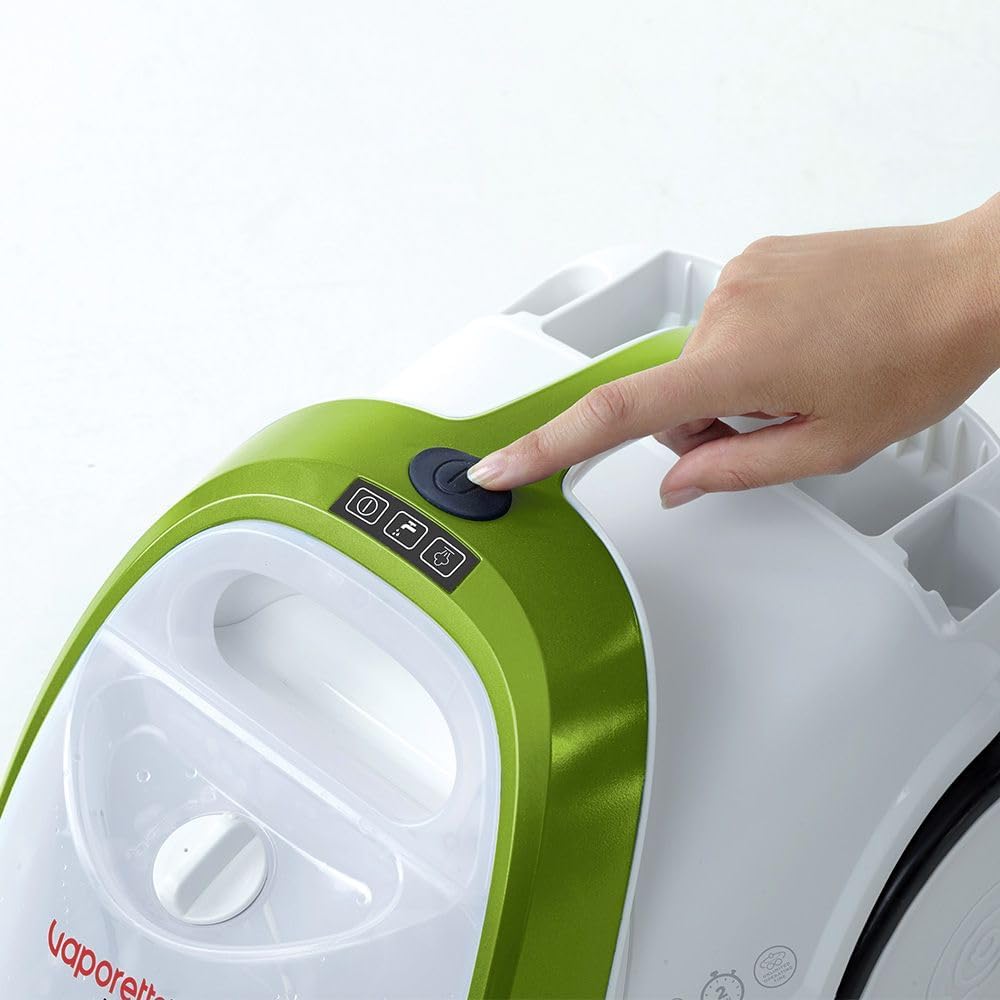
Figure 3: Power button location. A hand is shown pressing the main power button located on the top of the steam cleaner unit.
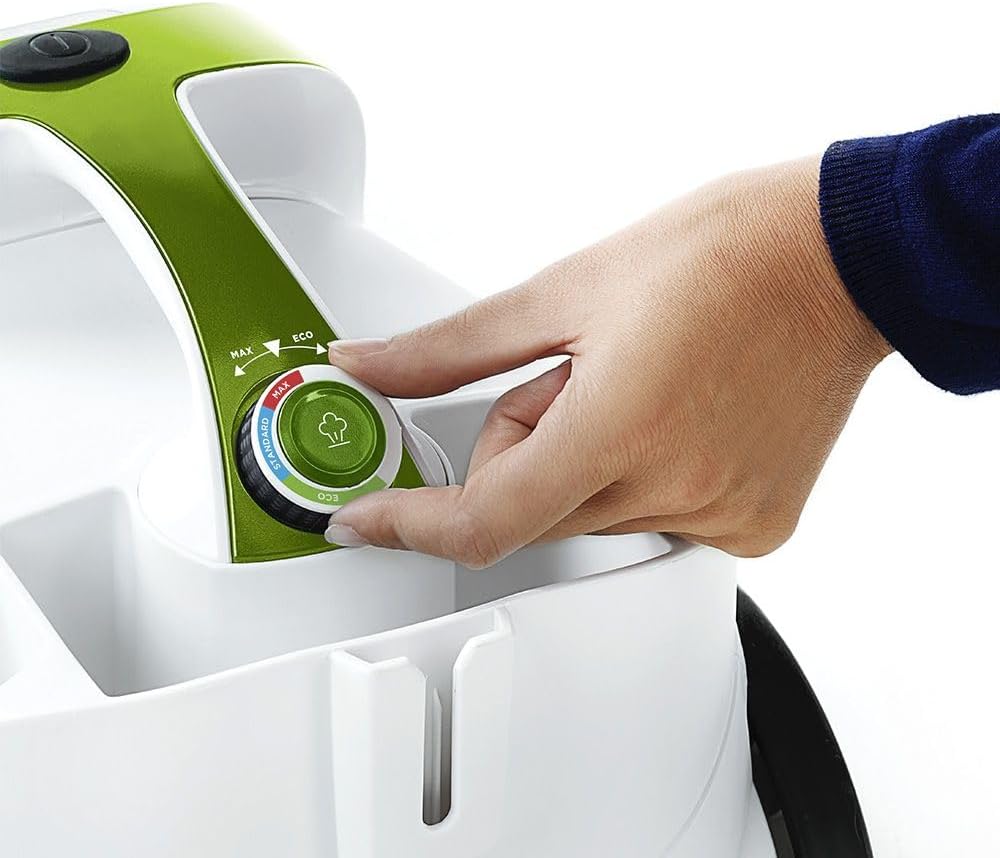
Figure 4: Steam adjustment dial. A hand is shown rotating the dial to select the desired steam intensity.
4. Persediaan
4.1 Membongkar
Carefully remove all components from the packaging. Retain the packaging for future storage or transport if needed. Ensure all accessories listed in Section 3.1 are present.
4.2 Mengisi Tangki Air
- Pastikan perkakas telah dicabut daripada plag dan sejuk.
- Tanggalkan penutup tangki air.
- Using the provided measuring jug and funnel, carefully pour up to 1.5 liters of tap water into the tank. Do not overfill.
- Skrukan semula penutup tangki air dengan kemas.

Figure 5: Filling the water tank. A hand is shown pouring water from a jug into the transparent water tank of the steam cleaner.
4.3 Memasang Aksesori
Connect the flexible steam hose to the main unit by aligning the connectors and pushing firmly until it clicks into place. Attach desired accessories (e.g., extension tubes, VaporForce brush) to the steam gun or to each other as needed for your cleaning task. For the VaporForce brush, ensure the cloth is securely attached.

Figure 6: VaporForce brush attachment. A close-up view of the rectangular VaporForce brush connected to the steam cleaner's handle.
5. Arahan Operasi
5.1 Menghidupkan dan Memanaskan
- Palamkan perkakas ke dalam salur keluar elektrik yang sesuai.
- Press the power button (refer to Figure 3). The indicator light will illuminate.
- The appliance will begin to heat up. This process takes approximately 2 minutes. The steam ready indicator light will turn on when the optimal operating temperature is reached.
5.2 Adjusting Steam Output
Use the steam adjustment dial (refer to Figure 4) to select the appropriate steam intensity for your cleaning task:
- Min: Untuk permukaan halus atau pembersihan ringan.
- Eko: Energy-saving mode for general cleaning.
- Standard: Untuk tugasan pembersihan harian.
- Maks: For stubborn dirt and heavily soiled surfaces.
5.3 Membersihkan Permukaan Berbeza
The Polti Smart 110 Eco is suitable for cleaning glass, hard floors, laminate, and tiles. Always test on a small, inconspicuous area first.
- Hard Floors/Tiles: Attach the extension tubes and VaporForce brush with a cloth. Move the brush slowly over the surface to allow the steam to work.
- Laminat: Use the Eco or Min steam setting and move the brush quickly to avoid excessive moisture.
- Kaca/Cermin: Use the window tool. Apply steam to loosen dirt, then use the squeegee to remove moisture and dirt.
- Grout/Small Areas: Use the concentrator nozzle or small round brushes for targeted cleaning.
6. Penyelenggaraan dan Pembersihan
6.1 Selepas Setiap Penggunaan
- Cabut plag perkakas dan biarkan sehingga sejuk sepenuhnya.
- Carefully unscrew the water tank cap and empty any remaining water.
- Clean accessories with water and mild soap if necessary. Allow them to dry completely before storing.
- Store the appliance and accessories in a dry, safe place. The unit has an integrated accessory storage compartment.

Figure 7: Accessory storage. The steam cleaner is shown with its various small accessories neatly stored in the integrated compartment on the unit.
6.2 Penyahkelasan
Depending on the hardness of your water, descaling may be required periodically to maintain optimal performance. Refer to the specific descaling instructions provided in the full product manual or Polti's official website. Do not use harsh chemical descalers not approved for steam cleaners.

Figure 8: Anti-calc filter/cap. A hand is shown interacting with the cap on the side of the unit, likely for maintenance or descaling.
7. Penyelesaian masalah
| Masalah | Kemungkinan Punca | Penyelesaian |
|---|---|---|
| Tiada keluaran wap | No water in tank; appliance not heated; steam lock engaged. | Fill water tank; wait for steam ready light; disengage steam lock. |
| Tekanan wap rendah | Low water level; steam adjustment set to Min/Eco; limescale buildup. | Refill water tank; adjust steam dial to Standard/Max; descale the appliance. |
| Air menitis dari muncung | Appliance not fully heated; condensation. | Wait for steam ready light; direct first bursts of steam into a cloth. |
If you encounter problems not listed here or if the suggested solutions do not resolve the issue, please contact Polti customer support.
8. Spesifikasi
- model: PTEU0317
- Kuasa: 1500 Watt
- Tekanan wap: 4 bar
- Masa pemanasan: 2 minit
- Bahan Dandang: Keluli Tahan Karat
- Dimensi Produk (L x W x H): 40 x 27 x 29 cm
- Berat Barang: 1 Kilogram
- Permukaan Disyorkan: Glass, hard floor, laminate, tile
- warna: Hitam, Hijau, Putih
9. Waranti dan Sokongan
For information regarding the product warranty, please refer to the warranty card included with your purchase or visit the official Polti website. For technical assistance, spare parts, or further inquiries, please contact Polti customer support through their official channels.
Anda boleh mendapatkan lebih banyak maklumat dan sokongan pada Polti Brand Store.