
pengenalan
This manual provides comprehensive instructions for the operation, maintenance, and troubleshooting of your JVSCAM C8 Digital Camera. Please read this manual thoroughly before using the camera to ensure proper functionality and to maximize your user experience. The JVSCAM C8 is a compact and portable digital camera designed for capturing high-quality photos and videos, featuring autofocus, digital zoom, and various creative filters.
Apa yang ada dalam Kotak
Selepas membuka pakej, sila sahkan bahawa semua item berikut disertakan:
- JVSCAM C8 Digital Camera
- Kad TF 32GB
- Kabel USB Jenis-C
- Pembaca Kad
- Lanyard
- Manual Pengguna (dokumen ini)
- Beg Simpanan
- Kain Lensa

Rajah 1: Included accessories with the JVSCAM C8 Digital Camera, including the camera, 32GB TF card, Type-C cable, card reader, lanyard, and storage bag.
Produk Selesaiview
Familiarize yourself with the physical components of your camera:
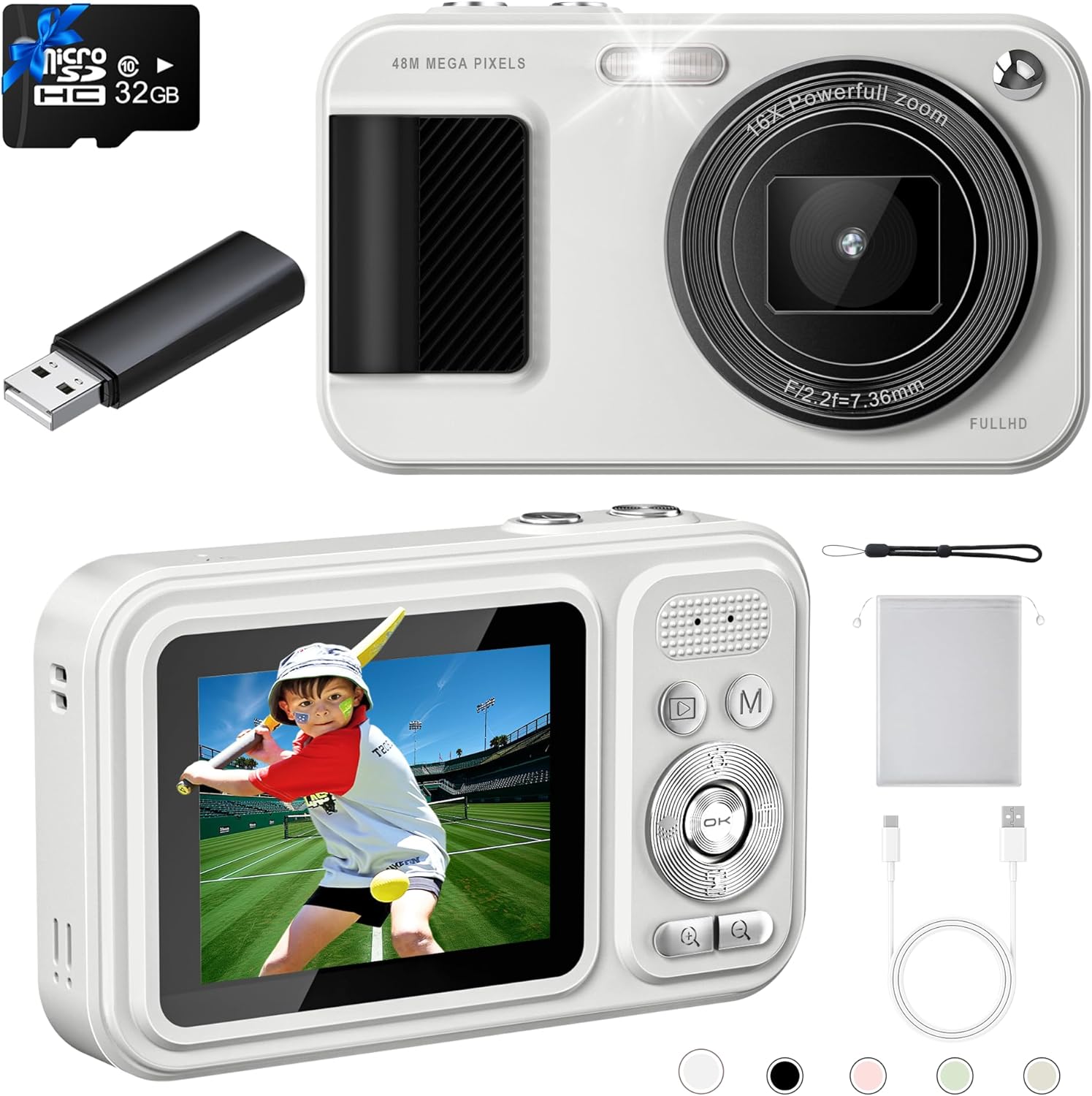
Rajah 2: Depan dan belakang views of the JVSCAM C8 Digital Camera, showcasing the lens, flash, display screen, and control buttons.
Komponen Utama:
- Kanta: Menangkap imej dan video.
- kilat: Menyediakan pencahayaan dalam keadaan cahaya malap.
- Skrin Paparan: Shows live view, menu dan main balik.
- Butang Kawalan: Navigate menus, adjust settings, and operate functions.
- Butang Pengatup: Initiates photo capture or video recording.
- mikrofon: Records audio during video capture.
- Port USB (Jenis-C): Untuk pengecasan dan pemindahan data.
- Slot Kad Memori: For inserting the 32GB TF card.
Persediaan
1. Mengecas Bateri
The camera has a built-in 1500mAh rechargeable battery. Before first use, fully charge the camera.
- Connect the supplied Type-C USB cable to the camera's USB port.
- Sambungkan hujung kabel yang satu lagi ke penyesuai kuasa USB (tidak disertakan) atau port USB komputer.
- The charging indicator light will illuminate. Once fully charged, the light will change or turn off.
- A full charge provides over 180 minutes of continuous shooting.

Rajah 3: The camera features a 1500mAh battery, supporting over 30,000 photos or 240 minutes of continuous video recording.
2. Memasukkan Kad Memori
The camera comes with a 32GB TF (MicroSD) card. Ensure it is properly inserted before use.
- Cari slot kad memori di sisi kamera.
- Insert the 32GB TF card into the slot with the gold contacts facing down, until it clicks into place.
- Untuk mengeluarkannya, tolak kad ke dalam dengan lembut sehingga ia terkeluar.
3. Memasang Tali Gantung
Attach the included lanyard to prevent accidental drops.
- Thread the thin loop of the lanyard through the lanyard hole on the camera body.
- Pass the larger end of the lanyard through the loop and pull tight to secure.
Arahan Operasi
Hidupkan/Mati Kuasa
- To power on, press and hold the power button located on the top of the camera for a few seconds.
- Untuk mematikan, tekan dan tahan butang kuasa sekali lagi sehingga skrin dimatikan.
- Utilize the Auto-off function in settings to conserve battery life.
Mengambil Foto
- Power on the camera. The display will show the live view.
- Fokus automatik: Gently press the shutter button halfway down. The camera will automatically focus, indicated by the focus frame changing from red to green.
- Once focused, press the shutter button all the way down to capture the 48MP photo.

Rajah 4: The autofocus feature ensures clear images by adjusting the lens when the shutter button is half-pressed.
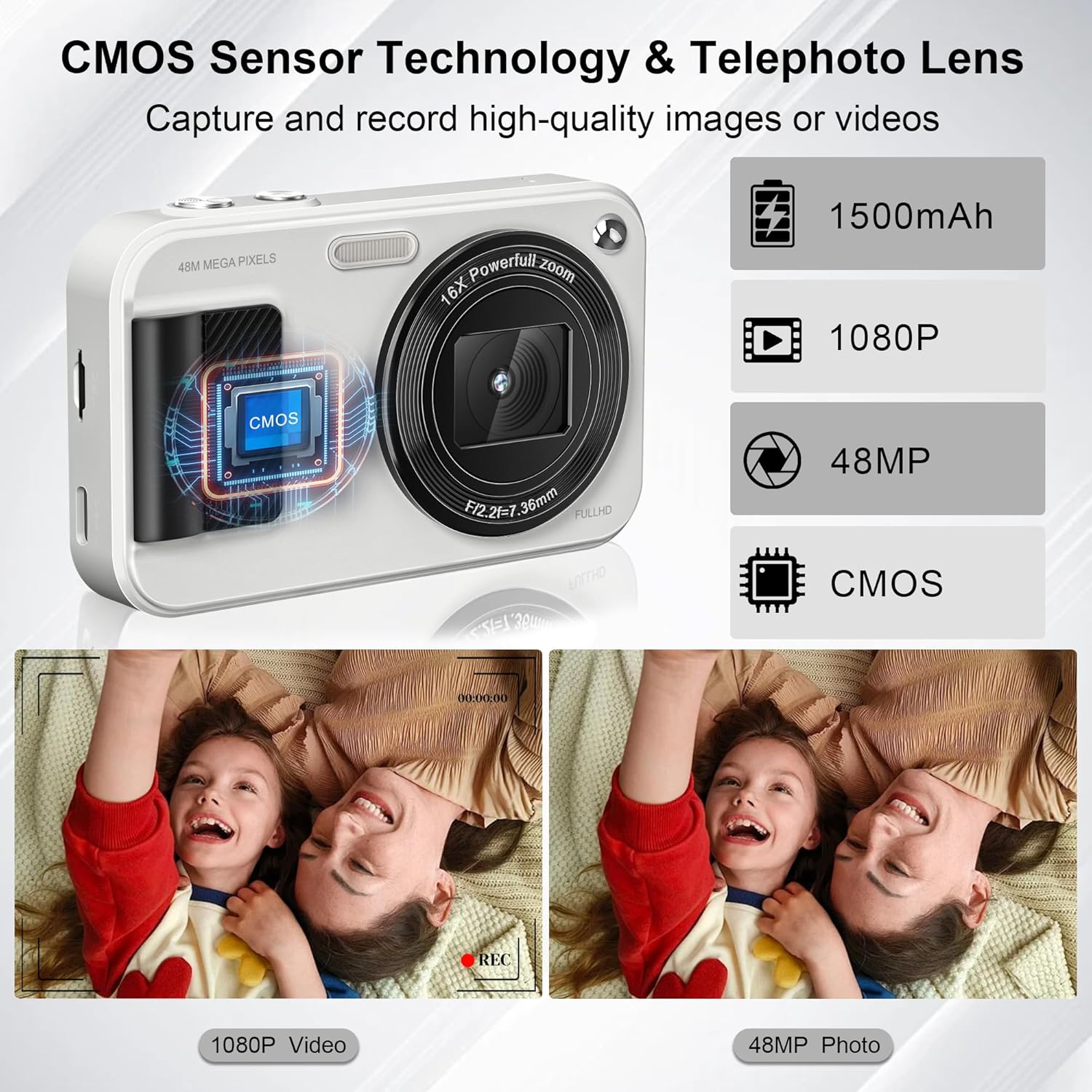
Rajah 5: Equipped with a CMOS image sensor and telephoto lens, the camera captures vivid 48MP photos and smooth 1080P videos.
Rakaman Video
- In camera mode, press the 'Mode' button (M) to switch to video recording mode.
- Press the shutter button to start recording FHD 1080P video. The recording indicator will appear on the screen.
- Tekan butang pengatup sekali lagi untuk menghentikan rakaman.
- The camera includes a built-in microphone for audio capture during videos.
Fungsi Zum
- Use the '+' and '-' buttons on the control pad to adjust the 16x digital zoom.
- Zoom in with '+' and zoom out with '-'.

Rajah 6: The camera offers 16x digital zoom for capturing distant subjects, anti-shake for stable images, and smile/face detection for optimal portraits.
Ciri Khas
- 22 Filters: Access various filter effects through the menu to enhance your photos.
- Anti gegaran: Fungsi ini membantu mengurangkan kabur yang disebabkan oleh pergerakan kamera.
- Pengesanan Senyuman: The camera can automatically detect smiles and capture photos.
- Timed Shooting (Self-Timer): Set a delay (2s, 5s, 10s) before the photo is taken. Ideal for group shots.
- Penggambaran berterusan: Capture multiple photos in quick succession by holding down the shutter button.
- Lampu LED terbina dalam: Ensures clear photos even in low-light conditions. Activate via the control buttons.

Rajah 7: Utilize the self-timer for delayed shots (2s, 5s, 10s) and continuous shooting for capturing action sequences.

Rajah 8: Explore 22 built-in filter effects to add creative touches to your photos, and use the fill light for improved illumination.
Connecting to Computer (Transferring Files)
You can transfer photos and videos to your computer or phone using the provided card reader or Type-C cable.
- Using the Card Reader: Remove the TF card from the camera and insert it into the supplied card reader. Plug the card reader into your computer's USB port. The card will appear as a removable drive, allowing you to copy files.
- Menggunakan Kabel Jenis-C: Connect the camera directly to your computer using the Type-C USB cable. The camera may appear as a removable disk or prompt you to select a connection mode (e.g., Mass Storage). Select the appropriate mode to access your files.
Penyelenggaraan
- Pembersihan: Use the provided lens cloth to gently wipe the lens and screen. For stubborn smudges, use a specialized camera lens cleaning solution. Do not use abrasive materials or harsh chemicals.
- Penjagaan Bateri: To prolong battery life, avoid exposing the camera to extreme temperatures. Charge the battery regularly, even if the camera is not in frequent use.
- Storan: When not in use, store the camera in the provided storage bag in a cool, dry place away from direct sunlight and moisture.
Menyelesaikan masalah
| Masalah | Kemungkinan Punca / Penyelesaian |
|---|---|
| Kamera tidak dihidupkan. | Battery may be depleted. Charge the battery fully. Ensure the power button is pressed and held sufficiently. |
| Tidak boleh mengambil gambar/video. | Memory card may be full or not inserted correctly. Check card insertion or delete unnecessary files. Ensure sufficient battery charge. |
| Imej adalah kabur. | Ensure autofocus is engaged (shutter button half-pressed until green frame appears). Check for smudges on the lens and clean if necessary. Use anti-shake feature. |
| Flash tidak berfungsi. | Check flash settings in the menu; ensure it's set to 'On' or 'Auto'. |
| Tidak boleh memindahkan files kepada komputer. | Ensure the camera is connected properly via Type-C cable or the card reader is functioning. Try a different USB port or cable. Check computer's device manager for recognition. |
Spesifikasi
| Ciri | Perincian |
|---|---|
| Resolusi Foto | 48 Megapiksel |
| Resolusi Video | FHD 1080P |
| Penderia Imej | CMOS |
| Zum | Zum Digital 16x |
| Kapasiti Bateri | 1500mAh Lithium Ion (termasuk) |
| Penyimpanan | Kad TF 32GB (termasuk) |
| Dimensi (L x W x H) | 4.13 x 2.51 x 0.91 inci |
| Berat Barang | 4.2 auns |
| bahan | Logam dan Plastik |
| Ciri Khas | Autofocus, Anti-Shake, 22 Filters, Smile Detection, Timed/Continuous Shooting, Self-Timer, Built-in LED Light, WebFungsi cam |

Rajah 9: The compact size and light weight (0.26 lbs) make the JVSCAM C8 highly portable.
Waranti dan Sokongan
Your JVSCAM C8 Digital Camera is covered by a two-year satisfactory warranty dari tarikh pembelian.
If you encounter any issues or have questions regarding your camera, please contact JVSCAM customer support. Our staff is available to provide prompt assistance.
- Sokongan Pelanggan: Refer to the contact information provided on the product packaging or the official JVSCAM webtapak.