
1. Pengenalan
Thank you for choosing the Hiicam Speed 10 Action Camera. This manual provides essential information for setting up, operating, and maintaining your camera to ensure optimal performance and longevity. The Speed 10 is designed to capture high-quality 5K 30FPS video and 30MP photos, featuring Electronic Image Stabilization (EIS), Wi-Fi connectivity, and waterproof capabilities up to 131 feet (40 meters) with its included housing. It is ideal for various activities including sports, travel, and underwater adventures.
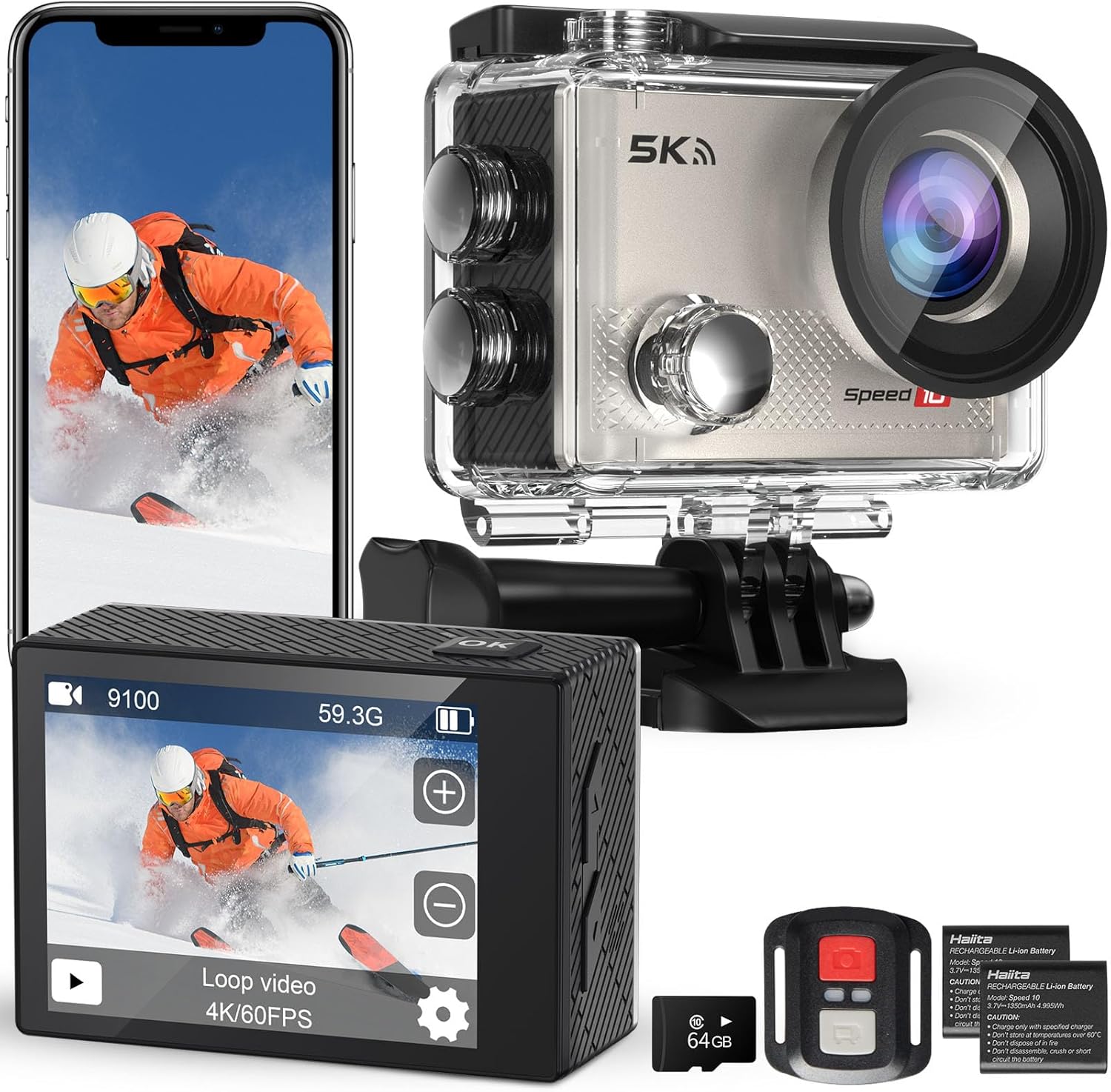
Figure 1.1: Hiicam Speed 10 Action Camera and included accessories.
2. Kandungan Pakej
Please check the package contents upon unboxing to ensure all items are present.
- Kamera Tindakan Hiicam Speed 10
- Perumahan Kalis Air
- Alat Kawalan Jauh
- 2 x 1350mAh Rechargeable Lithium-Ion Batteries
- Pengecas Bateri
- Mounting Accessories Kit (various mounts, straps, adhesives)
- Kabel Pengecas USB
- Manual Pengguna (dokumen ini)
- (Note: Memory card may or may not be included depending on the specific product variant purchased.)
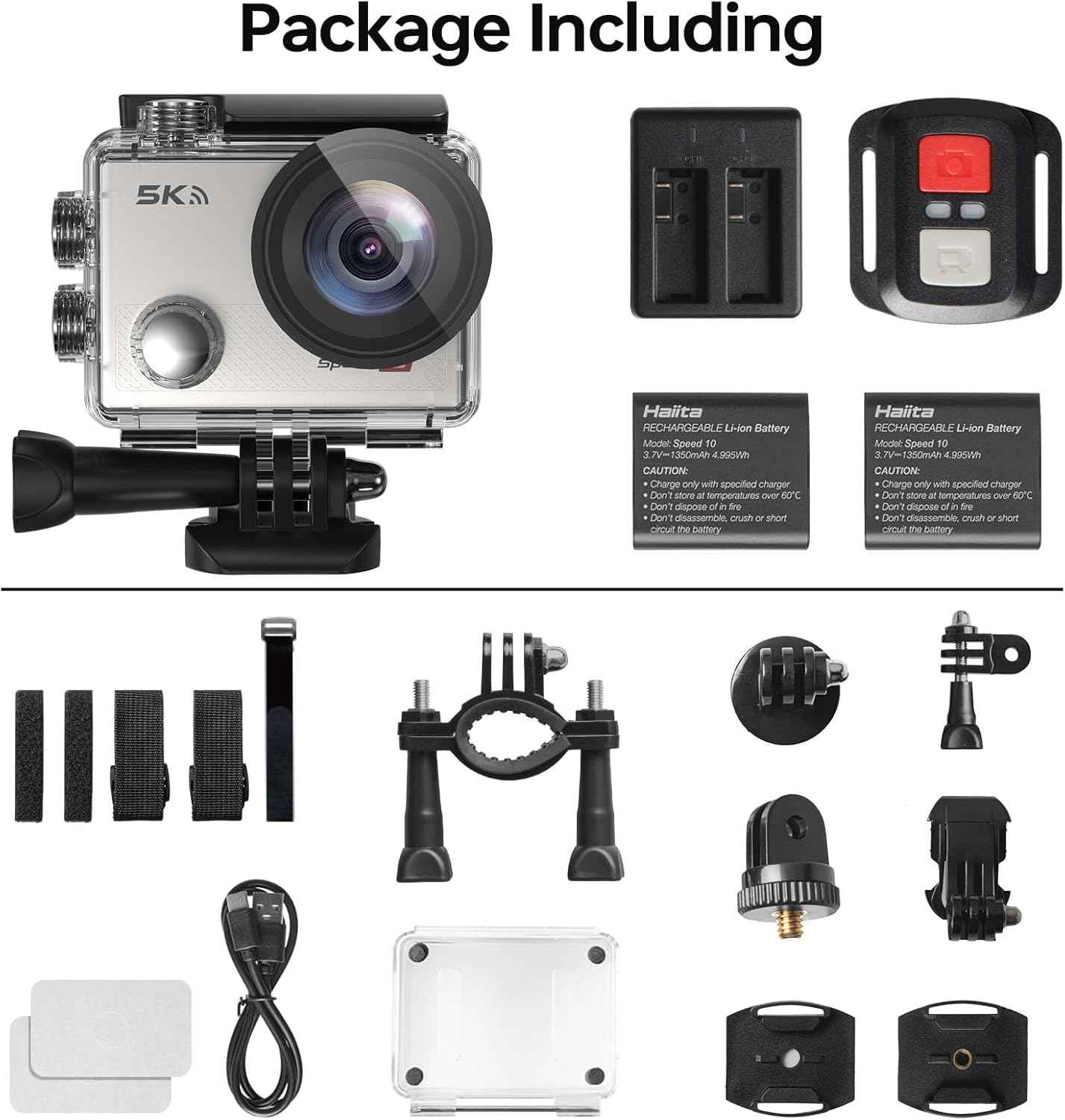
Figure 2.1: All components included in the standard package.
3. Komponen Kamera
Familiarize yourself with the main parts of your Hiicam Speed 10 Action Camera.
| Komponen | Penerangan |
|---|---|
| Lensa | Captures images and videos. Features a 170° wide-angle view. |
| Skrin Depan | Displays camera status, mode, and can be used for selfies. |
| Rear Touch Screen | Main display for live view, main balik dan navigasi menu. |
| Butang Kuasa/Mod | Powers the camera on/off and switches between shooting modes. |
| Butang Pengatup/OK | Starts/stops recording, takes photos, confirms selections. |
| Butang Naik / Turun | Navigation in menus, zoom control. |
| Slot Kad MicroSD | For inserting a microSD card (up to 256GB, Class 10 or higher recommended). |
| Petak Bateri | Menempatkan bateri boleh dicas semula. |
| Port USB | Untuk pengecasan dan pemindahan data. |
4. Persediaan
4.1. Pemasangan dan Pengecasan Bateri
- Buka penutup petak bateri di bahagian bawah kamera.
- Insert a fully charged 1350mAh battery, ensuring the contacts align correctly.
- Tutup penutup petak bateri dengan selamat.
- To charge, insert the battery into the provided battery charger and connect the charger to a USB power source using the USB cable. The indicator light will show charging status.
- Alternatively, you can charge the battery inside the camera by connecting the camera directly to a USB power source.

Figure 4.1: Charging batteries with the external charger.

Figure 4.2: The camera supports extended recording time with two included batteries.
4.2. Memasukkan Kad MicroSD
A microSD card (not always included) is required to store photos and videos.
- Pastikan kamera dimatikan.
- Locate the microSD card slot on the side of the camera.
- Insert a Class 10 or higher microSD card (up to 256GB) with the contacts facing the correct direction until it clicks into place.
- Untuk mengalih keluar, tolak kad perlahan-lahan sehingga ia keluar.
4.3. Waterproof Housing Usage
The waterproof housing allows the camera to be used underwater up to 131 feet (40 meters).
- Before each use, inspect the waterproof housing for any dirt, debris, or damage to the O-ring seal.
- Place the camera inside the housing, ensuring it fits snugly.
- Close the latch securely. Perform a dry test (without the camera) in water before first use to confirm no leaks.
- After underwater use, rinse the housing with fresh water and allow it to air dry.

Figure 4.3: The camera is waterproof up to 131 feet (40 meters) with the housing.
5. Mengendalikan Kamera
5.1. Hidupkan/Mati Kuasa
- To power on: Press and hold the Power/Mode button for a few seconds.
- To power off: Press and hold the Power/Mode button again until the camera shuts down.
5.2. Menukar Mod
Tekan butang Kuasa/Mod berulang kali untuk beralih antara mod yang berbeza: Video, Foto, Main Semula dan Tetapan.
5.3. Recording Video / Taking Photos
- In Video mode: Press the Shutter/OK button to start recording. Press again to stop.
- In Photo mode: Press the Shutter/OK button to take a photo.

Figure 5.1: Capture ultra-sharp 5K 30FPS video and 30MP photos.
5.4. Tetapan Menu
Access the settings menu to customize camera parameters.
- From any mode, navigate to the Settings icon (gear icon) using the Mode button or touch screen.
- Use the Up/Down buttons or touch screen to navigate through options.
- Press the Shutter/OK button or tap to select an option.
- Tetapan utama termasuk:
- Resolusi Video: Select from 5K/30FPS, 4K/60FPS, 4K/30FPS, 2.7K/30FPS, 1080P/120FPS, 1080P/60FPS, 720P/240FPS.
- Resolusi Foto: Adjust photo size up to 30MP.
- Electronic Image Stabilization (EIS): Enable or disable for smoother footage.
- Sudut Lebar: Laraskan medan view (170° ultra-wide angle available).
- Loop Recording, Time-Lapse, Slow Motion, Burst Photo: Explore various shooting modes.

Figure 5.2: Electronic Image Stabilization (EIS) ensures steady and smooth footage.

Figure 5.3: The 170° wide-angle lens captures a broad field of view.
6. Ciri Lanjutan
6.1. Wi-Fi & Smart App Control
Connect your camera to a smartphone or tablet via Wi-Fi for remote control, live preview, dan file pemindahan.
- Download the "iSmart DV" app (or specified app in camera manual) from your device's app store.
- On the camera, enable Wi-Fi from the settings menu. The camera's Wi-Fi name (SSID) and password will be displayed.
- On your smartphone, go to Wi-Fi settings and connect to the camera's Wi-Fi network.
- Open the app. You can now control the camera, view hidup footage, and download content to your device.

Figure 6.1: Share your moments instantly with Wi-Fi and app control.
6.2. Alat Kawalan Jauh
Alat kawalan jauh yang disertakan membolehkan operasi mudah dari jauh.
- Ensure the remote control has a working battery.
- Pair the remote with the camera (refer to the camera's settings menu for remote pairing instructions if needed).
- Use the dedicated buttons on the remote to start/stop video recording or take photos.

Figure 6.2: Wireless remote control for effortless capture.
7. Penyelenggaraan dan Penjagaan
- Pastikan kamera dan aksesorinya bersih dan kering.
- Gunakan kain lembut dan tidak berbulu untuk membersihkan kanta dan skrin. Elakkan bahan yang kasar.
- Apabila tidak digunakan, simpan kamera di tempat yang sejuk dan kering jauh dari cahaya matahari langsung dan suhu yang melampau.
- Keluarkan bateri jika kamera tidak akan digunakan untuk tempoh yang lama.
- Sandarkan foo anda secara keraptage and format the microSD card to maintain optimal performance.
8. Penyelesaian masalah
| Masalah | Penyelesaian yang Mungkin |
|---|---|
| Kamera tidak akan dihidupkan. | Ensure the battery is fully charged and correctly inserted. Try a different charged battery. |
| Tidak boleh merakam video/mengambil gambar. | Check if a microSD card is inserted and has sufficient free space. Ensure the card is Class 10 or higher. Format the card if necessary (this will erase all data). |
| Footage is blurry/shaky. | Ensure EIS (Electronic Image Stabilization) is enabled in settings. Check if the lens is clean. |
| Isu sambungan Wi-Fi. | Ensure Wi-Fi is enabled on the camera and your smartphone. Re-enter the Wi-Fi password. Restart both devices. Ensure you are using the correct app. |
| Kamera membeku. | Tanggalkan dan masukkan semula bateri untuk menetapkan semula kamera. Kemas kini perisian tegar jika tersedia. |
| Water leakage in housing. | Immediately remove the camera. Inspect the O-ring seal for dirt, hair, or damage. Ensure the latch is fully secured. Do not use if the housing is damaged. |
9. Spesifikasi Teknikal
| Ciri | Spesifikasi |
|---|---|
| Nama Model | Kelajuan 10 |
| Resolusi Video | Sehingga 5K 30FPS |
| Resolusi Foto | Sehingga 30MP |
| Penstabilan Imej | Penstabilan Imej Elektronik (EIS) |
| Kedalaman Kalis Air | 131FT / 40M (with waterproof housing) |
| Sudut Kanta | Sudut Lebar 170° |
| Paparan | 2-inch Rear Touch Screen, Front Screen |
| Bateri | 2 x 1350mAh Lithium-Ion (included) |
| Penyimpanan | MicroSD card, up to 256GB (Class 10 or higher) |
| Ketersambungan | Wi-Fi, USB |
| Dimensi | 2.2 x 0.95 x 1.61 inci |
| Berat badan | 1.1 paun |
10. Waranti dan Sokongan Pelanggan
The Hiicam Speed 10 Action Camera typically comes with a manufacturer's warranty. Please refer to the warranty card included in your package or visit the official Hiicam webtapak untuk terma dan syarat jaminan terperinci.
For technical support, troubleshooting assistance, or warranty claims, please contact Hiicam customer service through their official channels.
- Hiicam Store on Amazon: Visit the Hiicam Store
- Rujuk maklumat hubungan yang diberikan dalam pembungkusan produk anda.