
1. Pengenalan
The LAUNCH X431 PRO Star is an advanced automotive intelligent diagnostic tool designed for comprehensive vehicle analysis. This device features an 8-inch touch screen, runs on Android 10.0, and is powered by a 2.0GHz 4-Core processor with 4GB RAM and 64GB ROM. It includes a 6000mAh battery for extended operation. The PRO Star supports fault diagnosis for a wide range of vehicle models and systems, offering functions such as code reading, code clearing, data stream analysis, reset functions, action testing, coding, and matching.

Figure 1.1: LAUNCH X431 PRO Star Diagnostic Scanner with key features highlighted.
2. Persediaan dan Penggunaan Pertama
2.1 Membuka Kotak dan Kandungan Pakej
Carefully unpack all items from the carrying box. Verify that all components listed below are present.

Figure 2.1: Contents of the LAUNCH X431 PRO Star package.
- LAUNCH X-431 PRO STAR Tablet
- Kotak Membawa
- Diagnostic Cable (OBDII)
- Kabel USB Jenis-C
- Penyesuai AC
- US Plug, UK Plug, EU Plug
- Manual Pengguna
- Panduan Cepat
- Senarai Pembungkusan
- PIN Envelope
2.2 Konfigurasi Peranti Permulaan
- Cas Peranti: Fully charge the LAUNCH X431 PRO Star tablet using the provided AC adapter and Type-C USB cable before first use.
- Hidupkan kuasa: Tekan dan tahan butang kuasa untuk menghidupkan peranti.
- Language and Time Zone: Follow the on-screen prompts to select your preferred language and time zone.
- Sambung ke Wi-Fi: Connect the device to a stable Wi-Fi network (supports 2.4GHz and 5.0GHz). Internet access is required for registration and software updates.
- Daftar Akaun: Register an account on the manufacturer's website using the serial number provided with your device.
- Kemas Kini Perisian: After registration, you will be prompted to update the software. Perform all available updates to ensure optimal functionality and access to the latest vehicle data. This process may take some time.
3. Arahan Operasi
3.1 Menyambung ke Kenderaan
- Cari port OBDII kenderaan, biasanya di bawah papan pemuka di sebelah pemandu.
- Connect the diagnostic cable to the LAUNCH X431 PRO Star tablet.
- Sambungkan hujung kabel diagnostik yang satu lagi ke port OBDII kenderaan.
- Turn the vehicle's ignition to the 'ON' position (do not start the engine).
3.2 Fungsi Diagnostik Asas
Once connected, the device will attempt to auto-detect the vehicle's VIN. If auto-detection fails, you can manually enter the vehicle information.
- Laporan Kesihatan: After identifying the vehicle, the system can generate a comprehensive health report.
- Full System Scan: Perform a complete scan of all available vehicle systems.
- Baca/Kosongkan Kod: View diagnostic trouble codes (DTCs) and clear them after repairs.
- Data Langsung: Monitor real-time data streams from various sensors and components.
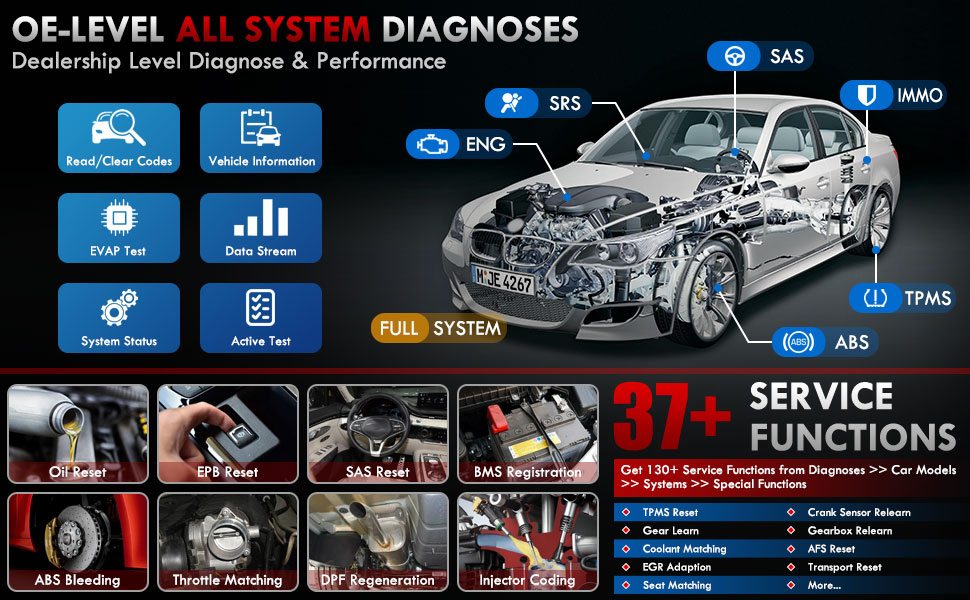
Gambar 3.1: Lebihview of OE-level all system diagnostic capabilities.
3.3 Advanced Maintenance Services (37+)
The LAUNCH X431 PRO Star offers over 37 advanced maintenance and reset functions, with the potential to expand to over 130 types depending on the vehicle's make, model, and year. These services include:
- Set Semula Minyak
- Pendarahan ABS
- Pendaftaran Bateri
- Tetapan Semula EPB (Brek Parkir Elektronik)
- Penjanaan Semula DPF (Penapis Partikulat Diesel)
- Pengekodan Penyuntik
- SAS Reset (Steering Angle Sensor)
- Pemadanan Pendikit
- TPMS Reset (Tire Pressure Monitoring System)
- Set Semula Kotak Gear
- Tetapan Semula Penggantungan
- Ketua AFSamp Tetapkan semula

Gambar 3.2: Cthamples of the 37+ maintenance service functions.
3.4 Kawalan Dwi-Arah (Ujian Aktif)
This feature allows the technician to send commands to vehicle systems and components to test their functionality. This helps in quickly identifying faulty components without manual disassembly. Examples termasuk:
- Turning the radiator fan on/off
- Testing door lock actuators
- Energizing injectors
- Cermin operasi
- Membuka/menutup tingkap

Figure 3.3: Illustration of bi-directional control capabilities.
3.5 Pengekodan ECU
ECU Coding enables the matching, relearning, and coding of newly installed ECU modules after repairs or replacements. It also allows for the activation of higher-level vehicle functions. This includes:
- Flash/Match/Calibration
- Recode and Relearn
- Alter Configuration
- Reprogram Adaptive Data
- Recognize New CPU
- Match Current Settings
- Customize Car Features (e.g., automatic lock, reverse rearview mirror down, windows close when rain)

Gambar 3.4: Cthamples of ECU coding applications.
3.6 FCA SGW Vehicle Access & Quick Guided Functions
- FCA SGW: The X431 PRO Star is AutoAuth certified, allowing secure diagnosis of SGW (Security Gateway) vehicles without limitations.
- Quick Guided: Provides step-by-step guidance for Volkswagen group vehicles, simplifying complex diagnostic procedures.
3.7 Extension Modules
The device supports various optional add-on tools to expand its capabilities, including:
- Battery Tester (e.g., BST360)
- Videoscope (e.g., VSP-600)
- Oscilloscope (e.g., O2-2)
- TPMS Detector (e.g., TSGUN, i-TPMS)
- WiFi Thermal Printer (e.g., X-431)
- Alat Penentukuran ADAS
- XPROG 3 (Immobilizer Programmer)

Figure 3.5: Various optional extension modules for the X431 PRO Star.
4. Penyelenggaraan
4.1 Kemas Kini Perisian
The LAUNCH X431 PRO Star includes 2 years of free software updates. After this period, the device will continue to function, but new software releases and vehicle data updates will require a subscription. Regular updates ensure compatibility with new vehicle models and access to the latest diagnostic features.
4.2 Penjagaan Am
- Pastikan peranti bersih dan bebas daripada habuk dan lembapan.
- Simpan peranti di dalam bekas pelindungnya apabila tidak digunakan.
- Elakkan daripada mendedahkan peranti kepada suhu yang melampau atau cahaya matahari langsung untuk tempoh yang lama.
- Use only the provided charging accessories to prevent damage.
5. Penyelesaian masalah
If you encounter issues with your LAUNCH X431 PRO Star, consider the following:
- Isu Sambungan: Ensure the diagnostic cable is securely connected to both the scanner and the vehicle's OBDII port. Verify the vehicle's ignition is in the 'ON' position.
- Kerosakan Perisian: Ensure the device's software is up to date. A factory reset may resolve persistent software issues (note: this will erase user data).
- Keserasian Kenderaan: While the device covers over 99% of vehicles, specific advanced functions may vary by make, model, and year. Consult the vehicle coverage list or contact support for details.
- Device Performance: If the device is slow or unresponsive, try restarting it. Ensure sufficient battery charge.
6. Spesifikasi
| Ciri | Spesifikasi |
|---|---|
| Model | LAUNCH X-431 PRO STAR |
| Sistem Operasi | Android 10.0 |
| Pemproses | 2.0GHz 4-Teras |
| RAM | 4GB |
| ROM (Storan) | 64GB |
| Paparan | Skrin Sentuh 8-inci (resolusi 1280x800) |
| Bateri | 6000mAh |
| Ketersambungan | Wi-Fi (2.4/5.0 GHz), CANFD, DoIP |
| Kamera | 8.0 MP Rear-facing |
| Berat Barang | 8.4 paun |
| Dimensi Pakej | 13.6 x 13.2 x 6.1 inci |
| Jenis Kesesuaian Automotif | Universal Fit |
7. Waranti dan Sokongan
7.1 Maklumat Waranti
The LAUNCH X431 PRO Star comes with a Waranti 2 tahun covering manufacturing defects and hardware malfunctions.
7.2 Sokongan Teknikal
LAUNCH provides 7*24 technical support for any post-sales issues or technical assistance. For support, please refer to the contact information provided in your product packaging or visit the official LAUNCH webtapak.