
1. Pengenalan
This manual provides detailed instructions for the installation, operation, and maintenance of the Yitouniu EWeLink 2-Channel Smart WiFi Switch Relay. This device enables remote control of household appliances and electronic devices via a mobile application, RF remote control, and voice commands through smart assistants like Alexa and Google Home. It supports various operating modes and timing functions to enhance smart home automation.
2. Maklumat Keselamatan
- Pastikan bekalan elektrik diputuskan sebelum pemasangan atau penyelenggaraan bagi mengelakkan kejutan elektrik.
- Installation should be performed by qualified personnel or under strict adherence to electrical safety guidelines.
- Jangan melebihi arus maksimum dan voltagpenilaian yang ditentukan untuk peranti tersebut.
- Jauhkan peranti daripada air, kelembapan dan suhu yang melampau.
- Sahkan semua sambungan pendawaian adalah selamat dan betul sebelum memulihkan kuasa.
3. Produk Lebihview
The Yitouniu EWeLink Smart WiFi Switch Relay is a compact, 2-channel device designed for integrating traditional appliances into a smart home system. It features WiFi and Bluetooth connectivity for app control and supports RF 433MHz for remote control.

Imej 3.1: Depan view of the Yitouniu EWeLink Smart WiFi Switch Relay. The device is white with branding and connection labels visible.

Imej 3.2: Jarak dekat view of the Yitouniu EWeLink Smart WiFi Switch Relay, showing input terminals (N, L), output terminals (NO, COM, NC), and model information.

Image 3.3: The compact size of the Yitouniu EWeLink Smart WiFi Switch Relay, held in a hand for scale.
4. Spesifikasi
| Parameter | Nilai |
|---|---|
| Input Voltage | AC/DC 85-250V, Micro USB 5V input |
| Maksimum Semasa | 10A |
| Kuasa Maks | 2200W |
| Standard WiFi | WiFi 2.4GHz b/n/g + Bluetooth (IEEE 802.11b/g/n) |
| Suhu Operasi | -20°C hingga 70°C |
| bahan | ABS kalis api |
| Dimensi Produk | 2.76 x 1.77 x 1.1 inci |
| Berat Barang | 1.76 auns |
| Jenis Kenalan | Biasa Terbuka |
| Penilaian Perlindungan Antarabangsa | IP65 |
| Pensijilan | FCC |
5. Persediaan dan Pemasangan
5.1 Arahan Pendawaian
The device supports both AC/DC 85-250V input and Micro USB 5V input. Ensure correct wiring based on your application. The relay has Normally Open (NO), Common (COM), and Normally Closed (NC) contacts for controlling external devices.
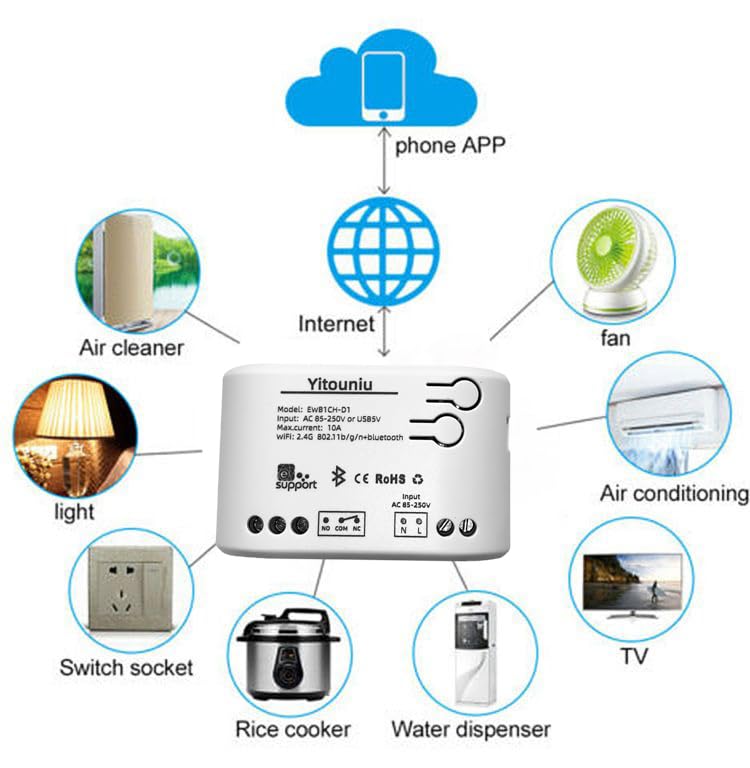
Image 5.1: Diagram illustrating the connectivity of the Yitouniu EWeLink Smart WiFi Switch Relay to various household appliances like lights, fans, and air conditioners, all controlled via a phone app and the internet.
5.2 Muat Turun Apl dan Berpasangan
- Muat turun eWeLink apl daripada Apple App Store atau Google Play Store.
- Daftar akaun dan log masuk.
- Power on the Smart WiFi Switch Relay.
- Open the eWeLink app, tap the '+' icon to add a device.
- Follow the on-screen instructions to connect the device to your 2.4GHz WiFi network.

Image 5.2: Screenshots of the eWeLink app interface, showing controls for a garage door (ON/OFF) and a scheduling function for setting specific times.
6. Mod Operasi
The device supports three operating modes: self-locking, interlocking, and inching (micromotion). These modes can typically be configured within the eWeLink app or via physical buttons on the device, depending on the specific model variant.
- Mod Mengunci Kendiri: Each channel operates independently. Pressing the button (or app control) turns the relay ON, pressing it again turns it OFF.
- Interlocking Mode: When one channel is turned ON, all other channels are automatically turned OFF. This is useful for applications where only one device should be active at a time.
- Inching (Micromotion) Mode: The relay turns ON for a set duration (e.g., 0.5 seconds to 1 hour) and then automatically turns OFF. This is suitable for momentary actions like garage door openers or pulse controls.
7. App Control and Voice Control
7.1 eWeLink App Features
The eWeLink app provides comprehensive control over your Smart WiFi Switch Relay:
- Jauh Hidup/Mati: Control connected devices from anywhere with an internet connection.
- Fungsi Masa: Set schedules, countdowns, or recurring timers for automatic on/off operations.
- Kawalan Bebas: Each of the two channels can be controlled independently.
- Perkongsian Peranti: Share control of your devices with family members.
- Kawalan Kumpulan: Organize multiple smart devices into groups for simultaneous control.

Image 7.1: A user remotely controlling home lighting via the eWeLink mobile application, demonstrating the convenience of app-based control.

Image 7.2: Illustration of the eWeLink app's group control and sharing functions, allowing multiple users to manage devices across different rooms.

Image 7.3: The timing function interface within the eWeLink app, enabling users to set specific on/off times for connected appliances.
7.2 Penyepaduan Kawalan Suara
The Yitouniu Smart WiFi Switch Relay is compatible with popular voice assistants, including Amazon Alexa and Google Home/Nest. To enable voice control:
- Ensure your Smart WiFi Switch Relay is successfully paired with the eWeLink app.
- Buka apl Alexa atau Google Home.
- Navigasi ke bahagian 'Kemahiran' atau 'Berfungsi dengan Google'.
- Cari untuk and enable the 'eWeLink Smart Home' skill/service.
- Link your eWeLink account when prompted.
- Discover devices. Your Smart WiFi Switch Relay should now be controllable via voice commands.
Example perintah:
- "Alexa, bukak lampu ruang tamu."
- "Hei Google, matikan kipas."

Image 7.4: A user interacting with voice assistants like Amazon Alexa and Google Home to control smart devices, highlighting the voice control capability of the relay.
8. Penyelenggaraan
The Yitouniu Smart WiFi Switch Relay requires minimal maintenance. Follow these guidelines:
- Pembersihan: Wipe the device with a dry, soft cloth. Do not use liquid cleaners or solvents.
- Semakan Sambungan: Periksa sambungan pendawaian secara berkala untuk memastikan ia kekal kukuh.
- Kemas kini Firmware: Keep the eWeLink app updated to receive the latest firmware for the device, which may include performance improvements and new features.
9. Penyelesaian masalah
- Peranti tidak bersambung ke WiFi:
- Ensure your WiFi network is 2.4GHz. The device does not support 5GHz networks.
- Semak sama ada kata laluan WiFi yang dimasukkan dalam apl adalah betul.
- Move the device closer to your WiFi router.
- Mulakan semula peranti dan penghala anda.
- Peranti luar talian dalam aplikasi:
- Sahkan sambungan internet rumah anda aktif.
- Periksa sama ada peranti mempunyai kuasa.
- Mulakan semula peranti.
- Kawalan suara tidak berfungsi:
- Confirm the eWeLink skill/service is enabled and linked in your Alexa or Google Home app.
- Ensure the device is named clearly in the eWeLink app and discovered by your voice assistant.
- Semak sambungan internet anda.
- Device not responding to RF remote:
- Ensure the RF remote is paired with the switch. Refer to the RF pairing instructions (if applicable to your specific remote).
- Check the battery in the RF remote.
10. Apa yang ada di dalam Kotak
Setelah membuka pembungkusan produk, anda harus menemui item berikut:
- 1 x Yitouniu Wifi 2-Channel Relay Switch
- 1 x Manual Arahan (dokumen ini)
11. Waranti dan Sokongan
This product comes with a standard manufacturer's warranty. For specific warranty terms, conditions, and duration, please refer to the documentation included with your purchase or contact Yitouniu customer support. For technical assistance or further inquiries, please visit the official Yitouniu webtapak atau hubungi saluran perkhidmatan pelanggan mereka.