
Active Pixel AP-4G-SY4.0MP-DUAL CAM-V-4MM-BW1
Active Pixel 4G SIM PTZ Security Camera User Manual
Model: AP-4G-SY4.0MP-DUAL CAM-V-4MM-BW1
1. Produk Lebihview
The Active Pixel 4G SIM PTZ Security Camera is an outdoor surveillance device designed for locations without traditional Wi-Fi or wired internet access. It operates using a 4G SIM card, providing remote monitoring capabilities. The camera features a dual-lens system for comprehensive coverage and detailed imaging, pan-tilt-zoom functionality, motion tracking, color night vision, and two-way audio communication.
1.1 Ciri-ciri Utama
- 4G SIM Connectivity: Operates independently using a 4G SIM card (Vi & Airtel Sim Supported), suitable for remote areas without Wi-Fi.
- Dual Lens (4MP + 4MP = 8MP Total): Provides both a wide-angle view and a detailed close-up view simultaneously for enhanced monitoring.
- Zum Pan-Condong-360° (PTZ): Allows remote control of camera direction and zoom, with automatic human motion tracking.
- Penglihatan Malam Warna: Equipped with bright spotlight LEDs and IR lights for clear, full-color footage dalam keadaan cahaya malap.
- Audio Dua hala: Enables real-time communication through the camera via a mobile application.
- Outdoor Ready (IP65): Weatherproof design ensures durability against rain and dust for outdoor installation.
- Smart Motion Tracking: Automatically follows detected human movement.
1.2 Kandungan Pakej
Sahkan bahawa semua item terdapat dalam pakej:
- 1x Active Pixel 4G SIM PTZ Security Camera
- 1x Pendirian Pemasangan
- 1x Penyesuai Kuasa
- 1x Manual Pengguna (dokumen ini)
- 1x Screw Kit for installation
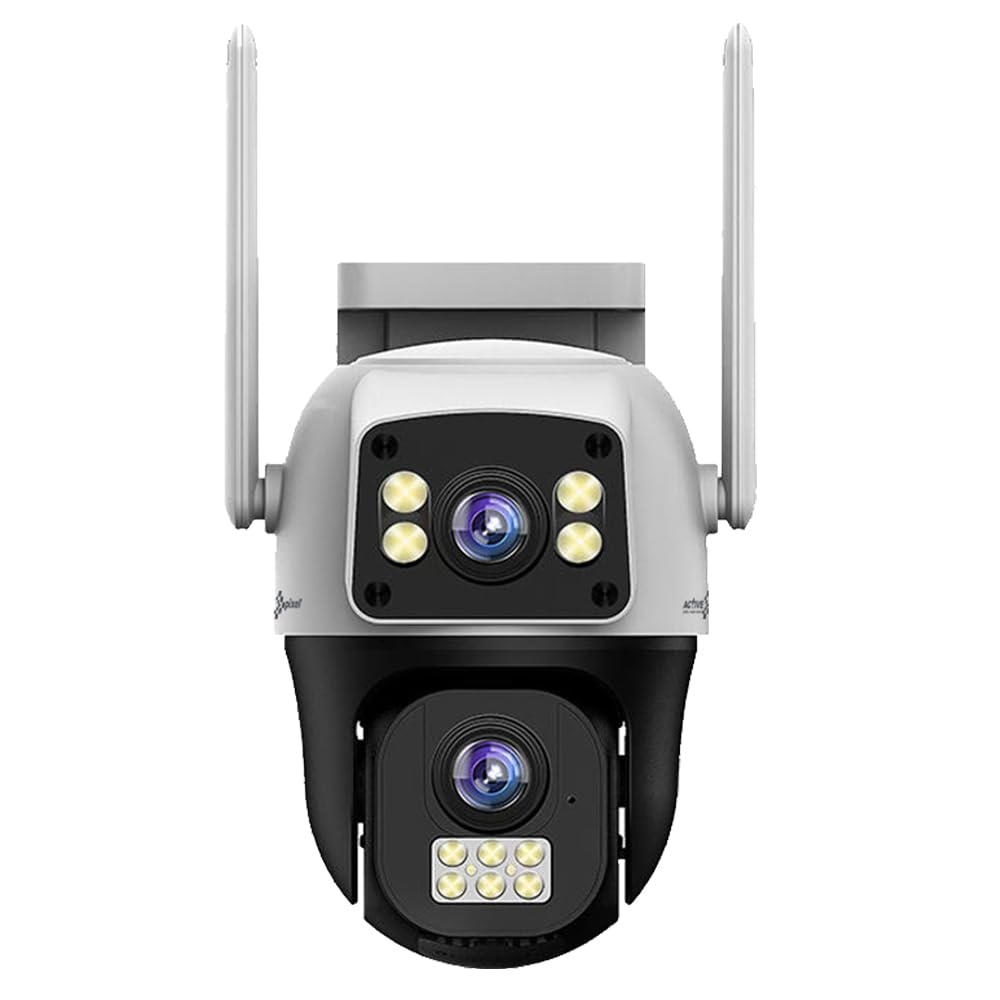
Figure 1: Active Pixel 4G SIM PTZ Security Camera (Front View)
2. Maklumat Keselamatan
- Pastikan kamera dipasang di lokasi yang stabil untuk mengelakkan terjatuh.
- Use only the provided power adapter to avoid damage or fire hazards.
- Jangan dedahkan kamera kepada suhu ekstrem di luar julat operasinya.
- Jauhkan kamera daripada medan magnet yang kuat.
- Elakkan pendedahan langsung lensa kepada sumber cahaya yang kuat untuk tempoh yang lama.
- Do not attempt to disassemble or repair the camera yourself. Contact support for assistance.
- Ensure proper sealing of all connections to maintain the IP65 water resistance rating.
3. Persediaan
3.1 Pemasangan Kad SIM
- Locate the SIM card slot on the camera. This is typically protected by a waterproof cover.
- Carefully open the cover using a small screwdriver if necessary.
- Insert a activated 4G SIM card (Vi or Airtel recommended) into the slot with the metal contacts facing down and the notched corner aligned correctly.
- Ensure the SIM card clicks into place.
- Securely close the waterproof cover to prevent water ingress.
Note: The camera does not require Wi-Fi. Ensure the 4G SIM card has an active data plan.
3.2 Sambungan Kuasa
- Sambungkan penyesuai kuasa yang disediakan ke port input kuasa kamera.
- Palamkan penyesuai kuasa ke salur keluar elektrik yang sesuai.
- The camera will power on and initiate its self-test sequence.
3.3 Pemasangan Apl dan Berpasangan
- Download the official Active Pixel security camera application from your mobile device's app store (e.g., Google Play Store for Android).
- Daftar untuk akaun baharu atau log masuk jika anda sudah mempunyai akaun.
- Follow the in-app instructions to add a new device. This typically involves scanning a QR code on the camera or manually entering its device ID.
- Once paired, you will be able to view suapan langsung dan mengawal kamera.
3.4 Memasang Kamera
The camera is designed for wall-mounted installation.
- Pilih lokasi luar yang sesuai yang menyediakan yang dikehendaki viewing angle and is within reach of a power source.
- Use the included mounting stand as a template to mark drilling points on the wall.
- Tebuk lubang pandu dan masukkan penambat dinding jika perlu.
- Secure the mounting stand to the wall using the provided screws.
- Attach the camera to the mounting stand, ensuring it is firmly secured.
- Adjust the camera's initial angle as needed before final tightening.
Gambar 2: Cthample of camera mounting (Image not available, refer to physical manual for illustration).
4. Arahan Operasi
4.1 Langsung View dan Kawalan PTZ
- Open the Active Pixel app on your smartphone.
- Select your camera from the device list to access the live video feed.
- Use the on-screen controls to pan (move horizontally), tilt (move vertically), and zoom the camera.
4.2 Pengesanan dan Penjejakan Gerakan
- Navigasi ke tetapan kamera dalam aplikasi.
- Enable "Motion Detection" and configure sensitivity levels as desired.
- Activate "Smart Motion Tracking" to allow the camera to automatically follow detected human movement.
- You will receive instant alerts on your mobile device when motion is detected.
4.3 Audio Dua Hala
- Semasa dalam live view, ketik ikon mikrofon dalam aplikasi untuk bercakap melalui pembesar suara kamera.
- Tap the speaker icon to listen to audio from the camera's microphone.
4.4 Penglihatan Malam
The camera automatically switches to night vision mode in low-light conditions. The powerful LEDs provide full-color night vision, while IR lights assist in darker environments.
4.5 Rakaman dan Penyimpanan
The camera supports local storage via a MicroSD card (not included) and may offer cloud storage options (check app for details). Recordings are triggered by motion detection or can be initiated manually.
- Insert a MicroSD card (up to 128GB, Class 10 recommended) into the designated slot (usually near the SIM card slot).
- Format the MicroSD card via the app settings before first use.
- Akses foo yang dirakamtage through the playback feature in the app.
5. Penyelenggaraan
- Pembersihan: Lap kanta dan badan kamera dengan lembut,amp kain. Jangan gunakan bahan kimia yang keras atau pembersih yang kasar.
- Kemas kini Firmware: Regularly check the app for available firmware updates to ensure optimal performance and security. Follow in-app instructions for updating.
- Kalis cuaca: Periodically inspect the waterproof covers and seals for any signs of wear or damage, especially after extreme weather conditions. Ensure they are securely closed.
- Bekalan Kuasa: Ensure the power adapter and cable are free from damage.
6. Penyelesaian masalah
| Masalah | Kemungkinan Punca | Penyelesaian |
|---|---|---|
| Kamera tidak dihidupkan | Tiada kuasa, penyesuai rosak, sambungan longgar. | Check power outlet, ensure adapter is securely connected, try a different outlet. |
| Tiada suapan video langsung | No 4G signal, inactive SIM card, incorrect app pairing. | Check 4G signal strength, ensure SIM card is active and has data, re-pair camera with app. |
| Pengesanan gerakan tidak berfungsi | Motion detection disabled, sensitivity too low, incorrect detection zone. | Enable motion detection in app, increase sensitivity, adjust detection zones. |
| Isu audio dua hala | Microphone/speaker disabled in app, poor network connection. | Ensure audio features are enabled in app, check 4G signal strength. |
| Poor video quality at night | Obstruction of IR/spotlight LEDs, dirty lens. | Clear any obstructions, clean the camera lens. |
7. Spesifikasi
| Ciri | Perincian |
|---|---|
| Nombor Model | AP-4G-SY4.0MP-DUAL CAM-V-4MM-BW1 |
| Jenama | Active Pixel |
| Teknologi Ketersambungan | Wireless (4G Cellular) |
| Resolusi Tangkapan Video | 1536P (Dual 4MP lenses for 8MP total clarity) |
| Ciri Khas | Dual Lens, 360° PTZ, Smart Motion Tracking, Color Night Vision, Two-Way Audio |
| Penggunaan Dalaman/Luar | Luar |
| Sumber Kuasa | DC |
| Kaedah Kawalan | App (Android compatible) |
| bahan | Akrilonitril Butadiena Stirena (ABS) |
| Dimensi Item (LxWxH) | 15 x 10 x 8 Sentimeter |
| Tahap Ketahanan Air | IP65 (Tahan Air) |
| Teknologi Cahaya Rendah | Warna Malam |
| Jenis Makluman | Gerak Sahaja |
| Teknologi Penderia Foto | CMOS |
| Jenis Pemasangan | Dipasang di Dinding |
| Komponen yang Disertakan | Camera, Stand, Adapter, Manual, Screw Kit |
8. Waranti dan Sokongan
8.1 Maklumat Waranti
This Active Pixel product comes with a Waranti 1 Tahun dari tarikh pembelian. Sila simpan resit pembelian anda sebagai bukti waranti.
The warranty covers manufacturing defects. It does not cover damage caused by misuse, accidents, unauthorized modifications, or improper installation.
8.2 Sokongan Pelanggan
For technical assistance, troubleshooting, or warranty claims, please contact Active Pixel customer care:
- Nombor Penjagaan Pelanggan: 9321367328
- Pengeluar: Glorious Digital Solution Pvt Ltd, Mumbai, India.
Please have your product model number (AP-4G-SY4.0MP-DUAL CAM-V-4MM-BW1) and purchase details ready when contacting support.
Ask a question about this manual
Ask about setup, troubleshooting, compatibility, parts, safety, or missing instructions. Manuals+ will review the question and use this page’s manual context to help answer it.