
1. Pengenalan
This manual provides detailed instructions for the setup, operation, maintenance, and troubleshooting of your mooas Multi-Hexagon Clock Timer (Yellow Ver.2) and mooas Visual Timer Clock. Please read this manual thoroughly before using the products to ensure proper functionality and to maximize your user experience.
2. Produk Lebihview
2.1 mooas Multi-Hexagon Clock Timer
The Multi-Hexagon Clock Timer is a versatile, compact device designed for efficient time management. Its unique hexagonal shape allows for quick selection of preset timers by simply rotating the device. It features a backlit display for visibility in various lighting conditions and offers both sound and vibration alarm modes.

Image: The yellow mooas Multi-Hexagon Clock Timer, showing the current time.

Image: A comparison of three Multi-Hexagon Timers in different colors, illustrating various timer presets.
2.2 mooas Visual Timer Clock
The Visual Timer Clock is a multi-functional device that displays time, date, temperature, and humidity. It features a large, clear backlit LCD display and is waterproof (IPX5 rated), making it suitable for use in bathrooms and kitchens. It offers flexible placement options including tabletop, wall-mounted, or magnetic attachment.
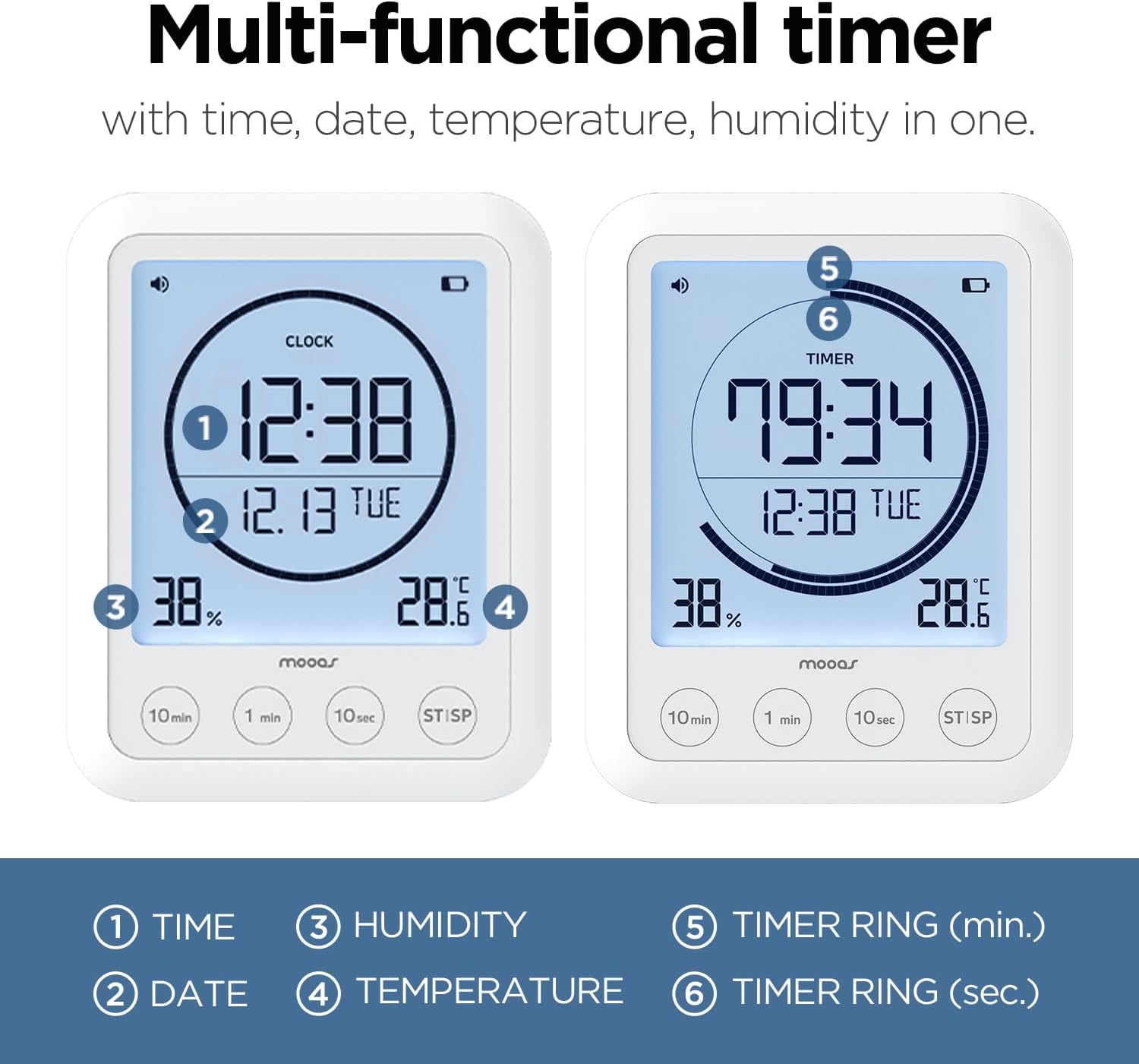
Image: The mooas Visual Timer Clock display, highlighting its various informational readouts.
3. Persediaan
3.1 Pemasangan Bateri
Both the Multi-Hexagon Clock Timer and the Visual Timer Clock are battery-powered. Locate the battery compartment on the back or bottom of each device. Insert the required batteries (typically AAA or AA, refer to the compartment label) ensuring correct polarity (+/-). Close the battery compartment securely.
3.2 Initial Setup - Multi-Hexagon Clock Timer
- Hidupkan kuasa: After battery installation, the display should activate.
- Menetapkan Jam: Refer to the small buttons on the side or bottom of the device. Typically, a 'SET' or 'MODE' button allows you to cycle through time settings (hour, minute). Use '+' or '-' buttons to adjust values.
- Tetapan Penggera: Access alarm settings via the 'SET' or 'ALARM' button. Adjust alarm time and select between sound, vibration, or both.
- Lampu latar: The backlight usually activates automatically when the device is moved or a button is pressed.
3.3 Initial Setup - Visual Timer Clock
- Hidupkan kuasa: The large LCD display will activate upon battery installation.
- Menetapkan Masa dan Tarikh: Use the 'SET' or 'MODE' button to enter time and date adjustment mode. Use the adjustment buttons (e.g., '10min', '1min', '10sec') to change values for hour, minute, year, month, and day.
- Unit Suhu: Look for a small button (often on the back or inside the battery compartment) to switch between Celsius (°C) and Fahrenheit (°F).
- Pemasangan: Decide on your preferred placement. The Visual Timer Clock can stand on a flat surface using its integrated kickstand, be mounted on a wall using a nail or screw (not included), or attached to a metallic surface via its built-in magnets.
4. Arahan Operasi
4.1 Using the Multi-Hexagon Clock Timer
This timer is designed for intuitive operation by rotating its sides.
- Selecting a Preset Timer: Simply rotate the timer so that the desired preset time (e.g., 5, 10, 25, 30, 50, 60 minutes) faces upwards. The timer will automatically start counting down.
- Start/Pause/Reset:

Image: Demonstrating the Start, Pause, and Reset functions of the Multi-Hexagon Timer.
- Mulakan: Once a side is facing up, the timer starts automatically.
- Jeda: To pause the countdown, place the timer on a neutral side (often indicated by a blank face or a specific icon) or press a designated button.
- Tetapkan semula: To reset the timer, turn it to a different preset or press the reset button if available.
- Fungsi Penggera: When the timer reaches zero, the alarm will activate according to your settings (sound, vibration, or both). To stop the alarm, simply pick up or rotate the timer.
- Lampu latar: The display features a backlight for improved visibility, especially in low-light conditions. It typically activates with movement or button press.
- Teknik Pomodoro: The 25-minute preset is ideal for implementing the Pomodoro Technique for focused work intervals.
4.2 Using the Visual Timer Clock
This timer offers a clear display and button-based operation.
- Maklumat Paparan: The large LCD continuously shows:
- Current Time (1)
- Tarikh (2)
- Kelembapan (3)
- Suhu (4)
- Menetapkan Pemasa: Use the dedicated buttons (e.g., '10min', '1min', '10sec') to set your desired countdown time. Pressing these buttons adds the respective time increments.
- Pemasa Mula/Berhenti: Press the 'ST/SP' (Start/Stop) button to begin or pause the countdown. When the timer reaches zero, an alarm will sound. Press 'ST/SP' again to stop the alarm.
- Kelantangan Boleh Laras: The timer features adjustable alarm volume. Refer to the side or back of the device for volume control buttons or a switch.
- Count-Up Timer: If no countdown time is set and 'ST/SP' is pressed, the device may function as a count-up timer.
- Lampu latar: The display is backlit for easy reading. The backlight typically activates when buttons are pressed.

Imej: Cthamples of the Visual Timer Clock in various daily activities.
5. Penyelenggaraan
- Pembersihan: Wipe the devices with a soft, dry, or slightly damp kain. Jangan gunakan pembersih atau pelarut yang melelas.
- Penggantian Bateri: Replace batteries when the display dims or functions become erratic. Always use new batteries of the specified type and dispose of old batteries responsibly.
- Storan: Store the timers in a cool, dry place away from direct sunlight and extreme temperatures when not in use for extended periods.
6. Penyelesaian masalah
- Paparan kosong atau malap: Check battery installation. Replace with fresh batteries.
- Timer not starting/responding: Ensure batteries are correctly installed. For the Multi-Hexagon Timer, ensure a preset side is fully facing upwards. For the Visual Timer, ensure 'ST/SP' button is pressed.
- Inaccurate temperature/humidity readings (Visual Timer): Ensure the device is not placed near heat sources, vents, or in direct sunlight, which can affect sensor accuracy.
- Alarm not sounding/vibrating: Check alarm settings to ensure the desired mode is selected. For the Visual Timer, check volume settings.
7. Spesifikasi
| Ciri | Perincian |
|---|---|
| Jenama | mooas |
| Jenis Paparan | digital |
| Gaya | moden |
| Ciri Khas | Adjustable Volume (Visual Timer) |
| Dimensi Produk | 2.46"W x 2.36"H (Multi-Hexagon Timer) |
| Sumber Kuasa | Dikuasakan Bateri |
| Jenis Bilik | Bathroom, Kitchen, Study |
| bentuk | Hexagonal (Multi-Hexagon Timer) |
| Penggunaan Dalaman/Luar | Dalaman |
| Bateri Termasuk | ya |
| Jenis Pemasangan | Tabletop, Wall Mount (Visual Timer) |
| Jam Penggera | ya |
| Mod Operasi | Elektrik |
| Bahan Bingkai | plastik |
| Borang Jam | Paparan Berbilang |
| Penilaian Kalis Air | IPX5 (Visual Timer) |
8. Waranti dan Sokongan
For warranty information or technical support, please refer to the product packaging or contact mooas customer service through the retailer's platform where the product was purchased. Keep your purchase receipt for warranty claims.