
Techmade TM-URI01
Techmade Universal 3-in-1 Remote Control (Model TM-URI01) Instruction Manual
pengenalan
This manual provides comprehensive instructions for the setup, operation, and maintenance of your Techmade Universal 3-in-1 Remote Control, Model TM-URI01. This remote is designed to consolidate control of up to three infrared devices, including televisions, set-top boxes (digital terrestrial and satellite), and DVD players, offering broad compatibility with brands such as Samsung, LG, and Sony.
1. Persediaan
1.1 Pemasangan Bateri
Alat kawalan jauh memerlukan dua bateri AAA (tidak disertakan). Ikuti langkah berikut untuk memasangnya:
- Cari penutup petak bateri di belakang alat kawalan jauh.
- Tekan ke bawah pada tab dan luncurkan penutupnya.
- Masukkan dua bateri AAA, pastikan terminal positif (+) dan negatif (-) sejajar dengan tanda di dalam petak.
- Luncurkan penutup petak bateri kembali ke tempatnya sehingga ia berbunyi dengan selamat.
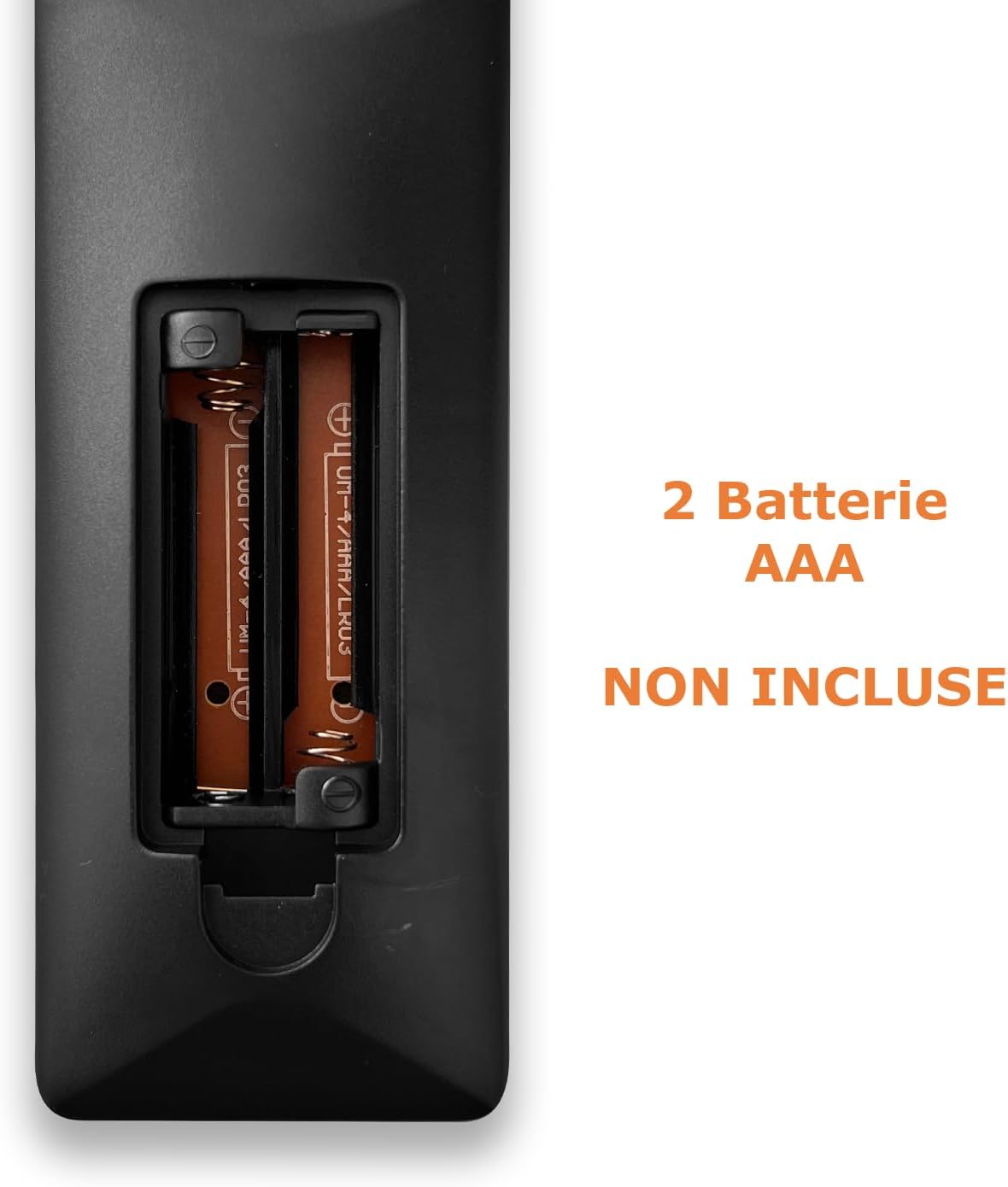
Image: Back of the remote control with the battery compartment open, indicating where to insert two AAA batteries.
1.2 Mengaturcarakan Alat Kawalan Jauh
The Techmade TM-URI01 remote control can be programmed to operate up to three different devices (TV, SAT/DVB-T, DVD). The remote retains its settings even when batteries are removed, thanks to its permanent memory.
Method 1: Direct Code Entry (Recommended)
- Turn on the device you wish to control (e.g., TV, Set-top box, DVD player).
- Press and hold the corresponding device button on the remote (e.g., TV, SAT, DVD) for approximately 3 seconds until the indicator light (usually the power button LED) illuminates and stays on.
- Enter the 4-digit code for your device's brand. A list of common codes is typically provided in a separate code booklet (not included in this manual). For example, for Samsung TVs, try codes like 0001, 0002, etc.
- If the indicator light turns off, the code has been accepted. Test the remote by pressing the Power button. If the device turns off, the programming was successful.
- If the device does not respond, repeat the process with the next code for your brand.
Kaedah 2: Carian Kod Automatik
- Hidupkan peranti yang ingin anda kendalikan.
- Press and hold the corresponding device button (e.g., TV, SAT, DVD) for approximately 3 seconds until the indicator light illuminates and stays on.
- Tekan ke kuasa button once. The indicator light will start flashing, indicating the remote is searching for a code.
- Point the remote at your device. When the device turns off, immediately press the device button (e.g., TV) again to save the code.
- Test the remote's functions. If not all functions work, repeat the auto-search process to find a more compatible code.

Image: The remote control's button layout, highlighting device selection and power buttons for programming.
2. Mengendalikan Alat Kawalan Jauh
Once programmed, your Techmade TM-URI01 remote control functions similarly to your original device remotes. Here are the basic operations:

Imej: Depan view of the Techmade TM-URI01 remote control, showing its complete 48-button layout.
- Pemilihan Peranti: Tekan ke TV, SAT, atau DVD button to select the device you wish to control. The remote will then send commands to that specific device.
- Kuasa: The kuasa button (usually red) turns the selected device on or off.
- Kawalan Kelantangan: Gunakan VOL+ dan vol- butang untuk melaraskan kelantangan.
- Kawalan Saluran: Gunakan CH+ dan CH- butang untuk menukar saluran.
- Papan kekunci angka: Use the number buttons (0-9) to directly input channel numbers or other numerical selections.
- Navigasi: The directional arrow buttons (UP, TURUN, KIRI, BETUL) dan OK button are used for menu navigation and selection.
- Menu/Panduan: Buttons like MENU dan PANDUAN access the respective functions on your device.
- Kawalan Main Semula: Butang seperti Main, jeda, Berhenti, Cepat Ke Hadapan, dan Putar balik are available for DVD or media player control.
Refer to your device's original manual for specific functions that may be mapped to the universal remote's buttons.
3. Penyelenggaraan
Untuk memastikan jangka hayat dan prestasi optimum alat kawalan jauh anda, ikut garis panduan penyelenggaraan ini:
- Pembersihan: Lap alat kawalan jauh dengan kerap menggunakan kain lembut dan kering. Untuk kotoran degil, lap sedikitampLap kain dengan air atau larutan pembersih yang lembut, kemudian lap hingga kering dengan segera. Elakkan menggunakan pembersih atau pelarut yang kasar.
- Penggantian Bateri: Replace batteries when the remote's response becomes sluggish or the indicator light fails to illuminate. Always replace both batteries at the same time with new AAA batteries. Do not mix old and new batteries, or different types of batteries.
- Storan: Simpan alat kawalan jauh di tempat yang sejuk dan kering, jauh daripada cahaya matahari langsung dan suhu yang melampau. Jika alat kawalan jauh tidak akan digunakan untuk tempoh yang lama, adalah dinasihatkan untuk menanggalkan bateri bagi mengelakkan kebocoran.
- Elakkan Titisan: Lindungi alat kawalan jauh daripada jatuh dan hentaman, kerana ini boleh merosakkan komponen dalaman.
4. Penyelesaian masalah
If you experience issues with your Techmade TM-URI01 remote control, consult the following troubleshooting tips:
- Alat Jauh Tidak Berfungsi:
- Pastikan bateri dipasang dengan betul dengan polariti yang betul (+/-).
- Gantikan bateri lama dengan bateri AAA baharu.
- Make sure you have selected the correct device (TV, SAT, DVD) using the device selection buttons.
- Point the remote directly at the device's infrared receiver, ensuring no obstructions are in the way.
- Verify that the remote is within the effective operating range (up to 10 meters).
- Peranti Tidak Membalas Selepas Pengaturcaraan:
- The code entered may be incorrect or not fully compatible. Try another code from the code list for your device's brand.
- Perform the auto code search method again.
- Ensure the device was turned on before starting the programming process.
- Beberapa Fungsi Tidak Berfungsi:
- Not all functions of your original remote may be available or mapped to the universal remote.
- Try programming the remote with a different code for your device, as some codes offer better compatibility for specific functions.
- Indicator Light Not Illuminating:
- Periksa pemasangan bateri dan gantikan bateri jika perlu.
- If the issue persists after replacing batteries, the remote may be faulty.
5. Spesifikasi
| Ciri | Perincian |
|---|---|
| Jenama | Techmade |
| Nombor Model | TM-URI01 |
| Teknologi Ketersambungan | Inframerah |
| Number of Supported Devices | Up to 3 (TV, SAT/DVB-T, DVD) |
| Peranti Serasi | TVs (Samsung, LG, Sony, and others), Set-top boxes, DVD/Blu-ray players |
| Bilangan Butang | 48 |
| Julat Maksimum | 10 Meter |
| Jenis Bateri | 2 x AAA Alkali (tidak termasuk) |
| Berat badan | 200 Gram |
| Ciri Khas | Lightweight, Permanent Memory (retains settings without batteries) |
| warna | Hitam |
6. Maklumat Waranti
Specific warranty details for the Techmade Universal 3-in-1 Remote Control (Model TM-URI01) are not provided within this instruction manual. Please refer to the retailer's purchase terms or the official Techmade webtapak untuk perlindungan waranti dan terma.
7. Sokongan Pelanggan
For further assistance, technical support, or inquiries regarding your Techmade Universal 3-in-1 Remote Control, please visit the official Techmade website or contact your retailer. Contact information is not provided directly in this manual.
Ask a question about this manual
Ask about setup, troubleshooting, compatibility, parts, safety, or missing instructions. Manuals+ will review the question and use this page’s manual context to help answer it.