
EYTSE EY300
EYTSE 61-Key Lighted Piano Keyboard EY300 User Manual
Model: EY300
1. Pengenalan
This manual provides comprehensive instructions for the setup, operation, and maintenance of your EYTSE 61-Key Lighted Piano Keyboard, Model EY300. Please read this manual thoroughly before using the product to ensure proper function and longevity.
The EYTSE EY300 is designed for beginners and advanced learners alike, featuring lighted keys, a rich sound library, and multiple teaching modes to enhance your musical journey.
2. Kandungan Pakej
Sahkan bahawa semua item yang disenaraikan di bawah disertakan dalam pakej anda. Jika ada item yang hilang atau rosak, sila hubungi sokongan pelanggan.
- EYTSE 61-Key Lighted Piano Keyboard (Model EY300)
- Pendirian Muzik
- Kekal Pedal
- Mikrofon
- Fon kepala
- Penyesuai Kuasa
- Kabel Audio
- Manual Pengguna (dokumen ini)

Image: The EYTSE 61-Key Lighted Piano Keyboard shown with all its accessories: power adapter, microphone, headphones, audio cable, user manual, and sustain pedal.

Image: A visual representation of the package contents, including the keyboard, headphones, music sheet stand, microphone, sustain pedal, audio cable, power supply adapter, and user manual.
3. Arahan Persediaan
Sambungan Kuasa: Connect the included power adapter to the DC 9V port on the back of the keyboard and then to a standard electrical outlet. Alternatively, for portable use, insert 6 AA batteries (not included) into the battery compartment on the underside of the keyboard.

Image: The keyboard can be powered by the included power adapter or 6 AA batteries for portability.
Music Stand Installation: Insert the music stand into the designated slot on top of the keyboard.
Sustain Pedal Connection: Plug the sustain pedal into the "SUSTAIN" jack on the rear panel of the keyboard.

Image: A foot operating the sustain pedal, demonstrating its connection and use.
Sambungan Mikrofon: Connect the microphone to the "MIC" input jack on the rear panel.
Sambungan Fon Kepala: For silent practice, plug the headphones into the "PHONES" jack on the rear panel. This will mute the internal speakers.

Image: A user practicing silently with headphones connected to the keyboard.
External Audio Input (AUX IN): Use the audio cable to connect an external audio device (e.g., smartphone, tablet) to the "AUX IN" jack to play along with your favorite music.
Sambungan Pembesar Suara Luaran: The keyboard can be connected to an external speaker system via the appropriate output jack (refer to the "Connections" diagram below).

Imej: A terperinci view of the rear panel connections, illustrating ports for MIDI, Sustain, Aux In, Microphone, Headphones, and Power (DC9V).
4. Arahan Operasi
4.1. Hidup/Mati dan Kelantangan
- Kuasa: Tekan ke KUASA butang untuk menghidupkan atau mematikan papan kekunci.
- Kelantangan: Gunakan JILID control knob or buttons to adjust the master volume.
4.2. LCD Display Overview
The high-definition LCD display provides real-time information on selected tones, rhythms, tempo, and teaching modes.

Imej: A terperinci view of the keyboard's control panel, highlighting the LCD screen and various function buttons.
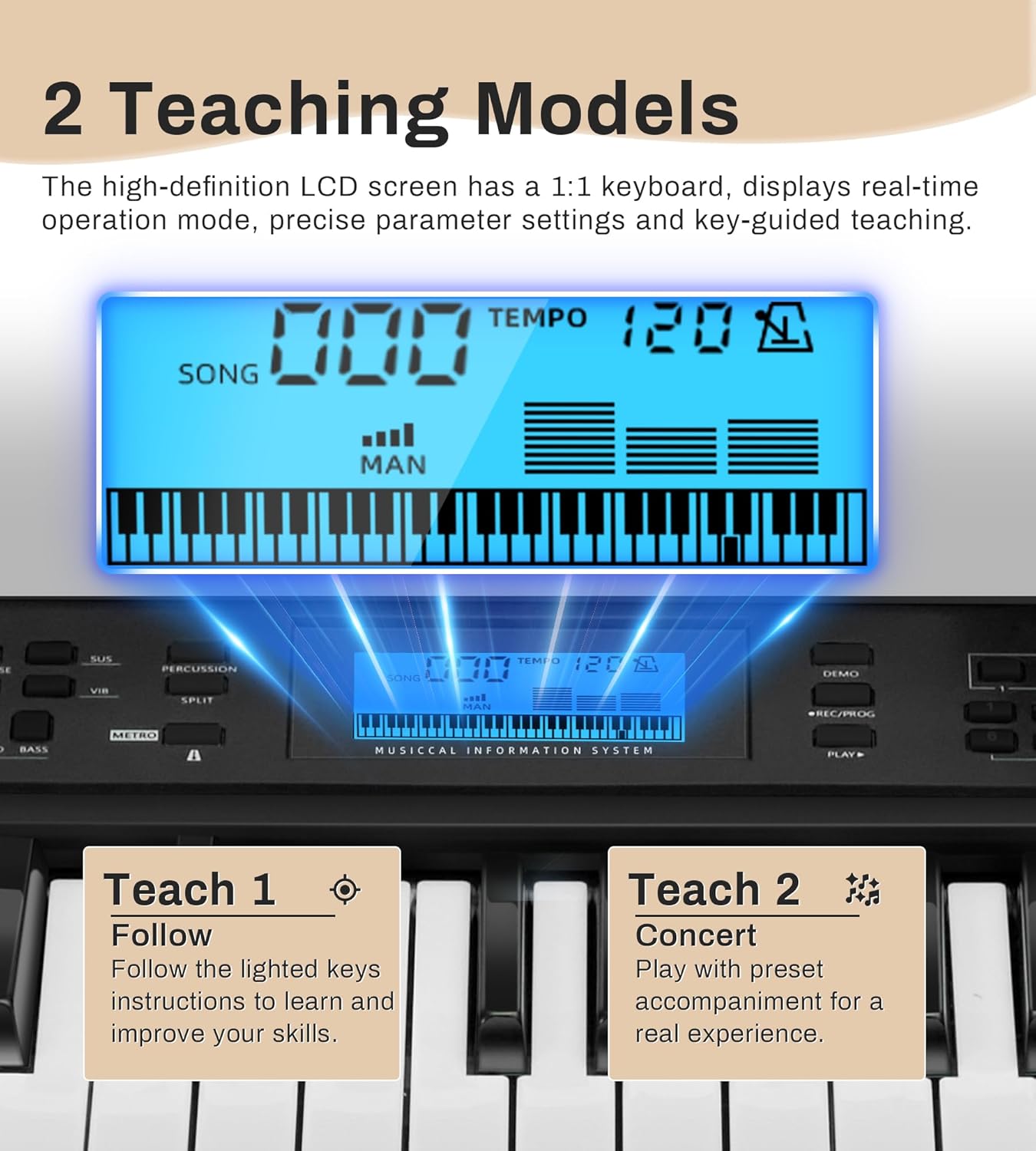
Image: The LCD screen displaying song number, tempo, and a visual representation of the keys. Below, descriptions for "Teach 1: Follow" and "Teach 2: Concert" modes are shown.
4.3. Selecting Tones and Rhythms
- Nada: Gunakan TONA buttons or number pad to select from 600 built-in tones.
- Irama: Gunakan RITMA buttons or number pad to select from 400 built-in rhythms.
- Lagu Demo: Access 50 demo songs using the DEMO butang.

Image: Visual representation of the extensive sound library, including 600 tones, 400 rhythms, 50 demo songs, and a drum kit feature.
4.4. Mod Pengajaran
The keyboard offers two teaching modes to assist with learning:
- Practice with Lights (Teach 1 - Follow): The lighted keys guide you by illuminating the notes to be played, helping beginners learn and master each note efficiently.
- Concert Mode (Teach 2 - Concert): Synchronizes with built-in background music, simulating an orchestral performance.
4.5. Fungsi Lanjutan
The EY300 includes several advanced features:
- Rakaman dan Main Semula: Gunakan REC/PROG butang untuk merakam persembahan anda dan BERMAIN butang untuk main balik.
- Kord: Activate chord functions for automatic accompaniment.
- Kit Drum: Access various percussion sounds.
- Metronom: Gunakan metronom terbina dalam untuk latihan pemasaan.
- Transposisi: Adjust the pitch of the keyboard up or down.
- Pisah: Divide the keyboard into two sections, each with a different tone.
- Vibrato: Add a vibrato effect to the sound.

Image: A child engaging with the keyboard, illustrating the availability of multiple functions such as Split, Record/Program, Sustain, Vibrato, Chord, and Metronome.

Image: A user utilizing the recording function of the keyboard to capture their performance.
5. Penyelenggaraan
- Pembersihan: Use a soft, dry cloth to clean the surface of the keyboard. Do not use abrasive cleaners, solvents, or waxes.
- Storan: Simpan papan kekunci di tempat yang sejuk dan kering jauh dari cahaya matahari langsung dan suhu yang melampau.
- Penjagaan Bateri: Jika menggunakan bateri, keluarkannya jika papan kekunci tidak akan digunakan untuk tempoh yang lama untuk mengelakkan kebocoran.
- Elakkan Kelembapan: Jauhkan papan kekunci daripada air dan cecair lain.
- Tangani dengan Berhati-hati: Elakkan daripada menjatuhkan atau mendedahkan papan kekunci kepada hentaman yang kuat.
6. Penyelesaian masalah
| Masalah | Kemungkinan Punca | Penyelesaian |
|---|---|---|
| Papan kekunci tidak dihidupkan. |
|
|
| Tiada bunyi dari pembesar suara. |
|
|
| Lighted keys are not working. |
|
|
| Sustain pedal not functioning. |
|
|
7. Spesifikasi
| Jenama | EYTSE |
| Nama Model | EY300 |
| Bilangan Kunci | 61 (Lighted, Full-size) |
| Dimensi (L x W x H) | 36.61" x 9.84" x 3.15" (93cm x 25cm x 8cm) |
| Berat Barang | 10.13 paun |
| Nada | 600 |
| Irama | 400 |
| Lagu Demo | 50 |
| Mod Pengajaran | 2 (Practice with Lights, Concert) |
| Paparan | Paparan HD LCD |
| Ketersambungan | 3.5mm Headphone Jack, 3.5mm Microphone Input, 3.5mm AUX In, Sustain Pedal Input, MIDI Out, DC 9V Power Input |
| Sumber Kuasa | Corded Electric (Power Adapter included) or 6 AA Batteries (not included) |
| bahan | plastik |
| warna | Hitam |
| Ciri Khas | Built-In Speaker, Digital Display, Duo Mode, Multiple Voices, Recording, Playback, Chords, Drum Kits, Metronome, Transposition, Split, Vibrato |

Image: A visual guide to the keyboard's dimensions and key measurements, alongside icons for power adapter and AA batteries.

Imej: Dari dekat view of the 61 full-size lighted keys, emphasizing their standard size and comfortable feel for players.
8. Waranti dan Sokongan
For warranty information and customer support, please refer to the contact details provided with your purchase documentation or visit the official EYTSE webtapak. Simpan resit pembelian anda sebagai bukti pembelian untuk sebarang tuntutan waranti.
If you encounter any issues not covered in the troubleshooting section, please contact EYTSE customer service for assistance.