
DEKELIFE MT43PRO
DEKELIFE MT43PRO Military Smart Watch User Manual
Model: MT43PRO | Brand: DEKELIFE
1. Pengenalan
The DEKELIFE MT43PRO Military Smart Watch is engineered for durability and functionality, designed to withstand challenging environments while providing comprehensive smart features. This tactical smartwatch offers military-grade toughness, 5 ATM waterproofing, and resistance to drops, shocks, and magnetic interference. It integrates advanced health monitoring, communication capabilities, and extensive sports tracking to support an active lifestyle.

Image 1: DEKELIFE MT43PRO Military Smart Watch, showcasinreka bentuk yang lasak dan paparan digitalnya.
2. Apa yang ada di dalam Kotak
Sila pastikan semua barang ada semasa membuka kotak:
- 1 x Jam Tangan Pintar Bluetooth Tentera
- 1 x Watch Bands
- 1 x Kabel Pengecasan Magnet USB
- 1 x Manual Pengguna
3. Panduan Persediaan
3.1 Pengecasan Awal
Before first use, fully charge the smartwatch. Connect the USB magnetic charging cable to the charging points on the back of the watch and to a standard USB power adapter. A full charge typically takes approximately 2 hours.
3.2 Pemasangan Apl dan Berpasangan
The smartwatch requires the Da Fit application for full functionality. Scan the QR code provided in the included user manual or search for "Da Fit" in your smartphone's app store (compatible with iOS 9.0 and Android 9.0 and above).
- Muat turun dan pasang Da Fit aplikasi pada telefon pintar anda.
- Buka apl dan ikut arahan pada skrin untuk membuat akaun atau log masuk.
- Pastikan Bluetooth didayakan pada telefon pintar anda.
- Dalam Da Fit app, navigate to the device pairing section and select "Add Device".
- The app will search for nearby devices. Select "C28" or "MT43PRO" from the list to pair.
- Sahkan permintaan berpasangan pada telefon pintar anda dan jam tangan pintar.
Once paired, the watch will synchronize time and data with your phone, and you can customize settings and watch faces through the app.
Video 1: Tamatview of the DEKELIFE MT43PRO Military Smart Watch, demonstrating its features and interface. This video is provided by the seller.
4. Mengendalikan Jam Tangan Pintar
4.1 Navigasi Asas
- Leret ke atas/bawah: Tatal melalui menu dan pemberitahuan.
- Leret Kiri/Kanan: Access quick functions or different watch faces.
- Ketik: Pilih item atau sahkan tindakan.
- Butang Sisi: Use for power on/off, back function, or quick access to sports modes.
4.2 Ciri-ciri Komunikasi
The MT43PRO supports Bluetooth 5.3 for seamless communication:
- Make/Receive Calls: With a built-in Hi-Fi speaker and microphone, you can answer or make calls directly from your wrist.
- Amaran Mesej: Receive notifications for incoming calls, text messages, and SNS messages directly on the smartwatch screen.
- Music Playback/Control: Control music playing on your phone or listen directly through the watch's speaker.
- Pembantu Suara: Access your smartphone's voice assistant for hands-free commands.
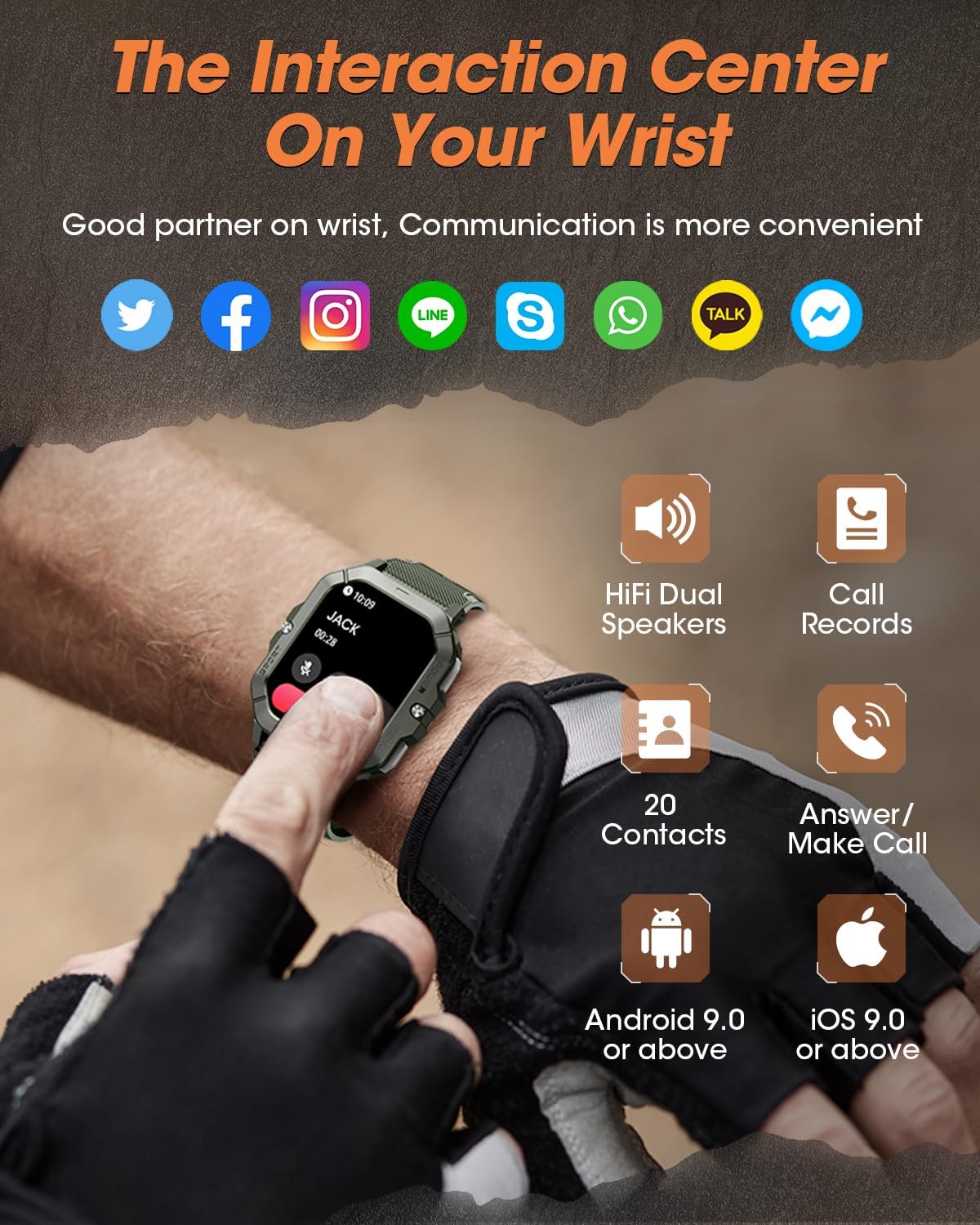
Image 2: The smartwatch screen showing an incoming call and various social media icons, highlighting its communication capabilities.
4.3 Pemantauan Kesihatan
Equipped with advanced sensors, the watch tracks key health metrics:
- Kadar Jantung: Pemantauan kadar jantung berterusan.
- Oksigen Darah (SpO2): Mengukur tahap ketepuan oksigen darah.
- Tekanan darah: Provides blood pressure data.
- Penjejakan Tidur: Monitors sleep patterns, including deep sleep, light sleep, REM time, and wake time, providing analysis for improved sleep quality.
- Pengukuran Tekanan: Helps monitor and manage stress levels.

Image 3: A visual representation of the smartwatch's health tracking features, including heart rate, blood oxygen, blood pressure, and sleep analysis.
4.4 Mod Sukan
The smartwatch offers over 100 indoor and outdoor sport modes:
- Menjejaki langkah, jarak dan kalori yang dibakar.
- Records exercise data tailored to your activity.
- Assists in achieving fitness goals.

Image 4: The smartwatch interface showing a selection of over 100 sports modes, such as walking, running, climbing, and cycling.
4.5 Fungsi Lain
Additional features for daily convenience:
- Ramalan cuaca: Provides real-time weather updates.
- Kawalan Kamera: Kawal kamera telefon pintar anda dari jauh.
- Pemasa & Penggera: Built-in timer and alarm clock functions.
- Peringatan Sedentari: Memberi amaran kepada anda untuk bergerak selepas tempoh tidak aktif.
- Peringatan Air Minum: Prompts you to stay hydrated.
- Cari Telefon: Membantu mencari telefon pintar anda yang dipasangkan.
5. Penyelenggaraan
5.1 Hayat Bateri & Pengecasan
The MT43PRO features a 450mAh battery, offering:
- Masa siap sedia sehingga 50 hari.
- Up to 7 days of general use.
- Full charge in approximately 2 hours.
To ensure optimal battery performance, avoid extreme temperatures and use only the provided charging cable.

Image 5: The smartwatch connected to its magnetic charger, illustrating its battery capacity and charging time.
5.2 Pembersihan dan Penjagaan
Regularly clean your smartwatch and strap to prevent skin irritation and maintain functionality. Use a soft, damp cloth to wipe the screen and body. Ensure the charging contacts are clean and dry before charging.
5.3 Tahan Air
The watch is 5 ATM waterproof, suitable for swimming and showering. However, it is not recommended for diving or high-pressure water activities. Avoid exposing the watch to hot water or steam.

Image 6: A close-up of the smartwatch being splashed with water, highlighting its 5 ATM waterproof rating.
6. Penyelesaian masalah
| Masalah | Penyelesaian yang Mungkin |
|---|---|
| Jam tangan tidak dihidupkan/dicas | Ensure the charging cable is securely connected to both the watch and a power source. Clean the magnetic charging contacts. Allow the watch to charge for at least 10-15 minutes before attempting to power on. |
| Tidak boleh berpasangan dengan telefon pintar | Ensure Bluetooth is enabled on your phone. Restart both the watch and your phone. Make sure the watch is within Bluetooth range. Try unpairing and re-pairing through the Da Fit app. |
| Data kesihatan yang tidak tepat | Ensure the watch is worn snugly on your wrist, not too tight or too loose. Keep the sensor clean. Note that smartwatches are not medical devices and data is for reference only. |
| Pemberitahuan tidak diterima | Check app permissions for notifications on your phone. Ensure the Da Fit app is running in the background. Verify notification settings within the Da Fit app. |
| Skrin tidak bertindak balas | Restart the watch by pressing and holding the power button. If unresponsive, allow the battery to drain completely and then recharge. |
If you encounter any problems during use, please contact customer service through Amazon.
7. Spesifikasi
| Ciri | Perincian |
|---|---|
| Nombor Model | MT43PRO |
| Jenama | DEKELIFE |
| Saiz Paparan | 2.02 Inci |
| Kapasiti Bateri | 450 Miliamp Jam (Litium Polimer) |
| Ketersambungan | Bluetooth 5.3 |
| Keserasian Sistem Pengendalian | iOS 9.0 dan ke atas, Android 9.0 dan ke atas |
| Tahan Air | 5 ATM |
| Ciri Khas | Fitness Tracker, Phone Call, Sleep Monitor, Blood Oxygen (SpO2) Monitor, Heart Rate Monitor, Calorie Tracker, Alarm Clock, Stopwatch, Timer, Pedometer, Camera Control, Music Playback/Control, Sedentary Reminder, Weather, Waterproof, Notifications |
| Berat Barang | 61.7 Gram (2.18 auns) |
| Dimensi | 58.3 x 46.1 x 13.3 mm |
8. Waranti dan Sokongan
DEKELIFE offers a 365-day year-round guarantee for the MT43PRO Military Smart Watch. For any product issues or inquiries, please contact DEKELIFE customer service directly through Amazon. Our online 24/7 customer support team is available to assist you.
Ask a question about this manual
Ask about setup, troubleshooting, compatibility, parts, safety, or missing instructions. Manuals+ will review the question and use this page’s manual context to help answer it.