
1. Pengenalan
The Gustard X30 is a high-performance network streaming decoder designed for audiophiles seeking exceptional sound quality and versatile connectivity. This device integrates advanced digital-to-analog conversion with comprehensive network streaming capabilities, supporting a wide range of high-resolution audio formats.
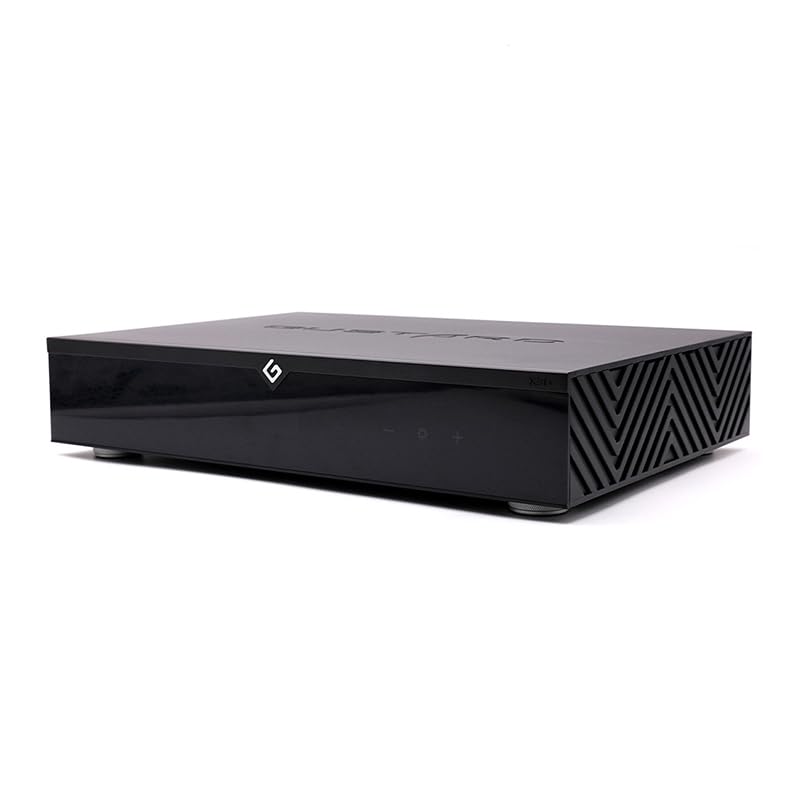
Rajah 1: Depan view of the Gustard X30 Network Streaming Decoder.
2. Produk Lebihview
The Gustard X30 is engineered with cutting-edge technology to deliver an immersive audio experience. Key features include:
- ES9039SPROx4 DAC: Utilizes four ES9039SPRO chips for superior digital-to-analog conversion.
- ES9311Q Multi-group Independent Power Supply: Ensures clean and stable power delivery to critical components.
- Synchronized Clock Implantation Technology: Reduces audio clock requirements for enhanced precision.
- Built-in OCXO Constant Temperature Crystal Oscillator: Supports 10M clock input with ultra-low noise synthesis.
- Passive Analog Preamp with R2R Relay Volume: Offers lossless adjustable volume control with pass-through option.
- DSP Autonomous Digital Filtering: Reduces aliasing noise for a cleaner audio signal.
- Comprehensive Network Support: Compatible with Roon, Airplay, UPnP, NAA, and Spotify protocols.
- Sokongan Audio Resolusi Tinggi: Decodes DSD512, PCM768k, and MQA384k formats.

Figure 2: Detailed feature breakdown of the Gustard X30.

Figure 3: Internal architecture highlighting the ES9039SPRO chips.
3. Persediaan
3.1 Membongkar
Carefully remove the Gustard X30 from its packaging. Ensure all components are present, including the main unit and the power cable. Inspect the unit for any signs of damage during transit.
3.2 Sambungan Fizikal
Refer to the back panel diagram below for proper connection of audio sources and output devices.

Figure 4: Back panel connections of the Gustard X30.
- Keluaran Analog: Sambungkan anda amplifier or active speakers to the XLR (balanced) or RCA (unbalanced) output ports.
- Input Digital: The X30 supports various digital inputs including LAN, USB, I2S, Coaxial, AES/EBU, and Optical. Connect your digital audio sources accordingly.
- 10MHz IN: For external clock synchronization, connect a 10MHz clock source to this BNC input.
- KEMASKINI: Port USB untuk kemas kini perisian tegar.
3.3 Sambungan Kuasa
Connect the provided power cable to the AC power input on the rear panel. Ensure the voltage switch (115V/230V) is set correctly for your region before powering on the device. Use the main power switch to turn the unit on or off.
3.4 Sambungan Rangkaian
Connect an Ethernet cable from your network router or switch to the LAN port on the rear panel. The X30 supports 100/1000Mbps LAN speeds. Network protocols such as Roon, Airplay, UPnP, NAA, and Spotify can be configured via a web antara muka.
4. Arahan Operasi
4.1 Kawalan Panel Hadapan
The front panel features a display and touch-sensitive controls for basic operation.

Figure 5: Front panel layout and controls.
- Suis Tunggu Sedia: Toggles the unit between active and standby modes.
- Kawasan Paparan: Menunjukkan input semasa, sample rate, and other operational information.
- Penerimaan Alat Kawalan Jauh: Penerima inframerah untuk alat kawalan jauh.
- Kawasan Sentuh: Provides touch-sensitive buttons for navigation and settings adjustments.
4.2 Alat Kawalan Jauh
The included remote control allows for convenient operation from a distance, including input selection, volume adjustment (if variable output is enabled), and menu navigation.
4.3 Pemilihan Input
Use the front panel touch controls or the remote control to cycle through available digital inputs (LAN, USB, I2S, Coaxial, AES/EBU, Optical).
4.4 Kawalan Kelantangan
The X30 offers both fixed and variable analog output levels. The RCA and XLR outputs are fixed at 2.5Vrms and 5.1Vrms respectively by default. The passive analog preamplifier with R2R relay volume allows for lossless adjustable volume from 0dB to -90dB via remote control.
4.5 Streaming Functionality
The X30 supports various network streaming protocols. Access the configuration web page (usually via the device's IP address on your network) to enable or disable specific protocols like Roon, Airplay, UPnP, NAA, and Spotify. Firmware updates for streaming functionality can also be performed online.
4.6 Digital Filter Settings
The X30 features DSP autonomous digital filtering to reduce aliasing noise. Specific filter modes (e.g., 4 kinds of DSD filters, 3 kinds of PCM filters) can be selected through the device's menu or web interface to tailor the sound to your preference.
4.7 Tetapan Jam
The built-in OCXO constant temperature crystal oscillator provides high-precision timing. If an external 10M clock source is connected, the device will automatically synchronize to it, further enhancing audio performance.
5. Penyelenggaraan
5.1 Pembersihan
To maintain the appearance and performance of your Gustard X30, regularly wipe the exterior with a soft, dry cloth. Avoid using abrasive cleaners or solvents, as these can damage the finish. Ensure the unit is powered off and unplugged before cleaning.
5.2 Kemas Kini Perisian Tegar
The Gustard X30 supports online firmware upgrades. Periodically check the manufacturer's website for new firmware versions. Updates can improve performance, add new features, or resolve issues. Follow the instructions provided on the configuration web page for a one-click online upgrade process.
6. Penyelesaian masalah
If you encounter any issues with your Gustard X30, consider the following basic troubleshooting steps:
- Tiada Kuasa: Check the power cable connection and ensure the AC voltage switch on the rear panel is set correctly. Verify the power outlet is functional.
- Tiada Bunyi: Confirm the correct input source is selected. Check all audio cable connections to your amplifier or active speakers. Ensure the volume is not muted or set too low.
- Isu Ketersambungan Rangkaian: Verify the Ethernet cable is securely connected. Check your router and network settings. Ensure the X30's network protocols are enabled via its web antara muka.
- Bunyi Herot: Check the source audio file quality. Ensure all connections are secure and free from interference. Try resetting the device to factory defaults if necessary (refer to the web interface for this option).
Untuk isu yang berterusan, rujuk sumber sokongan pengilang atau hubungi khidmat pelanggan.
7. Spesifikasi
Detailed technical specifications for the Gustard X30 Network Streaming Decoder:
| kategori | Spesifikasi |
|---|---|
| Nombor Model | Gustard X30 |
| Digital Input Protocols | Roon, Airplay, UPnP, NAA, Spotify |
| Kelajuan LAN | 100/1000Mbps |
| 10M Clock Input (BNC) | Input impedance 50 Ohm, 0dBm-20dBm, CMOS square wave 0.2V-3.3V, Sine wave 0.5V-3.3V |
| Respons Kekerapan | 20-20kHz / +-0.2dB |
| Julat Dinamik | > 130dB |
| Nisbah Isyarat kepada Bunyi | > 129dB |
| Saluran Crosstalk | -139dB @ 10kHz |
| THD+N | <=0.0001% @ 1kHz |
| IMD | ≈0.001% @ -1dbfs |
| Tahap Output RCA | 2.5Vrms (VOLUME TETAP) |
| Impedans Keluaran RCA | 100Ω |
| XLR Output Level | 5.1Vrms (VOLUME TETAP) |
| XLR Output Impedance | 100Ω |
| XLR Interface Definition | American standard (1 ground, 2 hot, 3 cold) |
| Bekalan Kuasa AC | AC115V/230V 50/60Hz |
| Penggunaan Kuasa | <30W |
| Dimensi (W*D*H) | 430mm * 300mm * 80mm (including feet 92mm) |
| Berat dengan Pakej | 10KG |
| Teknologi Ketersambungan | Ethernet |
| Jenis Pengawal | Alat Kawalan Jauh |
| Peranti Serasi | Smartphone, Tablet, Personal Computer, Game Console, Television, Amppenguat, Penceramah |

Figure 6: Dimensions of the Gustard X30.
8. Waranti dan Sokongan
For warranty information and technical support, please refer to the documentation included with your product or visit the official LEAUDIO webtapak. Simpan bukti pembelian anda untuk tuntutan waranti.