
1. Pengenalan
Thank you for choosing the GOOJODOQ Magsafe Power Bank AD4008. This manual provides essential information for the safe and efficient use of your new power bank. Please read it thoroughly before operation and retain it for future reference.
This 10000mAh wireless power bank features 20W magnetic wireless fast charging and 22.5W wired output, compatible with various smartphones and tablets.
2. Produk Lebihview
2.1 Ciri-ciri Utama
- Kapasiti Tinggi 10000mAh: Provides multiple charges for compatible devices.
- Pengecasan Wayarles Magnetik: Supports 7.5W, 10W, and 15W Max wireless charging for Magsafe-compatible iPhones.
- Pengecasan Berwayar Pantas: Offers 22.5W Max USB Power Delivery (PD) and 20W USB-C output.
- Pelbagai Pilihan Pengecasan: Features built-in Type-C and Lightning cables, a USB output port, and a Type-C input/output port.
- Paparan Digital LED: Menunjukkan peratusan bateri yang tinggal dengan jelastage.
- Padat dan Mudah Alih: Designed for easy carrying during travel or outdoor activities.
- Keselamatan yang Boleh Dipercayai: Built-in protection against overcharge, overdischarge, short circuit, and high temperature.
2.2 Kandungan Pakej
- GOOJODOQ Magsafe Power Bank AD4008
- Kabel Pengecas USB-C
- Manual Pengguna (dokumen ini)
2.3 Rajah Produk

Imej: Selesaiview of the power bank's various input and output ports, including Type-C Output, Lighting Output, Micro USB Input, USB Input, USB Output, and Type-C Output/Input Port.
3. Persediaan
3.1 Pengecasan Awal Bank Kuasa
- Connect the provided USB-C cable to the power bank's Type-C input/output port.
- Plug the other end of the USB-C cable into a compatible USB wall adapter (not included).
- The LED digital display will show the charging progress. Charge the power bank fully before first use.
Alternatively, you can use the Micro USB Input or Lighting Input ports to charge the power bank.

Image: The power bank's LED digital display indicating a full 100% charge, demonstrating its clear battery status indicator.
4. Arahan Operasi
4.1 Charging Devices Wirelessly (Magsafe)
- Ensure your device is Magsafe compatible (iPhone 12 series and above).
- Align the back of your iPhone with the magnetic charging area on the power bank. The magnets will snap into place.
- The power bank will automatically begin wireless charging.
- For optimal magnetic adsorption and charging efficiency, use a Magsafe-compatible phone case or no case at all. Thick or non-magnetic cases may affect performance.
4.2 Charging Devices Wired
The power bank offers multiple wired charging options:
- Menggunakan Kabel Terbina dalam: Connect your device directly using the integrated Type-C or Lightning cables.
- Using USB Output Port: Connect your device's charging cable to the standard USB output port.
- Using Type-C Output/Input Port: Connect your device's USB-C charging cable to this port for fast charging.
The power bank can charge up to 5 devices simultaneously using a combination of wireless and wired connections.

Image: Illustration showing an iPhone wirelessly charging on the power bank and another iPhone connected via a wired cable, highlighting both fast charging methods.

Image: The power bank connected to and wirelessly charging multiple smartphones and a tablet, demonstrating its 10000mAh capacity and ability to charge up to 5 devices.
5. Penyelenggaraan
- Pembersihan: Wipe the power bank with a soft, dry cloth. Do not use harsh chemicals or abrasive cleaners.
- Storan: Simpan bank kuasa di tempat yang sejuk dan kering jauh dari cahaya matahari langsung dan suhu yang melampau.
- Elakkan Kelembapan: Do not expose the power bank to water or high humidity.
- Kabel Pengecasan: Use only the original USB-C cable or certified cables for charging the power bank and your devices.
- Kesihatan Bateri: Untuk jangka hayat bateri yang optimum, cas dan nyahcas sepenuhnya power bank sekurang-kurangnya sekali setiap tiga bulan jika tidak digunakan secara tetap.
6. Penyelesaian masalah
6.1 Power Bank Tidak Mengecas
- Pastikan kabel pengecasan disambungkan dengan selamat ke bank kuasa dan penyesuai dinding.
- Verify that the wall adapter is functioning correctly and the power outlet has power.
- Try using a different charging cable or wall adapter.
6.2 Peranti Tidak Mengecas
- Pengecasan Tanpa Wayar:
- Ensure your device is Magsafe compatible and properly aligned with the power bank's magnetic area.
- Remove any non-Magsafe compatible or excessively thick phone cases.
- Pengecasan Berwayar:
- Check that the charging cable is securely connected to both the power bank and your device.
- Cuba gunakan kabel pengecas yang berbeza atau port output yang berbeza pada power bank.
- Ensure the power bank has sufficient charge, as indicated by the LED display.
6.3 Pengecasan Lambat
- Sahkan bahawa peranti anda menyokong pengecasan pantas dan anda menggunakan kabel yang serasi.
- Ensure the power bank itself is fully charged.
6.4 Overheating During Charging
It is normal for the power bank to generate some heat during charging or discharging. However, if it becomes excessively hot, discontinue use and allow it to cool down. Ensure the power bank is not covered and is in a well-ventilated area. Avoid using it near other heat sources.

Image: The power bank magnetically attached to the back of an iPhone, illustrating the strong magnetic adsorption feature for secure wireless charging.
7. Spesifikasi
| Jenama | GOOJODOQ |
| Nama / Nombor Model | AD4008 |
| Kapasiti Bateri | 10000 mAh |
| Jenis Sel Bateri | Litium Ion |
| Output Pengecasan Tanpa Wayar | 7.5W, 10W, 15W Maks |
| Output Berwayar | 22.5W Max USB PD, 20W USB-C output |
| Port Input | Micro USB, USB Input, Type-C Input/Output, Lighting Input (as per diagram) |
| Port Output | Type-C Output, Lighting Output, USB Output, Type-C Output/Input |
| Jenis Penyambung | Mikro USB, USB Jenis C |
| Dimensi (P x L x T) | 11.3L x 6.9L x 2.4Sentimeter |
| Berat badan | 204 Gram |
| Peranti Serasi | iPhone 12, 13, 14, 15, 16 series, Type C smartphones, Tablets |
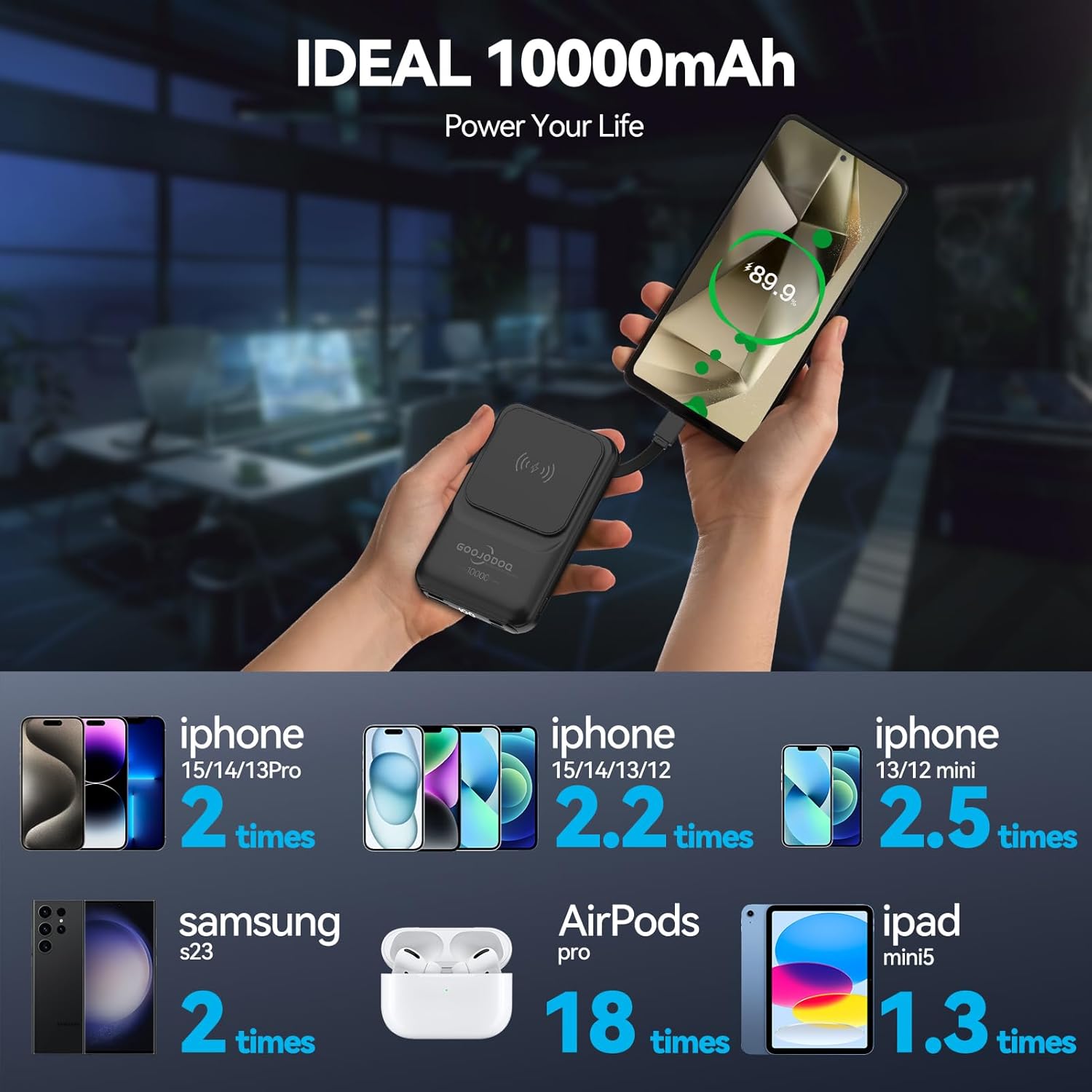
Image: An infographic detailing how many times the 10000mAh power bank can charge different devices, such as iPhones, Samsung S23, AirPods Pro, and iPad mini5.
8. Maklumat Waranti
This GOOJODOQ Magsafe Power Bank AD4008 comes with a Waranti pengilang 1 tahun. This warranty is non-transferable and is valid for 1 year from the original date of purchase. Please retain your proof of purchase for warranty claims.
9. Maklumat Sokongan
For technical support or warranty inquiries, please contact:
- Hubungan Pengilang: maisifang_yd@163.com
- Importer Contact (VALUECART PRIVATE LIMITED): arun@valuecart.in - 9901545456