
1. Pengenalan
Terima kasih kerana membeliasing the Minetom BL-HW02 Outdoor RGB Christmas Laser Light Projector. This device is designed to create dynamic and decorative light displays for various occasions, both indoors and outdoors. Featuring multiple color combinations, motion effects, and remote control operation, it offers a versatile lighting solution. Please read this manual thoroughly before use to ensure proper operation and safety.
2. Maklumat Keselamatan
- Keselamatan Mata: Do not look directly into the laser light beam. Direct exposure to laser light can cause eye damage.
- Sumber Kuasa: Pastikan sumber kuasa sepadan dengan voltage requirements specified on the product label. Use only the provided power adapter.
- Penggunaan Luaran: While the projector is IP65 waterproof, ensure the power adapter and connections are protected from water exposure.
- Pemasangan: Install the projector securely to prevent it from falling or being dislodged by wind or other environmental factors.
- Kanak-kanak dan Haiwan Kesayangan: Jauhkan peranti daripada capaian kanak-kanak dan haiwan peliharaan untuk mengelakkan kerosakan atau kecederaan yang tidak disengajakan.
- Suhu: Do not operate the device outside its specified temperature range (-30°F to 104°F).
- Penyelenggaraan: Jangan cuba membuka atau membaiki peranti sendiri. Rujuk semua servis kepada kakitangan yang berkelayakan.
3. Kandungan Pakej
Sahkan bahawa semua item terdapat dalam pakej:
- Minetom RGB Christmas Laser Light Projector
- Kawalan Jauh RF
- Pegangan Tanah
- Tapak Bulat
- Power Adapter (with 16.4ft extension cord)
- Manual Pengguna (dokumen ini)
4. Persediaan
4.1 Choosing an Installation Method
The projector offers three installation options: ground-mounted, wall-mounted, or placed on a flat surface.
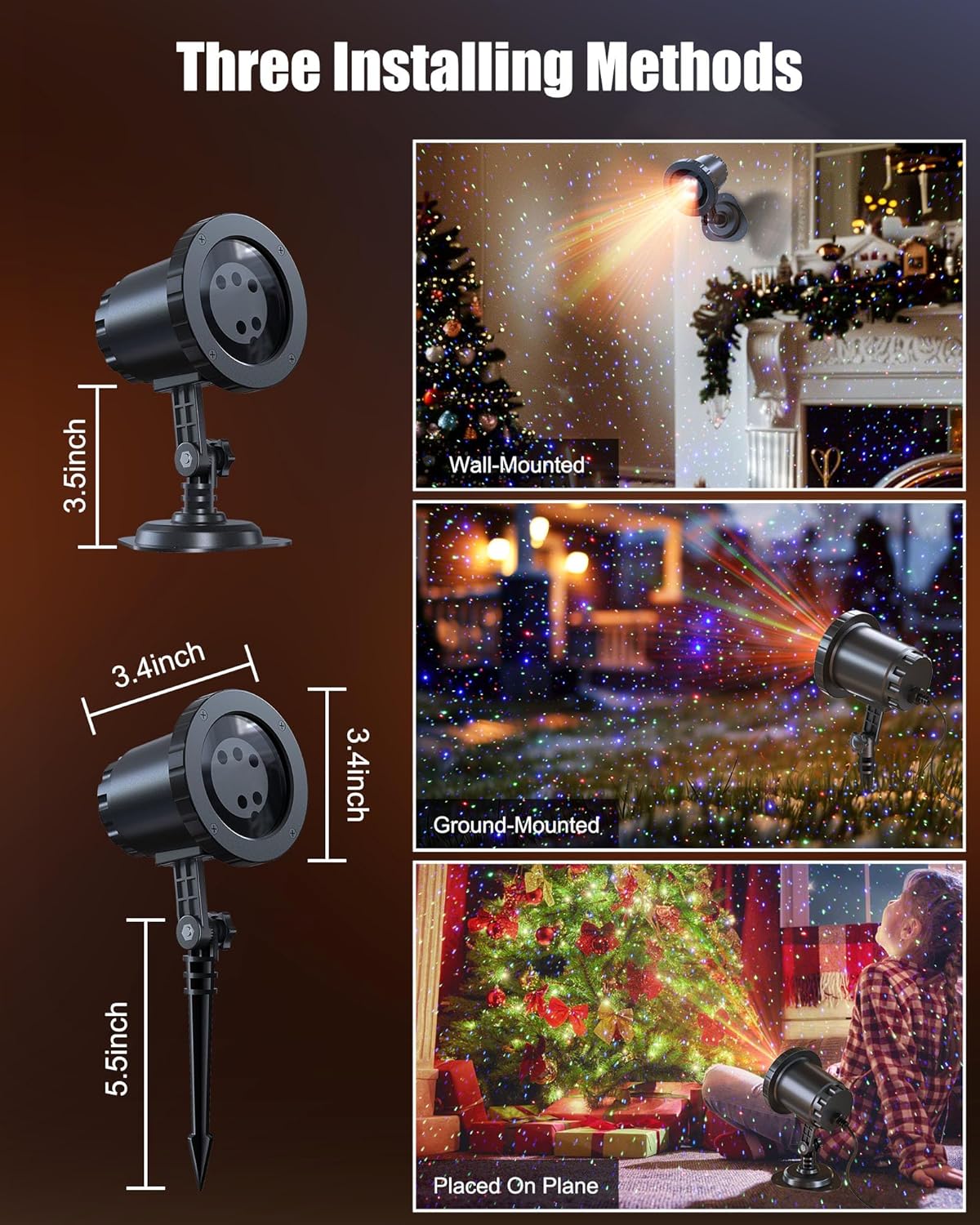
Image: The Minetom laser light projector can be installed in three ways: wall-mounted, ground-mounted, or placed on a flat surface using the included accessories.
- Dipasang di Tanah: Attach the ground stake to the projector. Insert the stake firmly into soft ground in your desired outdoor location.
- Dilekap di dinding: Attach the round base to the projector. Secure the base to a wall using appropriate screws (not included) for a stable installation.
- Placed on Plane: Attach the round base to the projector. Place the projector on any stable, flat surface indoors or outdoors.
4.2 Sambungan Kuasa
- Connect the projector to the provided power adapter.
- Use the 16.4ft extension cord to reach a suitable outdoor power outlet.
- Pastikan semua sambungan kukuh dan terlindung daripada kelembapan.
- Palamkan penyesuai kuasa ke dalam salur keluar elektrik yang dibumikan.
5. Arahan Operasi
Once powered on, the projector will begin its default light show. Use the RF remote control to customize the display.
5.1 Fungsi Kawalan Jauh
The RF remote control allows you to manage various settings from a distance. Ensure 2*AAA batteries (not included) are installed in the remote.

Image: RF Remote Control layout with functions for each button.
| Butang | Fungsi |
|---|---|
| HIDUP/MATI | Menghidupkan atau mematikan projektor. |
| 2H / 4H / 6H | Sets the timer for 2, 4, or 6 hours. |
| (H) Restore | Restores to default timing (6 hours on, 18 hours off). |
| Kitaran Warna | Cycles through Green, Blue, Red-Green, Blue-Green, Red-Blue, Red-Green-Blue, and Red-Green-Blue cycle. |
| Mod Pernafasan | Activates a slow fade-in/fade-out effect. |
| Jumping Mode | Activates a rapid color change effect. |
| S0 (Static) | Sets the light display to static (no motion). |
| S- / S+ | Adjusts rotation speed (S- for slow, S+ for fast). |
| R / G / B | Selects Red, Green, or Blue light individually. |
| R/G/B Breathing | Activates breathing mode for individual Red, Green, or Blue colors. |
| R/G/B Strobe | Activates strobe mode for individual Red, Green, or Blue colors. Press sequentially to adjust speed (Slow, Medium, Fast, Stop). |
| R/G/B Steady | Sets individual Red, Green, or Blue colors to steady (non-flashing). |
5.2 Gabungan Warna
The projector supports various color combinations to create diverse effects.

Imej: Cthamples of the 7 available color combinations.
- merah
- hijau
- Biru
- Merah Hijau
- Merah Biru
- Hijau Biru
- Merah Hijau Biru
6. IP65 Waterproof Rating
The projector body is designed with an IP65 waterproof rating, ensuring reliable performance in various weather conditions such as snow, rain, dust, and intense sunlight. It is cold-proof, operating effectively from -30°F to 104°F.

Image: The projector operating in rainy and snowy conditions, highlighting its IP65 waterproof and cold-proof features.
7. Coverage Area
The projector can cover a significant area, illuminating indoor ceilings, walls, or outdoor walls, gardens, lawns, trees, and rooftops. From a distance of 32.8 feet, it can cover approximately 3229.17 square feet.

Image: Coverage area chart illustrating how the projected area expands with increased distance from the surface.
8. Penyelenggaraan
- Pembersihan: Lap kanta dan badan projektor dengan lembut menggunakan kain lembut dan kering. Jangan gunakan pembersih atau pelarut yang kasar.
- Storan: Apabila tidak digunakan, simpan projektor di tempat yang sejuk dan kering, jauh dari cahaya matahari langsung dan suhu yang melampau.
- Pemeriksaan Kabel: Periodically check the power cord and adapter for any signs of damage. Discontinue use if damage is found.
9. Penyelesaian masalah
| Masalah | Penyelesaian |
|---|---|
| Projektor tidak dihidupkan. |
|
| Alat kawalan jauh tidak bertindak balas. |
|
| Keluaran cahaya malap atau tidak konsisten. |
|
| Multiple projectors interfere with each other. |
|
10. Spesifikasi
| Ciri | Perincian |
|---|---|
| Nombor Model | BL-HW02 |
| Jenama | Minetom |
| warna | Merah Hijau Biru |
| bahan | plastik |
| Jenis Selesai | Projektor |
| Jenis Sumber Cahaya | Diod Pemancar Cahaya |
| Sumber Kuasa | Elektrik Bertali |
| Jenis Pemasangan | Pemasangan Lantai, Pemasangan Dinding |
| Dimensi Produk | 2.75"L x 2.75"W x 11.02"H |
| Berat Barang | 14 auns |
| Sudut Rasuk | 120 Darjah |
| Penilaian Kalis Air | IP65 |
| Suhu Operasi | -30°F hingga 104°F |
| Coverage Area (approx.) | 3229.17 sq ft at 32.8 ft distance |
11. Waranti dan Sokongan
For warranty information or technical support, please refer to the contact details provided at the point of purchase or visit the official Minetom webtapak. Simpan resit pembelian anda sebagai bukti pembelian.