
1. Pengenalan
This manual provides detailed instructions for the use and maintenance of your new Generic remote control, designed for seamless compatibility with the ONN ONA19SB003 Mini Soundbar Sound Bar Speaker. This remote is pre-programmed and requires no additional setup or coding. Simply insert batteries, and it is ready for immediate use.
2. Kandungan Pakej
Sila sahkan bahawa semua item yang disenaraikan di bawah terdapat dalam pakej anda:
- 1 x Unit Kawalan Jauh
Note: Batteries are not included and must be purchased separately. No printed instruction manual is included in the package.
3. Persediaan: Pemasangan Bateri
To begin using your remote control, you must first install the required batteries. This remote typically uses a CR2025 coin cell battery.
- Cari petak bateri di belakang alat kawalan jauh.
- Depending on the design, you may need to slide a cover or press a latch to open the compartment. Refer to the image below for guidance.
- Insert one new CR2025 coin cell battery, ensuring the positive (+) side is facing upwards as indicated inside the compartment.
- Tutup petak bateri dengan selamat sehingga ia berbunyi klik pada tempatnya.

Rajah 3.1: Belakang view of the remote control, illustrating the battery compartment for a CR2025 coin cell battery.

Rajah 3.2: Belakang view of the remote control alongside a battery holder clip, indicating the battery type and insertion method.
Once batteries are installed, the remote is ready for use with your ONN ONA19SB003 Mini Soundbar. No programming is required.
4. Arahan Operasi
This remote control provides full functionality for your ONN ONA19SB003 Mini Soundbar. Below is a description of each button's function:
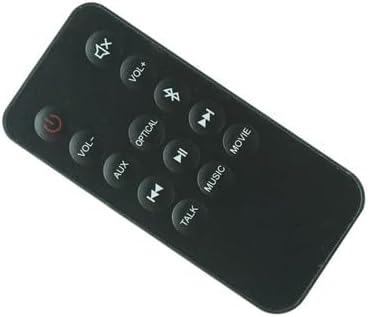
Rajah 4.1: Depan view of the remote control, displaying all functional buttons.
| Butang | Fungsi |
|---|---|
| kuasa (⏻) | Turns the soundbar On or Off. |
| Bisu (🔇) | Membisukan atau menyahredamkan bunyi. |
| VOL+ | Meningkatkan tahap kelantangan. |
| vol- | Menurunkan tahap kelantangan. |
| Bluetooth (☋) | Switches the soundbar to Bluetooth input mode. |
| AUX | Switches the soundbar to Auxiliary input mode. |
| OPTIK | Switches the soundbar to Optical input mode. |
| Lagu Sebelumnya (⏮) | Skips to the previous track (in supported modes like Bluetooth). |
| Main/Jeda (⏯) | Plays or pauses audio playback (in supported modes like Bluetooth). |
| Lagu Seterusnya (⏭) | Skips to the next track (in supported modes like Bluetooth). |
| FILEM | Activates the Movie sound mode, optimizing audio for films. |
| MUZIK | Activates the Music sound mode, optimizing audio for music playback. |
| CAKAP | Activates the Talk sound mode, enhancing vocal clarity for dialogue. |
5. Penyelesaian masalah
Jika anda menghadapi masalah dengan alat kawalan jauh anda, sila rujuk kepada masalah dan penyelesaian biasa berikut:
- Jauh tidak bertindak balas:
- Ensure new batteries are correctly installed with the correct polarity.
- Gantikan bateri lama dengan yang baru.
- Check for any obstructions between the remote and the soundbar's sensor.
- Ensure you are within the effective operating range of the soundbar.
- Butang khusus tidak berfungsi:
- Clean the remote's surface and buttons with a soft, dry cloth to remove any dirt or debris.
- Verify that the soundbar is powered on and not in a standby mode that prevents remote interaction.
- Soundbar not responding to any remote:
- Power cycle the soundbar by unplugging it from the power outlet for a few minutes, then plugging it back in.
- Ensure the soundbar's own power button is functioning.
If problems persist after trying these steps, please refer to the "Warranty and Support" section for further assistance.
6. Spesifikasi
| Ciri | Perincian |
|---|---|
| Jenama | Generik |
| Keserasian Model | ONN ONA19SB003 Mini Soundbar Sound Bar Speaker |
| Ciri Khas | No additional programming required |
| warna | As shown (Black) |
| Bilangan Maks Peranti yang Disokong | 1 (Soundbar) |
| Peranti Serasi | Bar bunyi |
| Jenis Bateri | CR2025 Coin Cell (not included) |
7. Penyelenggaraan
Untuk memastikan jangka hayat dan prestasi optimum alat kawalan jauh anda, ikut garis panduan penyelenggaraan ini:
- Pembersihan: Use a soft, dry cloth to wipe the remote's surface. Do not use liquid cleaners or abrasive materials.
- Storan: Simpan alat kawalan jauh di tempat yang sejuk dan kering jauh dari cahaya matahari langsung dan suhu yang melampau.
- Penggantian Bateri: Gantikan bateri dengan segera apabila prestasi alat kawalan jauh merosot. Tanggalkan bateri jika alat kawalan jauh tidak akan digunakan untuk tempoh yang lama untuk mengelakkan kebocoran.
- Elakkan Titisan: Lindungi alat kawalan jauh daripada renjatan fizikal dan jatuh, yang boleh merosakkan komponen dalaman.
8. Waranti dan Sokongan
Specific warranty information for this Generic remote control is not provided in the product details. For any warranty claims, technical support, or further assistance, please contact the seller directly through your purchase platform.
Please retain your purchase receipt as proof of purchase for any support inquiries.