
pengenalan
Terima kasih kerana membeliasing the Kenko Digital Camera KC-ZM08. This compact digital camera is designed for ease of use, allowing you to capture everyday moments with its 5x optical zoom, touch panel operation, and various convenient features. Please read this manual thoroughly before using the camera to ensure proper operation and to maximize your enjoyment of its capabilities. Keep this manual in a safe place for future reference.
Kandungan Pakej
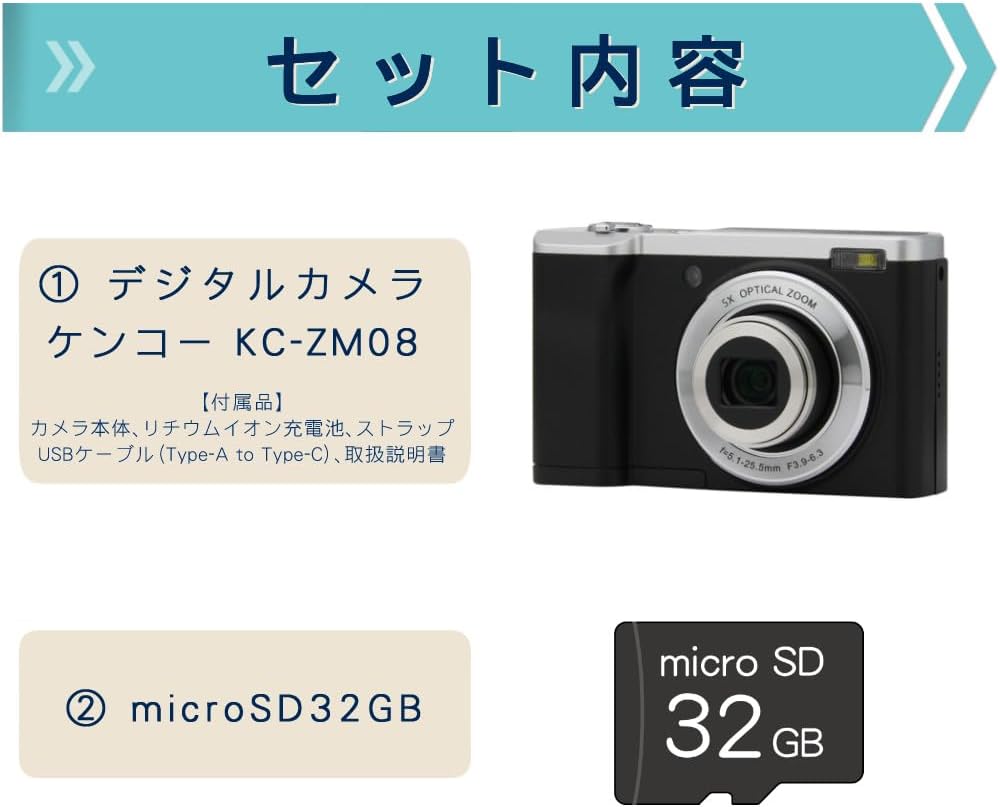
This package includes the Kenko Digital Camera KC-ZM08 and a 32GB microSD card, providing everything you need to start capturing photos and videos.
- Kenko Compact Digital Camera KC-ZM08
- Bateri Litium-ion Boleh Dicas semula
- Tali Pergelangan Tangan
- Kabel USB (Jenis-A ke Jenis-C)
- Manual Arahan
- Kad microSD (32GB)
Ciri-ciri Utama
Zum Optik 5x

The camera features a 5x optical zoom lens, covering a versatile range from wide-angle 28mm to telephoto 142mm (35mm equivalent). This allows for capturing a wide variety of scenes, from expansive landscapes to distant subjects.
Intuitive Touch Panel Operation

Easily change modes and settings with the responsive touch panel LCD monitor. This intuitive interface simplifies camera operation, making it quick and effortless to adjust your shooting preferences.
Convenient Rear Camera for Selfies

Switch to the rear camera with a single button press for easy selfies. You can capture both photos and videos while viewing yourself on the monitor, ensuring you get the perfect shot.
Shortest Shooting Distance: Approx. 10cm

When shooting at wide-angle, you can get as close as approximately 10cm to your subject, allowing for detailed close-up photography (with the front lens).
Built-in LED Flash and Constant Light

The camera not only has a built-in flash for still images but also features a constant LED light, which is convenient for video recording in low-light conditions.
Rakaman Video Gerak Perlahan

Easily capture slow-motion videos to add a creative touch to your recordings.
Penangkapan Selang Masa
The camera supports time-lapse shooting, automatically capturing images at set intervals to create dynamic time-lapse videos.
Fungsi Pemasa Kendiri
Utilize the self-timer for group photos with friends and family, or for convenient self-portraits.
WebKeupayaan cam
Connect the camera to your computer via USB to use it as a webcam for video calls and live streaming.
Digital Image Stabilization (for Video)
Reduce camera shake during video recording with the built-in digital image stabilization feature, ensuring smoother footage.
Panduan Persediaan
- Cas Bateri: Insert the rechargeable lithium-ion battery into the camera. Connect the camera to a USB power source using the provided USB Type-A to Type-C cable. The charging indicator will show the charging status. Ensure the battery is fully charged before first use.
- Masukkan Kad microSD: Open the card slot cover and gently insert the provided 32GB microSD card until it clicks into place. Ensure the card is inserted in the correct orientation.
- Pasang Tali Pergelangan Tangan: Securely attach the wrist strap to the camera to prevent accidental drops.
- Hidupkan kuasa: Tekan dan tahan butang kuasa untuk menghidupkan kamera.
- Tetapan Awal: Ikut gesaan pada skrin untuk menetapkan tarikh, masa dan bahasa.
Arahan Operasi
Mengambil Foto
- Pilih Mod Foto: Press the 'MODE' button to select the photo shooting mode.
- Bingkai Tangkapan Anda: Use the LCD screen to compose your image.
- Fokus: Gently press the shutter button halfway down to focus. The focus frame will turn green when focus is achieved.
- Tangkap: Tekan butang pengatup sepenuhnya ke bawah untuk mengambil gambar.
Merakam Video
- Pilih Mod Video: Press the 'MODE' button to select the video recording mode.
- Mulakan Rakaman: Press the shutter button to start recording. A red indicator will appear on the screen.
- Hentikan Rakaman: Tekan butang pengatup sekali lagi untuk menghentikan rakaman.
Menggunakan Panel Sentuh
Tap icons on the LCD screen to navigate menus, change settings like image size, ISO, exposure, and picture quality (Super Fine, Fine, Normal). Swipe to browse through captured media in playback mode.
Switching to Rear Camera
Locate the dedicated button for switching between the front and rear cameras. Press this button to activate the rear camera for convenient selfies or vlogging.
Mod Main Semula
Tekan butang main balik untuk view your captured photos and videos. Use the navigation buttons or touch screen to scroll through your media.
Penyelenggaraan
- Membersihkan Lensa: Use a soft, lint-free cloth specifically designed for camera lenses to gently wipe away dust or smudges. Do not use harsh chemicals.
- Membersihkan Badan: Lap badan kamera dengan kain lembut dan kering. Untuk kotoran degil, sedikit dampen kain dengan air dan kemudian lap kering.
- Penjagaan Bateri: Simpan bateri di tempat yang sejuk dan kering apabila tidak digunakan. Elakkan menyahcas sepenuhnya bateri untuk tempoh yang lama.
- Storan: When storing the camera for a long time, remove the battery and microSD card. Store the camera in a dry, well-ventilated area away from direct sunlight and extreme temperatures.
Menyelesaikan masalah
| Masalah | Kemungkinan Punca / Penyelesaian |
|---|---|
| Kamera tidak dihidupkan. | Bateri mungkin kehabisan kuasa. Cas bateri sepenuhnya. Pastikan bateri dimasukkan dengan betul. |
| Tidak boleh mengambil gambar/merakam video. | microSD card may be full or not inserted correctly. Check card status or replace. Ensure sufficient battery charge. |
| Imej adalah kabur. | Ensure the lens is clean. Check focus by pressing the shutter button halfway. Hold the camera steady during shooting. |
| Skrin sentuh tidak responsif. | Restart the camera. Ensure the screen is clean and dry. |
Spesifikasi
| Ciri | Perincian |
|---|---|
| Nama Model | KC-ZM08 |
| Jenama | Kenko |
| Zum Optik | 5x |
| Zum Digital | 2x |
| Teknologi Penderia Foto | CMOS |
| Resolusi Pegun Berkesan | 56 MP |
| Resolusi Tangkapan Video | 1080p |
| Panjang Fokus Minimum | 28 mm |
| Panjang Fokus Maksimum | 142 mm |
| Penstabilan Imej | Digital (for video) |
| serasi File Format | JPEG, MP4 |
| Saiz Paparan | 2.8 inci |
| Jenis Denyar | Built-in (Auto, Always On) |
| Ketersambungan | USB |
| Jenis Bateri | Litium-ion |
| Berat Produk | 148 grams (excluding accessories, battery) |
| Dimensi | lebih kurang 100 x 62 x 32 mm |
Waranti dan Sokongan
The Kenko Digital Camera KC-ZM08 comes with a 1-year manufacturer's warranty. For technical support, troubleshooting assistance, or warranty claims, please refer to the contact information provided in the separate warranty card or visit the official Kenko webtapak.
Sila simpan bukti pembelian anda untuk tujuan waranti.
Video Produk
Kenko Digital Camera KC-ZM08 Overview
Video ini memberikan gambaran umumview of the Kenko Digital Camera KC-ZM08, highlighting its compact design and ease of use for everyday photography and casual walks.
Digital Camera KC-ZM08 Features
Tayangan video pendekasing various features of the KC-ZM08 digital camera.