
1. Pengenalan
Welcome to the user manual for your Boult Audio Z40 True Wireless Earbuds. These earbuds are designed to provide a superior audio experience with features like long playtime, clear calls, and low-latency gaming. Please read this manual carefully to ensure proper use and maintenance of your device.

Image: Boult Audio Z40 True Wireless Earbuds in their brown charging case, with the lid open, showing both earbuds nestled inside. The case has a sleek, modern design.
2. Apa yang ada di dalam Kotak
Your Boult Audio Z40 package includes the following items:
- Boult Audio Z40 True Wireless Earbuds
- Sarung Pengecas Tanpa Wayar
- Kabel Pengecas Cepat Jenis-C
- Sepasang Tambahan Telinga
- Manual Pengguna
- Kad Waranti
3. Ciri-ciri Produk
The Boult Audio Z40 Earbuds come equipped with several advanced features for an enhanced audio experience:
- 60 Hours Total Playtime: Hayat bateri yang lebih lama untuk penggunaan yang berpanjangan.
- Lightning Boult Type-C Fast Charging: Dapatkan 100 minit masa bermain hanya dengan 10 minit pengecasan.
- Zen™ ENC Mic: Environmental Noise Cancellation for crystal-clear calls.
- Permainan Latensi Rendah: Enjoy an uninterrupted gaming experience with minimal audio lag.
- 10mm BoomX™ Tech Drivers: Delivers deep, dynamic bass for immersive audio.
- Rintangan Air IPX5: Perlindungan daripada peluh dan percikan ringan.
- Bluetooth 5.3: Sambungan tanpa wayar yang stabil dan cekap.
- Premium Haptics & Touch Controls: Intuitive control over music, calls, and voice assistant.

Imej: Tayangan kolajcasing key features of the Boult Audio Z40, including 10mm BoomX drivers, Zen™ ENC, 60H playtime, IPX5 water resistance, Bluetooth 5.2, touch controls, and fast charging capabilities.
Video: An official product video demonstrating the features and design of the Boult Audio Z40 True Wireless Earbuds, highlighting their functionality and user experience.
4. Persediaan
4.1 Mengecas Fon telinga dan Sarung
Sebelum penggunaan pertama, cas sepenuhnya fon telinga dan bekas pengecas.
- Connect the provided Type-C charging cable to the charging port on the case and a power source.
- Penunjuk LED pada sarung akan menunjukkan status pengecasan.
- A 10-minute charge provides approximately 100 minutes of playtime.
- The case provides up to 48 hours of battery life for the earbuds.

Image: The Boult Audio Z40 charging case with earbuds inside, connected to a Type-C charging cable, illustrating the 60 hours of playtime and fast charging capability (10 mins charge = 100 mins playtime).
4.2 Berpasangan dengan Peranti Anda
The Boult Audio Z40 features Blink & Pair™ technology for quick connection.
- Buka bekas pengecas. Fon telinga akan memasuki mod berpasangan secara automatik.
- Pada peranti anda (telefon pintar, tablet, dll.), dayakan Bluetooth.
- Cari untuk "Boult Audio Z40" in the list of available Bluetooth devices.
- Select "Boult Audio Z40" to connect. Once connected, you will hear a confirmation tone.

Image: A smartphone screen showing "Boult Audio Z40 Connected" via Bluetooth 5.2, with the earbuds in their open charging case in the foreground, demonstrating the Blink & Pair™ feature.
5. Arahan Operasi
5.1 Kawalan Sentuhan
The Boult Audio Z40 earbuds feature intuitive touch controls for various functions:
| Tindakan | Fungsi |
|---|---|
| Ketik Tunggal (Earbud Kiri/Kanan) | Main/Jeda Muzik, Jawab/Tamatkan Panggilan |
| Dwiketik (Earbud Kanan) | Trek Seterusnya |
| Dwiketik (Earbud Kiri) | Trek Sebelumnya |
| Ketik Tiga Kali (Earbud Kiri/Kanan) | Aktifkan Pembantu Suara |
| Tekan Lama (Earbud Kiri/Kanan) | Tolak Panggilan |
| Tekan Lama (Earbud Kiri) | Kelantangan Kurang |
| Tekan Lama (Earbud Kanan) | Kelantangan Naik |

Image: A close-up of the Boult Audio Z40 earbud in an ear, highlighting the premium haptics and touch controls, with an icon indicating voice assistant compatibility.
5.2 Making Calls with Zen™ ENC Mic
The Zen™ Environmental Noise Cancellation (ENC) microphone ensures clear voice transmission during calls by reducing ambient noise.
- To answer a call, single tap either earbud.
- Untuk menamatkan panggilan, ketik sekali sama ada fon telinga.
- To reject an incoming call, long press either earbud.
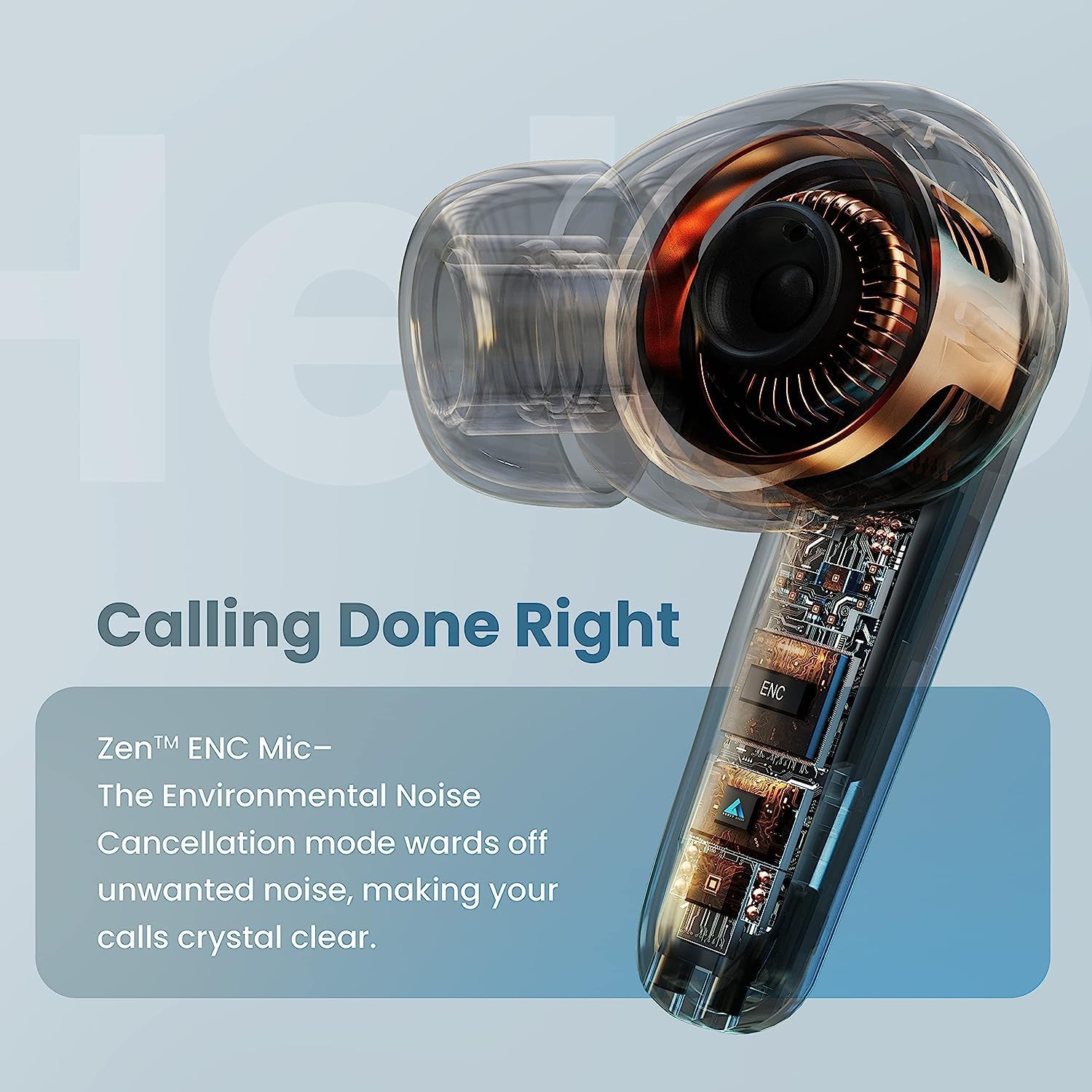
Imej: Gaya X-ray view of the Boult Audio Z40 earbud, highlighting the internal components and the Zen™ ENC Mic, emphasizing its role in clear call quality by cancelling unwanted noise.
5.3 Low Latency Gaming
The Z40 earbuds are equipped with adaptive low latency (45 milliseconds) for an immersive gaming and cinema experience without noticeable lags.
- Ensure your device's Bluetooth connection is stable for optimal performance.
- The low latency mode is automatically engaged when playing games or watching videos that support it.

Image: The Boult Audio Z40 earbuds and charging case in a gaming-themed setting, with text prominently displaying "Combat™ gaming" and "Low latency," indicating their suitability for gaming without lags.
6. Penyelenggaraan
6.1 Rintangan Air (IPX5)
The Boult Audio Z40 earbuds are IPX5 water resistant, meaning they can withstand light splashes of water and sweat. They are not designed for submersion in water.
- Do not expose the earbuds to running water or submerge them.
- Wipe them dry immediately if they come into contact with sweat or light rain.

Image: The Boult Audio Z40 earbuds resting on a damp, rocky surface, with text prominently displaying "IPX5 water resistant," illustrating their durability against splashes.
6.2 Pembersihan dan Penyimpanan
- Bersihkan fon telinga dan bekas pengecas dengan kerap menggunakan kain yang lembut, kering dan tidak berbulu.
- Elakkan menggunakan pembersih atau pelarut yang kasar.
- Simpan fon telinga dalam bekas pengecasnya apabila tidak digunakan untuk melindunginya dan memastikan ia dicas.
- Jauhkan peranti daripada suhu yang melampau dan cahaya matahari langsung.
7. Penyelesaian masalah
Isu dan Penyelesaian Biasa:
- Fon telinga tidak berpasangan:
- Pastikan kedua-dua fon telinga berada dalam bekas pengecasan dan mempunyai cas yang mencukupi.
- Matikan Bluetooth pada peranti anda, kemudian hidupkan semula.
- Forget "Boult Audio Z40" from your device's Bluetooth list and try pairing again.
- Ensure the earbuds are within the 10-meter Bluetooth range.
- Tiada bunyi dari satu fon telinga:
- Letakkan kedua-dua fon telinga kembali ke dalam bekas pengecas, tutup penutup, tunggu beberapa saat, kemudian keluarkannya semula.
- Check if the earbud has sufficient charge.
- Isu pengecasan:
- Pastikan kabel Jenis-C disambungkan dengan selamat pada kedua-dua bekas dan sumber kuasa.
- Cuba kabel pengecasan atau penyesuai kuasa yang berbeza.
- Bersihkan sesentuh pengecasan pada fon telinga dan bahagian dalam sarung dengan kapas kering.
- Kualiti panggilan yang lemah:
- Ensure the Zen™ ENC Mic is not obstructed.
- Berpindah ke persekitaran yang lebih tenang jika boleh.
- Semak kekuatan isyarat rangkaian peranti anda.
8. Spesifikasi
| Ciri | Perincian |
|---|---|
| Nama Model | Boult Audio Z40 |
| Teknologi Ketersambungan | Wayarles (Bluetooth) |
| Versi Bluetooth | 5.3 |
| Julat Bluetooth | 10 Meter |
| Latensi Audio | 45 milisaat |
| Saiz Pemandu | 10mm BoomX™ Tech Drivers |
| Jumlah Masa Main | Sehingga 60 Jam (dengan kes pengecasan) |
| Pengecasan Cepat | 10 mins charge = 100 mins playtime (Type-C) |
| Tahan Air | IPX5 |
| Mikrofon | Zen™ ENC Mic |
| Jenis Kawalan | Sentuh, Suara |
| Penempatan Telinga | Di Telinga |
| bahan | Plastik, Logam |
| Pengeluar | Boult |
9. Waranti dan Sokongan
Your Boult Audio Z40 True Wireless Earbuds come with a Warranty Card included in the box. Please refer to the Warranty Card for detailed information regarding warranty terms and conditions.
For any support inquiries, please refer to the contact information provided on the Warranty Card or visit the official Boult Audio webtapak.