
pengenalan
The Native Union Pocket Cable is a compact and durable USB-C to USB-C charging and data transfer cable designed for portability and convenience. Its unique design ensures tangle-free storage, making it an ideal accessory for on-the-go use. This manual provides essential information for the proper setup, operation, maintenance, and troubleshooting of your Pocket Cable.

Image: The Native Union Pocket Cable in its extended form, showcasing the compact housing and USB-C connectors.
Ciri-ciri Produk
- Reka Bentuk Ultra-Kompak: Inspired by a pocket knife, the cable is 7 inches (18 cm) long, prioritizing portability and featuring hideaway cable management to prevent tangles.
- Ketahanan Luar Biasa: Constructed with 100% recycled PET reinforced braiding, 100% TPU housing, and an ultra-strong aramid fiber core, providing a 30,000+ bend lifespan.
- Melegakan Ketegangan O-Flex: Engineered design at the connector joint absorbs significantly more stress than standard strain relief, enhancing longevity.
- USB-IF Certified: Contains an E-marker chip to regulate power and data transfer speeds, ensuring compatibility and safety with your USB-C devices.
- Penghantaran Kuasa 60W: Supports fast charging for a wide range of compatible USB-C devices.

Image: The Pocket Cable facilitating charging between an iPhone and a MacBook, demonstrating its utility.

Image: A visual representation of the cable's robust construction, highlighting its aramid fiber core and reinforced braiding for enhanced durability.

Image: The Pocket Cable conveniently stored in a pocket and attached to a keyring, emphasizing its portability.
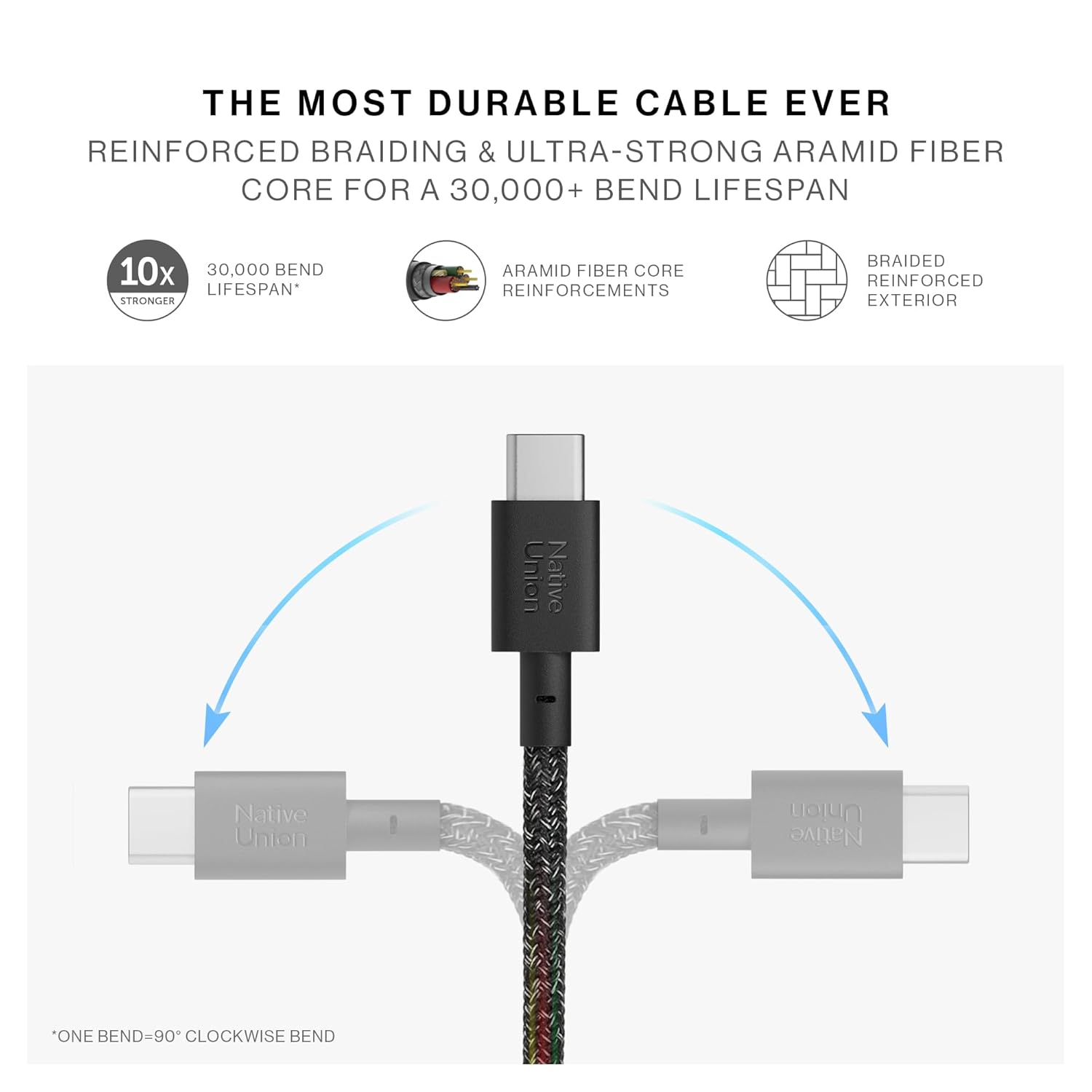
Image: The cable being stored in a pouch, illustrating its compact and tangle-free design for travel.

Imej: A terperinci view of the O-Flex strain relief, designed to absorb stress and protect the cable joint.
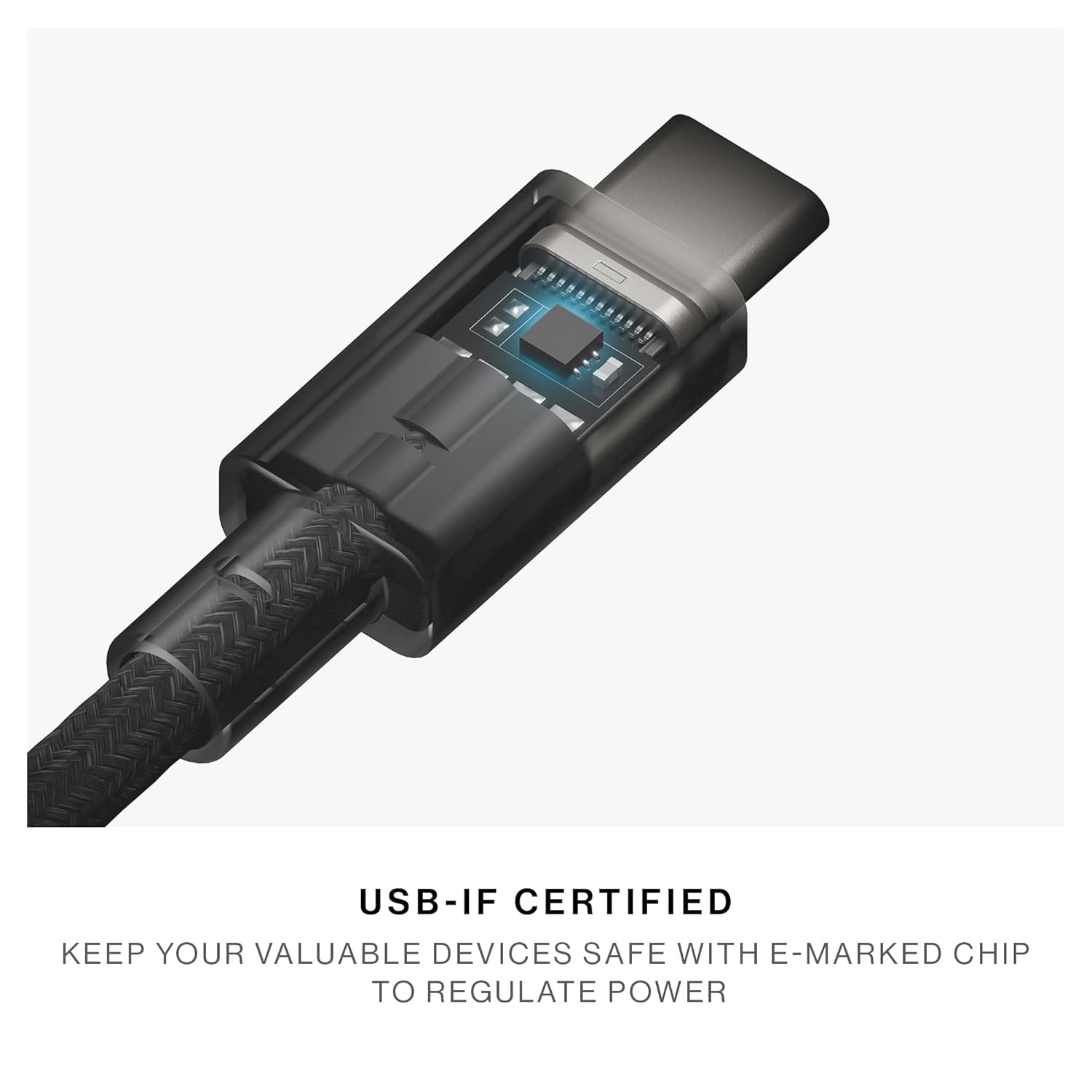
Imej: Satu dalaman view of the USB-C connector, highlighting the integrated E-marker chip for safe power regulation.
Persediaan
- Bongkar: Carefully remove the Pocket Cable from its packaging.
- Panjangkan Kabel: Gently pull the USB-C connectors from the housing to extend the cable. The cable is designed to be short for portability.
- Optional Keyring Attachment: If desired, attach the integrated keyring loop to your keys or bag for easy access.
Arahan Operasi
Mengecas Peranti
- Connect one USB-C end of the Pocket Cable to a compatible power source (e.g., wall adapter, power bank, laptop USB-C port).
- Connect the other USB-C end to your device's USB-C charging port.
- Ensure both connections are secure. Your device should begin charging. The cable supports up to 60W Power Delivery for fast charging.
Pemindahan Data
- Connect one USB-C end of the Pocket Cable to the USB-C port of your first device (e.g., smartphone, tablet).
- Connect the other USB-C end to the USB-C port of your second device (e.g., laptop, external drive).
- Follow the on-screen prompts on your devices to initiate data transfer.
Peranti Serasi
The Native Union Pocket Cable is compatible with a wide range of USB-C devices, including but not limited to:
- iPhone 15 series (15, 15 Plus, 15 Pro, 15 Pro Max) and later models (e.g., iPhone 16, 17 series)
- MacBook Pro (14”/16” M4), MacBook Air (15" M3 Ultra), MacBook & MacBook Pro (2017-2025), MacBook Air (2018-2025)
- iPad Pro (2018 dan lebih baharu), iPad Air 4 (2020), iPad Air 5 (2022), iPad mini 6 (2021)
- Samsung Galaxy S series (S25/S25+/S25 Ultra), Galaxy Z Flip 7 / Fold 7
- Google Pixel series (Pixel 10 / 10 Pro / 10 Pro XL)
- Microsoft Surface Pro 11, Surface Go 4
- Other USB-C enabled smartphones, tablets, and laptops.
Penyelenggaraan dan Penjagaan
- Pembersihan: Wipe the cable and housing with a soft, dry cloth. Avoid using harsh chemicals or abrasive materials.
- Storan: Always retract the cable into its housing when not in use to prevent tangles and protect the connectors.
- Persekitaran: Store and use the cable in a dry environment, away from extreme temperatures, direct sunlight, and humidity.
- Pengendalian: Avoid bending the cable sharply or applying excessive force when connecting or disconnecting.
Menyelesaikan masalah
| Masalah | Kemungkinan Punca | Penyelesaian |
|---|---|---|
| Peranti tidak dicas | Loose connection, incompatible power source, faulty device port. | Ensure both USB-C connectors are fully inserted. Try a different power source or wall adapter. Test with another device if possible. |
| Kelajuan pengecasan perlahan | Power source does not support 60W PD, device limitation. | Use a power adapter that supports USB Power Delivery (PD) and delivers at least 60W. Check your device's charging specifications. |
| Kegagalan pemindahan data | Loose connection, device settings, incompatible devices. | Verify secure connections. Check device settings for data transfer permissions. Ensure both devices support data transfer over USB-C. |
| Cable does not fit port | Incorrect port type. | Ensure you are connecting to a USB-C port. This cable is USB-C to USB-C only. |
Spesifikasi
- Nombor Model: POCKCC01
- Jenis Penyambung: USB Jenis C ke USB Jenis C
- Penghantaran Kuasa: Sehingga 60W
- Panjang kabel: 7 inci (18 cm)
- Bahan: 100% recycled PET reinforced braiding, 100% TPU housing, Aramid fiber core
- Pensijilan: USB-IF Diperakui
- Dimensi Pakej: 4.88 x 3.54 x 0.83 inci
- Berat Barang: 1.76 auns
Maklumat Keselamatan
Please read and follow these safety guidelines to ensure safe operation and prevent damage to the product or connected devices:
- Jauhkan daripada kanak-kanak kecil dan haiwan peliharaan.
- Elakkan pendedahan kepada suhu atau kelembapan yang melampau.
- Never leave a charging device unattended.
- Switch off or unplug when not in use.

Image: Safety information provided in various languages, emphasizing critical precautions.
Waranti dan Sokongan
Waranti Seumur Hidup Terhad
The Native Union Pocket Cable is covered by a Limited Lifetime Warranty. This warranty covers any defects in materials or workmanship under normal use conditions for as long as the original customer owns the cable. For full terms and conditions, please refer to the manufacturer's official webtapak.
Sokongan Pelanggan
For further assistance, technical support, or warranty claims, please visit the Native Union support section on their official website or contact their customer service directly. Please have your product model number (POCKCC01) and proof of purchase available.