
1. Pengenalan
The AVMATRIX S4 Plus is a versatile video switcher equipped with a 10.1-inch IPS FHD real-time monitoring screen. This integrated display allows users to simultaneously monitor 4 input channels, Preview (PVW), and Program (PGM) feeds without requiring an external monitor, enhancing convenience during live productions. It is designed for various live streaming applications, supporting multiple device connections and advanced video production features.
2. Ciri-ciri Utama
- Integrated 10.1-inch IPS FHD Display: Real-time monitoring of 4 input channels, PVW, and PGM.
- Kesambungan Berbilang Peranti: 2x HDMI and 2x SDI inputs for cameras, gaming consoles, computers, and camcorders.
- Virtual Live Studio Capabilities: Chroma Key and Luma Key for real-time post-production and scene switching.
- Advanced Transitions: Includes WIPE, DIP, and MIX effects for dynamic live streaming.
- Flexible Output Options: 2x HDMI PGM output, 1x HDMI multiview output, and 1x Type-C output, assignable from various sources.
- Rakaman Langsung: SD card and USB interface for direct PGM signal recording up to 32Mbps (MP4/TS formats).
- Dual Live Streaming Methods: LAN port for IP streaming (RTMP(S), RTSP, SRT) and USB Type-C for capturing PGM video/audio to platforms like OBS, vMIX, ZOOM, Teams, Skype, and Twitch.
- Web Antara Muka Kawalan: Kawalan jauh melalui web browser for encode, stream, and record settings.
3. Persediaan
3.1 Menyahkotak dan Komponen
Selepas membuka bungkusan, pastikan semua komponen ada:
- S4 PLUS Video Switcher
- Bekalan kuasa
- Kabel USB (Jenis AC)
- Tally connector (DB-15)

Gambar 3.1: Lebihview of the AVMATRIX S4 Plus Video Switcher with its main features.
3.2 Menyambung Peranti
The S4 Plus offers a rich interface for connecting various video and audio sources. Refer to the diagram below for port identification and connection examples.

Figure 3.2: Rear panel connections including SDI, HDMI, LAN, USB, and audio ports.
- Input Video: Connect up to two HDMI sources and two SDI sources (e.g., cameras, computers) to the respective input ports.
- Input Audio: Use the MIC/LINE inputs for external audio sources.
- Kuasa: Connect the provided power supply to the DC 12V input.
- Rangkaian: Connect an Ethernet cable to the LAN port for web control and IP streaming.
- USB: Use the USB Type-C port for direct streaming to a computer or the USB REC port for recording to an external drive.
3.3 Kuasa Awal Hidup
After connecting all necessary devices, power on the switcher. The integrated 10.1-inch display will show the multiview interface, allowing you to see all input sources, PVW, and PGM feeds.

Figure 3.3: The 10.1-inch display showing the multiview layout with various inputs and outputs.
4. Arahan Operasi
4.1 Switching and Transitions
The S4 Plus allows for seamless switching between input sources and applying various transition effects. Use the dedicated buttons and T-bar for manual or automatic transitions.
- Select an input for Preview (PVW) and another for Program (PGM).
- Use the T-bar or AUTO button to execute transitions (WIPE, DIP, MIX).
4.2 Rakaman
Record your PGM output directly to an SD card or USB disk. The switcher supports MP4/TS formats with an encoding bit rate up to 32Mbps.

Figure 4.1: SD card slot and USB REC port for direct program recording.
4.3 Penstriman Langsung
The S4 Plus supports two primary methods for live streaming:
- Ethernet Streaming: Connect the LAN port to your network for IP streaming via RTMP(S), RTSP, and SRT protocols.
- USB Type-C Streaming: Connect the USB Type-C port to a computer to capture PGM video and audio for streaming on platforms like OBS, vMIX, ZOOM, Teams, Skype, and Twitch. Compatible with Windows, Linux, and Mac.
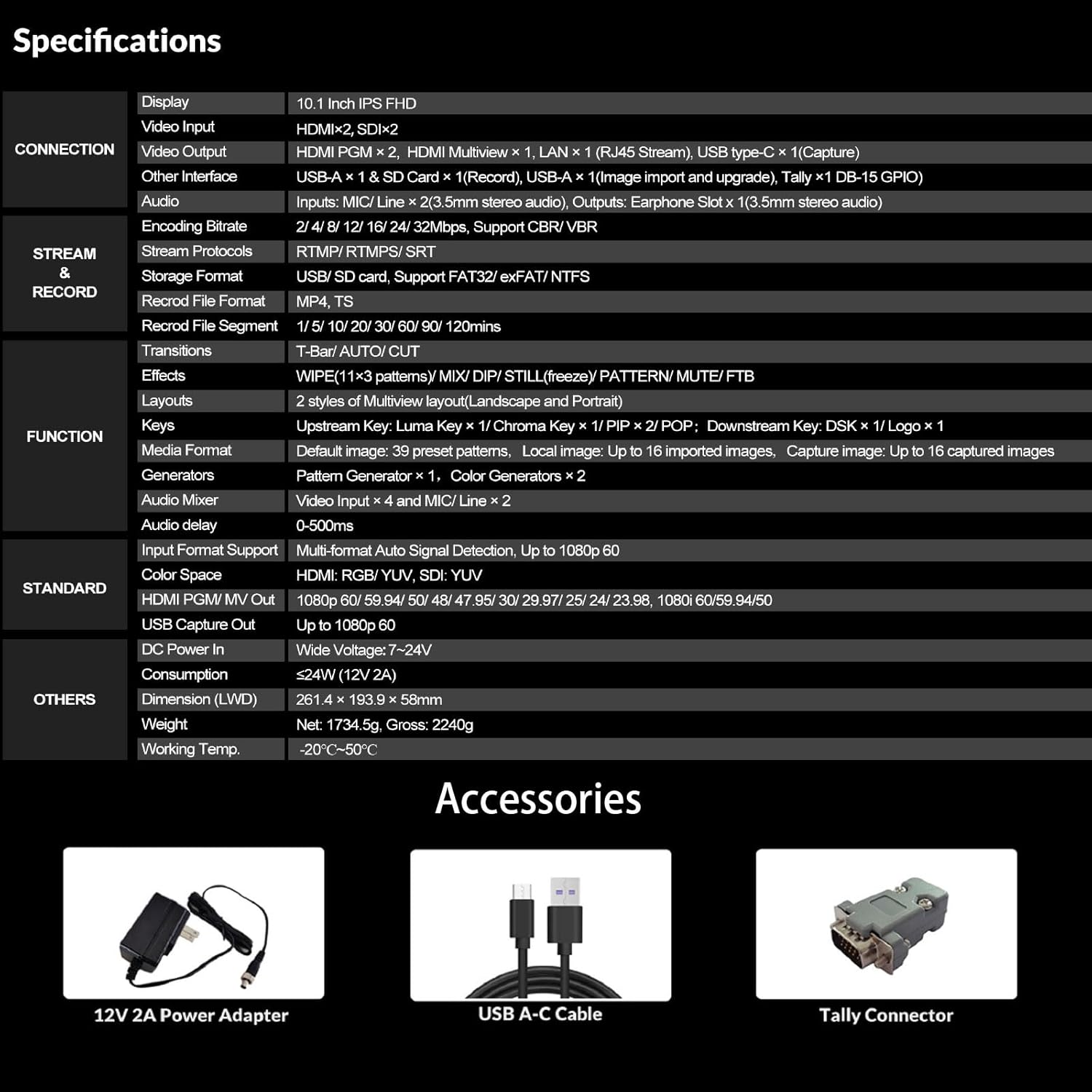
Figure 4.2: Live streaming setup showing Ethernet and USB connections to popular platforms.
4.4 Special Effects (Chroma Key / Luma Key)
Create immersive virtual live studios using the built-in Chroma Key and Luma Key features for real-time background removal and post-production.

Figure 4.3: Enhanced Chroma Key technology for precise background removal.
4.5 Pengadun Audio
The integrated audio mixer allows for precise control over audio levels from various inputs, ensuring high-quality sound for your production.
4.6 Web Antara Muka Kawalan
Access the device's IP address in a web browser to remotely control settings such as encoding, streaming, and recording. This provides flexible management options.
5. Penyelenggaraan
To ensure the longevity and optimal performance of your AVMATRIX S4 Plus Video Switcher, follow these maintenance guidelines:
- Pastikan peranti bersih dan bebas daripada habuk. Gunakan kain lembut dan kering untuk pembersihan.
- Avoid exposing the switcher to extreme temperatures, humidity, or direct sunlight.
- Pastikan pengudaraan yang betul untuk mengelakkan terlalu panas.
- Regularly check cable connections for secure fit.
- Update firmware as recommended by AVMATRIX for new features and bug fixes.
6. Penyelesaian masalah
If you encounter issues with your AVMATRIX S4 Plus, refer to the following common troubleshooting steps:
- Tiada Kuasa: Ensure the power adapter is securely connected and the power outlet is functional.
- No Video Input: Verify that input sources are correctly connected and powered on. Check cable integrity and ensure input resolution/frame rate is supported.
- Tiada Audio: Check audio cable connections, input levels on the audio mixer, and ensure the correct audio channel is selected.
- Isu Penstriman: Verify network connectivity, streaming settings (RTMP server URL, stream key), and ensure your computer's firewall is not blocking the streaming software.
- Recording Failure: Check if the SD card or USB disk has sufficient free space and is formatted correctly (FAT32/NTFS). Ensure the recording bit rate is compatible with your storage device.
For further assistance, please contact AVMATRIX customer support.
7. Spesifikasi
| Ciri | Penerangan |
|---|---|
| Paparan | 10.1 Inch IPS FHD |
| Input Video | HDMI x 2, SDI x 2 |
| Output Video | HDMI PGM x 2, HDMI Multiview x 1, LAN x 1 (RJ45 Stream), USB Type-C x 1 (Capture) |
| Antara Muka Lain | USB-A x 1 & SD Card x 1 (Record), USB-A x 1 (Image import and upgrade), Tally x 1 DB-15 GPIO |
| Audio | Inputs: MIC/Line x 2 (3.5mm stereo audio), Outputs: Earphone Slot x 1 (3.5mm stereo audio) |
| Pengekodan Kadar Bit | 2/4/8/12/16/24/32Mbps, support CBR/VBR |
| Stream Protocols | RTMP/RTMP(S)/RTSP/SRT |
| Format Penyimpanan | USB/SD card, Support FAT32/exFAT/NTFS |
| Rekod File Format | MP4, TS |
| Peralihan | T-Bar/AUTO/CUT |
| Kesan | WIPE (11x3 patterns), MIX, DIP, STILL (freeze), PATTERN, MUTE, FTB |
| Susun atur | 2 gaya Multiview layout (Landscape and Portrait) |
| Keying | Upstream Key: Luma Key x 1 / Chroma Key x 1 / PIP x 2 / POP; Downstream Key: DSK x 1 / Logo x 1 |
| Format Media | Default image: 39 preset patterns, Local image: Up to 16 imported images, Capture image: Up to 16 captured images |
| Penjana | Pattern Generator x 1, Color Generators x 2 |
| Pengadun Audio | Video Input x 4 and MIC/Line x 2 |
| Kelewatan Audio | 0-500ms |
| Input Format Support | Multi-format Auto Signal Detection, Up to 1080p 60 |
| Ruang Warna | HDMI: RGB/YUV, SDI: YUV |
| HDMI PGM/MV Out | 1080p 60/59.94/50/48/47.95/30/29.97/25/24/23.98, 1080i 60/59.94/50 |
| Tangkap USB Keluar | Sehingga 1080p 60 |
| Masuk Kuasa DC | Lebar Voltage (7~24V) |
| Penggunaan | ≤24W (12V 2A) |
| Dimensi (LWD) | 261.4 x 193.9 x 58mm |
| Berat badan | Bersih: 1734.5g, Kasar: 2240g |
| Suhu Bekerja. | -20°C~50°C |
8. Waranti & Sokongan
8.1 Maklumat Waranti
The AVMATRIX S4 Plus Video Switcher comes with a 2-year warranty. Please retain your proof of purchase for warranty claims.
8.2 Sokongan Pelanggan
If you have any questions or require technical assistance, please contact AVMATRIX customer support. We are always at your service.
For additional resources and product information, visit the official AVMATRIX Store: AVMATRIX Store on Amazon
9. Video Produk Rasmi
Video ini memberikan penamatview of the AVMATRIX 6-channel SDI/HDMI multi-camera video switcher, demonstrating its features and capabilities. While the video title mentions a 6-channel switcher, it showcases general functionality relevant to AVMATRIX video switchers, including unboxing and interface overview.