
1. Pengenalan
Thank you for choosing the SIFENE Mini Single Serve Coffee Maker, Model KC211. This manual provides essential information for the safe operation, maintenance, and troubleshooting of your new coffee maker. Please read it thoroughly before first use and retain it for future reference.

Image 1.1: SIFENE Mini Single Serve Coffee Maker in operation, showing coffee pouring into a white mug.
2. Arahan Keselamatan Penting
Apabila menggunakan peralatan elektrik, langkah berjaga-jaga keselamatan asas hendaklah sentiasa diikuti untuk mengurangkan risiko kebakaran, kejutan elektrik dan/atau kecederaan kepada orang, termasuk yang berikut:
- Baca semua arahan.
- Jangan sentuh permukaan panas. Gunakan pemegang atau tombol.
- Untuk melindungi daripada kebakaran, renjatan elektrik dan kecederaan kepada orang lain, jangan rendam kord, palam atau pembuat kopi di dalam air atau cecair lain.
- Pengawasan rapi diperlukan apabila sebarang perkakas digunakan oleh atau berhampiran kanak-kanak.
- Cabut plag dari soket apabila tidak digunakan dan sebelum membersihkan. Biarkan sejuk sebelum memakai atau menanggalkan bahagian, dan sebelum membersihkan perkakas.
- Jangan kendalikan sebarang perkakas dengan kord atau palam yang rosak atau selepas perkakas tidak berfungsi, atau telah rosak dalam apa jua cara. Kembalikan perkakas ke kemudahan servis sah terdekat untuk pemeriksaan, pembaikan atau pelarasan.
- Penggunaan lampiran aksesori yang tidak disyorkan oleh pengilang perkakas boleh mengakibatkan kebakaran, renjatan elektrik atau kecederaan kepada orang.
- Jangan gunakan di luar rumah.
- Jangan biarkan kord tergantung di tepi meja atau kaunter, atau menyentuh permukaan panas.
- Jangan letakkan pada atau berhampiran gas panas atau penunu elektrik, atau dalam ketuhar yang dipanaskan.
- Sentiasa pasangkan plag pada perkakas terlebih dahulu, kemudian pasangkan kord ke dalam salur keluar dinding. Untuk memutuskan sambungan, matikan mana-mana kawalan kepada "mati", kemudian tanggalkan palam dari alur keluar dinding.
- Jangan gunakan perkakas untuk kegunaan selain daripada yang dimaksudkan.
- Perkakas ini adalah untuk kegunaan rumah sahaja.
3. Produk Lebihview
3.1 Ciri-ciri Utama
- 2-in-1 Brewing: Compatible with K-pods and fresh coffee grounds using the included reusable stainless steel filter.
- Customizable Water Levels: Clear water window with measurements from 6 to 12 oz for precise filling.
- Pembuatan bir cepat: Brews a 12 oz cup in approximately 2 minutes.
- Kawalan Satu Sentuhan: Simple operation with a single button.
- Reka bentuk padat: Ideal for small spaces (4.3" D x 7.8" W x 9.4" H).
- Self-Cleaning & Descaling Reminder: Indicator light for descaling and easy cleaning process.
- Bahan Bebas BPA: Constructed from non-BPA materials for safety.
3.2 Komponen

Imej 3.1: Selesaiview of the coffee maker with key dimensions and features. The image shows the compact size of the coffee maker (7.8" W x 4.3" D x 9.4" H) next to a water bottle and a coffee mug, highlighting its small footprint and the water window with cup size markings (6, 8, 10, 12 oz).
- Water Reservoir with Water Window
- tudung
- Kepala Brew
- Control Button / Descale Indicator
- Dulang Titis
- K-pod Holder (removable)
- Ground Coffee Filter Basket (removable)
4. Persediaan dan Penggunaan Pertama
4.1 Membongkar
Carefully remove all packaging materials and inspect the coffee maker for any damage. Ensure all components listed in Section 3.2 are present.
4.2 Pembersihan Awal
Before first use, clean all removable parts (K-pod holder, ground coffee filter basket, drip tray) with warm, soapy water. Wipe the exterior of the coffee maker with a damp kain. Jangan rendam unit utama dalam air.
4.3 First Brew Cycle (Cleaning Cycle)
To prime the machine and remove any manufacturing residues:
- Fill the water reservoir with fresh water up to the MAX (12 oz) line.
- Letakkan mug kosong di atas dulang titisan.
- Close the lid without any K-pod or ground coffee filter inserted.
- Press the power button once. The white light will illuminate, and the machine will begin a brewing cycle, dispensing hot water into the mug.
- Once the cycle is complete, discard the hot water. Your coffee maker is now ready for use.
5. Arahan Operasi
5.1 Brewing with K-pods
- Buka penutup pembancuh kopi.
- Insert a K-pod into the K-pod holder. Ensure the K-pod is seated correctly.
- Fill the water reservoir with fresh water to your desired level (6-12 oz). Do not exceed the MAX line.
- Place your coffee mug on the drip tray.
- Close the lid firmly. Ensure the handle of the holder is placed horizontally for proper closure.
- Press the power button once for hot coffee. The white light will indicate brewing.
- Wait for the brewing cycle to complete. Do not open the lid during brewing.
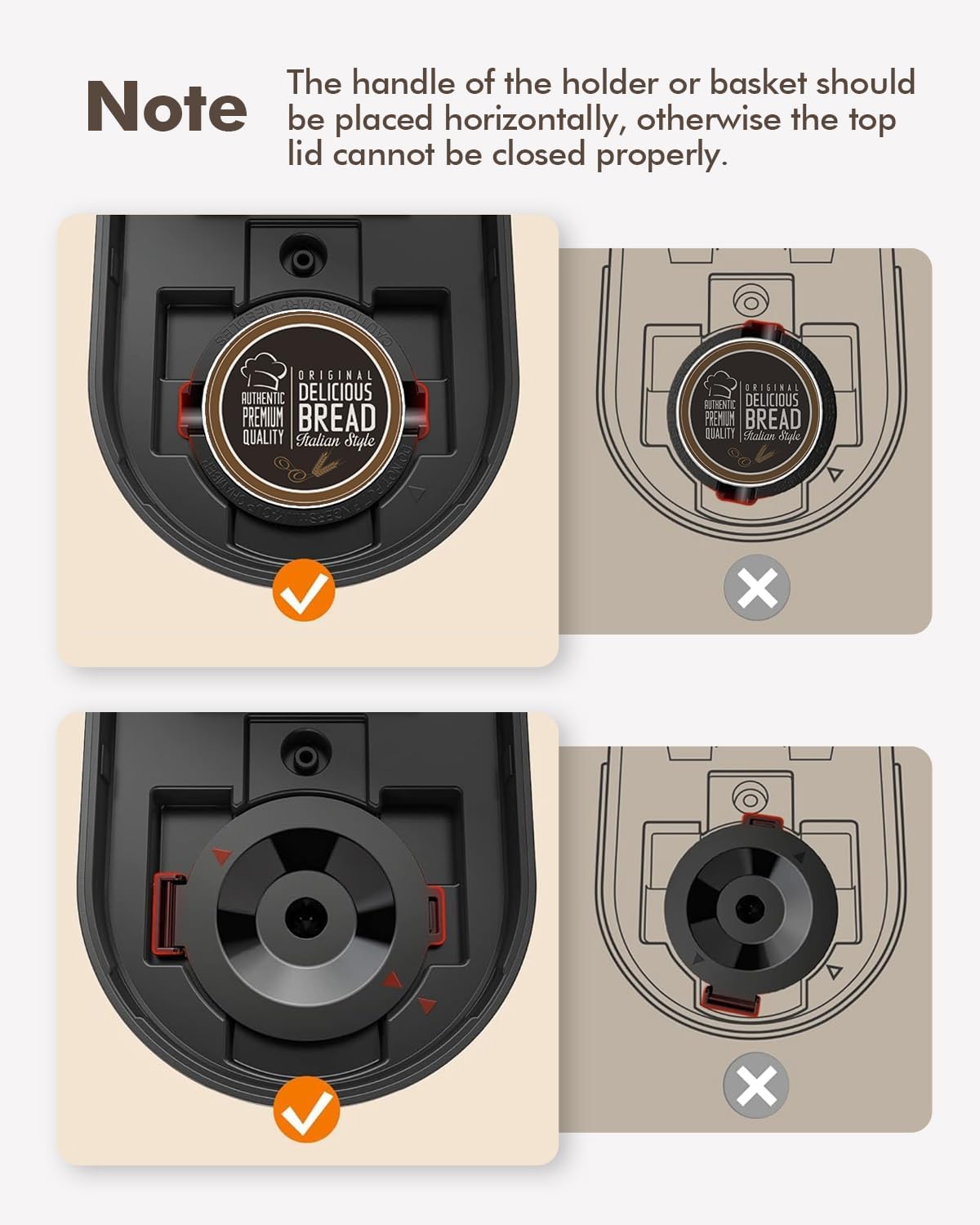
Image 5.1: Correct placement of K-pod and ground coffee filter. The image illustrates the proper horizontal alignment of the holder handle for both K-pods and ground coffee filters to ensure the lid closes securely.
5.2 Brewing with Ground Coffee
- Buka penutup pembancuh kopi.
- Insert the reusable ground coffee filter basket into the brew head.
- Add your desired amount of ground coffee to the filter basket. Do not overfill.
- Fill the water reservoir with fresh water to your desired level (6-12 oz). Do not exceed the MAX line.
- Place your coffee mug on the drip tray.
- Close the lid firmly. Ensure the handle of the filter basket is placed horizontally for proper closure.
- Press the power button once for hot coffee. The white light will indicate brewing.
- Wait for the brewing cycle to complete. Do not open the lid during brewing.
5.3 Iced Coffee Function
The coffee maker features an iced coffee brewing mode. Follow these steps:
- Prepare your K-pod or ground coffee as described above.
- Fill the water reservoir with fresh water to your desired level (6-12 oz).
- Fill your coffee mug with ice and place it on the drip tray.
- Tutup penutup dengan kuat.
- Press the power button twice. The blue light will illuminate, indicating iced coffee brewing mode.
- Tunggu sehingga kitaran pembuatan bir selesai.

Image 5.2: Control panel with power button and descale reminder. The image shows the power button and the "DESCALE" indicator light, along with simple operating instructions printed on the lid.
6. Penyelenggaraan dan Pembersihan
6.1 Pembersihan Harian
- After each use, remove and rinse the K-pod holder or ground coffee filter basket.
- Kosongkan dan bilas dulang titisan.
- Lap bahagian luar pembuat kopi dengan damp kain.
6.2 Penyahkelasan
Over time, mineral deposits (scale) can build up in your coffee maker, affecting performance and coffee taste. The "DESCALE" indicator light will illuminate red when descaling is recommended.

Image 6.1: Preparing descaling solution. The image shows a hand pouring descaling powder into a measuring cup filled with water, next to the coffee maker.
Prosedur nyah kerak:
- Sediakan larutan penyahkerak mengikut arahan pengilang (contohnya, campuran cuka putih dan air, atau agen penyahkerak komersial).
- Pour the descaling solution into the water reservoir up to the MAX (12 oz) line.
- Place a large empty mug or container on the drip tray to collect the solution.
- Close the lid without any K-pod or ground coffee filter inserted.
- Press and hold the power button for 2 seconds to initiate the descaling cycle. The red "DESCALE" light will illuminate.
- The machine will run a descaling cycle, dispensing the solution. This may take longer than a regular brew cycle.
- Once the cycle is complete, discard the used solution.
- Rinse the reservoir thoroughly and run 2-3 cycles with fresh water to flush out any remaining descaling solution.
- The "DESCALE" light should turn off after successful descaling.
7. Penyelesaian masalah
| Masalah | Kemungkinan Punca | Penyelesaian |
|---|---|---|
| Coffee not brewing / No water dispensed. |
|
|
| Kopi terasa lemah atau berair. |
|
|
| Lampu "TANGGAL KERANG" menyala. | Pengumpulan mineral dalam mesin. | Perform descaling procedure (Section 6.2). |
| Kebocoran mesin. |
|
|
8. Spesifikasi
| Ciri | Perincian |
|---|---|
| Jenama | SIFENE |
| Nama Model | KC211 |
| Dimensi Produk | 7.79"D x 4.33"W x 9.48"H |
| Jenis Pembancuh Kopi | Mesin Kopi Titisan, Hidangan Tunggal |
| Jenis Input Kopi | Both K-pods and ground coffee |
| Voltage | 120 Volt |
| Ciri Khas | Auto Clean Function, Auto Shut-Off, Permanent Filter, Descaling Reminder |
| Komponen yang Disertakan | Single Serve Coffee Maker, 2 Filters (K-pod holder, ground coffee filter) |
| Berat Barang | 2.5 paun |
9. Waranti dan Sokongan
9.1 Maklumat Waranti
Butiran jaminan khusus biasanya diberikan bersama pembungkusan produk atau pada arahan rasmi pengilang webtapak. Sila rujuk sumber ini untuk terma dan syarat waranti yang paling tepat dan terkini.
9.2 Sokongan Pelanggan
For technical assistance, troubleshooting beyond this manual, or warranty claims, please contact SIFENE customer support. Contact information can usually be found on the product packaging, the official SIFENE webtapak, atau melalui peruncit anda.
Anda juga boleh melawat SIFENE Store on Amazon untuk maklumat produk tambahan dan sumber sokongan.