
pengenalan
Thank you for choosing Topsung M920 Walkie Talkies. This manual provides essential information for setting up, operating, and maintaining your new two-way radios. Please read it thoroughly before use to ensure optimal performance and safety. These FRS radios are designed for clear communication over long distances, featuring rechargeable batteries, VOX hands-free operation, and NOAA weather alerts, making them ideal for family activities and outdoor adventures.
Kandungan Pakej
Sahkan bahawa semua item terdapat dalam pakej anda:
- 3 x Topsung M920 Walkie Talkies
- 3 x 3000mAh AA Rechargeable Batteries
- 3 x Detachable Lanyards & Belt Clips
- 1 x Multi-port USB Charging Cable
- 1 x Manual Pengguna

The image above displays the complete set of items included with your purchase: three walkie talkie units, three sets of rechargeable AA batteries, three lanyards with belt clips for easy carrying, a multi-port USB charging cable for simultaneous charging, and this user manual.
Produk Selesaiview
Familiarize yourself with the components and controls of your Topsung M920 Walkie Talkie.
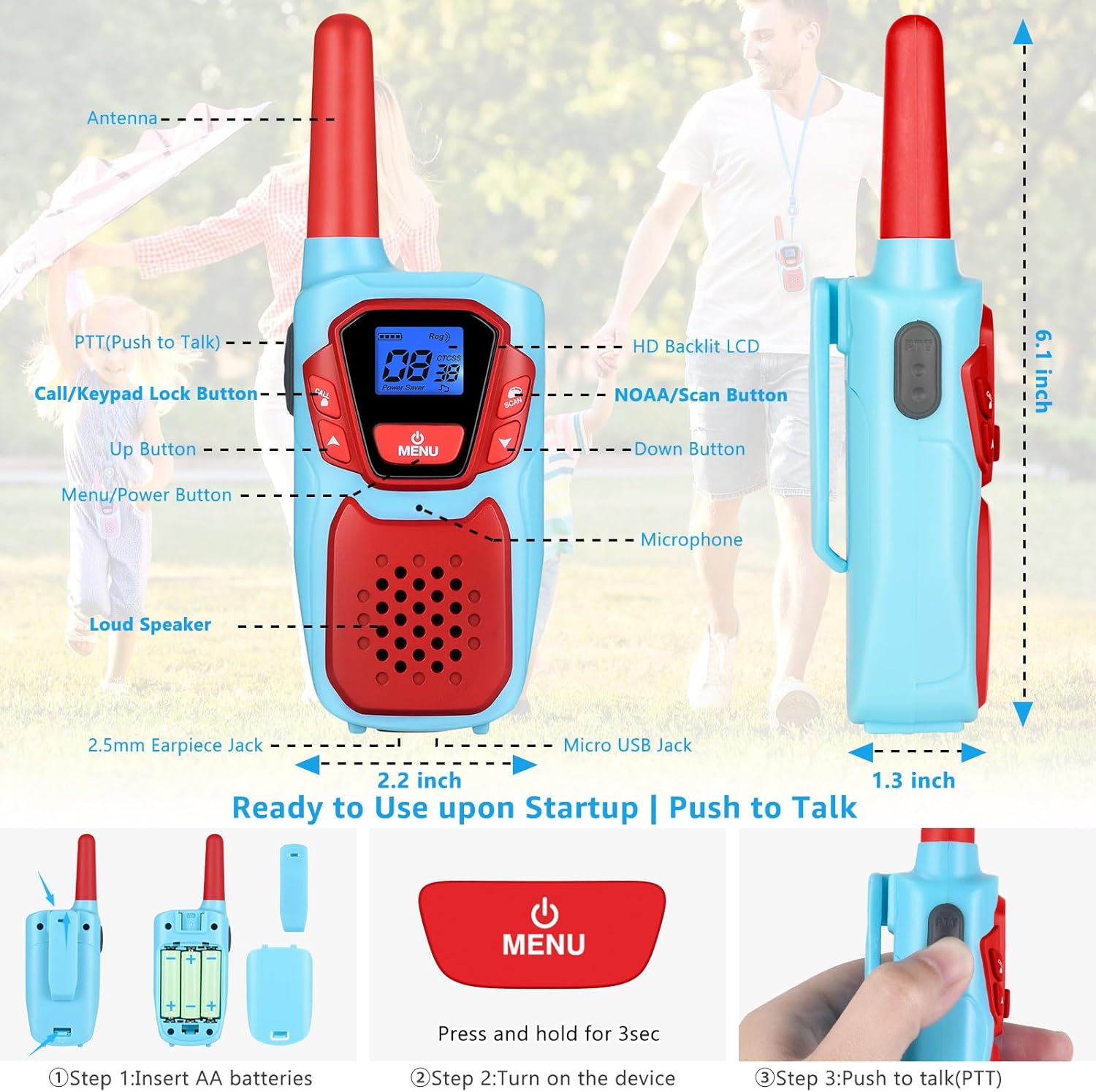
This diagram highlights the key features of the walkie talkie, including the antenna for signal transmission, the Push-to-Talk (PTT) button for communication, the Call/Keypad Lock button, Up and Down buttons for navigation, the Menu/Power button, an HD Backlit LCD display, NOAA/Scan button for weather alerts, microphone, loud speaker, 2.5mm earpiece jack, and Micro USB charging port. Dimensions are also indicated for reference.
Persediaan
1. Pemasangan Bateri
- Buka penutup petak bateri di bahagian belakang walkie-talkie.
- Insert the three provided 3000mAh AA rechargeable batteries, ensuring correct polarity (+/-).
- Tutup penutup petak bateri dengan selamat.
The image demonstrates the process of opening the battery cover and correctly inserting the AA rechargeable batteries into the compartment. Ensure the cover is firmly closed after installation to protect the batteries.
2. Mengecas Bateri
Use the included multi-port USB charging cable to charge all three walkie talkies simultaneously. The original charging kit is designed for efficiency and environmental friendliness.
- Connect the multi-port USB cable to the Micro USB Jack on each walkie talkie.
- Plug the USB end of the cable into a compatible USB power source (e.g., PC, car charger, power bank, or wall adapter).
- Ikon bateri pada paparan LCD akan menunjukkan status pengecasan.
- A full charge provides approximately 72 hours of average battery life.

This image illustrates a walkie talkie being charged using the USB cable. It highlights the rechargeable nature of the device, emphasizing the 3000mAh battery capacity and features like auto power saving and low battery alerts to extend usage time and reduce the need for frequent battery replacements.
Operasi Asas
1. Hidupkan/Mati Kuasa
Tekan dan tahan butang MENU/KUASA button for 3 seconds to turn the device ON or OFF.
2. Melaraskan Kelantangan
Gunakan UP dan TURUN buttons to adjust the speaker volume.
3. Push-to-Talk (PTT)
Untuk menghantar, tekan dan tahan butang PTT button. Speak clearly into the microphone. Release the PTT butang untuk mendengar.
4. Pemilihan Saluran
- Tekan ke MENU butang sekali. Nombor saluran akan berkelip.
- Gunakan UP or TURUN buttons to select one of the 22 available FRS channels.
- Tekan PTT or MENU sekali lagi untuk mengesahkan pilihan anda.
5. Kunci Pad Kekunci
Untuk mengelakkan perubahan yang tidak disengajakan, tekan dan tahan butang CALL/KEYPAD LOCK button for 3 seconds to lock or unlock the keypad.
Ciri Lanjutan
1. VOX (Pertukaran Beroperasi Suara)
The iVOX feature allows for hands-free communication. When activated, the radio transmits automatically when you speak, without needing to press the PTT button. This is useful for activities like climbing, cycling, or cooking.
- Tekan ke MENU button multiple times until the VOX icon appears.
- Gunakan UP or TURUN buttons to select a VOX sensitivity level (1-3, with 3 being most sensitive).
- Tekan PTT or MENU untuk mengesahkan.
2. Amaran Cuaca NOAA
Stay informed about weather conditions with the integrated NOAA All Hazards Weather Service. This feature provides real-time weather alerts, crucial for outdoor safety, especially in areas without cell service.
- Tekan ke NOAA/SCAN button to activate the weather scan.
- The radio will scan for active NOAA weather channels.
- Tekan ke NOAA/SCAN butang sekali lagi untuk keluar dari mod cuaca.

This image illustrates the NOAA Weather Service functionality, emphasizing its role in keeping users informed about various weather hazards such as snow storms, tsunamis, fires, and earthquakes, even when cellular service is unavailable.
3. Kod Privasi (CTCSS/DCS)
The M920 supports 121 privacy codes (38 CTCSS codes and 83 DCS codes) per channel. These codes help filter out unwanted transmissions from other radios on the same channel, ensuring more private conversations.
- Selepas memilih saluran, tekan butang MENU button twice (for CTCSS) or three times (for DCS). The privacy code will flash.
- Gunakan UP or TURUN butang untuk memilih kod yang anda inginkan.
- Tekan PTT or MENU to confirm. All radios in your group must use the same channel and privacy code for communication.
Penyelenggaraan
- Keep the walkie talkies dry. Do not expose them to rain or moisture.
- Bersihkan peranti dengan lembut, damp kain. Elakkan bahan kimia yang keras atau pembersih yang kasar.
- Simpan di tempat yang sejuk dan kering apabila tidak digunakan.
- Ensure batteries are fully charged before long periods of storage to maintain battery health.
- The walkie talkies feature a drop-proof design (ABS material) for enhanced durability.
Menyelesaikan masalah
| Masalah | Kemungkinan Punca | Penyelesaian |
|---|---|---|
| Tiada kuasa | Bateri lemah atau tidak dipasang dengan betul. | Charge batteries or re-install them with correct polarity. |
| Tidak boleh berkomunikasi dengan radio lain | Radios are on different channels or privacy codes. Out of range. | Pastikan semua radio berada di saluran dan kod privasi yang sama. Bergerak lebih dekat dengan radio lain. |
| Kualiti bunyi kurang baik / Statik | Gangguan. Di luar julat. Bateri lemah. | Move to an open area. Charge batteries. The auto squelch system helps suppress noise. |
| Pad kekunci tidak bertindak balas | Kunci pad kekunci aktif. | Tekan dan tahan butang CALL/KEYPAD LOCK butang selama 3 saat untuk membuka kunci. |
Spesifikasi
- Nombor Model: M920
- ID FCC: 2ACVFM-920B
- Bilangan Saluran: 22 Saluran FRS
- Kod Privasi: 121 (38 CTCSS, 83 DCS)
- Julat Kekerapan: FRS
- Julat Percakapan Maksimum: Up to 3 miles (actual range varies based on terrain and conditions)
- Bateri: 3000mAh AA Rechargeable Batteries (included)
- Purata Hayat Bateri: 72 Jam
- Voltage: 3.6 Volt
- Tahap Rintangan Air: Not Water Resistant (IP5X rated for dust resistance)
- Ciri Khas: Keypad Lock, iVOX Hands-free, Drop Protection, Adjustable Lanyards, NOAA Hazards Weather Service, Auto Power Saver, Auto Squelch System, Auto Scan FRS Channels, Auto Low Battery Alert, Auto Memory Function, LCD Screen with Backlight, License-free Communication, Compatible with Most Brands' FRS Devices, Crystal-clear Sound (Noise Reduction, Loud Speaker)

The image provides a visual guide to the expected communication range under different real-world conditions. It shows that the maximum range can be achieved in open areas like mountain-to-valley (3-5 miles), reduced over open water (2-3 miles), and further reduced in urban or neighborhood settings (up to 1 mile) due to obstacles.
Video Produk Rasmi
Easy to use, and fun! Full review of Walkie Talkies!
Video ini menyediakan semula yang komprehensifview of the Topsung M920 Walkie Talkies, demonstrating their ease of use and various features in a practical setting. It highlights how the devices can be fun and functional for users.
Topsung Walkie Talkies
Selesai taklimatview tayangan videocasing the Topsung Walkie Talkies, focusing on their design and basic functionality. This video offers a quick visual introduction to the product.
Waranti dan Sokongan
Topsung offers a 3-year manufacturer service for the M920 Walkie Talkies. For any product-related inquiries, technical assistance, or warranty claims, please contact Topsung Technology directly. Seller customer service can provide personalized after-sales support, including single piece or accessory replacement.
To contact the seller:
- Go to the product detail page on Amazon.
- Click on the store name "topsung technology" located below the "Add to Cart" button.
- Click "Ask a question" and follow the Messaging Assistant instructions: select "An item for sale" → "Something else" → "Other", then send your message.