
pengenalan
Thank you for choosing the WORKPRO 3.6V Electric Cordless Screwdriver. This manual provides essential information for the safe and efficient operation, maintenance, and care of your new tool. Please read this manual thoroughly before use and retain it for future reference.
Maklumat Keselamatan
Sentiasa patuhi langkah berjaga-jaga keselamatan asas semasa menggunakan peralatan elektrik untuk mengurangkan risiko kebakaran, kejutan elektrik dan kecederaan diri.
- Pastikan kawasan kerja bersih dan terang. Kawasan bersepah atau gelap mengundang kemalangan.
- Jangan kendalikan alatan kuasa dalam atmosfera yang mudah meletup, seperti di hadapan cecair mudah terbakar, gas atau habuk. Alat kuasa menghasilkan percikan api yang boleh menyalakan habuk atau asap.
- Jauhkan kanak-kanak dan orang ramai semasa mengendalikan alat kuasa. Gangguan boleh menyebabkan anda hilang kawalan.
- Elakkan bermula secara tidak sengaja. Pastikan suis berada dalam kedudukan mati sebelum menyambung ke pek bateri, mengambil atau membawa alat.
- Jangan melampaui batas. Pastikan pijakan dan keseimbangan yang betul pada setiap masa. Ini membolehkan kawalan alat kuasa yang lebih baik dalam situasi yang tidak dijangka.
- Berpakaian dengan betul. Jangan memakai pakaian atau barang kemas yang longgar. Jauhkan rambut dan pakaian anda daripada bahagian yang bergerak. Pakaian longgar, barang kemas atau rambut panjang boleh tersangkut di bahagian yang bergerak.
- Gunakan peralatan keselamatan. Sentiasa pakai pelindung mata. Topeng habuk, kasut keselamatan tidak tergelincir, topi keras atau perlindungan pendengaran mesti digunakan untuk keadaan yang sesuai.
Kandungan Pakej
Sahkan bahawa semua item yang disenaraikan di bawah disertakan dalam pakej anda:
- 1 PC Electric Cordless Screwdriver
- 1 PC USB Cable (Type-A to Type-C)
- 1 PC Carrying Case
- 1 PC 50mm Extension Rod
- 2 PCS 50mm Bits (PH2/PZ2)
- 19 PCS 25mm Bits (PH0/1/2/3, PZ1/2/3, H1/8, 5/32, 3/16, 1/4, T10/15/20/25, SL1/8, 5/32, 3/16, 1/4)
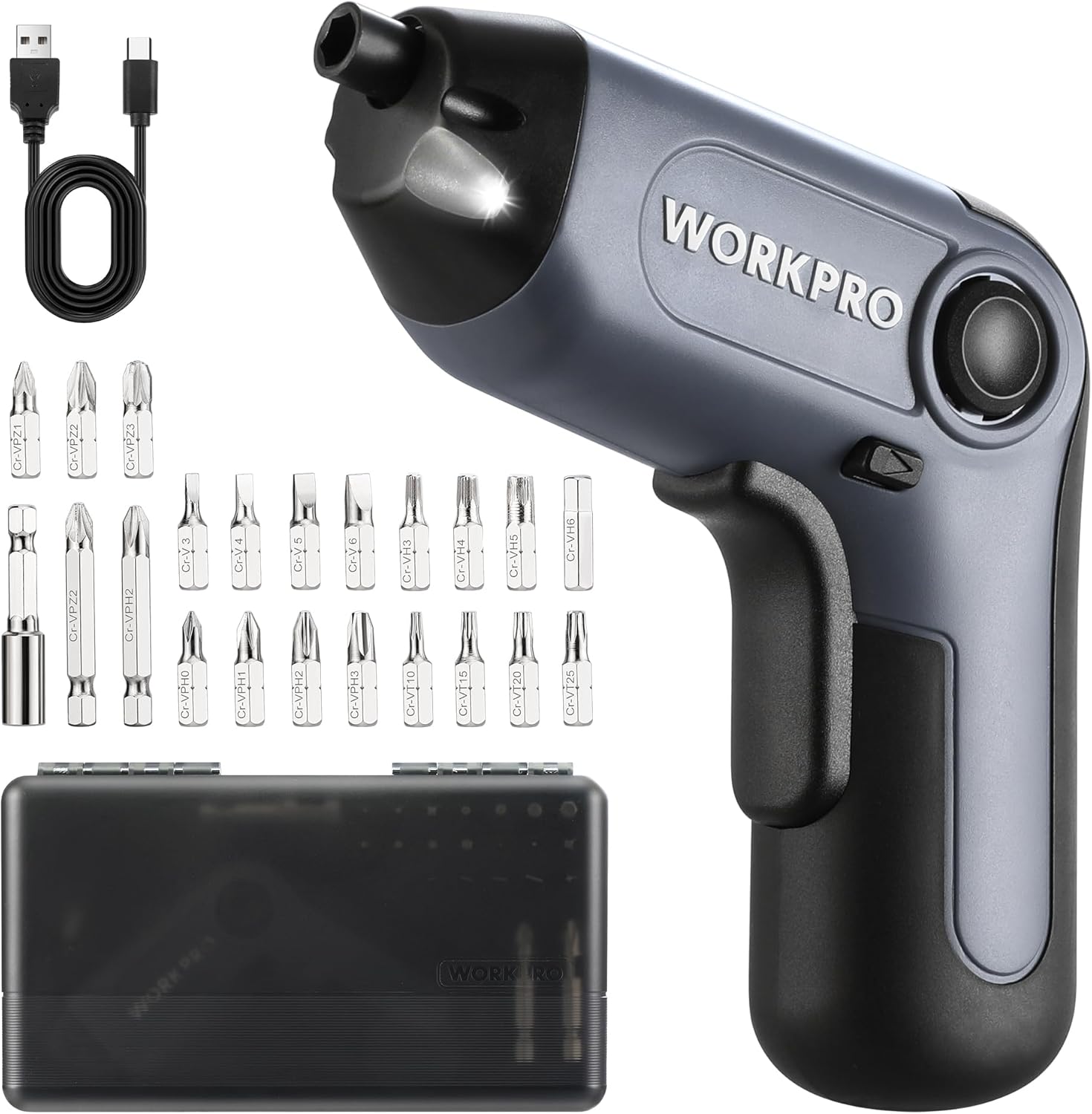
Image: The WORKPRO Electric Cordless Screwdriver, USB cable, carrying case, extension rod, and various screwdriver bits.
Produk Selesaiview
Familiarize yourself with the components and features of your WORKPRO Electric Cordless Screwdriver.

Image: A diagram highlighting key parts of the screwdriver, including the 1/4" Collet Sleeve, LED Light, ON/OFF Switch, USB-C Cable port, Forward/Reverse/Lock Control, and Charge Port & Charge Indicator.
- Offset Driving Shaft: Designed for improved access in tight spaces and corners, offering greater flexibility compared to traditional center-driving tools.
- Lampu LED: An integrated front LED light automatically illuminates the work area, enhancing visibility in dimly lit environments.
- Chuck Magnetik: The 1/4" magnetic chuck securely holds screwdriver bits in place during operation.
- Forward/Reverse/Lock Control: A convenient switch allows for easy selection of driving direction or locking the tool for manual use.
Persediaan
Mengecas Bateri
The screwdriver is equipped with a built-in rechargeable battery. Before first use, or when the battery is low, charge the tool using the provided USB cable.
- Connect the USB cable (Type-A to Type-C) to the charging port on the screwdriver.
- Connect the other end of the USB cable to a power source such as a power bank, USB charger (5V), car charger, or laptop/PC.
- The charge indicator light will show merah semasa mengecas.
- Setelah dicas sepenuhnya, lampu penunjuk akan menyala hijau. A full charge typically takes 1.5-2 hours.

Image: The screwdriver being charged via USB-C, illustrating the built-in 2000mAh battery and compatible charging methods.
Installing/Changing Bits
The screwdriver features a 1/4" magnetic chuck for quick and secure bit changes.
- Ensure the screwdriver is in the 'Lock' position (center position of the Forward/Reverse switch) to prevent accidental activation.
- Insert the desired 1/4" hex bit directly into the magnetic chuck until it is firmly seated.
- To remove a bit, simply pull it straight out from the chuck.
- For extended reach, insert the 50mm extension rod into the chuck first, then insert the desired bit into the extension rod.
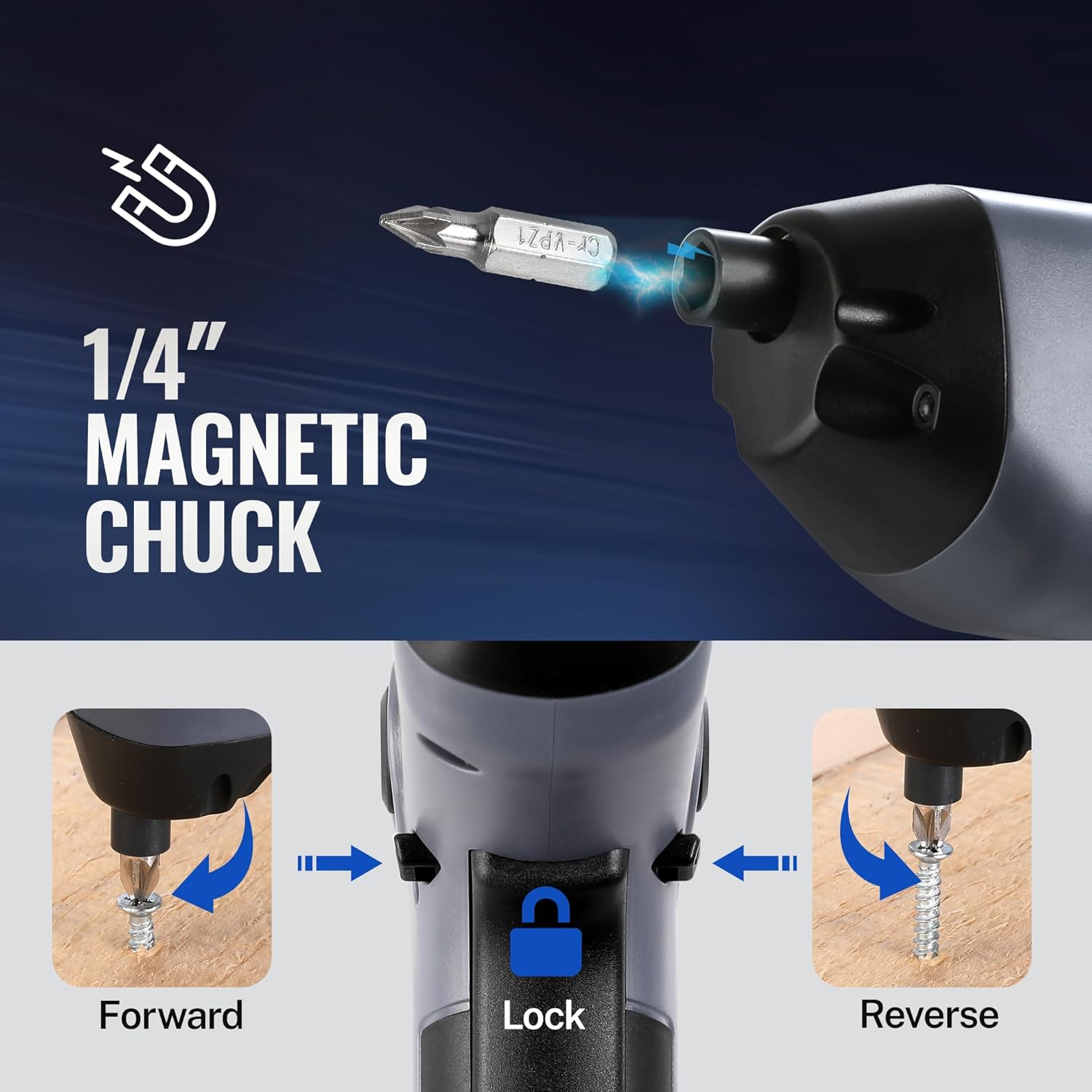
Image: A visual representation of inserting a bit into the magnetic chuck and the Forward, Lock, and Reverse positions of the control switch.
Arahan Operasi
Menghidupkan/Mematikan
To operate the screwdriver, press the ON/OFF switch (trigger) located on the handle. Release the switch to stop the tool.
Operasi Hadapan/Undur
The Forward/Reverse/Lock control switch is located near the top of the handle.
- Push the switch forward (towards the bit) for ke hadapan rotation (to drive screws).
- Push the switch backward (towards the base) for terbalik rotation (to remove screws).
- Tetapkan suis kepada pusat position to lock the tool, preventing accidental activation and allowing for manual tightening/loosening if needed.
Menggunakan Lampu LED
The integrated LED light automatically activates when the ON/OFF switch is pressed, illuminating your work area. It will turn off automatically when the switch is released.

Image: The screwdriver in use, demonstrating how the LED light illuminates the screw and surrounding area for better visibility.
Utilizing the Offset Driving Shaft
The offset design of this screwdriver allows it to reach screws in confined spaces and close to edges where traditional screwdrivers or drills might not fit.
- When working in corners or near obstacles, position the offset shaft to align the bit with the screw head.
- This design provides increased flexibility for precise work in challenging areas.

Image: A comparison showing a standard drill with a center driving shaft unable to reach a screw in a corner, contrasted with the WORKPRO screwdriver's offset driving shaft successfully accessing the screw in a narrow space.
Penyelenggaraan
Proper maintenance ensures the longevity and optimal performance of your screwdriver.
- Pembersihan: Regularly wipe the tool with a soft, damp kain. Jangan gunakan bahan kimia yang keras atau pembersih yang kasar. Pastikan bukaan pengudaraan bersih daripada habuk dan serpihan.
- Storan: Simpan pemutar skru dan aksesorinya di dalam bekas pembawa yang disediakan di tempat yang kering dan sejuk, jauh daripada cahaya matahari langsung dan kelembapan.
- Penjagaan Bateri: Untuk penyimpanan jangka panjang, cas bateri kepada kira-kira 50% setiap 3-6 bulan untuk mengekalkan kesihatan bateri.
- Pemeriksaan Bit: Periodically inspect screwdriver bits for wear or damage. Replace worn bits to ensure effective screw driving and prevent damage to screw heads.
Menyelesaikan masalah
If you encounter issues with your WORKPRO Electric Cordless Screwdriver, refer to the following common problems and solutions:
- Screwdriver does not turn on:
- Ensure the battery is charged. Connect the tool to a power source and check the charging indicator.
- Verify the Forward/Reverse/Lock switch is not in the 'Lock' (center) position.
- Screwdriver lacks power/torque:
- The battery may be low. Recharge the tool.
- Ensure the correct bit size is used for the screw to prevent stripping and maximize torque transfer.
- Bit falls out of chuck:
- Ensure the bit is fully inserted into the magnetic chuck.
- Check if the bit is a standard 1/4" hex shank.
- Charging indicator light does not turn green:
- Ensure the USB cable is securely connected to both the screwdriver and the power source.
- Try a different USB cable or power adapter to rule out a faulty accessory.
Spesifikasi
| Ciri | Spesifikasi |
|---|---|
| Jenama | WORKPRO |
| Model | 3.6V Electric Cordless Screwdriver |
| Jenis Bateri | Lithium Ion (Included) |
| Tork | Sehingga 5 Nm |
| Kelajuan tanpa beban | 210 RPM |
| Masa Mengecas | 1.5-2 jam |
| Port Pengecasan | USB-C |
| Gaya Kepala | Phillips, Pozidriv, Torx, Hex, Slotted |
| Saiz Bit | 1/4" Hex Shank (25mm and 50mm bits included) |
| Berat Barang | 1.96 paun |
| Dimensi Pakej | 9.96 x 5.71 x 2.64 inci |
Waranti dan Sokongan
WORKPRO products are manufactured to high-quality standards. For warranty information, technical support, or service inquiries, please refer to the contact information provided with your purchase documentation or visit the official WORKPRO webtapak. Sila simpan bukti pembelian anda untuk tuntutan waranti.