
pengenalan
Thank you for choosing the Hisense APC09QC Portable Air Conditioner. This manual provides essential information for the safe and efficient operation of your new appliance. Please read these instructions thoroughly before use and retain them for future reference. This portable air conditioner is designed to provide cooling for indoor spaces, featuring a compact design and convenient mobility.
Maklumat Keselamatan
Sentiasa ikuti langkah berjaga-jaga keselamatan asas apabila menggunakan peralatan elektrik untuk mengurangkan risiko kebakaran, renjatan elektrik dan kecederaan.
- Pastikan bekalan kuasa sepadan dengan voltage dinyatakan pada label penarafan unit.
- Jangan kendalikan unit dengan kord atau palam yang rosak.
- Jangan masukkan jari atau objek ke dalam saluran masuk atau keluar udara.
- Jauhkan unit daripada bahan mudah terbakar dan api terbuka.
- Sentiasa cabut plag unit sebelum membersihkan atau menservis.
- Jangan gunakan unit dalam persekitaran basah seperti bilik mandi atau bilik dobi.
- Perkakas ini tidak dimaksudkan untuk digunakan oleh orang (termasuk kanak-kanak) yang kurang keupayaan fizikal, deria atau mental, atau kurang pengalaman dan pengetahuan, melainkan mereka telah diberi pengawasan atau arahan mengenai penggunaan perkakas oleh orang yang bertanggungjawab untuk keselamatan mereka.
Kandungan Pakej
Carefully unpack your portable air conditioner and check that all items are present.
- Hisense APC09QC Portable Air Conditioner Unit
- Selang Ekzos Udara
- Window Sealing Kit (components may vary, refer to specific kit instructions)
- Alat Kawalan Jauh (jika disertakan)
- Manual Pengguna (dokumen ini)
Produk Selesaiview
Familiarize yourself with the main components of your Hisense APC09QC Portable Air Conditioner.
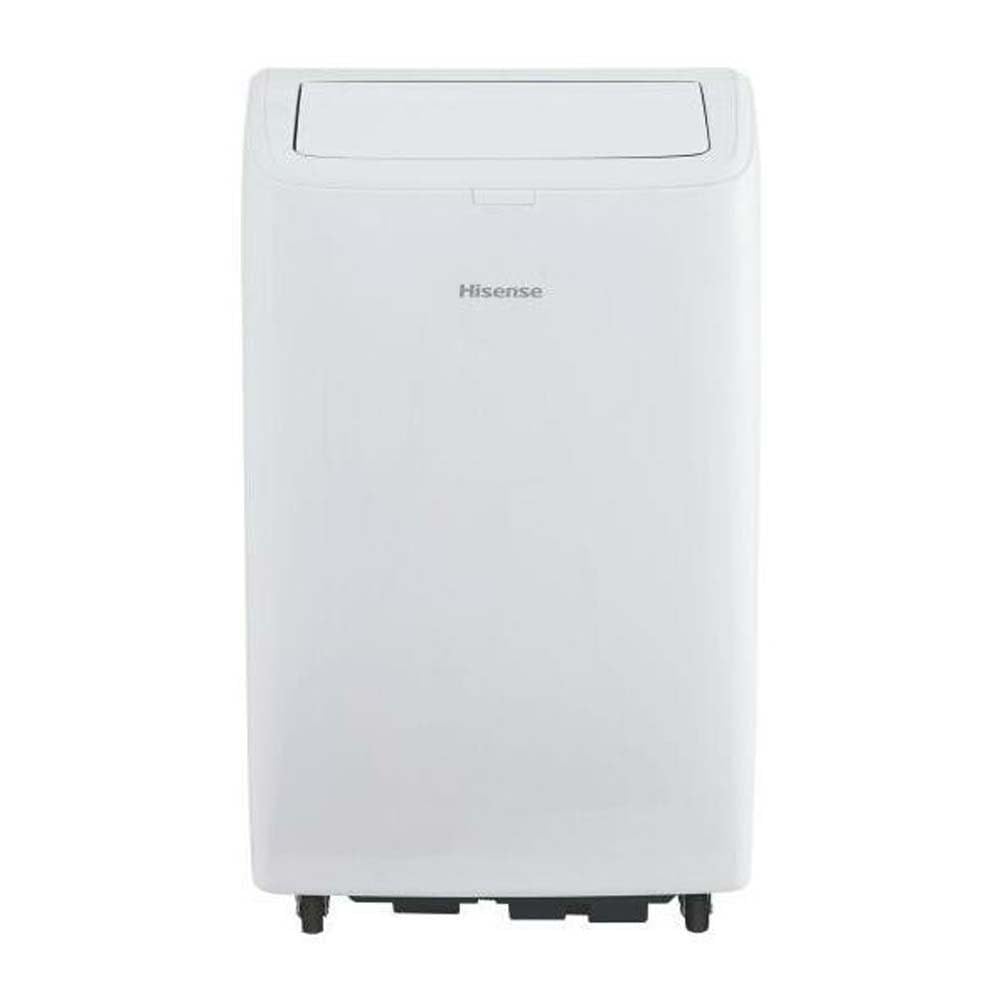
Rajah 1: Depan view of the Hisense APC09QC Portable Air Conditioner. The unit is white with the Hisense logo on the front. The top air outlet flap is open, showing the internal louvers.

Rajah 2: sebelah view of the Hisense APC09QC Portable Air Conditioner. This image highlights the integrated side handle for easy transport and the caster wheels at the base, facilitating movement.

Rajah 3: Atas view of the Hisense APC09QC Portable Air Conditioner. The air outlet flap is closed, showing the sleek top panel where the control interface is typically located.
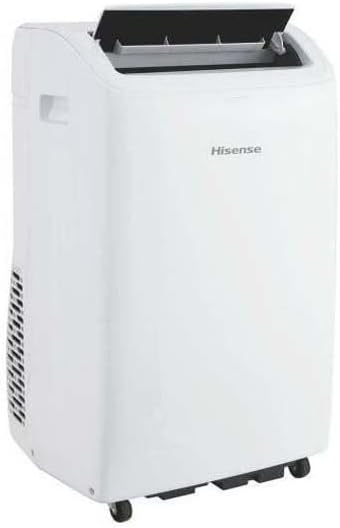
Rajah 4: Bahagian belakang view of the Hisense APC09QC Portable Air Conditioner. This angle shows the exhaust vent grille on the side, where the air exhaust hose connects.
Ciri-ciri Utama:
- Panel Kawalan: Terletak di bahagian atas unit untuk akses mudah ke tetapan.
- Saluran Udara: Adjustable louvers to direct airflow.
- Roda Caster: For convenient movement between rooms.
- Pemegang Sisi: For lifting and carrying the unit.
- Penapis Udara: Removable for cleaning, located behind a grille (typically on the back or side).
- Saluran Udara Ekzos: Connection point for the exhaust hose to vent hot air outside.
- Pelabuhan Longkang: Untuk saliran manual air pekat.
Persediaan
Persediaan yang betul adalah penting untuk prestasi dan keselamatan yang optimum.
- penempatan: Place the air conditioner on a flat, stable surface near a window. Ensure there is at least 20 cm (8 inches) of space around the unit for proper airflow. Do not block the air inlets or outlets.
- Pemasangan Hos Ekzos:
- Attach one end of the air exhaust hose to the exhaust air outlet on the back of the unit. Twist or click into place securely.
- Extend the other end of the hose to the window.
- Install the window sealing kit according to its specific instructions. This typically involves fitting the adjustable window slider kit into the window opening and sealing any gaps to prevent hot air from re-entering the room.
- Connect the exhaust hose adapter to the window kit, ensuring a tight seal to expel hot air outdoors.
- Sambungan Kuasa: Plug the power cord into a grounded electrical outlet. Ensure the outlet meets the electrical requirements of the unit (230 Volts).
- Initial Drainage Check: Before first use, ensure the drain plug is securely closed to prevent water leakage during operation.
Arahan Operasi
Your Hisense APC09QC offers various modes and settings for personalized comfort.
Panel Kawalan dan Alat Kawalan Jauh:
The unit can be operated via the control panel on top of the unit or the included remote control. The functions are generally identical.
- Butang Kuasa: HIDUPKAN atau MATI unit.
- Butang Mod: Cycles through available operating modes: Cool, Fan, Dehumidify.
- Butang Naik/Turun Suhu: Melaraskan tetapan suhu yang dikehendaki.
- Butang Kelajuan Kipas: Memilih kelajuan kipas (Rendah, Sederhana, Tinggi).
- Butang Pemasa: Menetapkan pemasa auto hidup atau mati automatik.
- Sleep/Silent Mode Button: Activates a quieter operation mode for nighttime use.
Mod Pengendalian:
- Mod Sejuk: Provides cooling. Set your desired temperature using the Up/Down buttons. The unit will cool until the room reaches the set temperature.
- Mod Kipas: Circulates air without cooling. You can adjust the fan speed.
- Mod Nyahlembap: Removes moisture from the air. The fan speed is typically fixed in this mode.
WiFi Connectivity and App Control:
The Hisense APC09QC is WiFi enabled and can be controlled via a smartphone application, such as ConnectLife. Refer to the app's instructions for pairing and remote operation. This allows for control through Google Assistant and Alexa.
- Download the ConnectLife app from your device's app store.
- Follow the in-app instructions to create an account and add your Hisense APC09QC unit.
- Once connected, you can control modes, temperature, fan speed, and set schedules remotely.
Penyelenggaraan
Penyelenggaraan tetap memastikan operasi yang cekap dan memanjangkan jangka hayat penghawa dingin anda.
- Membersihkan Penapis Udara:
- Penapis udara hendaklah dibersihkan setiap dua minggu atau lebih kerap bergantung pada penggunaan dan kualiti udara.
- Cabut palam unit.
- Remove the filter from its housing (refer to the unit's diagram for exact location).
- Wash the filter with warm, soapy water. Rinse thoroughly and allow it to air dry completely before reinstalling.
- Mengeluarkan air pekat:
- During cooling and dehumidifying, water condenses inside the unit. The unit has an internal reservoir.
- When the reservoir is full, the unit may stop operating and display an indicator.
- Unplug the unit. Place a shallow pan or tray under the drain port.
- Remove the drain plug to allow water to flow out. Re-insert the plug once drainage is complete.
- Membersihkan Bahagian Luar:
- Lap bahagian luar dengan lembut, damp kain. Jangan gunakan bahan kimia yang keras atau pembersih yang kasar.
- Pastikan tiada air memasuki panel kawalan atau komponen elektrik yang lain.
- Storan:
- Before long-term storage, drain all condensed water completely.
- Clean the air filter and ensure the unit is dry.
- Store the unit in an upright position in a cool, dry place, away from direct sunlight.
Menyelesaikan masalah
Before contacting customer service, refer to the following common issues and solutions.
| Masalah | Kemungkinan Punca | Penyelesaian |
|---|---|---|
| Unit tidak dihidupkan. | Tiada kuasa, kord kuasa dicabut, pemutus litar tersandung, tangki air penuh. | Periksa sambungan kuasa, tetapkan semula pemutus litar, longkang tangki air. |
| Unit tidak menyejukkan dengan berkesan. | Dirty air filter, blocked air intake/outlet, exhaust hose not properly installed/sealed, room too large, windows/doors open. | Clean air filter, ensure clear airflow, properly install and seal exhaust hose, close windows/doors. |
| Kebocoran air. | Drain plug loose or open, unit not level, internal reservoir full. | Ensure drain plug is secure, place unit on a level surface, drain water tank. |
| Unit bising. | Unit not on a level surface, fan obstruction, normal operating sounds. | Ensure unit is level, check for obstructions, some noise is normal during operation. |
| Isu sambungan WiFi. | Incorrect network password, unit too far from router, app issues. | Verify WiFi password, move unit closer to router, restart app/unit, consult app's troubleshooting guide. |
Spesifikasi
Technical details for the Hisense APC09QC Portable Air Conditioner.
| Nombor Model | APC09QC |
| Dimensi (D x W x H) | 49 cm x 31 cm x 88 cm (19.3 in x 12.2 in x 34.6 in) |
| Berat badan | 25.5 kg (56.2 lbs) |
| Kapasiti Penyejukan | 9000 BTU/h (2.6 kW / 2236 fg/h) |
| Kelas Kecekapan Tenaga | A |
| Nisbah Kecekapan Tenaga Bermusim (SEER) | 37.4 |
| Tahap Kebisingan | 63 Desibel |
| Bahan penyejuk | R-290 |
| Voltage | 230 Volt |
| Penggunaan Kuasa (Penyejukan) | 2.6 kW |
| Luas Lantai Berkenaan | Sehingga 60 meter persegi |
| Ciri Khas | Silent Mode, WiFi Enabled (App Control) |
| Kaedah Kawalan | Control Panel, Remote Control, Application |
| Bilangan Tahap Kuasa | 3 (Kelajuan Kipas) |
| Minimum Window Opening Height | 70.8 sm (27.9 in) |
| Minimum Window Opening Width | 32 sm (12.6 in) |
Waranti dan Sokongan
Your Hisense APC09QC Portable Air Conditioner comes with a manufacturer's warranty.
- Tempoh Waranti: This product is covered by a two-year manufacturer's warranty from the date of purchase. This warranty covers defects in materials and workmanship under normal use.
- Tuntutan Waranti: For warranty service, please retain your proof of purchase. Contact Hisense customer support or the retailer where the product was purchased. Do not attempt to repair the unit yourself, as this may void the warranty.
- Sokongan Pelanggan: For technical assistance, troubleshooting beyond this manual, or to inquire about parts and service, please visit the official Hisense website or contact their customer service department. Contact information can typically be found on the Hisense webtapak atau dalam bahan pendaftaran produk anda.