
pengenalan
The KU XIU X36 PRO MAX is an innovative arm holder designed specifically for the 13-inch iPad Pro (M4) model. It integrates wireless charging and stand functionality, offering a seamless and efficient user experience. This product features a powerful magnetic attachment system, ensuring your iPad is securely held while charging. Its highly adjustable design allows for optimal viewing angles and heights, reducing strain during extended use. Constructed from high-grade aluminum alloy, the stand boasts durability, excellent heat dissipation, and a stable base for a reliable workspace.
Arahan Persediaan
1. Memasang Clamp to Your Desk
The X36 PRO MAX arm holder comes with a C-clamp for secure attachment to your desk. Ensure your desk thickness is within the clamp's maximum capacity (up to 5cm). Place the clamp on the edge of your desk and tighten the screw until it is firmly secured. The clamp features silicone pads to protect your desk surface from scratches.

Figure 1: Desk clamp attachment and thickness range. The clamp can accommodate various desk thicknesses up to 5cm and includes rubber protective mats.
2. Attaching Your iPad Pro (M4)
The holder features a powerful magnetic array designed to perfectly align with the magnets inside your 13-inch iPad Pro (M4). Simply bring your iPad close to the holder's magnetic surface; it will snap into place securely. Ensure the iPad's camera cutout aligns with the holder's hollow design for optimal positioning.

Figure 2: iPad Pro M4 magnetically attached to the arm holder, indicating wireless charging is active.
3. Pengurusan Kabel
Route the included USB-C charging cable through the integrated cable clips on the arm to maintain a tidy workspace. Connect the USB-C cable to a suitable power adapter (not included) to enable wireless charging.
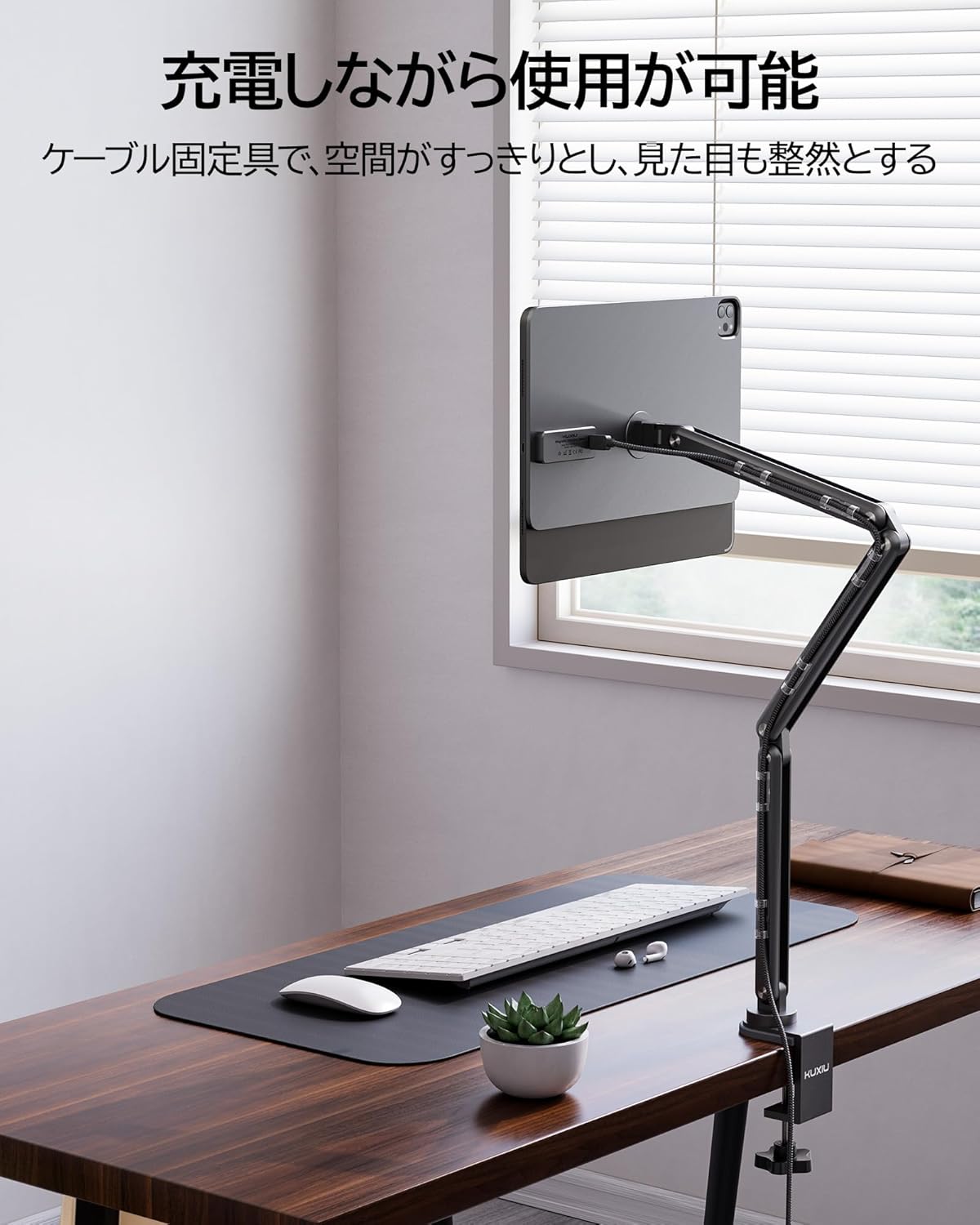
Figure 3: Cable management with the integrated cable clips, keeping the workspace organized.
Arahan Operasi
1. Adjusting Angle and Height
The X36 PRO MAX features seven movable joints, allowing for extensive adjustment of the iPad's angle and height. Gently move the arm to position your iPad at the most comfortable viewing angle. The robust hinges are designed for stability and durability, ensuring the iPad stays in place once adjusted.

Figure 4: Adjustable joints allow for precise positioning of the iPad in both landscape and portrait orientations.
2. Rotating the iPad
The magnetic holder allows for smooth 360-degree rotation, enabling quick switching between landscape and portrait modes without detaching the iPad. This flexibility is ideal for various tasks, from watching videos to drawing or working.
3. Wireless Charging Functionality
Once your iPad Pro (M4) is magnetically attached and the stand is connected to power, wireless charging will commence automatically. This allows you to use your iPad for work, entertainment, or creative tasks without worrying about battery depletion.

Figure 5: The iPad charges wirelessly while mounted, allowing for continuous use.
4. Lipat untuk Penyimpanan
The arm holder can be folded into a compact form for space-saving storage when not in use. Ensure to handle the joints carefully when folding to prevent damage.

Figure 6: Proper technique for folding the arm holder to save space.
Penyelenggaraan
To ensure the longevity and optimal performance of your KU XIU X36 PRO MAX arm holder, follow these simple maintenance guidelines:
- Pembersihan: Wipe the surface of the arm holder with a soft, dry cloth. For stubborn marks, a slightly damp kain boleh digunakan, diikuti dengan pengeringan segera. Elakkan pembersih atau pelarut yang melelas.
- Sendi: The joints are designed to be robust and require no lubrication. Avoid applying excessive force when adjusting to prevent wear.
- Penyambung: Periodically check the USB-C connector and the magnetic charging pins for dust or debris. Refer to the troubleshooting section for instructions on cleaning the charging pins if intermittent charging occurs.
Menyelesaikan masalah
- Q: Is this stand compatible with M2 chip iPads or other iPad models?
- A: This iPad stand is designed exclusively for the 13-inch iPad Pro (M4) and is not compatible with other models (e.g., M2 chip iPads or Android tablets). Please verify your iPad model number (A2925, A2926, A3007) for compatibility.
- Q: Why doesn't the on-screen keyboard appear after connecting my iPad?
- A: This stand charges wirelessly via the Magic Keyboard's Smart Connector. The iPad detects a physical keyboard connection, which typically disables the on-screen keyboard. If you need to use the on-screen keyboard, you must tap the screen to display it each time.
- Q: How do I address charging issues or intermittent charging?
- A: Due to its aluminum alloy construction, the stand's pin connector is sensitive to static electricity. In dry environments or during transport, unavoidable static electricity can cause intermittent charging issues. This is normal. Please follow these steps to address static electricity:
- Use an eraser to remove static electricity from the connector.
- Touch the connector with a coin or other metal object to discharge static electricity.
- Use the positive and negative terminals of a battery to discharge static electricity.
- Clean the connector with an alcohol wipe to remove dust.
- Q: What if a Chinese keyboard suddenly appears?
- A: This stand charges wirelessly via the Magic Keyboard's Smart Connector. When using the iPad for the first time, a pop-up notification regarding a Chinese keyboard may appear. This is completely normal. Once dismissed, this notification will not reappear.
Spesifikasi
| Ciri | Penerangan |
|---|---|
| Nombor Model | X36 PRO MAX |
| Jenama | KU XIU |
| Peranti Serasi | 13-inch iPad Pro (M4, 2024 model) only (Model numbers: A2925, A2926, A3007) |
| Jenis Pemasangan | Meja Clamp |
| bahan | Aloi Aluminium |
| Berat Produk | 1.5 kg |
| Dimensi Pakej | 50.2 x 20.2 x 6.2 cm |
| Ciri Khas | Wireless Charging, Magnetic Attachment, Adjustable Arm, Rotatable, Cable Management |
| Termasuk Aksesori | USB-C Charging Cable (2m / 6.56ft) x 1, X36 Pro MAX Charging Stand x 1, Cable Clips x 10, Nano Double-Sided Tape (non-marking type) x 10 |
Waranti dan Sokongan
Maklumat Waranti
All KU XIU products, including the X36 PRO MAX arm holder, come with an 18-month warranty from the date of purchase. This warranty covers manufacturing defects and malfunctions under normal use. In the unlikely event of a problem, please contact our customer service team for prompt assistance.
Sokongan Pelanggan
KU XIU provides a dedicated Japanese-speaking customer service team to assist you. Our team offers comprehensive support, including product usage explanations, troubleshooting guidance, and assistance with repairs or exchanges within the warranty period. For any inquiries or support needs, please contact us through the Amazon platform or visit our official brand store.
Maklumat Hubungan: Please refer to your purchase platform (e.g., Amazon) for the most up-to-date customer service contact methods.


