
pengenalan
Terima kasih kerana membeliasing the KOKKO KMF-1 Multi-Effects Guitar Pedal. This versatile pedal combines 18 speaker models, a drum machine, and a looper, offering a comprehensive solution for guitarists. Please read this manual carefully to ensure proper operation and to fully utilize all features.
Ciri-ciri Utama
- 18 Speaker Models: Features 18 high-fidelity speaker models, developed with advanced DSP algorithms and IR technology for world-renowned speaker simulations.
- IR Cabinet Simulation: Ensures superior sound quality with high-fidelity cabinet modeling.
- Drum Machine & Looper: Includes a drum machine with 6 styles and over 40 rhythms, and a looper with 30 seconds of non-overdub recording capability, enabling one-man band performances.
- Pilihan Kuasa Fleksibel: Can be powered by AA batteries or an adapter.
- Pelbagai Antara Muka: Equipped with external signal input, USB output, and headphone output for easy plug-and-play use.
Kandungan Pakej
Selepas membongkar, sila pastikan semua item yang disenaraikan di bawah ada dan dalam keadaan baik:
- 1 x KOKKO KMF-1 Multi-Effects Pedal
- (Note: Power adapter and AA batteries are typically sold separately and not included in the standard package.)
Produk Selesaiview
Familiarize yourself with the various parts and controls of your KMF-1 pedal.

Rajah 1: Atas ke bawah view of the KOKKO KMF-1 Multi-Effects Pedal, showing the expression pedal on the left and the control panel with display, knobs, and footswitches on the right.
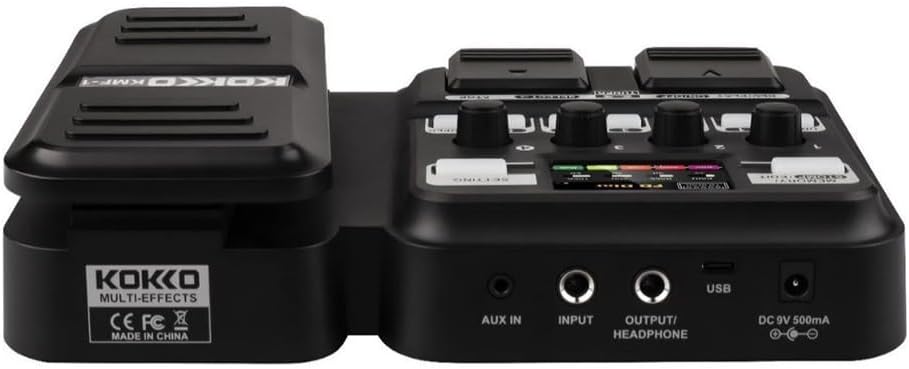
Rajah 2: belakang view of the KOKKO KMF-1 Multi-Effects Pedal, highlighting the AUX IN, INPUT, OUTPUT/HEADPHONE, USB, and DC 9V power input ports.
Kawalan dan Sambungan:
- Pedal Ekspresi: Used for volume control or wah effects.
- Skrin Paparan: Shows current settings, effects, and modes.
- Knobs (1-4): Control various parameters depending on the selected effect or mode.
- Footswitches (DRUM, REC/PLAY ON/OFF, TUNER, SELECT, STOP, LOOPER): For activating/deactivating functions and navigating presets.
- MEMORY/STOMP EDIT Button: Toggles between memory and stompbox modes, or enters edit mode.
- SETTING Button: Mengakses tetapan sistem.
- AUX DI: 3.5mm input for connecting external audio sources (e.g., MP3 player).
- MASUKKAN: 1/4" input for connecting your guitar.
- OUTPUT/HEADPHONE: 1/4" output for connecting to an ampliifier atau fon kepala.
- Port USB: Untuk menyambung ke komputer bagi rakaman atau kemas kini perisian.
- Input Kuasa DC 9V: For connecting a 9V DC power adapter (center negative).
Persediaan
Menghidupkan:
- Kuasa Bateri: Open the battery compartment on the underside of the pedal and insert 4 x AA batteries (not included), ensuring correct polarity.
- Kuasa Penyesuai AC: Connect a 9V DC (center negative) power adapter (not included) to the DC 9V input jack.
Menyambungkan Gear Anda:
- Sambungkan gitar anda ke INPUT jack using a 1/4" instrument cable.
- Sambungkan OUTPUT/HEADPHONE jack to your guitar amplifier's input or to headphones using a 1/4" cable.
- (Optional) Connect an external audio source (e.g., smartphone, MP3 player) to the AUX IN jack using a 3.5mm stereo cable.
- (Pilihan) Sambungkan USB port to your computer for direct recording or firmware updates.
Arahan Operasi
Operasi asas:
- Hidupkan/Mati Kuasa: The unit powers on automatically when connected to power. Disconnect power to turn off.
- Kawalan Kelantangan: Use the expression pedal to control the overall output volume.
- Navigating Presets: Use the SELECT footswitch to cycle through different presets or effects.
Using Speaker Models:
The KMF-1 features 18 high-quality speaker models. These models simulate the sound characteristics of various guitar cabinets.
- Enter the speaker model selection mode (refer to display).
- Use the SELECT footswitch or corresponding knobs to browse and choose your desired speaker model.
- Adjust parameters like gain, tone, and volume using the numbered knobs (1-4) as indicated on the display.
Mesin Drum:
The built-in drum machine offers 6 styles and over 40 rhythms to practice or jam along with.
- Tekan ke DRUM footswitch to activate the drum machine.
- Use the SELECT footswitch or knobs to choose a drum style and rhythm.
- Adjust the drum volume using the appropriate knob.
- Tekan DRUM again to stop the drum machine.
Looper Function:
The looper allows you to record up to 30 seconds of audio without overdubbing, perfect for creating backing tracks.
- Tekan ke REC/PLAY ON/OFF footswitch once to start recording. The display will indicate recording status.
- Play your guitar part.
- Tekan REC/PLAY ON/OFF again to stop recording and immediately start playback of the recorded loop.
- Untuk menghentikan main balik, tekan BERHENTI tukar kaki.
- To clear the loop, press and hold the BERHENTI tukar kaki.
Fungsi Penala:
The integrated tuner allows for accurate guitar tuning.
- Tekan ke TUNER footswitch to activate the tuner. The output signal will be muted.
- Play a single note on your guitar. The display will show the note and indicate if it is sharp, flat, or in tune.
- Laraskan penalaan gitar anda sehingga paparan menunjukkan nota itu selaras.
- Tekan ke TUNER footswitch again to exit the tuner and unmute the output.
Memory/Stomp Edit Mode:
This mode allows you to switch between saved presets (Memory mode) and individual stompbox effects (Stomp mode), as well as edit parameters.
- Tekan ke MEMORY/STOMP EDIT button to toggle between Memory and Stomp modes.
- In Stomp mode, individual effects can be turned on/off using their dedicated footswitches or by selecting them.
- To edit parameters, press and hold the MEMORY/STOMP EDIT button to enter edit mode. Use the knobs and footswitches to adjust settings as displayed.
- Save your changes by following the on-screen prompts (usually by pressing a specific footswitch or button).
Tetapan Sistem:
Access system settings to configure global parameters.
- Tekan ke TETAPAN butang untuk memasuki menu tetapan sistem.
- Use the footswitches or knobs to navigate through the menu options.
- Adjust settings such as display brightness, factory reset, etc.
- Tekan ke TETAPAN butang sekali lagi untuk keluar dari menu.
Penyelenggaraan
- Pembersihan: Gunakan kain lembut dan kering untuk membersihkan pedal. Jangan gunakan pembersih atau pelarut yang kasar.
- Storan: Simpan pedal di tempat yang sejuk dan kering jauh dari cahaya matahari langsung dan suhu yang melampau.
- Penggantian Bateri: If using batteries, replace them when the low battery indicator appears or when the pedal's performance degrades. Remove batteries if the pedal will not be used for an extended period.
- Elakkan Kelembapan: Keep the pedal away from water and other liquids.
- Tangani dengan Berhati-hati: Elakkan daripada menjatuhkan atau menundukkan pedal kepada hentaman kuat.
Menyelesaikan masalah
| Masalah | Kemungkinan Punca | Penyelesaian |
|---|---|---|
| Tiada keluaran bunyi. | Incorrect cable connections; Low battery; Tuner is active; Ampliifier dimatikan. | Check all cables are securely connected. Replace batteries or use AC adapter. Deactivate tuner. Ensure ampPengaktif dihidupkan dan kelantangan dinaikkan. |
| Kualiti bunyi yang herot atau lemah. | Input level too high; Incorrect effect settings; Damaged cable. | Adjust guitar volume or pedal input level. Check and adjust effect parameters. Try a different cable. |
| Pedal does not power on. | No power source; Dead batteries; Faulty adapter. | Ensure power adapter is connected or batteries are inserted correctly. Replace batteries. Try a different compatible power adapter. |
| Looper not recording. | Incorrect looper mode; Memory full. | Ensure you are in the correct looper recording mode. Clear previous loops if memory is full. |
Spesifikasi
| Ciri | Perincian |
|---|---|
| Nama Model | KMF-1 |
| Dimensi Produk (L x W x H) | 31 x 20 x 7 cm (12.2 x 7.9 x 2.8 inci) |
| Berat Barang | 900 g (1.98 paun) |
| Bekalan Kuasa | 9V DC (center negative) adapter or 4 x AA batteries |
| Antara Muka Perkakasan | USB |
| Model Pembesar suara | 18 (IR technology) |
| Looper Recording Time | 30 seconds (non-overdub) |
| Irama Gendang | Over 40 rhythms across 6 styles |
| Nombor Model Pengeluar | 43ST9NRST131F1P8K5GRJ7 |
Waranti dan Sokongan
KOKKO products are designed and manufactured to the highest quality standards. For information regarding warranty coverage, technical support, or service, please refer to the warranty card included with your product or visit the official KOKKO webtapak. Sila simpan bukti pembelian anda untuk sebarang tuntutan waranti.
Untuk bantuan lanjut, sila hubungi pasukan khidmat pelanggan kami.