
T-Wolf GG-G530
T-Wolf RoboCop Competitive Gaming Mouse GG-G530 User Manual
Model: GG-G530
pengenalan
This manual provides essential information for the setup, operation, and maintenance of your T-Wolf RoboCop Competitive Gaming Mouse GG-G530. Please read this manual thoroughly before using the product to ensure optimal performance and longevity.
Kandungan Pakej
- 1 x T-Wolf RoboCop Competitive Gaming Mouse GG-G530
- 1 x Manual Pengguna (dokumen ini)
Ciri-ciri Produk
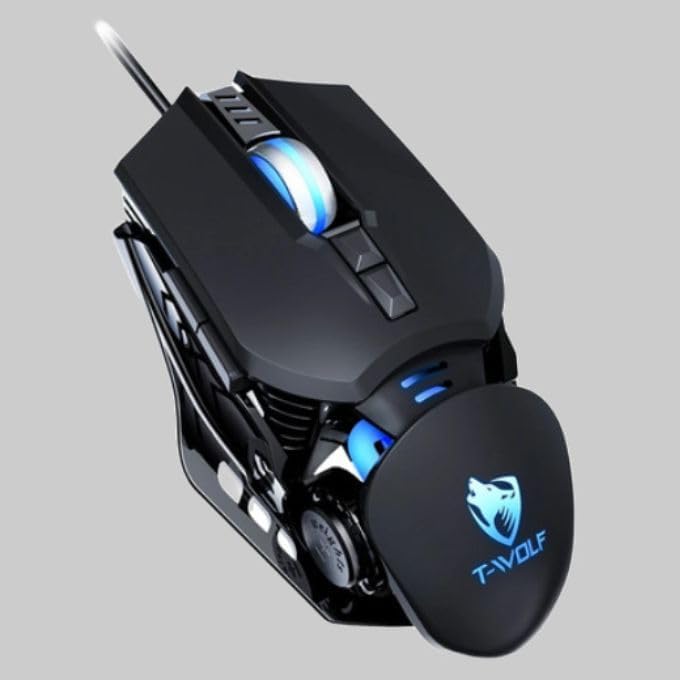
The T-Wolf RoboCop Competitive Gaming Mouse GG-G530 is designed for precision and comfort, suitable for both gaming and office use. Key features include:
- Optical Engine Design: Ensures stable operation and high sensitivity.
- Mechanical Armored Modeling: Distinctive and robust design.
- Symmetrical DIY Counterweight: Allows for adaptable weight adjustment.
- 7 Butang: Includes left click, right click, scroll wheel, DPI switcher, and additional programmable buttons.
- Kesambungan Pintar: Plug-and-play functionality with automatic driver installation.
- DPI boleh laras: Four levels of sensitivity (1200/2400/3200/6400 DPI) for precise control.
- Reka bentuk ergonomik: Provides comfortable use for extended periods without fatigue.
- Four-Color Light Effect: Dynamic lighting for visual appeal.
- Sambungan Berwayar: Reliable USB interface with a 150cm cable.
- Keserasian Sistem: Supports Windows and Mac operating systems.
Persediaan
- Sambungkan Tetikus: Insert the USB connector of the T-Wolf RoboCop Gaming Mouse into an available USB port on your computer.
- Pemasangan Pemacu Automatik: The operating system will automatically detect the mouse and install the necessary drivers. This process typically takes a few moments. No manual driver installation is required.
- Sedia untuk Digunakan: Once the drivers are installed, the mouse is ready for immediate use.
Arahan Operasi
The T-Wolf RoboCop Gaming Mouse features 7 buttons for various functions. Familiarize yourself with their basic operations:
- Butang Klik Kiri: Primary selection and interaction.
- Butang Klik Kanan: Accesses contextual menus and secondary functions.
- Roda Tatal: Menatal dokumen dan web halaman. Boleh juga berfungsi sebagai butang klik tengah.
- DPI Switcher Button: Melaraskan kepekaan tetikus (DPI).
- Butang Tambahan: The remaining buttons can be assigned specific functions through your operating system's mouse settings or compatible third-party software (note: no macro programming is natively supported by the mouse hardware).

Pelarasan DPI
The mouse features an adjustable DPI (Dots Per Inch) setting, allowing you to change the cursor sensitivity on the fly. This is particularly useful for different tasks, such as precise aiming in games or fast navigation in general use.
- Cari DPI Switcher Button, typically positioned behind the scroll wheel.
- Press the DPI Switcher Button to cycle through the available DPI settings: 1200 DPI, 2400 DPI, 3200 DPI, and 6400 DPI.
- Each press will change the sensitivity, allowing you to find the setting that best suits your current activity.

Penyelenggaraan
To ensure the longevity and optimal performance of your T-Wolf RoboCop Gaming Mouse, follow these simple maintenance guidelines:
- Pembersihan: Gunakan kain lembut dan kering untuk mengelap permukaan tetikus. Untuk kotoran degil, sedikit dampen kain dengan air atau larutan pembersih lembut. Elakkan bahan kimia yang keras atau bahan yang melelas.
- Sensor Optik: Periodically clean the optical sensor on the underside of the mouse with a cotton swab to prevent dust buildup, which can affect tracking performance.
- Penjagaan Kabel: Avoid sharply bending or pulling the USB cable to prevent internal damage.
- Storan: Apabila tidak digunakan, simpan tetikus dalam persekitaran yang bersih dan kering dari suhu yang melampau.
Menyelesaikan masalah
If you encounter issues with your T-Wolf RoboCop Gaming Mouse, refer to the following common solutions:
- Tetikus Tidak Menjawab:
- Pastikan kabel USB dipasang dengan selamat ke dalam port USB yang berfungsi pada komputer anda.
- Cuba pasangkan tetikus ke port USB yang berbeza.
- Mulakan semula komputer anda.
- Pergerakan kursor tidak menentu atau gelisah:
- Bersihkan sensor optik di bahagian bawah tetikus.
- Ensure you are using the mouse on a clean, non-reflective, and uniform surface. Mouse pads are recommended.
- DPI Adjustment Not Working:
- Ensure you are pressing the correct DPI switcher button.
- The mouse cycles through fixed DPI settings; there is no visual indicator on the mouse itself for the current DPI level, only the change in cursor speed.
- Butang Tidak Berfungsi:
- Semak tetapan tetikus sistem pengendalian anda untuk memastikan butang diaktifkan dan dikonfigurasikan dengan betul.
- Test the mouse on another computer to rule out a software or system issue.
Spesifikasi
| Model | GG-G530 |
| bahan | ABS + Electroplating |
| Sistem Penjejakan | Optik |
| Sambungan | berwayar |
| Panjang Kabel | 150 sm |
| Jenis Antaramuka | USB |
| Tetapan DPI | 1200 / 2400 / 3200 / 6400 (Boleh Laras) |
| Bilangan Butang | 7 |
| Hayat Perkhidmatan | Approximately three years |
| Kaedah Kerja | Fotolistrik |
| Kesan Cahaya | Four-color cycling |
| Saiz Barang | 130 x 80 x 35 mm |
| Berat Barang | 160 g |
| Sistem yang Disokong | Windows, Mac |
Waranti dan Sokongan
Your T-Wolf RoboCop Competitive Gaming Mouse GG-G530 comes with a Waranti pengilang 6 bulan dari tarikh pembelian.
This warranty covers defects in materials and workmanship under normal use. It does not cover damage caused by accident, misuse, abuse, unauthorized modification, or external causes such as liquid damage.
For warranty claims or technical support, please contact your retailer or the point of purchase. Please retain your proof of purchase for warranty validation.

Dokumen Berkaitan - GG-G530
 |
T-Wolf V1 Mouse Instruction Manual User manual for the T-Wolf V1 wired optical mouse, featuring setup instructions, button functions, and care guidelines for optimal performance. |
 |
T-Wolf X4 Game Mouse User Manual User manual for the T-Wolf X4 Three-Mode Bluetooth Wireless Gaming Mouse. Includes warnings, precautions, and after-sales service information. |
 |
FREE WOLF A3 Wireless Mouse User Manual User manual for the FREE WOLF A3 wireless mouse, detailing its features, specifications, button functions, connection modes (USB and Bluetooth), and usage instructions. Features include 4000 DPI, Type-C charging, and dual-mode connectivity. |
 |
Ubique Group Table Base and Tabletop Assembly Instructions & Safety Guidelines Detailed assembly instructions, parts lists, and safety guidelines for Ubique Group restaurant table bases (X-Base, T-Base, Round-Base) and 30x60 commercial tabletops. Includes contact information and warranty details. |
 |
Ubique Group Table Base and Tabletop Assembly Instructions & Safety Guidelines Assembly instructions and safety guidelines for Ubique Group restaurant table bases (X-Base, T-Base, Round-Base) and 30x60 commercial tabletops. Includes parts list, assembly steps, and important safety warnings. |
 |
Ubique Group Table Base and Commercial Tabletop Assembly & Safety Guide Comprehensive assembly instructions and safety guidelines for Ubique Group restaurant table bases (X-Base, T-Base, Round-Base) and 24x30 commercial tabletops. Includes parts list, step-by-step assembly, product features, and important safety warnings for furniture stability and use. |
Ask a question about this manual
Ask about setup, troubleshooting, compatibility, parts, safety, or missing instructions. Manuals+ will review the question and use this page’s manual context to help answer it.