
Ninkear A15
Ninkear A15 Laptop User Manual
Model: A15
1. Pengenalan
Welcome to the Ninkear A15 Laptop user manual. This guide provides essential information for setting up, operating, maintaining, and troubleshooting your new Ninkear A15 laptop. Please read this manual thoroughly to ensure proper use and to maximize the performance and longevity of your device.
The Ninkear A15 is a high-performance laptop featuring an AMD Ryzen 5 5500U Hexa-core Processor, 16GB RAM, and a 512GB PCIe SSD, designed for a variety of computing tasks from daily productivity to graphic design and entertainment.
2. Apa yang ada di dalam Kotak
Upon opening your Ninkear A15 Laptop package, please verify that all the following items are included:
- A15 laptop x 1
- Tetikus x 1
- Pad tetikus x 1
- Pengecas x 1
3. Produk Lebihview
The Ninkear A15 laptop is engineered for efficiency and user comfort. Below are key features and components:
3.1 Ciri-ciri Utama
- Pemproses berkuasa: Equipped with an AMD Ryzen 5 5500U processor, AMD Radeon graphics, 6 cores and 12 threads, with a frequency up to 4.0Ghz, suitable for various applications.
- Paparan Imersif: Features a 15.6-inch FHD IPS display with 1920x1080 resolution, offering a 90.3% screen-to-body ratio and a 180-degree viewing angle for clear and natural picture quality.
- Jangka Hayat Bateri: A 4350mAh battery provides up to 6 hours of daily use, making it ideal for mobile work. It supports full-function Type-C charging.
- Ample Penyimpanan & Memori: Comes with 16GB DDR4 RAM (3200Mhz) and a 512GB PCIe SSD, ensuring fast performance for professional software and multitasking.
- Reka Bentuk Mesra Pengguna: Includes a full digital backlit keyboard with three adjustable monochrome backlight levels (FN+F9) and a 0.5-second fingerprint unlocking feature for enhanced security and convenience.
3.2 Visual Overview

Depan view of the Ninkear A15 Laptop, showcasing reka bentuk dan paparannya yang anggun.

Berakhirview of the Ninkear A15 Laptop highlighting key specifications like 15.6" IPS FHD display, AMD Ryzen 5 5500U processor, 16GB DDR4 RAM, 512GB PCIe SSD, 4350mAh battery, backlit keyboard, and Type-C full function port.

Terperinci view of the AMD Ryzen 5 5500U processor, emphasizing its 6 cores, 12 threads, 7nm process, and 4.0GHz max turbo frequency.
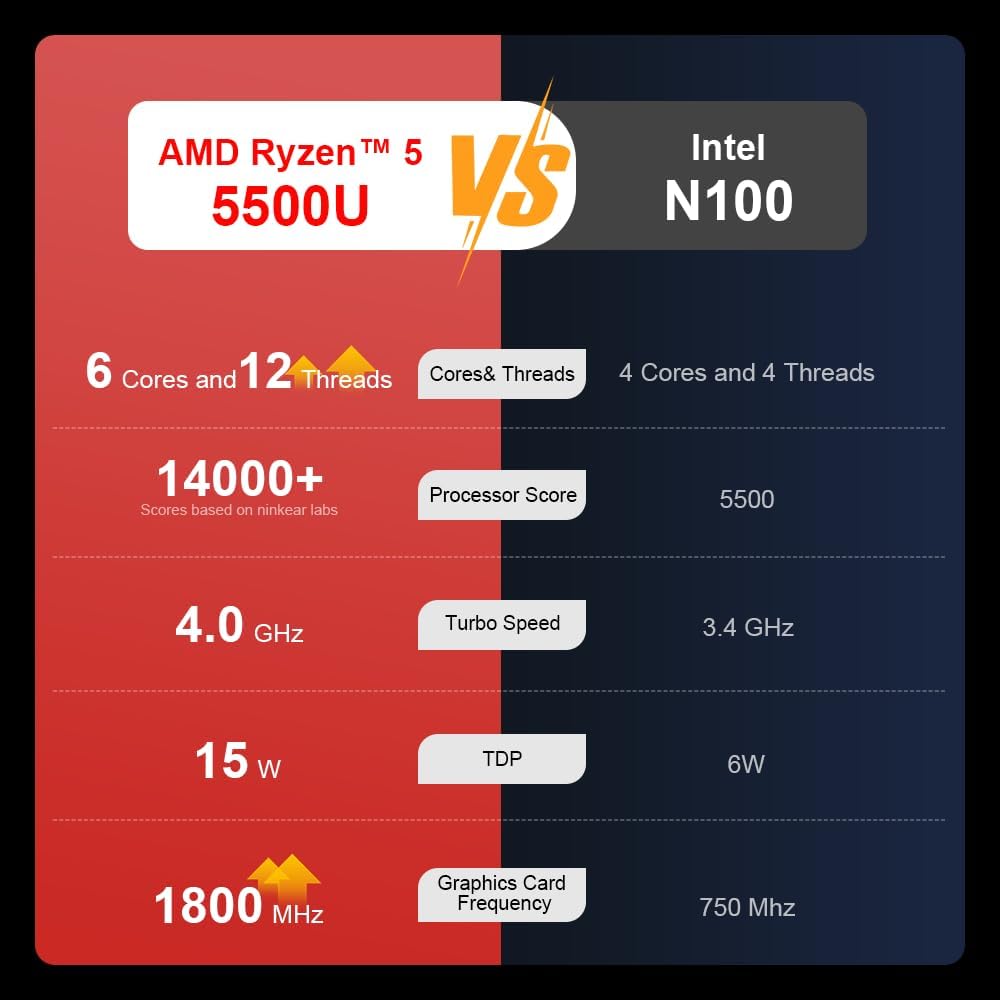
A comparison chart illustrating the performance differences between the AMD Ryzen 5 5500U and Intel N100 processors, including core/thread count, processor score, turbo speed, TDP, and graphics card frequency.

Image showing the 512GB M.2 PCIe SSD and highlighting the 3200MHz DDR4 running frequency, indicating a 20% speed improvement over 2666MHz DDR4.

The 15.6-inch IPS FHD screen of the A15, designed to deliver vibrant and accurate colors while reducing eye strain during long work hours.

Illustration of the A15 laptop's suitability for various 'recreational office' tasks, including graphic design (Ae, Ps, Ai) and gaming/entertainment.

Information about the laptop's 50.5WH high-capacity lithium-ion battery, providing up to 8 hours of local video playback and 72 hours of standby time.

A visual guide to the rich interfaces of the Ninkear A15 Laptop, including USB 3.0, USB 2.0, Headphone Jack, Charging Port, HDMI, and full-function Type-C ports.
3.3 Video Produk
Tayangan video produk rasmicasing the Ninkear A15 Laptop's features, including its design, display, backlit keyboard, and various ports. This video provides a dynamic overview of the laptop's capabilities and physical attributes.
4. Persediaan
Follow these steps to set up your Ninkear A15 Laptop for the first time:
- Buka bungkusan Laptop: Keluarkan komputer riba dan semua aksesori dengan berhati-hati dari pembungkusan.
- Sambungkan Kuasa: Plug the charger into the laptop's charging port (DC-in or Type-C) and then into a power outlet.
- But Permulaan: Open the laptop lid and press the power button (integrated with fingerprint sensor). The laptop will power on and begin the initial Windows 11 setup process.
- Persediaan Windows 11: Follow the on-screen instructions to complete the Windows 11 setup, including selecting your region, language, connecting to Wi-Fi, and creating a user account.
- Persediaan Cap Jari: During or after Windows setup, you can configure the fingerprint reader for quick and secure login.
5. Arahan Operasi
This section covers basic operation of your Ninkear A15 Laptop.
5.1 Hidupkan/Mati Kuasa dan Tidur
- Hidupkan kuasa: Tekan butang kuasa.
- Matikan: Klik butang Mula dalam Windows, kemudian pilih Kuasa > Matikan.
- Mod tidur: Close the lid or click the Start button, then select Power > Sleep.
5.2 Papan Kekunci dan Pad Sentuh
- Papan Kekunci Bercahaya Belakang: Tekan Fn + F9 to cycle through the three levels of monochrome backlight brightness or turn it off.
- Pad sentuh: Use the integrated touchpad for cursor control and gestures. Refer to Windows settings for touchpad customization.
- Papan kekunci angka: The laptop features a full digital numeric keypad for convenient data entry.
5.3 Menyambung Peranti
Utilize the various ports for external devices:
- Port USB: Connect USB devices like external hard drives, mice, or keyboards to the USB 2.0 or USB 3.0 ports.
- HDMI: Connect to external monitors or projectors using the HDMI port.
- Jenis-C: The full-function Type-C port supports data transfer, video output, and power delivery.
- Jack Audio: Sambungkan fon kepala atau pembesar suara luaran ke bicu audio 3.5mm.
5.4 Tetapan Paparan
Adjust display settings via Windows Settings > System > Display to optimize resolution, scaling, and multiple monitor setups.
6. Penyelenggaraan
Proper maintenance ensures the longevity and optimal performance of your Ninkear A15 Laptop.
- Pembersihan: Use a soft, lint-free cloth to clean the screen and chassis. For stubborn marks, slightly dampen kain dengan air atau pembersih skrin. Elakkan bahan kimia yang keras.
- Kemas Kini Perisian: Regularly update Windows and device drivers to ensure system stability, security, and performance.
- Penjagaan Bateri: Untuk memanjangkan hayat bateri, elakkan daripada menyahcas sepenuhnya bateri dengan kerap. Simpan komputer riba di tempat yang sejuk dan kering apabila tidak digunakan untuk tempoh yang lama.
- Pengudaraan: Pastikan lubang angin komputer riba tidak terhalang untuk mengelakkan terlalu panas. Gunakan komputer riba pada permukaan yang keras dan rata.
- Sandaran Data: Sandarkan data penting anda secara kerap ke pemacu luaran atau storan awan untuk mengelakkan kehilangan data.
7. Penyelesaian masalah
This section addresses common issues you might encounter with your Ninkear A15 Laptop.
| Masalah | Kemungkinan Punca | Penyelesaian |
|---|---|---|
| Komputer riba tidak dihidupkan | Low battery or power adapter issue | Ensure the charger is properly connected and the power outlet is working. Allow the laptop to charge for at least 30 minutes before attempting to power on again. |
| Skrin kosong atau hitam | Display driver issue, external display connected, or sleep mode | Press any key or move the mouse to wake from sleep. Disconnect any external monitors. Try pressing Fn + F7 (or the key with a display icon) to switch display modes. If still blank, force shut down by holding the power button for 10 seconds, then restart. |
| Wi-Fi tidak bersambung | Wi-Fi adapter off, incorrect password, or router issue | Check if Wi-Fi is enabled in Windows settings. Verify the Wi-Fi password. Restart your router and modem. Update Wi-Fi drivers if necessary. |
| Lampu latar papan kekunci tidak berfungsi | Backlight turned off or low brightness setting | Tekan Fn + F9 repeatedly to adjust brightness or turn on the backlight. |
| Prestasi perlahan | Too many programs running, low disk space, or outdated drivers | Close unnecessary applications. Free up disk space. Run Windows Update and update drivers. Consider running a virus scan. |
8. Spesifikasi
Detailed technical specifications for the Ninkear A15 Laptop:
| Ciri | Spesifikasi |
|---|---|
| Jenama | Ninkear |
| Nama Model | A15 |
| Saiz Skrin | 15.6 Inci |
| Resolusi Skrin | 1920 x 1080 pixels (FHD IPS) |
| Pemproses | AMD Ryzen 5 5500U (2.1 GHz, 6 Cores, 12 Threads) |
| RAM | 16 GB DDR4 (3200 MHz) |
| Pemacu Keras | 512 GB PCIe SSD |
| Kad Grafik | Grafik AMD Radeon Bersepadu |
| Sistem Operasi | Windows 11 |
| warna | Perak |
| Berat Barang | 5 paun |
| Dimensi Produk | 14 x 9 x 0.15 inci |
| Port USB 3.0 | 2 |
| Purata Hayat Bateri | Up to 6-8 hours (daily use) |
| Ciri Khas | Backlit Keyboard, Numeric Keypad, Fingerprint Unlock, Full-function Type-C |
9. Waranti & Sokongan
Ninkear provides a standard warranty for the A15 Laptop. Please refer to the warranty card included in your product packaging for specific terms and conditions, including warranty duration and coverage details.
For technical support, troubleshooting assistance, or warranty claims, please contact Ninkear customer service through the official website or the contact information provided with your purchase. Ensure you have your product model (A15) and purchase details ready when contacting support.
You can also visit the official Ninkear store on Amazon for additional product information and support resources: Ninkear Amazon Store
Ask a question about this manual
Ask about setup, troubleshooting, compatibility, parts, safety, or missing instructions. Manuals+ will review the question and use this page’s manual context to help answer it.