
1. Pengenalan
Thank you for choosing the pxton 666S Walkie Talkie. This manual provides essential information for the safe and efficient operation of your two-way radio. Please read this manual thoroughly before use to ensure optimal performance and to prevent damage to the device.

Image 1.1: pxton 666S Walkie Talkies in use, highlighting key features.
2. Produk Lebihview
2.1 Komponen yang Disertakan
- pxton 666S Walkie Talkie Unit(s)
- Bateri Lithium-ion 1500mAh
- Pangkalan Pengecasan
- Penyesuai Kuasa
- Klip Tali Pinggang
- Antena
- Headphones (earpiece with microphone)
- Manual Pengguna
2.2 Ciri-ciri Utama
- VOX (Pertukaran Dikendalikan Suara): Hands-free communication.
- Pengurangan Bunyi: Meningkatkan kejelasan audio dalam persekitaran yang bising.
- TOT (Pemasa Tamat Masa): Mencegah penghantaran jarak jauh yang tidak disengajakan.
- Lampu suluh terbina dalam: Untuk pencahayaan dalam keadaan cahaya malap.
- Fungsi Pemantauan: Allows listening to weak signals.
- Fungsi Imbasan: Scans active channels.
- Jarak jauh: Up to 3 miles in open areas, 1.2 miles in suburban, 0.6 miles in urban.
- Bateri Li-ion 1500mAh: Provides extended standby and talk time.
- Tahan Air: Offers protection against splashes.
- 16 Saluran: For diverse communication needs.
2.3 Parts of the Walkie Talkie
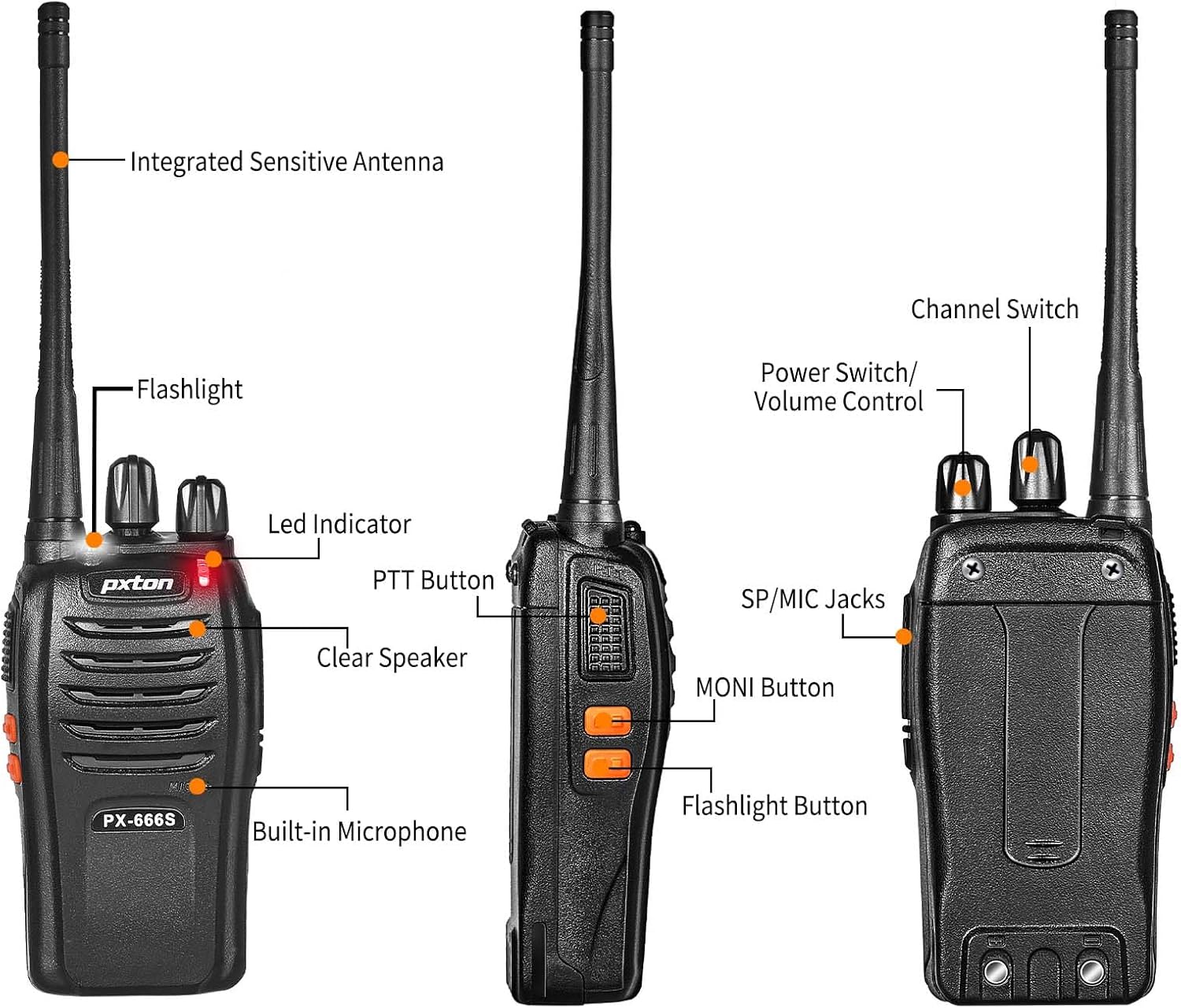
Imej 2.1: Depan dan sisi view of the pxton 666S with labeled components.

Imej 2.2: Bersudut view of the pxton 666S with labeled components.
3. Persediaan
3.1 Pemasangan dan Pengecasan Bateri
- Pastikan walkie talkie dimatikan.
- Sejajarkan bateri Li-ion 1500mAh dengan petak bateri di bahagian belakang radio.
- Tolak perlahan bateri ke tempatnya sehingga ia berbunyi dengan selamat.
- To charge, place the walkie talkie into the charging base. Ensure the charging contacts align.
- Sambungkan penyesuai kuasa ke tapak pengecas dan pasangkannya ke soket dinding.
- The LED indicator on the radio will typically show red during charging and turn green when fully charged.
- Masa pengecasan adalah lebih kurang 3-4 jam untuk cas penuh.

Image 3.1: Battery installation and specifications.

Image 3.2: Walkie talkie in charging base.
3.2 Memasang Aksesori
- Antena: Screw the antenna clockwise into the connector on top of the radio until it is firm. Do not overtighten.
- Klip tali pinggang: Attach the belt clip to the designated slots on the back of the radio using the provided screws.
- Fon kepala: Insert the headphone jack into the SP/MIC jacks on the side of the radio. Ensure it is fully inserted for proper connection.
4. Arahan Operasi
4.1 Kuasa Hidup/Mati dan Kawalan Kelantangan
- Hidupkan kuasa: Rotate the Power Switch/Volume Control knob (top left knob) clockwise until you hear a click. The radio will emit a tone, and the LED indicator will flash.
- Matikan: Rotate the Power Switch/Volume Control knob counter-clockwise until you hear a click.
- Pelarasan Kelantangan: After powering on, continue rotating the Power Switch/Volume Control knob clockwise to increase volume or counter-clockwise to decrease volume.
4.2 Pemilihan Saluran
- Rotate the Channel Switch knob (top right knob) to select your desired channel (1-16).
- Pastikan semua radio dalam kumpulan anda ditetapkan ke saluran yang sama untuk komunikasi.
4.3 Menghantar dan Menerima
- Untuk Menghantar: Press and hold the PTT (Push-To-Talk) button on the side of the radio. Speak clearly into the microphone (located below the speaker grille). Release the PTT button to stop transmitting.
- Untuk Menerima: When the PTT button is not pressed, the radio is in receive mode. You will hear incoming transmissions through the speaker or connected headphones.
4.4 Fungsi VOX
The VOX function allows for hands-free operation. When activated, the radio will automatically transmit when it detects your voice, without needing to press the PTT button. Refer to your radio's programming software for VOX activation and sensitivity adjustment (programming cable sold separately).
4.5 Operasi Lampu Suluh
Press the dedicated Flashlight Button (often located below the PTT button) to turn the built-in LED flashlight on or off.
4.6 Monitoring and Scan Functions
- Butang MONI: Press and hold the MONI (Monitor) button to temporarily disable squelch and listen to all activity on the current channel, including weak signals.
- Fungsi Imbasan: The scan function allows the radio to automatically sweep through programmed channels to detect active transmissions. Activation and channel programming for scan typically require programming software.
4.7 Julat Komunikasi
The actual communication range varies significantly based on terrain and obstructions:
- Open Areas (e.g., flat terrain, mountain peaks): Sehingga 3 batu.
- Suburban/Countryside: Lebih kurang 1.2 batu.
- City Limits (with buildings and obstructions): Lebih kurang 0.6 batu.

Image 4.1: Communication distance in various environments.
5. Penyelenggaraan
- Pembersihan: Gunakan yang lembut, damp kain untuk membersihkan bahagian luar radio. Jangan gunakan bahan kimia atau pelarut yang keras.
- Penjagaan Bateri: Avoid fully discharging the battery frequently. Charge the battery regularly, even if not in use, to maintain its lifespan. Do not expose batteries to extreme temperatures.
- Storan: Simpan walkie-talkie di tempat yang sejuk dan kering apabila tidak digunakan. Tanggalkan bateri jika disimpan untuk tempoh yang lama.
- Antena: Jangan bengkokkan atau ubah suai antena, kerana ini boleh menjejaskan prestasi.
6. Penyelesaian masalah
| Masalah | Kemungkinan Punca | Penyelesaian |
|---|---|---|
| Radio tidak dihidupkan. | Bateri lemah atau tidak dipasang dengan betul. | Cas bateri sepenuhnya. Pasang semula bateri dengan kukuh. |
| Tidak boleh menghantar atau menerima. | Saluran yang dipilih salah. Di luar julat. Bateri lemah. | Pastikan semua radio berada di saluran yang sama. Bergerak lebih dekat dengan radio lain. Cas bateri. |
| Kualiti audio yang lemah atau statik. | Weak signal. Obstructions. Volume too low/high. | Move to an open area. Adjust volume. Use MONI button to check for weak signals. |
| Hayat bateri lebih pendek daripada jangkaan. | Frequent transmissions. Old battery. Extreme temperatures. | Reduce transmission time. Replace old battery. Operate in moderate temperatures. |
7. Spesifikasi
| Ciri | Perincian |
|---|---|
| Jenama | pxton |
| Nombor Model | 666S |
| Bilangan Saluran | 16 |
| Julat Kekerapan | UHF |
| Julat Bercakap (Maks) | 3 Miles (open areas) |
| Kapasiti Bateri | 1500mAh Litium-ion |
| Purata Hayat Bateri | Up to 120 hours standby, 12 hours continuous talk |
| Voltage | 3.7 Volt (DC) |
| Tahap Ketahanan Air | Tahan Air |
| Ciri Khas | Long Range, Noise Reduction, VOX, Flashlight, Monitoring, Scan |
| Peranti Serasi | PX-888S, PX-777S, PX-888S Pro (with same programming tools/cables) |

Image 7.1: Size comparison of pxton 666S walkie talkie.
8. Waranti dan Sokongan
pxton offers a 30-day no-questions-asked replacement and refund policy for your peace of mind. Additionally, we provide lifelong after-sales service to ensure your satisfaction.
If you encounter any issues or have questions regarding your pxton 666S walkie talkie, please do not hesitate to reach out to pxton customer support. We are committed to assisting you and resolving any concerns you may have.
For support, please refer to the contact information provided with your purchase or visit the official pxton webtapak.