
1. Pengenalan
This manual provides detailed instructions for the installation, operation, maintenance, and troubleshooting of your XikeStor 10Gb PCIe Network Card. This high-performance network adapter is designed to deliver reliable and high-speed network connectivity for various computing environments.
2. Produk Lebihview
The XikeStor 10Gb PCIe Network Card features an Intel X550-T2 chipset, offering dual RJ45 ports for 10 Gigabit Ethernet connectivity. It is engineered for stable performance across multiple speeds and broad compatibility with various operating systems and server configurations.
Ciri-ciri Utama:
- Stable Performance Across Multiple Speeds: Equipped with the Intel X550-T2 chipset, this 10G Ethernet card supports speeds of 100M, 1G, 2.5G, 5G, and 10G, ensuring stable performance without frame loss or packet drops.
- Adaptive Duplex Modes and Versatile Installation: Supports both half/full duplex auto-negotiation and includes standard and low-profile brackets for flexible installation in various system setups.
- High-Speed PCIe Interface: Utilizes a PCIe v3.0 (8.0GT/s) interface with x4 lane width, compatible with x8 and x16 slots, facilitating high-speed data transfer and broad compatibility with server configurations.
- Pelesapan Haba yang Cekap: Features an oversized high-performance alloy heatsink for quick and effective dissipation of excess heat, ensuring stable operation even under heavy workloads.
- Keserasian Sistem Operasi Luas: Compatible with Windows 10/11, Windows Server 2012-2019, Ubuntu 22.04/20.04 LTS, Linux RHEL 8.0-9.2, SLES 15 SP5, VMware ESX/ESXi 5.x/6.x or later, FreeBSD 13.1/12.4, and Synology 7.1 and above.

Figure 2.1: The network card supports high-speed data transmission up to 10Gbps, compatible with various network speeds.

Figure 2.2: The oversized alloy heatsink ensures optimal thermal management for sustained performance.
3. Kandungan Pakej
Sila sahkan bahawa semua item terdapat dalam pakej:
- 10G PCIe Network Card × 1
- Pro rendahfile Kurungan × 1
4. Persediaan dan Pemasangan
Follow these steps to properly install your XikeStor 10Gb PCIe Network Card into your computer system.
4.1 Pemasangan Fizikal
- Sistem Matikan Kuasa: Completely shut down your computer and disconnect the power cord from the power outlet.
- Buka Kes Komputer: Keluarkan panel sisi sarung komputer anda untuk mengakses papan induk.
- Kenal pasti Slot PCIe: Locate an available PCI Express slot (x4, x8, or x16) on your motherboard.
- Tanggalkan Penutup Slot: Tanggalkan penutup slot logam yang sepadan dengan slot PCIe yang dipilih dari bahagian belakang casing komputer anda dengan berhati-hati.
- Install Network Card: Align the network card with the chosen PCIe slot and firmly press it down until it is securely seated. Ensure the gold contacts are fully inserted into the slot.
- Kad Selamat: Use a screw or the case's retention mechanism to secure the network card to the computer case.
- Tutup Kes: Pasang semula panel sisi casing komputer dan sambungkan semula kord kuasa.
- Sambungkan Kabel Rangkaian: Connect your Ethernet cables to the RJ45 ports on the newly installed network card.
- Hidupkan kuasa: Hidupkan komputer anda.
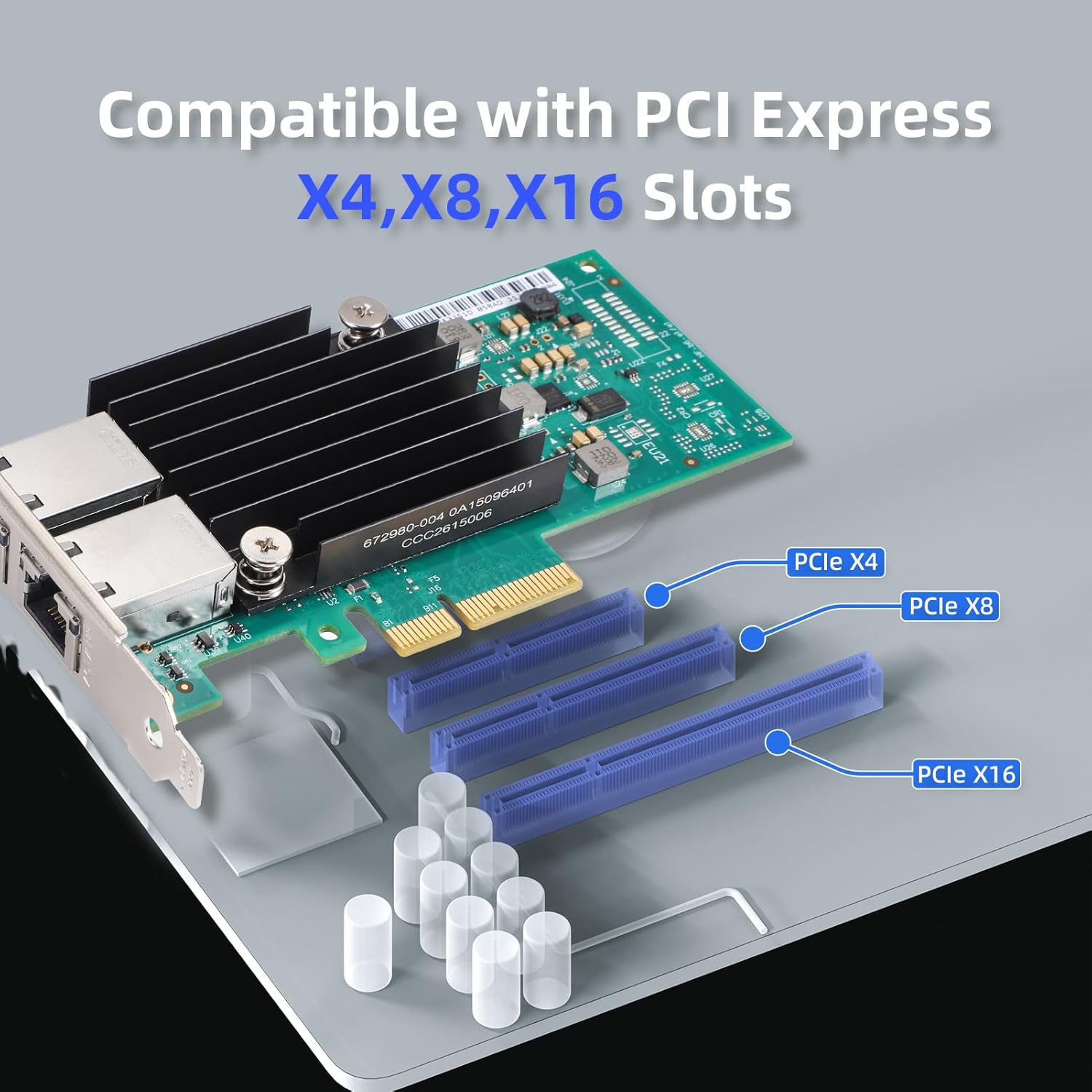
Figure 4.1: The network card is designed to fit into PCIe x4, x8, or x16 slots.

Figure 4.2: The included low-profile bracket allows installation in small form factor PCs or 2U chassis.
5. Arahan Operasi
5.1 Pemasangan Pemandu
After physical installation, you may need to install drivers for the network card to function correctly. Most modern operating systems may automatically detect and install generic drivers. However, for optimal performance and full feature support, it is recommended to install the latest drivers from the XikeStor official website or the Intel support page for the X550-T2 chipset.
- Windows: Download the appropriate driver package for your Windows version (10/11, Server 2012-2019) and follow the on-screen instructions.
- Linux/Ubuntu/FreeBSD: Drivers are often included in the kernel or available through package managers. Refer to your specific distribution's documentation for installation.
- VMware/Synology: Consult the official documentation for VMware ESX/ESXi or Synology DSM for driver installation procedures.

Figure 5.1: The network card supports a wide range of operating systems for diverse server environments.
5.2 Konfigurasi Rangkaian Asas
Once drivers are installed, verify the network card's status in your operating system's network settings. Configure IP addresses, subnet masks, and gateway settings as required by your network environment. Ensure that your network switch or router also supports 10 Gigabit Ethernet for full speed utilization.

Gambar 5.2: Cthample of a 10G network diagram showing the integration of the PCIe adapter.
6. Penyelenggaraan
To ensure the longevity and optimal performance of your network card, consider the following maintenance tips:
- Jaga kebersihan: Periodically clean dust from the network card's heatsink and surrounding components using compressed air. Ensure the computer is powered off and unplugged before cleaning.
- Pastikan Aliran Udara: Maintain good airflow within your computer case to prevent overheating. Ensure no cables or other components obstruct the heatsink.
- Kemas Kini Pemandu: Periksa dengan kerap pengeluar weblaman web untuk pemacu yang dikemas kini bagi mendapat manfaat daripada penambahbaikan prestasi dan pembetulan pepijat.
7. Penyelesaian masalah
If you encounter issues with your network card, try the following troubleshooting steps:
Isu dan Penyelesaian Biasa:
- Tiada Kesambungan Rangkaian:
- Verify that the Ethernet cables are securely connected to both the network card and the network device (switch/router).
- Check the LED indicators on the network card; they should show activity when connected.
- Ensure the network card is properly seated in the PCIe slot.
- Check your operating system's network adapter settings to ensure the card is enabled and configured correctly.
- Kelajuan Rangkaian Perlahan:
- Ensure your network switch/router and cables support 10 Gigabit Ethernet. Cat6a or Cat7 cables are recommended for 10Gbps.
- Update the network card drivers to the latest version.
- Check for network congestion or other devices consuming bandwidth on your network.
- Isu Pemasangan Pemacu:
- Download drivers specifically for your operating system version and architecture (32-bit/64-bit).
- Disable antivirus software temporarily during driver installation if it interferes.
- Try installing drivers in compatibility mode if experiencing issues on newer OS versions.
- Kad Tidak Dikesan:
- Reseat the network card in the PCIe slot.
- Try installing the card in a different PCIe slot if available.
- Check your motherboard's BIOS/UEFI settings to ensure PCIe slots are enabled.
8. Spesifikasi
| Ciri | Perincian |
|---|---|
| Jenama | XikeStor |
| Nombor Model | 10G X550 2×RJ45 |
| Nombor Bahagian Mfr | SKN-X550-2BT |
| Antara Muka Perkakasan | PCI Express x4 (compatible with x8, x16) |
| Protokol Pautan Data | Gigabit Ethernet, 10 Gigabit Ethernet |
| Kadar Pemindahan Data | 10 Gigabits Per Second (supports 100M/1G/2.5G/5G/10G) |
| Peranti Serasi | Desktop, Servers |
| Dimensi Produk (L×W×H) | 5.12" × 2.72" × 0.71" |
| Berat Barang | 0.33 paun |
| Pengeluar | Anhui Seeker Electronic Technology Co., Ltd. |
9. Waranti dan Sokongan
9.1 Maklumat Waranti
The XikeStor 10Gb PCIe Network Card comes with a Waranti 1 Tahun dari tarikh pembelian. Waranti ini meliputi kecacatan pembuatan dan kerosakan dalam penggunaan biasa. Ia tidak melindungi kerosakan yang disebabkan oleh penyalahgunaan, kemalangan, pengubahsuaian yang tidak dibenarkan, atau pemasangan yang tidak betul.
9.2 Sokongan Teknikal
For technical assistance, driver downloads, or further inquiries, please visit the official XikeStor website or contact their customer support. Have your product model number (10G X550 2×RJ45) and purchase information ready when seeking support.