
1. Pengenalan
Thank you for choosing the BAISHUN Tablet Wall Mount Holder. This manual provides essential information for the safe and efficient installation and operation of your new tablet mount. Please read these instructions thoroughly before use and retain them for future reference.
2. Maklumat Keselamatan
Untuk memastikan operasi yang selamat dan mencegah kerosakan, sila patuhi perkara berikut:
- Ensure the mounting surface is structurally sound and can support the weight of the mount and your tablet (up to 3.3 lbs / 1.5 kg).
- Use appropriate tools and hardware for installation. A drill is required for mounting.
- Do not overtighten screws during installation to avoid damaging the mount or the mounting surface.
- Verify all connections are secure before placing a tablet in the holder.
- Jauhkan bahagian kecil dan bahan pembungkusan daripada kanak-kanak.
- Avoid placing the mount in locations where it could obstruct pathways or be easily bumped.
3. Kandungan Pakej
The BAISHUN Tablet Wall Mount Holder package includes:
- Tablet wall mount (1 unit)
- Mounting hardware (screws, wall anchors, small wrench)
4. Produk Lebihview
The BAISHUN Tablet Wall Mount Holder is designed for versatile and secure tablet placement in various environments. It features a robust metal construction and adjustable components for optimal viewing.
Ciri-ciri Utama:
- Sturdy & Reliable Construction: Made with a robust metal base and arms, supporting up to 3.3 lbs (1.5 kg). The clamp features anti-slip and anti-scratch protection.
- Adjustable Arms & 360° Rotation: A 360° rotating ball joint allows for landscape or portrait mode. Three mechanical arms offer 240° adjustment for extending, raising, lowering, or folding the stand.
- Extendable & Foldable Design: 3-stage adjustable arms extend up to 15.55 inches or retract to 3.9 inches from the wall, ideal for space-saving or closer viewing.
- Keserasian Luas: The expandable bracket fits tablets and phones with 4.7–13.5-inch screens, including iPad Pro 12.9"/11", iPad Air, iPad Mini, Surface Pro, Galaxy Tabs, iPhone, Galaxy S20, Switch, and e-Readers. Adjustable width from 4.9 to 9.8 inches ensures a secure fit.

Figure 1: Long Arm Wall Tablet Mount in use, showing its extended reach.

Figure 2: Adjustable Arm Angle and 360° Rotation capabilities.
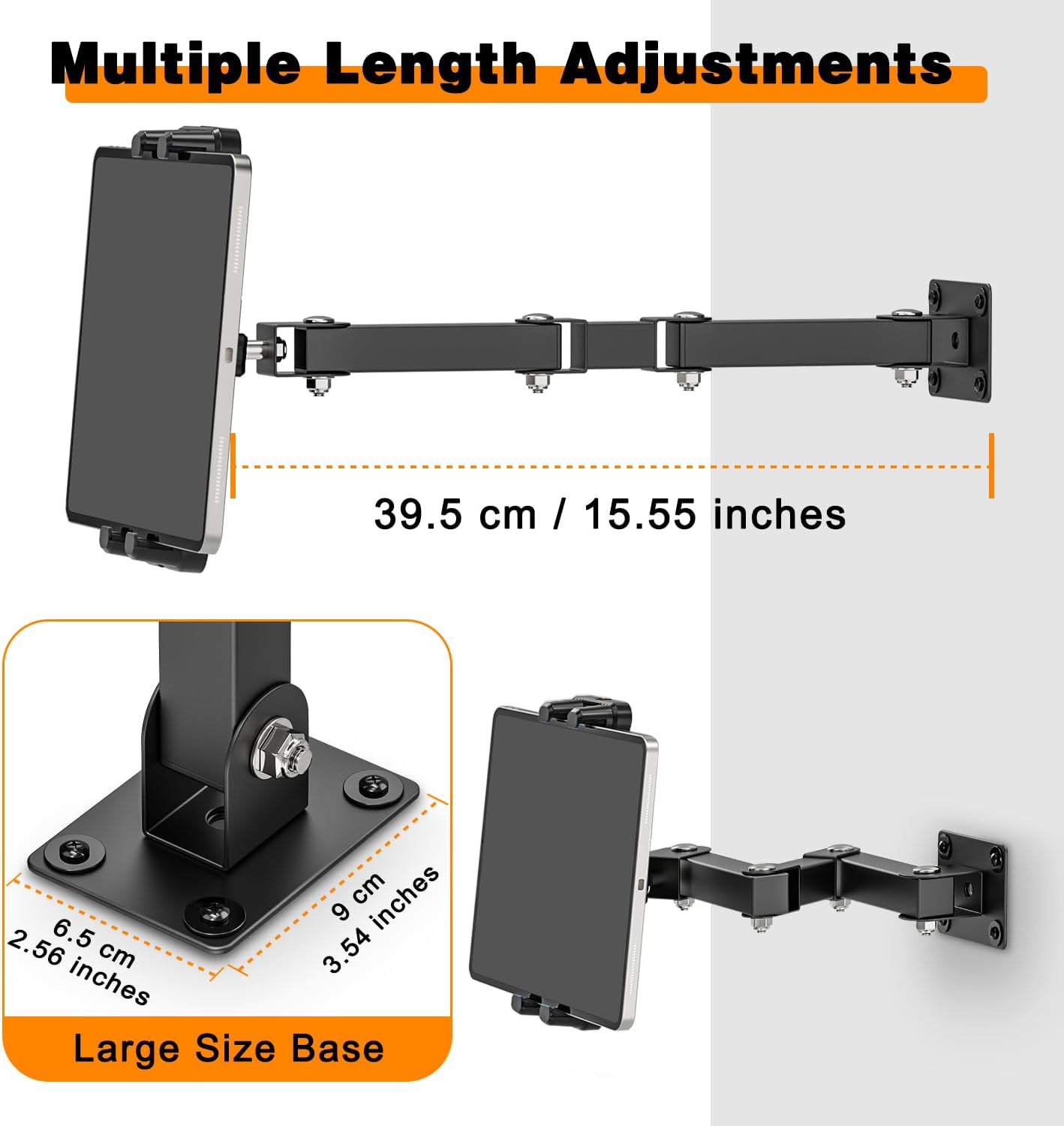
Figure 3: Multiple Length Adjustments and Large Size Base dimensions.

Figure 4: Universal Tablet Compatibility for devices from 4.7 to 13.5 inches.
5. Persediaan & Pemasangan
Follow these steps to properly install your BAISHUN Tablet Wall Mount Holder. A drill is required for installation.
- Pilih Lokasi: Select a suitable wall or cabinet surface that is sturdy and can safely support the mount and your tablet. Consider viewsudut dan kebolehcapaian.
- Tandakan Titik Penggerudian: Position the base of the mount on your chosen surface. Use a pencil to mark the four drilling points through the holes on the base.
- Gerudi Lubang Juruterbang: Using an appropriate drill bit for your wall type, drill pilot holes at the marked locations. Insert the provided wall anchors if necessary.
- Selamatkan Pangkalan: Align the mount's base with the drilled holes. Insert the screws and tighten them securely with a screwdriver until the base is firmly attached to the wall.
- Attach the Tablet Holder: Connect the tablet holder component to the adjustable arm. Ensure it clicks into place or is securely fastened according to the design.
- Laraskan Keketatan: Use the provided small wrench to adjust the tightness of the joints on the arm. This allows you to control the arm's movement and stability.

Figure 5: Installation Diagram illustrating the mounting process.
6. Arahan Operasi
Once installed, the BAISHUN Tablet Wall Mount Holder offers flexible positioning for your device.
- Memasukkan Tablet Anda: Gently expand the tablet holder's clamps and carefully place your tablet or smartphone into the holder. Ensure it is centered and securely gripped by the anti-slip pads.
- Melaraskan Lengan: The three mechanical arms can be extended, raised, lowered, or folded to achieve your desired viewing distance and height. Adjust the joints as needed.
- Rotating the Tablet: The ball joint allows for a full 360° rotation. You can easily switch your tablet between landscape and portrait orientations without removing it from the holder.
- Lipatan untuk Storan: When not in use, the arm can be folded back towards the wall to save space.

Figure 6: Tablet Wall Mount in an office setting, demonstrating flexible positioning.

Figure 7: Versatile usage scenarios for the tablet mount in various rooms.
7. Penyelenggaraan
To maintain the longevity and appearance of your tablet mount:
- Lap pelekap dengan kain lembut dan kering untuk menghilangkan habuk.
- Elakkan menggunakan pembersih atau pelarut yang kasar, kerana ini boleh merosakkan kemasan.
- Periodically check all screws and joints to ensure they remain tight. Retighten if necessary.
8. Penyelesaian masalah
If you encounter any issues with your tablet mount, refer to the following common problems and solutions:
| Masalah | Kemungkinan Punca | Penyelesaian |
|---|---|---|
| Mount feels unstable or sags. | Loose mounting screws or arm joints. | Check and tighten all mounting screws and arm joints using the provided wrench. Ensure the wall is suitable for mounting. |
| Tablet slips from the holder. | Holder not fully tightened or tablet size incompatible. | Ensure the holder clamps are securely gripping the tablet. Verify your tablet's size is within the 4.7-13.5 inch range. |
| Difficulty adjusting the arm. | Sendi terlalu ketat. | Slightly loosen the joint screws with the wrench until the desired movement is achieved, then retighten to secure. |
9. Spesifikasi
| Ciri | Perincian |
|---|---|
| Nombor Model | CJX-075-US |
| Dimensi Produk | 15.55 x 3.54 x 2.56 inci |
| Berat Barang | 1.74 paun |
| bahan | Metal (base and arms) |
| warna | Hitam |
| Kapasiti Berat | Sehingga 3.3 paun (1.5 kg) |
| Keserasian Tablet/Telefon | 4.7–13.5 inch screens (e.g., iPad Pro 12.9"/11", iPad Air, iPad Mini, Surface Pro, Galaxy Tabs, iPhone, Galaxy S20, Switch, e-Readers) |
| Lebar Boleh Laras | 4.9 hingga 9.8 inci |
| Tambahan Lengan | 3.9 to 15.55 inches from wall |
| Putaran | 360° (ball joint), 240° (mechanical arms) |
| Jenis Pemasangan | Lekap di dinding |
10. Waranti & Sokongan
For warranty information or technical support, please refer to the contact details provided with your purchase or visit the official BAISHUN website. Please have your model number (CJX-075-US) ready when contacting support.